How Automation Can Simplify Your PTO Process (Advice From an HR Expert)
Jessica Helms
Last update on:
December 17, 2025 10:56 AM
Published on:
TL;DR
Managing PTO by email or spreadsheets makes it easy for things to slip through the cracks. HR expert Pennie Sponsel shares the most common PTO mistakes companies make and how automated PTO tracking helps teams stay accurate, compliant, and organized.
You’re in the middle of reviewing timecards for payroll when you notice Marjorie left 3 hours early 5 days in a row. There’s no note explaining her early clock-outs, and she never emailed you to ask for permission to leave early.
You wrack your brain trying to remember if she ever mentioned anything to you in passing, but nothing comes to mind. Now you have to spend extra time tracking her down to figure out what happened.
When you finally reach Marjorie by phone, she says that she used PTO to leave early those days. “Okay, thanks for letting me know, Marjorie. Remember to add a note on your timecard so I’ll know next time,” is the best you can say while you’re visibly frustrated.
Several thoughts run through your mind:
“Why didn’t she email me to let me know she was going to use PTO?”
“You can’t just take off early and assume you can use PTO!”
“Ugh. Now I have to go in and code her hours and calculate her remaining PTO balance.”
But the truth is, there was no clear PTO policy in place, so Marjorie did what she thought was best.
Companies that have no clear time-off policy, demonstrate poor communication between employees and the employer, and use manual time-tracking methods end up running into costly payroll errors and compliance risks. But with an automated PTO tracking system in place, employers can accurately track employee hours without worrying about financial and legal ramifications.
Is your PTO policy audit-ready?
Replace risky spreadsheets with a centralized system that tracks requests, approvals, and balances to keep you compliant.
This isn’t top on our list for no reason. Without a clear time-off policy, employees are left to interpret PTO as they wish. In our opening scenario, Marjorie didn’t know how to request PTO; there was no policy written that included how or when she should ask to use her PTO.
Pennie Sponsel, an HR professional with over 15 years of experience, said, “ … the lack of a written PTO policy causes confusion, as employees will interpret their own policies, leading to entitlement and compliance issues.”
#2 Manual tracking
“Many businesses still track PTO manually using spreadsheets or paper, which leads to human error, miscalculations, and disputes with employees and payroll because managers often forget to log the hours,” says Pennie.
Manual time tracking might seem like an affordable solution, but the payroll errors that stem from manual tracking methods can be extremely costly.
“The errors often surface during time card approval for payroll,” which is exactly what happened in our workplace scenario with Marjorie.
#3 Poor communication
Poor communication is not only bad for employee morale, but it also leads to a lot of unnecessary back and forth. This is especially true when it comes to communication regarding PTO.
Imagine you are an employee wanting to use your PTO so you can fly to your sister’s wedding in Washington. You need to book the tickets, but your boss still hasn’t approved your PTO request that you put in two weeks ago. You followed the company’s PTO policy, but the manager isn’t doing their part to communicate with you.
According to Pennie, “Clear communication must start at the executive level, empowering everyone else to do the same.”
#4 Ignoring accruals
There are usually two types of employees: those that use their PTO and those that stack it. But the best businesses don’t ignore PTO accruals.
If your employees are accumulating PTO hours but never using them, you’re setting your business up for disaster.
“PTO management should be a high priority for scaling companies because high accruals indicate potential financial liabilities…”
What if three employees have accumulated 70 hours of PTO each? Add in the policy that they have to take their PTO by the end of the year, or they lose it. All three employees request to use their PTO the week of Thanksgiving, your busiest time of the year. Which employees’ requests do you approve, if any?
Either you violate the policy and deny the requests, or grant each request and operate understaffed. This is what happens when you ignore PTO accruals.
#5 Overlooking compliance
Overlooking compliance is one of the most costly mistakes that HR teams can make. Failing to keep up with PTO accruals can be extremely frustrating for employees, especially when they want to know how much time off they can request.
An important part of compliance that companies need to remember is that when employees leave the company, any unused PTO should be paid out as wages. If proper documentation has not been kept, the employee can file a lawsuit for unpaid wages at any time after termination, and the company doesn’t have a leg to stand on in court.
See where your PTO process may be putting you at risk
Find out how much manual PTO tracking could be costing your business.
Manually tracking PTO is not only time-consuming but also extremely costly—especially if an employee claims they were never paid out their PTO when they resigned. You’re scrambling to piece together records from 2 years ago, and thousands of dollars are on the line.
By automating your PTO process, you can simplify time-off management and avoid legal battles, as well as penalties and fines associated with noncompliance.
Benefits of automating PTO tracking
Let’s start with a few of the basic benefits that come from automating your PTO tracking.
Accuracy: with automation there is no error, and you prevent time theft like buddy punching
Compliance: real-time data is collected, along with a detailed audit history
Visibility: everyone has access to the same data and updates, reducing confusion and frustration
HR and payroll efficiency gains
Manually running payroll for a large team takes up a lot of time, even more so when you have to reconcile time-off requests. Calculating employee hours by hand each week leaves room for error, which can be extremely costly in the long run.
Pennie suggests that if teams want to increase operational efficiency and decrease payroll costs, they need to automate their PTO process by using a system that automatically tracks employee hours and time off.
Cultural impact: fairness and transparency
It’s not uncommon for HR managers to make mistakes when entering payroll each week. Employees trust that their paychecks will be an accurate reflection of their work hours, but unless they sit down and compare the hours submitted against the hours recorded, minor errors usually go undetected.
When companies use an automated PTO tracking system, employees can trust that they are being compensated fairly and accurately since approved PTO requests are automatically added to employee timesheets.
Quick wins you can implement this week
1. Review and update your policy
Every company should have a well-defined time-off policy.
Does your time off policy list accrual amounts, how to request PTO, when PTO can be used, and what qualifies as approved paid time off?
Company needs are prone to change, and your PTO policy will need to be updated as your company grows.
Revisiting your paid time off policy every year is a good practice to keep your company in compliance with state and federal labor laws.
2. Train managers
Supervisors tend to be responsible for training shift managers. If your managers are not aware of your company’s time-off policy, or you feel they aren’t following the policy as they should be, take the time to schedule a PTO policy training to go over your company’s rules.
It can be confusing for employees if the morning shift manager strictly follows the PTO policy, while the afternoon manager has employees handwrite notes requesting PTO and doesn’t track paid time off that well.
3. Communicate balances and caps
Meeting with employees one-on-one is a great way to gain valuable feedback and communicate any changes within the company, as well as an employee’s PTO balances and approaching caps.
When employees are aware of their balances and caps, this can encourage them to use their earned PTO for a much needed rest.
4. Download Timeero’s PTO policy template
If you’re not sure what should be included in your company’s time-off policy or need help getting started, check out our free time-off policy template.
Download your Free PTO Policy Template
Get a customizable, compliant PTO policy for your business, including the latest rules for tracking and reporting time off.
Timeero’s Paid Time Off feature makes leave management easier for HR teams.
Let’s take a look at how Timeero manages PTO.
1. Request and approve PTO from anywhere
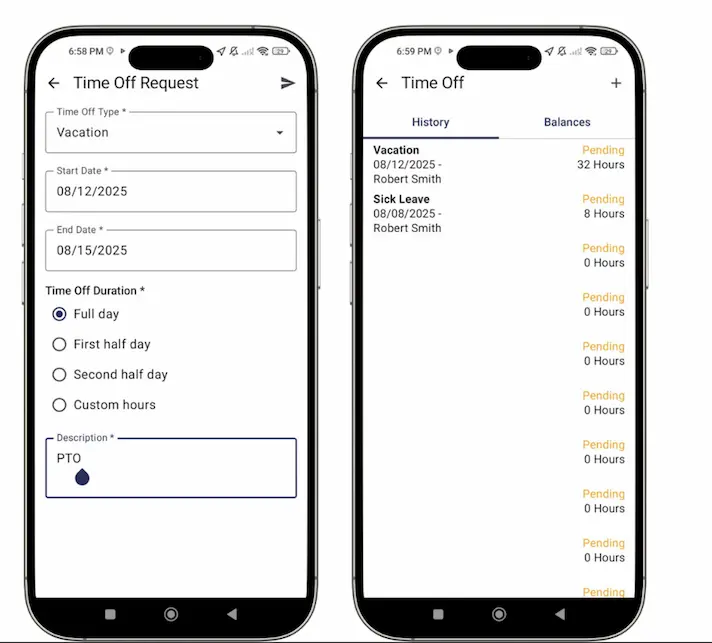
Employees can submit time-off requests directly from the mobile app. No need to submit emails or text messages. Managers can approve time-off requests directly from their mobile device.
2. Create custom time-off categories
Set up both paid and unpaid types—like vacation, sick leave, jury duty, or bereavement—with specific rules by team, role, or individual. You can even color-code categories for increased visibility.
3. Automate holiday pay
Is a holiday coming up? Easily apply holiday pay rates across your whole team.
4. Track accruals and balances in real time
Set up accrual policies and carryovers to match your PTO rules.
5. Give employees visibility into their leave
Employees can check their accruals and balances from within the app.
Manual PTO Tracking vs. Automated PTO tracking
Feature
Manual PTO (Email, Spreadsheets)
Automated PTO (Timeero)
Accuracy
Easy to miscalculate or forget entries
Hours, balances, and edits are tracked automatically
Compliance
Limited documentation; risky during audits
Real-time records with audit history
Visibility
Employees rarely know accurate balances
Employees see balances and accruals in the app
Payroll
Time-consuming, error-prone
Approved PTO flows straight into payroll
Communication
Back-and-forth emails and follow-ups
Managers approve requests on mobile instantly
Employee trust
Low transparency
Clear records build fairness and confidence
Embrace automation and simplify PTO management
Pennie’s final words of advice to companies looking to simplify their PTO management process are to “embrace automation and available technologies, because the longer you wait, the more challenges you’ll face.”
Manually managing PTO for one or two employees is pretty simple, but when you manage PTO for a team of 250 employees, there’s no way you can keep up with accruals, leave requests, and schedules without the help of automation.
Timeero’s PTO management system automates the process for you so you can worry less about tracking balances and more about managing your workforce successfully while employees enjoy their time off.
Take the stress out of PTO management and eliminate compliance risks with Timeero. Start a free trial today, no credit card required.
FAQs
Why do I need a written PTO policy?
Having a written PTO policy helps keep your teams on the same page. It eliminates inconsistent PTO application across shifts and gives employees and managers clear steps to manage PTO effectively.
What should a PTO policy include?
A PTO policy at the very least should include how PTO is accrued and when PTO can be used. It should also include how to request PTO, the approval process, how to check accruals, what happens to unused PTO at the end of the year, and how PTO is paid if an employee leaves.
Does Timeero integrate with payroll software?
Yes, Timeero integrates with many popular payroll systems such as: Paychex, ADP and Paycor. To see a full list of payroll integrations, click here.
How can I encourage employees to use their PTO?
Implementing a “use it or lose it” policy is one way you can encourage employees to use their PTO. The number one way to encourage employees to use PTO is for managers to regularly use their own PTO. This sets the example that using PTO is a way to rest and celebrate your hard work.
Take the stress out of PTO management
Avoid payroll mistakes, prevent disputes, and stay compliant with automated PTO tracking.
Jessica is a skilled writer and proofreader with a unique flair for crafting engaging and impactful content. Her work reflects her ability to connect with clients on a personal level while successfully addressing their most pressing concerns. Jessica's professional background includes: teaching, social media marketing, and e-commerce. She resides in Alabama and loves the Golden Girls sitcom.




%202.svg)


.png)
.png)



.png)


