What Is GPS Time Tracking? (And Why Field Teams Need It)
Judyann Sonido
Last update on:
September 9, 2026 10:14 AM
Published on:
TL;DR
GPS time tracking combines employee time records with location data, so managers can verify when and where field work happened.
It is most useful for mobile teams that work across job sites and need better proof of attendance, travel and time spent at each location.
Depending on the workflow, Timeero can combine GPS time tracking with geofencing, route history, mileage tracking, or Segmented Tracking for multi-stop days.
It’s 7 o’clock on a Monday morning. You haven't even had your first cup of coffee when your phone rings. Mrs. Thompson is complaining that your technician did not arrive until about 10:30 yesterday and left after 2 hours.
Later, you sit down and pull up the timesheet. It shows Mike clocked in at 7:30 a.m. and spent 4 hours at the Thompson job.
Who's telling the truth? More importantly, how do you sort out this mess?
If your business is still relying on paper timesheets or old punch clocks, you might have a harder time finding out what really happened.
With manual timekeeping methods, once your team heads out into the field, you lose visibility. So you end up playing detective – calling clients and questioning employees. It's exhausting, and frankly, it damages trust on both sides.
GPS time tracking solves these challenges by providing real-time workforce visibility. This guide breaks down exactly what GPS time tracking is and why it is essential for managing your field teams.
Tired of playing detective with your timesheets?
Stop guessing who’s telling the truth. Get indisputable proof of time and location with Timeero.
In simple terms, GPS time tracking uses the GPS chip in an employee’s smartphone to timestamp their location when they clock in or clock out. A GPS time clock app applies this location data to employee time records, helping businesses verify where employees start and end their shifts and where work took place.
GPS time tracking functions much like an old punch clock, recording shift start and end times. The difference is that GPS technology adds location context to those time records, even when employees work away from a central workplace. When someone starts their day, the system records the time and location, so you’re not guessing later where work actually began.
Even better, you'll see something much more useful than a generic timesheet that only tells you "Tuesday, 8 hours."
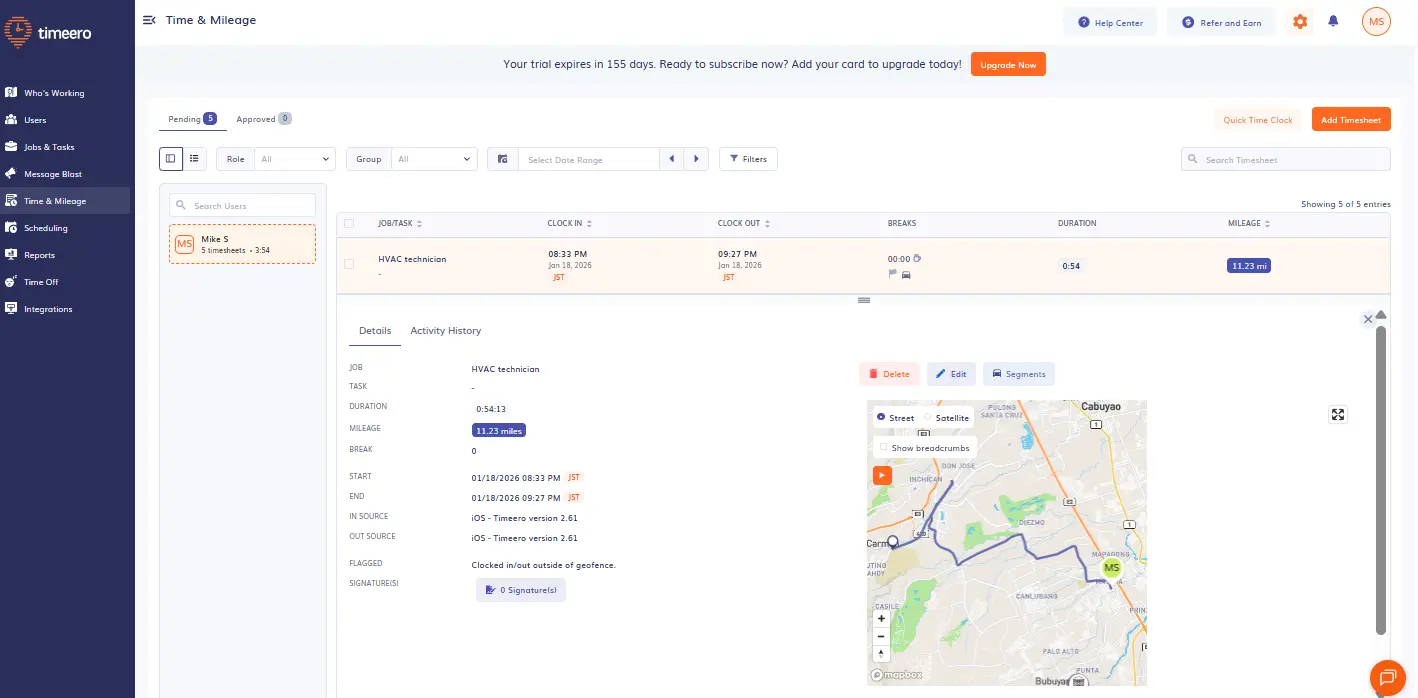
Workforce visibility apps like Timeero show an employee’s exact location at clock-in/out.
So when Mrs. Thompson calls again, claiming your technician was never there, you can pull up the recorded time and mileage and say, "Actually, here’s the record showing he was at your address from 7:30 to 11:45." Conversation over.
When your field team uses a GPS app for time tracking, you protect your employees from unfair accusations and give payroll admins clean data they can actually trust.
GPS time tracking vs employee GPS tracking
GPS time tracking and employee GPS tracking are closely related, but they are not exactly the same thing. GPS time tracking connects location data to employee work hours, helping you verify when and where a shift started or ended.
Employee GPS tracking is broader. Depending on the app, it can also show an employee’s location or route while they’re on the clock, giving managers visibility into travel between jobs and activity throughout the workday.
For field teams, the two often work together: time tracking tells you when work happened, while GPS tracking adds context about where it happened and how employees moved between job sites.
How does geofencing help control where employees clock in?
A geofence creates a virtual boundary around an approved job site. Depending on the settings, it can remind employees to clock in when they arrive, restrict off-site clock-ins, or trigger automatic clock-in/out when they cross the boundary.
Let's say your maintenance crew is scheduled at Riverside Apartments this morning. You placed a 300-foot radius geofence around that property to prevent time fraud. When the lead tech enters that virtual fence, their phone prompts them to log in: "You just arrived at Riverside Apartments. Clock in now?"
One tap, and they're clocked in. The system knows they are on-site, and you have GPS proof without lifting a finger. When your team wraps up and drives away, the GPS time clock catches that too and reminds them to clock out.
If even that one tap is too much to rely on, Auto Clock-In/Out removes it entirely. The moment an employee crosses the geofence, Timeero clocks them in automatically — no prompt, no tap, nothing required from the employee. Same at the end of the shift: cross the boundary leaving, and the clock stops.
Breadcrumbing: Increase visibility and accountability in the field
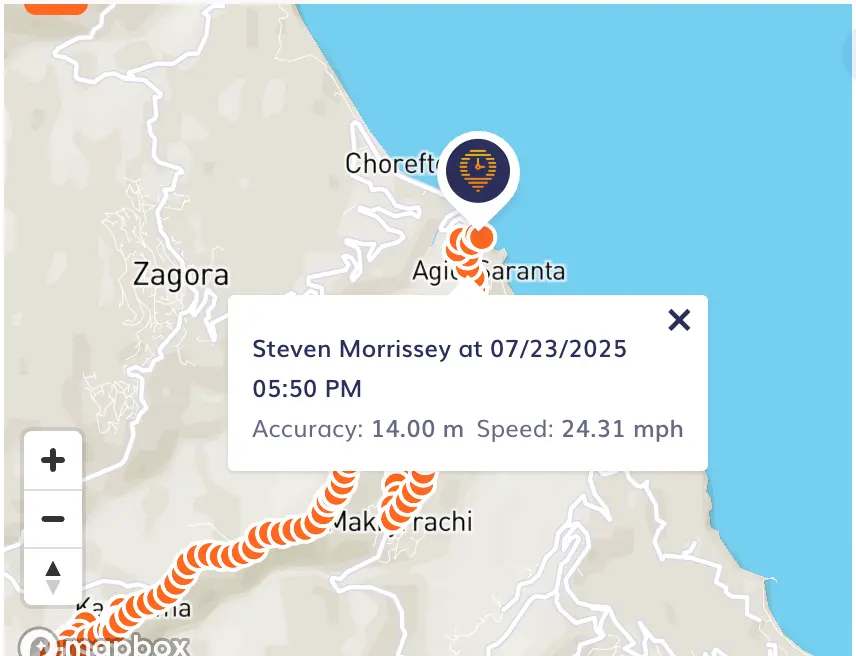
Another useful feature of GPS-based time tracking apps is breadcrumbing. Instead of just recording start and end times, the system tracks your team’s driving routes every 5-30 minutes or every 150 ft traveled while they're on the clock.
With breadcrumb technology, you can see:
The driving path taken between job sites
Where an employee was at a specific point in time
Details tied to each breadcrumb, like driving speed
Gaps, detours, on unexpected stops while on the clock
This GPS time clock feature is especially helpful when your crew is visiting multiple sites in one day. One shift might look like this:
Breadcrumb trails show exactly where a field employee traveled during the workday, creating a clear record of driving activity between job sites.
If a client asks why there was a delay, instead of saying, “Let me check with the crew,” you can look at the breadcrumb data to see whether it was due to traffic, a slowdown, or an unexpected stop along the way.
How do you track employees who visit several job sites in one shift?
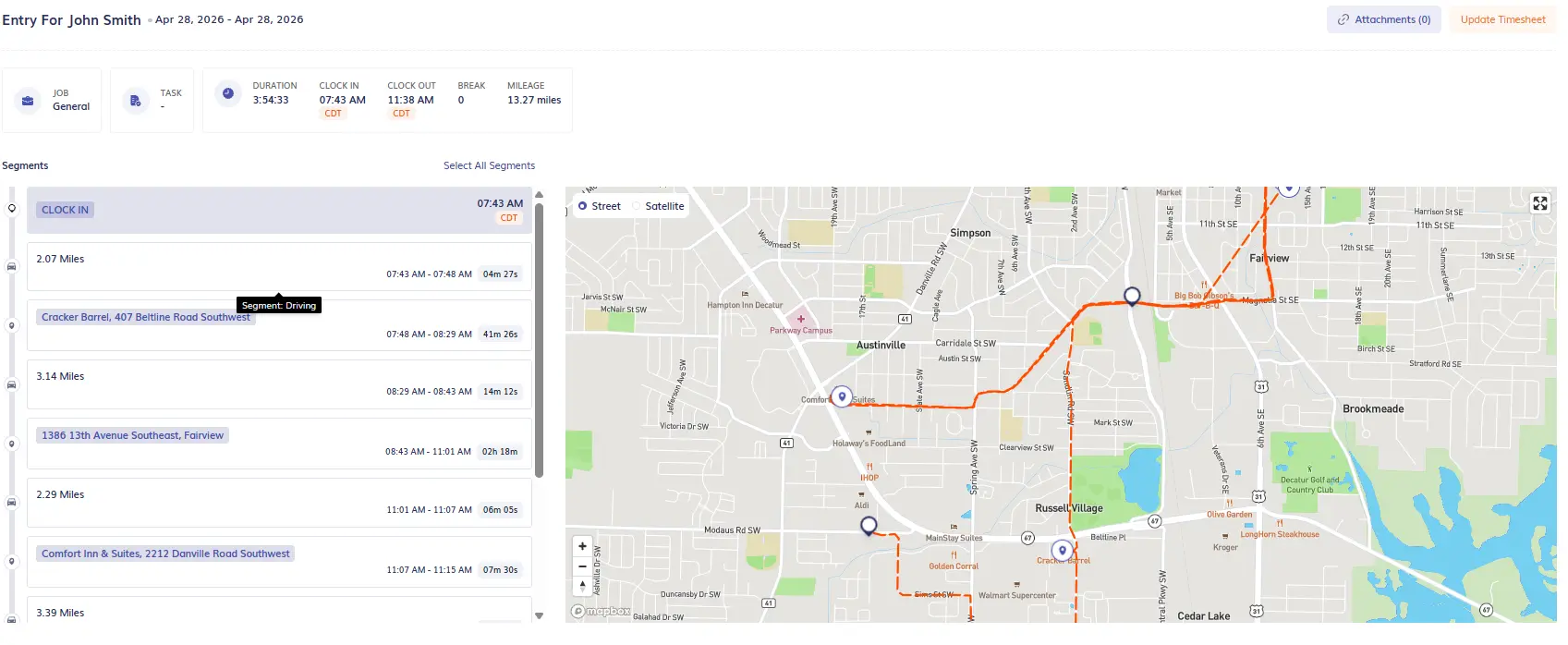
For crews that move between several job sites in a day, Timeero’s Segmented Tracking can automatically break a shift into separate job-site stops, drive segments, and time spent at each location. context about where it happened and how employees moved between job sites.
How GPS time tracking actually works (step by step)
The goal of field workforce time tracking apps is to automate processes without burdening your team with additional paperwork. Here's what a typical workday looks like using GPS time clocks:
1
Step 1: Employee opens the app and clocks in
David opens the GPS time tracking app on his phone and sees his schedule for the day. He taps “Johnson Residence – HVAC Repair,” then hits Start at the office.
As he drives to the Johnson house, the GPS mileage tracking app automatically drops a breadcrumb. His manager can see the stop on the map without David needing to do anything else.
If Auto Clock-In/Out is enabled, he wouldn't need to tap at all — the moment he enters the geofenced job site, Timeero clocks him in automatically.
2
Step 2: Location is recorded at the moment of clock-in
Behind the scenes, the workforce visibility app uses the GPS chip in David's phone to track his exact coordinates. This happens in a couple of seconds, and David does not have to do anything extra.
No typing in addresses, no taking photos of street signs. The field workforce time tracking app handles it automatically.
3
Step 3: Time entries are stored with location context
While David’s working on the HVAC unit, the GPS-based time tracking system continues to operate in the background. With breadcrumbing, the app logs his location every 5–30 minutes, building a trail that shows he stayed put at the job site.
Let's say David finishes the Johnson job and heads across town to the next appointment. This is automatically logged, so when you review his day later, you will see exactly what happened and when.
4
Step 4: Data flows seamlessly into reports and payroll
Once David's done for the day, his time entries are automatically synced to your admin dashboard. You can pull up reports showing:
The total hours David worked this week
GPS-verified proof of where he was during each shift
How much time David spent at each job site
Drive time between locations
Overtime, if any
If you're running payroll through QuickBooks,ADP, or Gusto, a workforce visibility app like Timeero easily integrates for simple data export. This means your payroll admin doesn't have to retype anything or cross-check a stack of paper timesheets. It's all there, verified and ready to process.
Why field teams need GPS-based time tracking
GPS time tracking for mobile teams is not just a fancy add-on to your employees’ day-to-day; it fundamentally changes how fieldwork is documented.
When your team is bouncing between job sites all day, a traditional time clock tells you almost nothing useful. GPS-based time tracking systems fill that gap by tying the when to the where, a combination that solves problems you have probably been dealing with for years.
Here’s how a workforce visibility app can help optimize your daily operations:
1. Verify employees are actually on-site when the clock starts
Right this second, do you know where all of your employees are? Probably not without making a bunch of phone calls, right?
With GPS tracking, you don't have to wait for a time card or make a worried phone call. The moment your crew clocks in, their location is logged. So if Mike is supposed to be at the Hernandez place at 8:00 a.m., you can check his activity right away.
2. Resolve client disputes with GPS-verified location data
Let's revisit that scenario from the beginning. Mrs. Thompson says your tech showed up late and left early. Mike swears he was there for the full 4 hours.
Without GPS data, you're stuck in the middle playing referee. No matter how you handle it, someone is bound to end up walking away unhappy. Either your client feels overcharged, or your employee feels accused.
Most of the time, nobody’s trying to pull a fast one. People lose track of time or remember the day a little differently. A GPS time clock keeps these conversations short and drama-free.
Survey insight
This matters more than most employers realize. According to
Timeero's 2026 GPS Survey of 1,000 field workers
,
54.8% have personally experienced workplace disputes, and
79.3% have direct or indirect experience with conflicts where GPS data could have made a difference.
These aren't edge cases — they're a routine part of field work.
3. Know where your team is in case of emergencies
Field employees work alone a lot. If something goes wrong, you need to know exactly where they are, not where the schedule says they are supposed to be.
GPS-based time tracking gives you that visibility. Imagine if Jen, one of your field staff, suddenly goes radio silent for an hour. You start getting worried.
Instead of panicking, you can quickly check the system to see her last confirmed location. GPS time tracking gives you peace of mind, knowing you can respond quickly if there's a problem.
4. Reduce payroll errors
Payroll disputes are exhausting. Jade claims to have worked 42 hours last week. Payroll processed 38. Now your admin has to dig through messy timesheets to figure out where those 4 hours went. In the meantime, Jade already feels as though you're accusing him of lying.
GPS time tracking eliminates this headache. If your tech says he worked 8 hours on Tuesday and the GPS data shows he clocked in at 8:00 a.m. and out at 5:00 p.m., there’s no argument. The system backs him up, payroll processes it, everyone's happy.
Survey insight
There's a reason this works so well: workers actually trust GPS data.
The same survey found that 39.1% of field workers trust GPS records more than manager observations or customer reports,
compared to only 14.0% who trust human judgment more.
When the data is there, the conversation ends.
What to look for in a GPS tracking solution
If you’re ready for an upgrade, look for a workforce visibility app that checks all of these boxes:
✅ Ease of use for non-tech-savvy workers
Your crew should not need a training session to figure out how to clock in. If the app is confusing, people will not use it right – or they won't use it at all. You want something simple: big buttons, clear prompts, and an interface that makes sense.
✅ Offline mode for remote work areas
Your crew works in areas where cell service is spotty at best. Basements, rural properties, big commercial buildings with thick walls – places where their phone shows one bar if they are lucky.
✅ Integration with payroll software (QuickBooks, ADP, etc.)
GPS time tracking for mobile employees only saves you time if it actually connects to your payroll system. If you have to export a file and manually upload it every pay period, you are not solving the problem; you're just creating a different kind of paperwork.
At the end of the pay period, you need more than just a list of hours. You need reports that show:
Hours worked per employee
GPS-verified locations for every shift
Time spent at individual job sites
Mileage driven and what that's costing you in reimbursements
Overtime calculations
Exceptions and missed punches
The best GPS time tracking systems for field teams automatically generate all of this data and allow you to filter by employee, job, date range, or location.
When an auditor shows up, or a client questions an invoice, you should be able to pull a detailed report in under a minute, not spend your afternoon digging through incomplete records trying to reconstruct what happened three weeks ago.
Get started with GPS time tracking
GPS time tracking is not about micromanaging your team. It’s about giving field workers the same accountability and clarity that office workers get from walking into a building every morning.
The right GPS time tracking system won't solve every problem. But it will address the biggest one: knowing where work happens and whether your team was actually there to do it.
Check out our guide on the best GPS tracking apps to see which tools are built for your operational needs.
FAQs
What is GPS time tracking?
GPS time tracking uses the location chip built into smartphones to record the time entries and locations when your employees clock in, move between job sites, and clock out.
What is the difference between a GPS time clock and GPS employee tracking?
A GPS time clock ties location data to work hours, such as where an employee started or ended a shift. GPS employee tracking is broader and may also show movement or routes during working time.
How does GPS time tracking work for field employees?
Your team opens the mobile app and clocks in. Right then, the app grabs their GPS location and attaches it to their time entry. When they clock out, the app captures their location at that moment and tallies up their total hours.
From there, you can review the data in your reports and export it to payroll using the option that works best for your setup. Some integrations allow automatic syncing, while others require a quick manual export. Either way, the time and location data are ready when you need them, without manual entry.
Can GPS time tracking work without cell service?
Absolutely. Most GPS time tracking systems have an offline mode built in. So even if your crew loses cell signal, the app keeps recording their location and time entries in the background.
Can GPS time tracking handle employees who work at multiple job sites in one day?
Yes. Some systems let employees clock in and out at each site, while others automate parts of the process. For example, Timeero’s Segmented Tracking can break one workday into separate stops, drive segments and time spent at each location.
Stop paying for hours that didn't happen.
Accurately track arrival and departure times to ensure your payroll matches reality.
Judyann is a content specialist with nearly a decade of experience in digital marketing. When she's not building brands and strategies, you'll find her exploring new destinations, embarking on spontaneous adventures, hunting down the best local eats, and spoiling her two fur babies. She believes the best content, like the best trips, comes from curiosity, creativity, and never playing it safe.



.webp)

%202.svg)


.png)
.png)



.png)


