How To Stop Mileage Padding Without Micromanaging Your Team
Judyann Sonido
Last update on:
April 16, 2026 6:57 AM
Published on:
TL;DR
Manual logs, late entries, sloppy recordkeeping, and unclear rules often lead to inflated reimbursements. Instead of policing your mobile team, the most effective way to stop mileage padding is to fix your process.
Automated GPS mileage tracking apps like Timeero facilitate fair and accurate record-keeping of actual miles driven and reimbursable trips. These solutions eliminate micromanaging while improving compliance and efficiency.
Once again, it’s time to run payroll. Your mileage reports show that reimbursement totals are higher than last month, but you can’t figure out why. Your team’s routes haven’t changed, and their workload is pretty consistent. Yet somehow, employee reimbursement totals just keep going up.
“Is someone rounding up a little too generously?”
“Did they forget to subtract their commute?”
“Are they estimating the same route differently each week?”
You scroll back through the reports, trying to spot a pattern. Maybe heavy traffic added more mileage, or your technician had to swing by the supplier. Still, the math does not add up.
But there’s no way to know exactly why your employee mileage reimbursement totals are high if you’re still relying on manual logs and best-guess estimates for mileage tracking – a system that costs you money and exposes you to compliance risk.
The good news is, GPS tracking apps like Timeero help stop mileage padding by removing estimation and micromanaging from the process. Let’s explore what mileage padding is and how you can use automated mileage tracking systems like Timeero to get your mileage costs back under control.
What is mileage padding, and is it always intentional?
Mileage padding is when employees add extra miles to their work expense reports, leading to overreimbursement. In most cases, this is not a deliberate attempt to cheat the system but the result of human errors mixed with a poor process.
We see this across all types of mobile teams, from small electrical contractors with a few vans on the road to growing service teams juggling multiple stops a day. When your employees are focused on getting the job done, mileage tracking is usually the last thing on their mind.
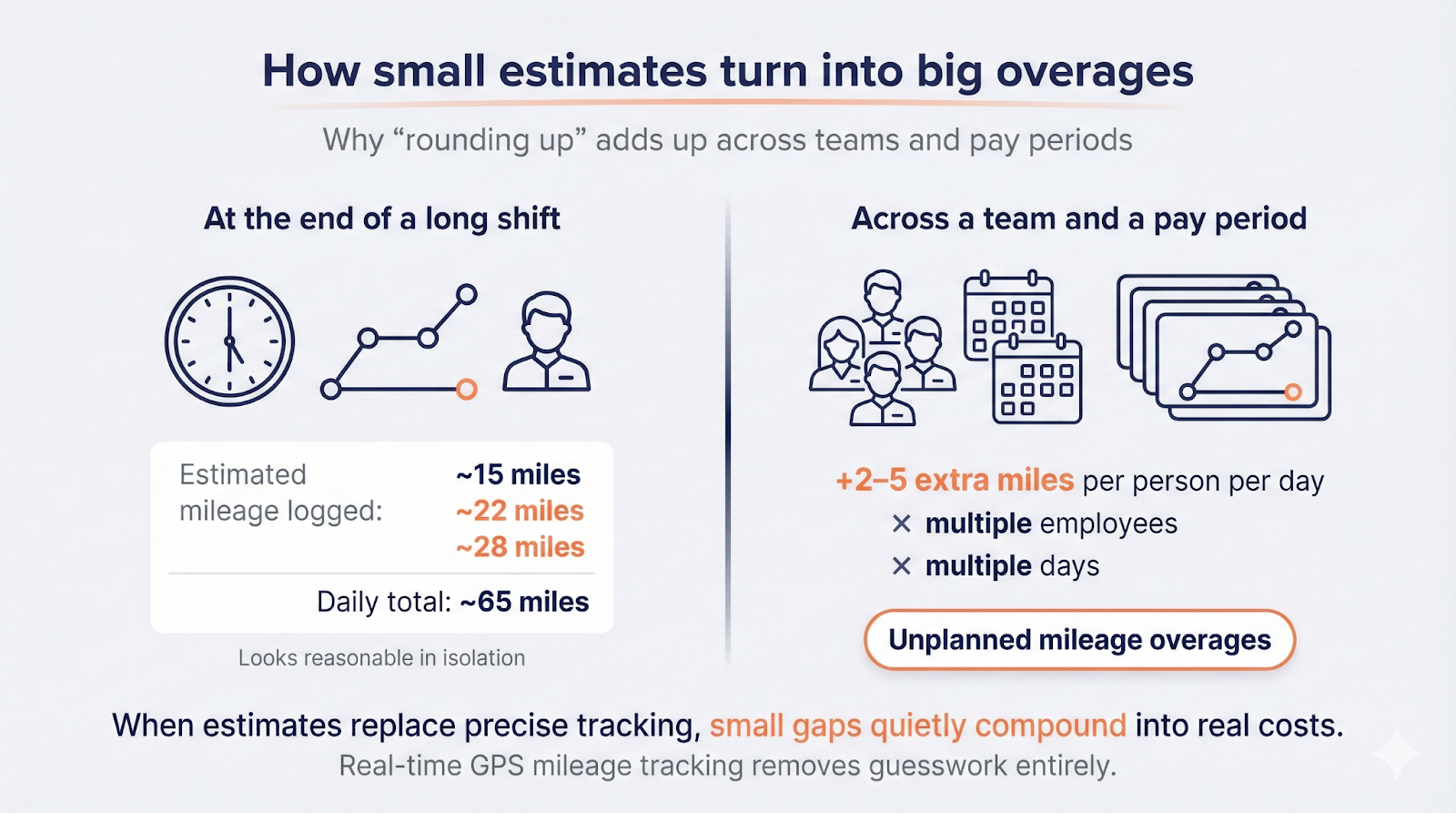
How small estimates turn into big overages
It’s 7:00 pm. Your best field technicians had a full schedule, including 15 stops and an unexpected emergency call. When they finally sit down at the end of the shift to fill out their mileage report, they have a hard time remembering specifics, so they try to piece together where they went from memory.
"That trip to the west side client was probably 15 miles each way."
"The first site visit felt like a good 22 miles one way."
"If I recall correctly, I had three client appointments. I will log that as 65 miles total for the morning."
While none of these statements is false, they just aren’t precise. Guess work might not be that bad if only one employee is doing it, right? But when everyone rounds up just a little bit, those extra miles add up fast across a single pay period.
Manual mileage tracking systems leave too much up for interpretation. Without clear rules and real-time GPS mileage tracking for small businesses, employees fill in the gaps as best they can. That uncertainty is where mileage padding quietly starts.
Why does mileage padding happen in businesses with mobile teams?
There are several reasons why mileage padding happens within mobile teams. When you rely on manual mileage logs or spreadsheets and ask your employees to do the math, you lack control and visibility, which is where your company loses money.
Here are 4 reasons why mileage padding happens within mobile teams:
1. Memory-based logging creates gaps
When employees wait days or weeks to log their mileage, the numbers are basically guesswork.
For example, your residential cleaner just wrapped up a 12-hour shift across three neighborhoods. By the end of that shift, there is no way they remember if the drive from Mrs. Smith's house to Mr. Jones's was 5.1 miles or closer to 6.8 miles. They just know they drove there.
Instead of leaving fields blank, they make their best guess. That consistent rounding up is what leads to employees inflating mileage.
2. Paper logs and spreadsheets encourage guessing
Manual business mileage tracking using paper logs and shared spreadsheets seems simple enough. Log the odometer’s starting and ending readings, maybe list a couple of stops, and that’s it.
Except it never actually works that cleanly.
Employees forget to check the odometer when they clock out. They scribble notes on scratch paper and transfer them to their mileage log later. They estimate distances between stops because pulling out their phone to map every route feels like overkill. The entire process is based on estimation, which is one reason why reimbursement totals look suspiciously high.
3. No shared definition of reimbursable mileage
Does your team know exactly which miles count for reimbursement? If someone runs a quick personal errand between job sites, do they subtract those miles, or do they just log the full drive?
Without clear, written rules on how to verify employee mileage, your team members may interpret these situations differently. Some employees play it safe and only log the trips that clearly count. While others genuinely do not know what counts as business mileage, so they round up their numbers instead of risking being underpaid.
4. Managers lack visibility until it is too late
By the time those mileage reports hit your desk, the workday is already over. You’re looking back at last Tuesday, wondering if 62 miles actually even sounds right for the route they took. But you were not in the vehicle. You don’t know if they took a detour, hit traffic, or made an extra stop.
So you approve it. What else can you do? You can’t prove the mileage is wrong, and calling someone out based on a hunch damages trust.
This lack of real-time visibility leaves you stuck between two unfavorable options: approving numbers you’re not confident about or questioning employees over every reported mile.
Automatic mileage tracking made simple
Capture mileage automatically when employees clock in and reduce manual logging across your team.
“Being able to track employee’s mileage allows us to help save money and always know where our team is.”
How much does mileage padding actually cost a business?
Paying for a few extra miles may not sound like a big deal. But multiply that across your whole crew, day after day, for a year, and suddenly it’s a real problem for your bottom line. Before long, you are paying for hundreds of miles a week that no one really drove.
You have 20 mobile employees, and each one logs an extra four miles daily.
Your losses quickly add up to roughly $14,500 per year
based on the
2026 IRS rate of 72.5 cents per mile:
20 employees × 4 miles/day × 5 days/week = 400 inflated miles per week
This doesn’t even factor in the time spent disputing mileage logs or the risk of weak documentation during an audit.
It’s not just about payroll.Overpaying for mileage reimbursements inflates your weekly expenses and creates downstream problems that cost time and impact credibility.
1. Tax complications
The Internal Revenue Service (IRS) demands verifiable records for all mileage claims. When your documentation is full of gaps, inconsistent figures, or vague start and end points, you are setting yourself up for an extremely stressful and draining audit.
If you cannot properly back up the miles you have reimbursed to employees, the IRS may reclassify those payments as taxable income. Which means both you and your employees could potentially be hit with penalties and back taxes.
2. Budgeting headaches
When mileage reports are based on estimates, it’s difficult to spot trends or plan ahead. Reimbursement totals fluctuate without a clear explanation, making it tough to forecast expenses or explain overruns to leadership.
Instead of planning with confidence, your team ends up reacting – adjusting budgets after the fact and hoping next month looks better.
3. Disputes and corrections
Despite good intentions, your staff can feel singled out when you question the accuracy of their mileage tracking totals. At the same time, you hate feeling like you are nitpicking people you actually trust.
The whole situation turns uncomfortable fast. Instead of solving the problem, it creates tension, and that’s the last thing most managers want over a mileage report.
4. Opportunity cost
Every hour you spend reviewing questionable mileage logs, cross-referencing routes, and resolving disputes is time lost that should have been spent on higher-value operational work.
Use our free mileage savings calculator to see what manual mileage tracking is actually costing your business.
Your first instinct when you suspect mileage padding is to require more documentation, audit every report, and question mileage reimbursement that looks questionable. But that approach backfires fast. Not trusting your team creates resentment and slows down productivity.
However, strict procedures still don’t guarantee mileage reimbursement accuracy when you’re still relying on manual inputs.
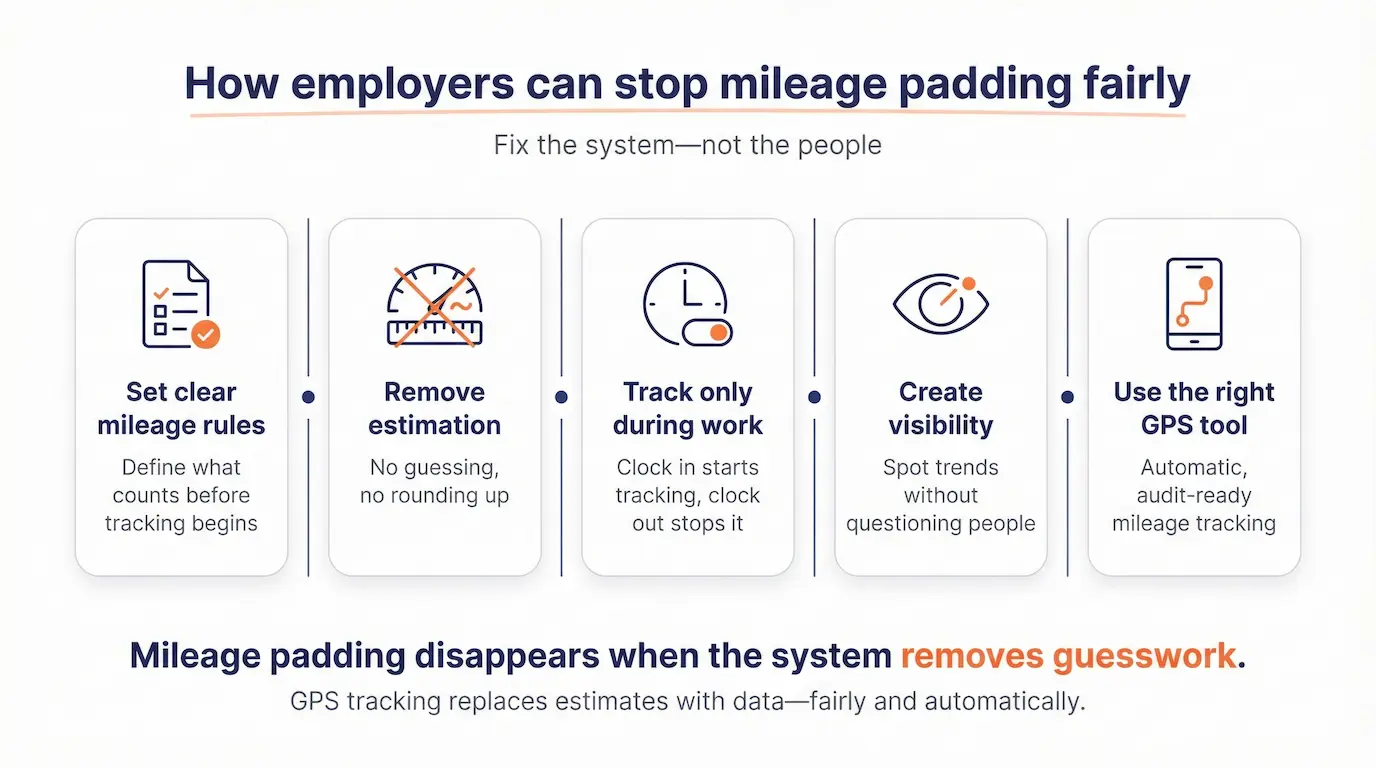
The best solution to stop mileage padding is to fix the system. Here’s how to do that:
1. Set clear mileage rules
Get your mileage policy crystal clear first. Define precisely what counts as a reimbursable trip. Document it, share it with your team, and ensure they thoroughly understand the policy before submitting another log.
Your mileage policy should answer questions like:
Is the commute from home to the first job site reimbursable mileage?
Is the drive from the last job site back home reimbursable?
Can employees claim mileage when they pick up supplies or materials?
What happens if someone runs a personal errand between work stops?
How should employees handle forgotten odometer readings or missing data?
2. Remove estimation from the process
The biggest driver of mileage padding is estimation. As long as your tracking process allows employees to estimate distances, reimbursement totals will likely increase month after month.
The solution is simple: stop asking employees to estimate and start monitoring mileage automatically.
GPS mileage tracking completely takes the guesswork out of the equation. You no longer have to ask your team to recall how far they drove last Tuesday. The system records the exact distance traveled as it happens. No odometer checks. No route reconstruction. No memory required.
3. Track mileage only during work activity
We get it. Privacy is a huge concern with GPS tracking. Of course, you don’t want your employees to feel like you’re watching their every move. The trick to keeping mileage tracking fair is simple: only track when people are actually working. They clock in, tracking starts. They clock out, and it stops.
This way, you’re only capturing business mileage, and employees maintain full privacy outside of work. This prevents mileage padding without GPS abuse.
4. Create visibility without micromanaging
You don’t need to interrogate employees to understand mileage trends. You just need visibility.
Automated mileage tracking allows you to identify unusually long routes or higher-than-average totals. That visibility shifts mileage discussions from “I do not trust this number” to “Let’s look at what the data shows.”
And in most cases, those conversations disappear altogether because the numbers finally make sense.
Automatic mileage tacking: Every mile driven during work hours is recorded automatically. No manual entry. No estimation. Just accurate, real-time mileage tracking for employees.
Route verification: If mileage reimbursement looks too high, you can pull up the route and see exactly where they drove.
Segmented Tracking details by job or location: You can see how many miles were driven between stops and how long each visit took. This makes reimbursement much easier.
Automatic commute deductions: Personal commute miles are excluded automatically, eliminating the burden on your team.
Audit-ready reports: All mileage data is organized into clean reports. If questions ever arise later, you have a solid paper trail documenting every mileage log.
Ensure fair mileage tracking for employees
You shouldn’t have to resort to micromanagement to keep your budget under control. Timeero automates your entire mileage tracking process and provides your team with an easy-to-use tool, while ensuring they are paid fairly every time.
FAQs
What is mileage padding?
Mileage padding is when an employee reports more miles than they actually drove for work. It usually happens when teams rely on manual mileage tracking.
Is mileage padding common?
Yes. Mileage padding is extremely common, especially in businesses that still use manual mileage logs or spreadsheets. Those small overages, when multiplied across your team, can cost you thousands of dollars in unnecessary reimbursements every year.
How do I stop mileage padding?
Automate mileage tracking using tools like Timeero. Instead of asking your team to remember their routes or estimate distances at the end of the day, Timeero automatically logs every mile they drive while they are on the clock.
Can mileage be tracked without GPS?
Yes, but it is much less accurate. Manual mileage logs create opportunities for error or inflated reimbursements. GPS mileage tracking for SMBs automatically captures exact routes, making it the most reliable option for businesses with mobile teams.
Is automated mileage tracking worth it for SMBs?
Absolutely. Even small overages add up fast when you have multiple people on the road. Automated mileage tracking eliminates inflated reimbursements and saves time spent double-checking logs.
Stop the guesswork and reimburse your employees accurately with Timeero.
Judyann is a content specialist with nearly a decade of experience in digital marketing. When she's not building brands and strategies, you'll find her exploring new destinations, embarking on spontaneous adventures, hunting down the best local eats, and spoiling her two fur babies. She believes the best content, like the best trips, comes from curiosity, creativity, and never playing it safe.



.webp)

%202.svg)


.png)
.png)



.png)


