How to Build a Mileage Reimbursement Policy for Property Managers
Emman Velos
Last update on:
September 7, 2026 9:09 AM
Published on:
TL;DR
Mileage reimbursement gets messy fast in property management, because your team drives constantly and logs it inconsistently.
That leads to delays, disputes, and paying for miles you shouldn't (or denying miles you should).
When you put clear rules in writing and back them with GPS-based tracking, mileage becomes easier to document and easier to approve.
With a clear policy in place, you get a smoother reimbursement process and none of the guesswork.
In property management, your mileage reimbursement policy is often whatever the last supervisor approved.
One tech turns in “drove around — 87 miles.” Another submits a spreadsheet with odometer readings, timestamps, and color-coded stops. Meanwhile, payroll is stuck deciding what counts, what doesn’t, and how to reimburse maintenance tech mileage consistently.
That’s the reality of property management mileage when teams are constantly moving between sites. Maintenance techs move between buildings all day. Leasing staff bounce from the office to showings to move-ins. Inspectors rack up multi-stop routes across the portfolio. Add supply runs, contractor meetings, and after-hours calls, and “business miles” can start to blur into commuting and personal detours.
Without a clear mileage reimbursement policy for property managers, reimbursement becomes inconsistent, slow, and error-prone. People get paid late. Claims get kicked back. And you either overpay for miles you shouldn’t reimburse or underpay the people doing the driving.
A mileage policy doesn’t have to be long. It just has to be clear enough that every employee logs miles the same way, and every reviewer approves them the same way. So, let’s build a policy your team can follow without guesswork.
Policies set the rules. Tracking enforces them.
See how Timeero keeps mileage consistent across your team.
Most mileage tracking problems in property management companies start off as a mileage tracking habit.
Someone drives somewhere, writes it down (or doesn't), and submits it whenever they remember. If the number seems reasonable, it gets approved. If it doesn't, someone sends a Slack message asking for clarification, which may or may not get answered before the next pay period.
That approach works fine when your team consists of only two people and three properties. But once your team grows (or your portfolio spreads out), the cracks will eventually start to show.
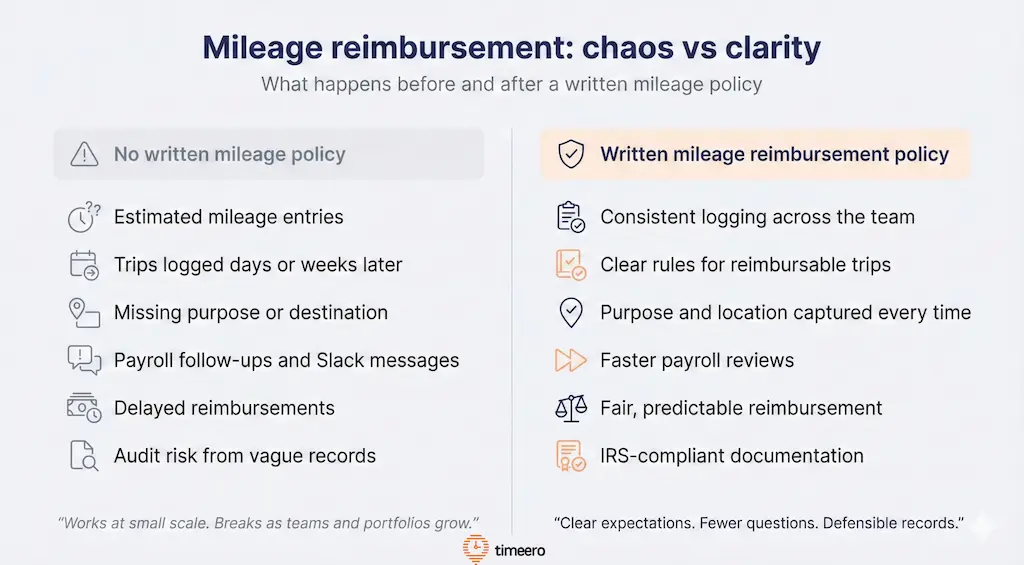
Without a written mileage reimbursement policy, payroll teams face inconsistent logs, follow-up questions, and compliance risk.
Without a mileage tracking policy in place, property management companies often encounter the following problems.
1. Inconsistent logging habits across team members
One person logs every trip the day it happens. Another calculates mileage at the end of the month (half of the mileage being an estimate), and another team member totally forgets to track mileage at all.
Instead of payroll being a simple task, now you’re HR team is left asking questions:
What was this trip for?
Where did they travel?
Did they really drive this many miles in one day?
2. Overpayment and underpayment issues
When the rules aren’t written down, reimbursing for mileage can turn into guesswork.
Some trips get reimbursed that shouldn’t: personal detours, quick errands, or commutes that don’t qualify under IRS guidelines. Other trips that should be reimbursed get denied because they weren’t logged “the right way,” even though no one ever defined what “the right way” is.
Overpayment hurts your budget, while underpayment hurts morale. Both create frustration, and make people less likely to take mileage reporting seriously.
3. Missing details during payroll review
Vague mileage records not only create confusion, but also create extra work come payroll.
When a team member turns in a handwritten mileage log with the number “87 miles” jotted at the bottom with no additional context given, your payroll team has to spend time chasing down answers.
Which property is this mileage tied to?
Was the drive for an emergency call?
Did you stop anywhere else on this trip?
Did you run any personal errands?
What payroll actually receives
Before
87 miles
No date. No purpose. No destination.
After
Date: March 12
From: Office → Property A
Purpose: Emergency maintenance
Miles: 17.4
Filling in the blanks turns what should have taken five minutes into a thread of back-and-forth messages, stalled approvals, and mileage reimbursements that are delayed until the next pay cycle.
4. IRS compliance considerations
The IRS has established clear rules about what counts as business mileage and what doesn’t. If you reimburse commutes or personal travel, you can unintentionally create taxable income. And if you’re ever audited, vague logs won’t hold up.
Some states go further than the IRS and legally require reimbursement. California (Labor Code § 2802), Illinois (Wage Payment and Collection Act), and Massachusetts (General Laws Chapter 149 § 148) all treat unreimbursed business mileage as a wage violation, not just a missed courtesy. If your properties span any of these states, your policy needs to reflect that directly.
You need documentation that connects the miles to the work performed by capturing the following details:
Date of travel
Starting and ending points
Destination
Purpose of travel
Total mileage
A written policy sets those expectations upfront and helps you stay compliant without turning payroll into a compliance exercise.
5. Disputes or miscommunication among your team
Without a clear policy in place, people operate using their best judgement – which might not always be in alignment with your company’s rules or the IRS.
One tech thinks they should be reimbursed for any mileage accrued when they drive from home to the office. Another assumes mileage traveled during lunch breaks don’t have to be recorded, even if they drove to a property during their break. Someone else heard you round up to the nearest five miles. Suddenly, you’re not just reviewing mileage — you’re managing misunderstandings.
And those misunderstandings don’t stay small. They turn into disputes, resentment, and the feeling that reimbursement is unfair.
A written policy fixes all of this. It sets the standard, answers mileage related questions from the very beginning, and gives everyone, from your newest hire to your most experienced supervisor, a shared, repeatable way to handle mileage reimbursement.
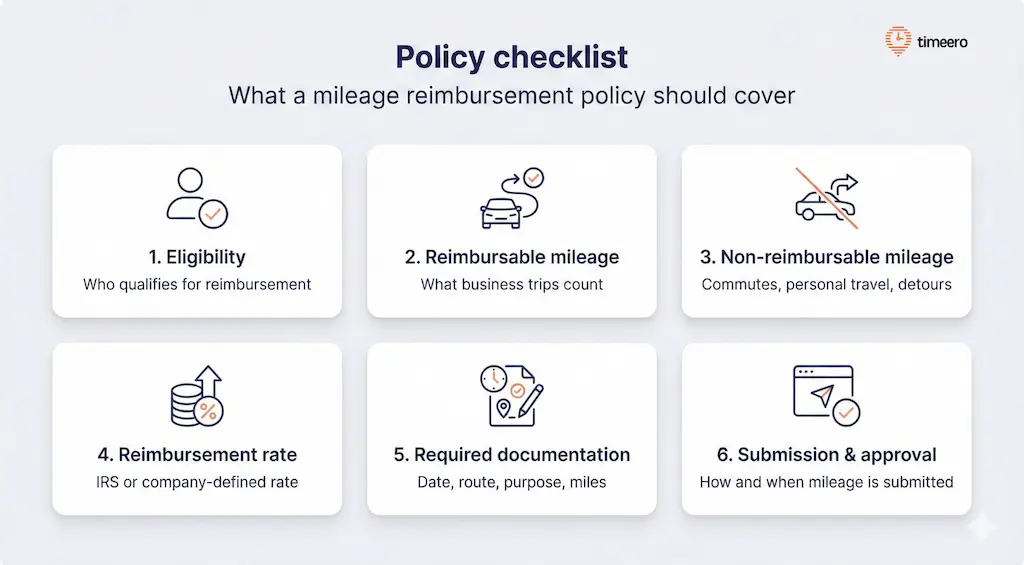
What a mileage reimbursement policy for property managers should cover
A good policy doesn’t need to read like a legal document. It needs to remove guesswork.
If your team can answer “Do I get reimbursed for this trip?” in five seconds, you’ve done it right.
A clear mileage reimbursement policy defines eligibility, reimbursable trips, documentation requirements, and submission rules to reduce confusion and disputes.
When writing your mileage reimbursement policy, here’s what to include:
Who qualifies for mileage reimbursement
Start by defining who gets reimbursed and why. In most property management companies, mileage reimbursement applies to employees who use their personal vehicles for required business travel, such as:
Maintenance techs traveling between properties or to suppliers
Leasing agents showing units or attending off-site meetings
Inspectors visiting multiple locations in a day
Field supervisors overseeing work across a portfolio
Office staff who occasionally run approved errands or pick up supplies
The language in your policy should be plain and simple: if someone drives their personal vehicle for work-related travel, they’re eligible for mileage reimbursement. If driving isn’t part of their job duties, they aren’t eligible. Having a direct rule prevents the awkward, “I assumed it counted” conversations later.
What counts as reimbursable mileage
Reimbursable mileage typically includes business trips that are ordinary and deemed necessary to do the job, such as:
Driving to off-site meetings, training, or inspections
Any trip that starts and ends at a work location (not home)
Every trip has to have a clear business purpose. If the drive is part of an assignment, was previously approved by management, or the job role requires the travel, it qualifies for reimbursement.
What doesn't count as reimbursable mileage
When there isn’t a hard rule on what counts as reimbursable mileage, employees tend to make up their own rules, “Since I was working while driving, I should get reimbursed for all of these miles”.
Defining what doesn’t qualify for reimbursement removes gray areas before they turn into disputes.
Common examples of non-reimbursable mileage includes:
Commuting from home to the primary work location
Personal errands, even if they happen during work hours
Detours or side trips not related to the business purpose
Driving to and from lunch, unless it's part of a work trip
The IRS is pretty strict about commutes. So spell out the difference between commute and business mileage so everyone follows the same rule. If someone drives from home to the office every day, that's a personal expense. But if they drive from the office to a property, or from one property to another, that's business mileage.
Your company’s reimbursement rate
State the rate, where it comes from, and what it covers.
Many companies use the IRS standard mileage rate because it’s widely recognized and updated annually. If you choose to use the IRS rate for reimbursements, list the current rate in the policy. For 2026, the IRS rate is 72.5 cents per mile through June 30 and 76 cents per mile from July 1 on, so make sure the version you're referencing reflects the current period, and include a note that it may change again.
Whether you use the IRS rate or your own company-specific rate, be sure to list what the rate covers – fuel, wear and tear, maintenance, and insurance are included in the standard mileage rate. This way, employees aren’t submitting mileage and gas receipts for the same trip.
Requiring employees to keep a detailed trip log is one way you can verify mileage for reimbursements. At minimum, each entry should include:
Date of travel
Starting location and destination (property name/address is fine)
Business purpose (property, work order number, meeting, supply run)
Total miles driven
Any additional stops along the way
Detailed mileage records should allow a supervisor or payroll manager to review a trip log without needing to ask any follow up questions.
Explain how and when mileage should be submitted
Setting a submission deadline and establishing a submission method are two guidelines that help prevent late entries, encourage detailed records, and eliminate individuals creating their own submission processes.
How often should employees submit mileage records?
Weekly submissions are ideal, so details stay fresh, and end-of-month guessing disappears.
Bi-weekly submissions can work if the dates line up with payroll.
Monthly submissions tend to invite estimates, missing stops, and payroll chaos, so approach with caution.
Once you’ve decided how and when mileage should be submitted, require everyone to use it. Avoid “email it to whoever” workflows, as they drift fast and create gaps you’ll have to clean up later.
Describe how and when mileage is reviewed and approved
Make your reimbursement process predictable by spelling out who owns each step.
A simple review workflow might look like this:
Employee submits mileage by Friday at 5 PM
Direct supervisor reviews and approves by Monday
Payroll processes reimbursement with the next check
Any issues or questions get flagged within 48 hours
When employees know the review timeline and leadership knows the standard, approvals move faster, and trust goes up because the process feels fair every time.
The easiest way to put this into practice is to start with a free mileage reimbursement policy template and adjust it to your company’s rules.
How to standardize mileage tracking across your team
A policy is only as good as the habits behind it. Without consistent logging, mileage turns into guesswork again.
For many teams, the best way to track mileage for property management staff is to standardize logging and support it with GPS tracking. Here’s how:
Standardizing mileage tracking for property managers requires clear expectations, consistent documentation, and a single system for logging and review.
Set expectations for daily or weekly logging
Make it clear that mileage should be logged as it happens, or at least at the end of each day. Waiting until the end of the pay period is a recipe for guesswork. Build logging into the routine, the same way people clock in or submit timesheets.
Require consistent trip descriptions or work order numbers
Instead of accepting vague entries like "property visit" or "maintenance call," ask for specifics. Tie each trip to a work order, property address, or task. This makes it easier to verify the trip and connects mileage to the work being done.
For example:
"Drove to Maple Ridge Apartments to repair HVAC unit (WO #4521)"
"Picked up plumbing parts at Home Depot for Sunset Villas"
"Inspected three units at Parkside Commons for move-out"
Details like this take an extra ten seconds to write, but they save hours during payroll review.
Use a single place to store mileage records
Don't let people submit mileage through email one week, a Google form the next, and a text message when they're in a hurry. Pick one system and stick with it. Whether it's a shared spreadsheet, a project management tool, or a dedicated mileage tracking app, consistency matters.
Create rules for questionable or unclear entries
Even with a clear policy in place, you’ll still get entries that don’t add up.
What happens if someone submits a trip that doesn't match the policy? Or the mileage seems way off?
Define what records are considered “questionable” and explain how these entries are handled so managers aren’t making judgment calls every pay period. For example, flag the entry, and request clarification from the employee be made within 24 hours for reimbursement to be processed.
Train staff when the policy rolls out and incorporate the policy into onboarding
A mileage policy won’t stick if it’s only shared in an email. Roll out your new policy with a short walkthrough so people know exactly how to log trips, what counts as reimbursable mileage, and how and when to submit mileage records. Bring examples of one “good” mileage entry and one “bad” one, so the expectations are crystal clear, then leave time for questions.
After that, incorporate the new policy into onboarding so new hires can learn the correct way to track mileage from the get go.
When employees understand the “why” and see that the policy helps them get reimbursed faster (with fewer kickbacks), compliance stops feeling like a chore and starts feeling like the easiest path.
How GPS-based mileage tracking supports your policy
A written policy sets the property management mileage rules. The hard part is getting consistent, accurate mileage data to match those rules, especially in property management, where days are packed with multi-stop routes, quick supply runs, and last-minute calls.
GPS-based apps take the pressure off tracking mileage between properties for employees and payroll by capturing trips as they happen. Instead of asking your team to recreate their day, a tool like Timeero records drive distance and routes in the background, so each trip comes with timestamps, start and end points, and a clear record you can review.
That means fewer vague entries, reduced follow-up messages, and a much smoother mile-by-mile reimbursement process for property managers, because the data is already there.
1. Automatic trip detection reduces errors
To reduce mileage reimbursement errors, GPS-based mileage tracking apps automatically capture mileage in real time. Once an employee clocks in and begins driving, the app logs trip details and driving routes without missing a beat.
This means there are fewer errors and corrections to be made when it's time for payroll.
2. Accurate start and end points for every stop
The question payroll always ends up asking is: “Where did this trip start and end, and why?”
GPS logs answer that question by allowing you to see each leg of a multi-stop day (e.g. Office → Property A → Supplier → Property B) without relying on someone to remember every address or sequence.
That detail matters because it helps you separate business mileage from commuting and personal detours. So, instead of a one-lump entry of “42 miles”, you can see the day as it actually played out.
3. Reimbursement rates built in for easy calculation
Even with perfect mileage logs, reimbursement can still get messy when someone has to total miles manually. Rates can be applied incorrectly and spreadsheet formulas may not reflect current changes.
A mileage tracking system with built-in reimbursement rates lets you set the rate once (IRS standard or a custom rate) and automatically calculates reimbursement based on the miles captured.
This keeps payouts consistent across the team and eliminates “math review” as part of approvals.
4. Simple reports for payroll
Mileage becomes a headache when the paperwork isn’t consistent. One person gets reimbursed quickly because their log is easy to interpret. Another gets delayed because the entry is vague and payroll has to ask follow-up questions.
Standardized mileage reports fix that by giving payroll the same clean output every time, with trip details and totals laid out in one place. Instead of piecing together notes and guessing what a number represents, reviewers can scan the report, flag anything that needs clarification, and move the rest through without holding up the entire batch.
5. Greater transparency and fairness for the whole team
Mileage gets tense when reimbursement depends on who wrote the clearest notes, who remembers the most details, or which supervisor happens to review the claim. A GPS log gives you one shared source of truth: what miles were driven, when the trip happened, and where it started and ended.
When transparency is built into your policy, reimbursement feels consistent because it’s tied to the same standard for everyone. Accurate mileage tracking for property managers supports that by producing uniform trip records across the team, with mileage tied to real routes and timestamps.
With that level of visibility, approvals are easier to justify and disagreements fade, since decisions are based on documented trips, not whoever wrote the best notes.
Put your mileage policy on autopilot
A mileage reimbursement policy for property managers should do one thing: remove guesswork. When your team knows what counts toward mileage, how to document trips, and when to submit records, mileage stops being a payroll debate and starts being a routine process.
Timeero is a GPS mileage tracking app that supports your reimbursement policy by capturing trips automatically and keeping the records consistent across your team. Instead of relying on handwritten logs or end-of-week estimates, you get clear trip history and mileage totals that are easier to review and approve.
How do I decide what counts as reimbursable mileage?
If the trip is required for an employee to be able to complete their work assignment, generally it is reimbursable.
Driving from Property A to Property B to check a unit? Yes.
Running to grab parts for a repair? Yes.
Heading to a contractor meeting, inspection, or showing? Also yes.
What's the best way to handle multi-stop days?
Multi-stop days need structure, or they turn into one big, hard-to-verify total. Instead of one lump number, have employees log the day the way they actually drove it, stop by stop.
Here’s a simple format that works:
Start Point → Stop → Reason for travel
Next Stop → Reason for travel
How do I roll out a new mileage reimbursement policy?
Start with a short walkthrough where you explain what’s changing and why. Keep it practical: what counts, what doesn’t, what details you need in the log, and when it has to be submitted. Showing a “good” mileage entry next to a “bad” one helps more than another paragraph of rules.
Then give your team a little leeway. Expect questions in the first couple of pay cycles, correct issues early, and stick to the same standard when you review claims. After that, incorporate your new policy into onboarding so new hires don’t learn mileage reporting from whoever happens to train them first.
Do maintenance techs get reimbursed for their commute?
Most of the time, no. The normal drive from home to the primary work location is generally considered commuting.
Where it gets tricky is when a tech goes straight from home to a job site because they were dispatched, especially for after-hours or on-call work. Some companies reimburse that, some don’t, but either way it should be spelled out in your policy so everyone is treated the same.
Emman is a passionate writer with more than 6 years of digital marketing experience under his belt. As a licensed chemical engineer with a passion for writing, he marries the technical with the creative to create engaging copy that converts. He is also a certified #girldad who spends most of his day playing with his three girls when he's not busy writing.



.webp)

%202.svg)


.png)
.png)



.png)


