Paper Timesheets vs Digital Time Tracking: How Timeero Helps Field Teams Stay Consistent
Emman Velos
Last update on:
January 27, 2026 4:43 AM
Published on:
TL;DR
Paper timesheets may feel like the cheapest option. But once your team is mobile or working across multiple sites, they can create delays and add unnecessary admin that costs your business in other ways. Timeero replaces all of that with real-time, location-supported time records, so field hours are easier to verify and faster to process. If you want fewer payroll corrections and fewer end-of-week surprises, switching to a digital system built for field work is the cleanest fix.
Paper timesheets feel like the simplest option. No software to learn, no monthly fees, no login credentials to remember. All you need is a clipboard, a pen, and a stack of forms, and that’s often enough.
For a crew of three working out of one location, that setup can hold together. Everyone clocks in at the same place and leaves at roughly the same time. Come Friday, just collect the sheets so you can run payroll.
And for a while, that setup works — until it doesn't.
Someone’s sheet is missing, someone else’s totals don’t line up, and one timesheet looks like it was filled out in the cab of a truck at a red light. Payroll is due, and you’re doing math you didn’t plan on doing, while asking questions nobody wants to answer after a long week.
This is where paper timesheets fall short. Paper doesn’t fail because your people are shady, it fails because field work is too mobile, too fragmented, and too fast to be captured accurately after the driving is done.
If your business has grown beyond a single worksite, paper stops being simple. It becomes deferred complexity. The mess just shows up later, usually at the exact moment you can least afford it. Now you have a choice to make - should you keep using paper timesheets or switch to digital time tracking?
Pay for Actual Work, Not "Best Guesses"
Paper timesheets encourage rounding up. Timeero’s GPS tracking and geofencing ensure you only pay for hours actually spent on the job site.
Field work is messy by nature. It’s not a nine-to-five in one building. It’s movement, dispatching, detours, job sites that change daily, and a lot of work that happens where no one from the office can see it.
In this setup, paper timesheets break down, but not as quickly as you might think. It’s not like you go to work one day and paper timesheets suddenly stop working. It’s more like a slow drift that shows up when:
Crews start guessing and rounding up their time
Context disappears when hours aren’t tied to work that actually happened
Time logs need to be audited to find clarity
That’s the quiet truth behind the problems with paper timesheets: they reward simplicity over accuracy, which isn’t always ideal.
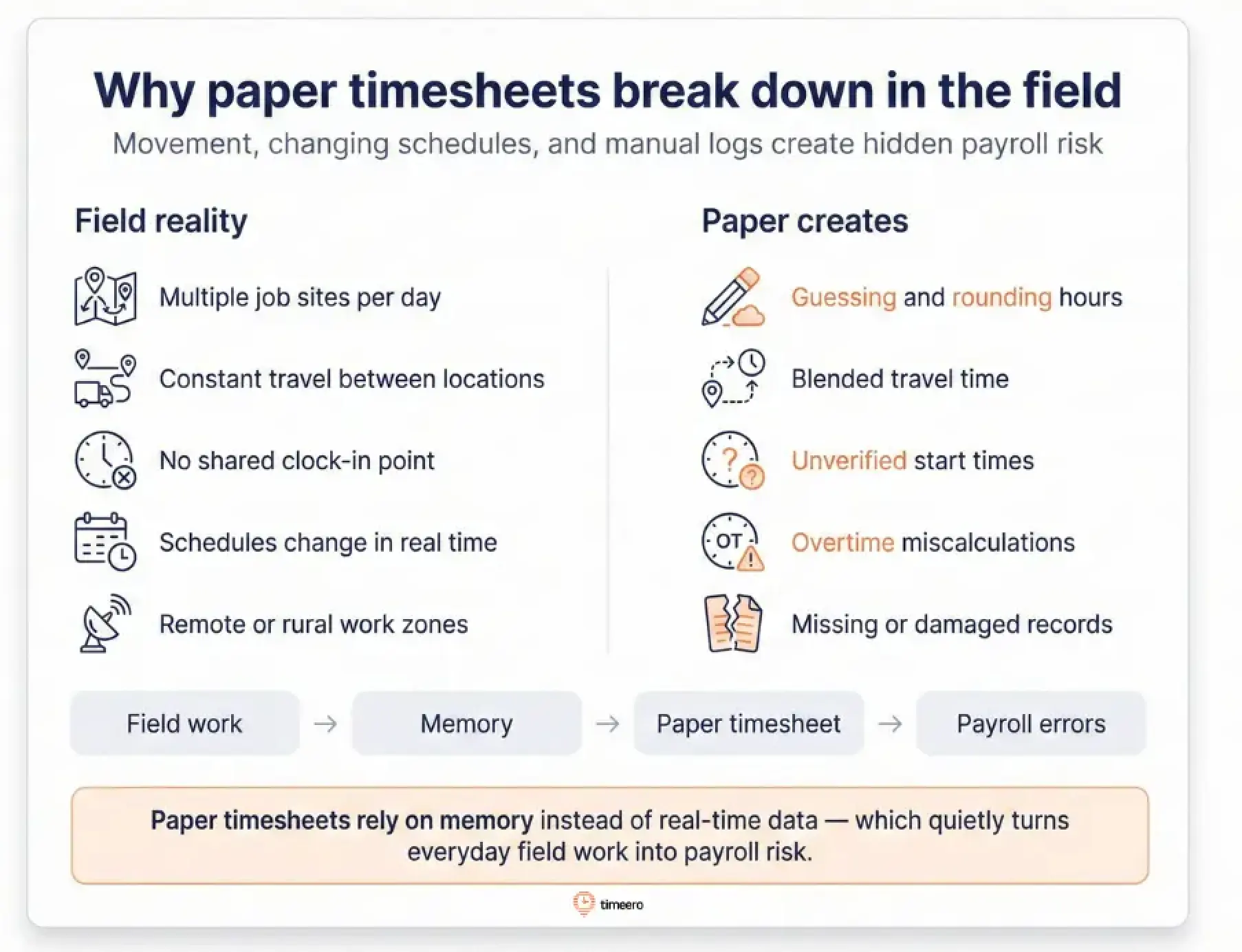
Here’s why paper doesn’t hold up in the field:
Multiple job sites per day
Your field team isn't working in one place. They're moving constantly. A typical day might start at one property, driving to another for a few hours, then dropping by a third site before lunch. At the end of the day, your workers are left trying to replay the day from memory.
Was the second stop at 9:15 or closer to 9:45?
Did they spend two hours at the third site, or was it actually more because the tenant wasn’t home and the crew had to come back?
When those details blur, people round the numbers and move on. Over the course of a week, those small guesses turn into hours that are inflated, deflated, or simply wrong.
What’s worse is you have no solid details to back up billing other than a handwritten line that says, “Job #2 – 3 hours”.
Travel time between locations
A crew wraps up at one site and heads to the next. Sometimes it’s a clean 20-minute drive. Other days, it turns into 45 minutes because traffic backs up, a gate won’t open, or your workers have to swing by a supplier for a part that wasn’t on the truck. On paper, those in-between minutes rarely get captured with any real detail.
And since field teams spend a meaningful slice of the day in transit, that missing detail matters.
A timesheet might say “travel,” but it won’t tell you how far they drove, when the trip happened, or whether the stop was work-related. More often than not, the travel time simply blends into the next job’s hours, which makes job costing and client billing harder to defend later.
When you're trying to calculate true job costs or justify travel charges to a client, you're working off incomplete information. You can't prove how long the drive actually took, and you can't show the actual route. At that point, you're stuck defending estimates, and clients know it.
No shared clock-in location
Crew members out in the field rarely have time to visit the central office. They start their day wherever the work is: at a job site, at home, or in a truck heading to the first location. There's no time clock to punch and no supervisor standing there watching them arrive.
Regardless of where they are, everyone's supposed to write down their start time – maybe most of your team does. But without any verification, you're relying entirely on self-reporting.
Did they really start at 7:00 a.m., or did they write that down because that's when they were supposed to start?
You won't know until the timesheet comes in days later, and by then the week's already over.
The employees who show up on time notice when others don't. It creates tension. And you're stuck in the middle, paying for hours you can't verify and trying to manage a team that's starting to question whether the system's fair.
Inconsistent schedules
Field work rarely fits into a clean 9-to-5. Jobs run long. A client pushes a start time. An urgent call reroutes the day. Weather slows everything down. On paper, all of that gets flattened into a handful of boxes.
One day an employee starts early to handle an emergency. Another day, they stayed late to finish a job that went sideways. Sometimes they’re stuck waiting because a site isn’t ready or a tenant can’t be reached.
In theory, they should document every shift change, gap, and overtime hour. In reality, they’re filling out the timesheet at the end of the week, tired and trying to reconstruct a schedule that’s been rewritten on the fly.
So they write what seems reasonable. A little rounding here, a forgotten early start there. Then payroll is left trying to calculate overtime and job costs from numbers that don’t quite add up.
Was Tuesday a 10-hour day or 11? At that point, everyone is guessing.
Remote or rural work environments
A lot of fieldwork happens in places where infrastructure is thin. Your crew might be working on a site with zero cell service, no nearby office, and no easy way to check in. They're out there all day, while their timesheet is left sitting in their truck that's covered in dust, mud, or worse.
By the end of the week, that paper's been through a lot. Rain, boots, the floor of a truck, a dashboard baking in the sun. Sometimes the writing is illegible. Sometimes entire days are missing. Sometimes the whole sheet is just gone.
You're trying to process payroll, and you're stuck calling people asking, "What hours did you work on Thursday?" Half of them don't remember. The other half give you their best guess, which you enter because you have to.
Deep down, you know the data is probably off, but there's nothing you can do about it.
Why use Timeero instead of paper timesheets
Most discussions on time tracking focus on the same three themes: accuracy, efficiency, and visibility. All three matter, but they rarely capture the real reason teams change their process.
In practice, the shift happens when the system reduces recurring friction. With time captured in context, teams spend less time chasing missing details, resolving preventable disputes, and reconstructing the week at payroll. Done well, it improves documentation without creating a culture of constant oversight.
Paper timesheets struggle in those exact friction points because they rely on after-the-fact recall and handwritten summaries that strip away context. Timeero closes that gap by capturing time where the work happens with location-supported records that are easy to review and even easier to export to payroll.
At a glance:
Paper timesheets vs. Timeero: Side-by-side comparison
Feature
Paper Timesheets
Timeero
Location Verification
No built-in verification; relies on self-reported start/stop times
GPS-supported clock-ins with geofencing to confirm on-site punches
Works Without Cell Signal
Still “works,” but details often get filled in later and are hard to verify
Offline capture stores time/location on-device and syncs automatically when reconnected
Real-Time Visibility
No live view; you see issues only after timesheets are submitted
Live “Who’s Working” view shows who is clocked in and where work is happening
Proof of Work Location
Typically none beyond notes, if added
Location history with breadcrumb-style tracking and route replay for context
Break Compliance
Manual tracking, often incomplete or inconsistent
Break reminders and shift sign-offs create a cleaner compliance record
PTO Management
Managed outside the timesheet (spreadsheets, email, texts)
In-app requests, approvals, and balances that stay current automatically
Payroll Integration
Hours must be re-entered into payroll, creating delays and errors
Payroll-ready exports that reduce retyping and shorten the review cycle
Accountability Features
Signatures and handwritten notes; easy to miss or fake
Photo/signature options tied to time entries with timestamps and location context
Lower: review exceptions, approve, and export (less back-and-forth)
Geofencing: No more clocking in from the driveway
Paper timesheets have one fatal weakness: they’re easy to fill out from anywhere. If the sheet is sitting on a dashboard, the “clock-in location” becomes whatever someone says it is.
Geofencing fixes that in a clean, non-dramatic way. You set a boundary around a job site, and clock-ins are tied to that location. If someone tries to clock in before they arrive, the attempt is flagged on their timesheet (either as an exception or as a blocked attempt), depending on how you configure it.
Avoid time theft by drawing custom geofences around job sites.
The value of geofencing isn’t in “catching” people but in removing ambiguity. Instead of having an awkward conversation built on suspicion like “Were you actually there?”, you’re dealing with a simple operational rule: clock in when you arrive on site.
And when the system flags an exception, you’re not debating someone’s character. You’re reviewing a specific event, with specific context. That’s a very different tone. Procedural, not personal.
Offline mode: Because job sites don’t care about LTE bars
This is the concern that stops a lot of businesses from moving away from paper: what happens when the signal drops?
Because in the field, connection drops all the time: rural routes, basement units, concrete-heavy buildings, new developments where coverage is a coin flip. If a time tracking app can’t handle dead zones, it basically trains your team to leave things for later, which is how paper problems come right back.
When connectivity dips, Timeero activates offline mode and keeps running in the background, storing time and location data on the device until the phone reconnects. Once service returns, the app syncs automatically, so the record stays continuous without extra steps from the crew. That matters because it prevents the common fallback to paper in low-signal areas and keeps payroll review consistent across every team and job site.
When your digital time tracker remains active even when offline, your team doesn’t have to change how they work depending on the environment. And payroll doesn’t have to manage two different realities: digital for some, paper for others.
Photo and signature capture: Accountability without the weird vibe
There’s a version of accountability that feels like trust, and a version that feels like someone is building a case file.
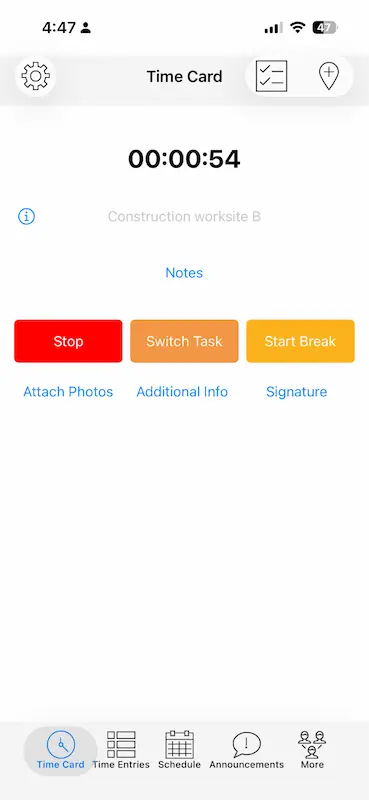
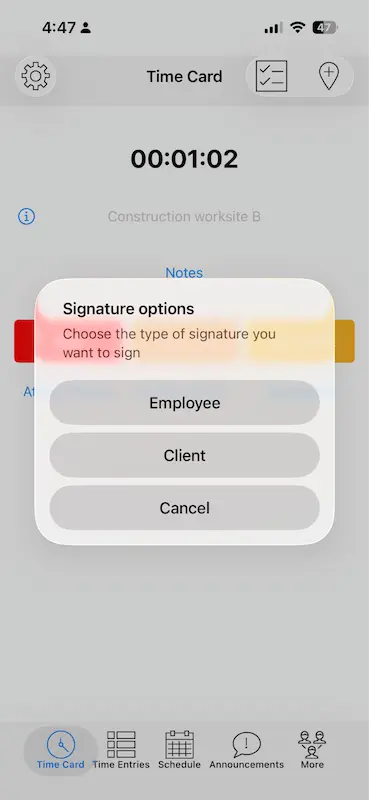
Timeero includes photo capture and in-app signature tools that let teams attach simple proof directly to a time entry. Instead of relying on handwritten notes or a signature line at the bottom of a paper sheet, you can document key moments in the workday as they happen.
For example:
A tech arrives at a unit, snaps a quick photo at clock-in, and you have simple proof of presence.
A crew completes work, attaches a photo with a short note (e.g. “meter box replaced; panel sealed”), and you don’t have to chase details at the end of the week.
A customer signs off in-app after the work is accomplished, preventing future disputes.
The photo, note, and signature live alongside the exact hours they relate to, which makes reviews faster and keeps disagreements from turning into personal debates. It’s a small shift in workflow that saves a surprising amount of time, especially once you’re managing multiple crews and job sites.
Accurate reports: Fewer “best guesses,” more usable records
Paper timesheets tell you when an employee says they worked. Timeero reports tell you where they were, how long they stayed, what breaks they took, and then sends that data straight to your payroll provider.
That shift, from self-reported summaries to documented records, does more than improve accuracy. It changes how disputes get resolved.
If a client questions billing, you don’t have to rely on someone’s memory and hope the story is consistent. If a manager needs to confirm time at a job site, they’re not texting three people and piecing together a day from fragments.
This is the core difference in gps time tracking vs. paper. Paper records a claim, while GPS-supported tracking creates a record that stands up when someone asks, “Are we sure?”
Break tracking: Compliance without hovering
Break tracking is one of those areas where paper creates a false sense of security. A sheet can say “lunch: 30 minutes” while still telling you almost nothing: when it happened, whether it was taken, whether the employee acknowledged policy, whether the record would help you if a complaint landed later.
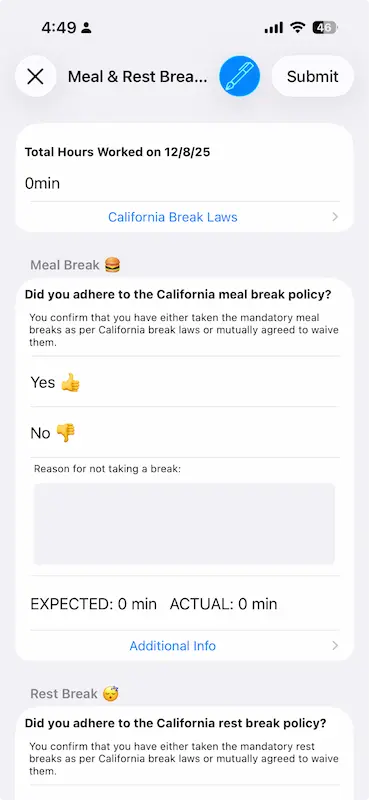
With Timeero, break tracking is built into the same flow as clock-ins and time cards, so it’s harder for breaks to become an afterthought. You can set up break types that match how your business actually runs (meal vs. rest, paid vs. unpaid), then use automated reminders to nudge employees at the right time based on your rules.
For teams operating under California-style requirements, Timeero can also prompt a Daily Sign-Off break attestation at clock-out, asking the employee to confirm whether they took the required breaks or to document why they didn’t.
Instead of relying on handwritten notes and after-the-fact memory, break records are captured as part of the shift while the details are still clear. That means missed breaks don’t surface weeks later as a vague entry or a dispute that’s hard to reconstruct.
PTO tracking: Fewer “Do I even have days left?” moments
PTO is where paper processes quietly fall apart. Not because anyone is careless, but because time-off requests tend to arrive everywhere except the place you need them: texts, quick calls, a note in the hallway, a last-minute “hey, can I take Friday?” as someone’s already halfway out the door.
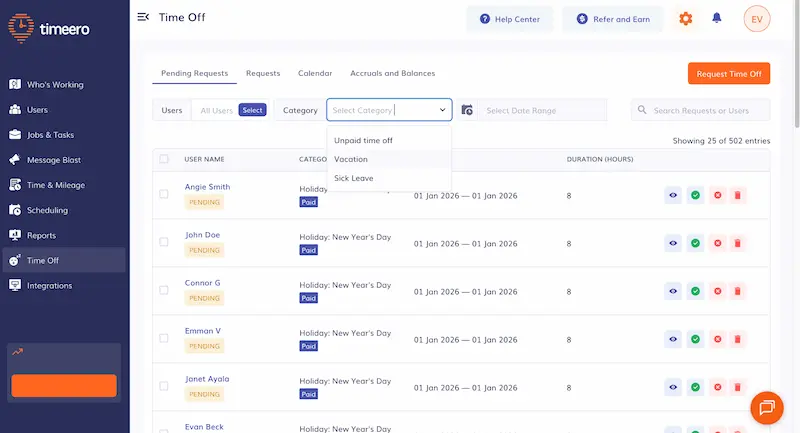
Timeero pulls that into a single workflow you can actually manage. Employees can easily submit PTO requests in the app, while managers handle approvals in the Timeero online dashboard. When payroll runs, approved time off is already reflected in the same record as hours worked, which reduces backtracking to confirm what was taken and when.
That alone cuts down the most common friction point in PTO tracking: employees being left guessing how much time off they have left. Meanwhile, managers aren’t approving based on outdated spreadsheets or half-remembered accrual rules.
Easy payroll exports: The end of retyping
If you want to understand why paper timesheets are so costly, follow the data trail.
With paper, hours are written down, signed, collected, and then typed into payroll. Each handoff adds friction and introduces risk: a digit gets flipped, handwriting gets misread, job codes get entered under the wrong customer, and totals stop matching just enough to trigger another round of back-and-forth.
Timeero reduces those handoffs by letting you export payroll-ready hours directly from the dashboard into providers such as QuickBooks, ADP, and Gusto. Depending on how you configure your account, those exports can include supporting details like job information and approved paid time off, so payroll is working from a structured record instead of a stack of sheets.
That means less time entering data, more time reviewing exceptions. For payroll teams, that means fewer late corrections, fewer follow-up messages, and a cleaner close to each pay period.
The real cost of sticking with paper timesheets
Paper timesheets don’t usually fail in a big, obvious way. They fail quietly, through delay. The information you need to run payroll accurately shows up late, often incomplete, and almost always stripped of context.
By the time someone notices a gap, the week is over and everyone is reconstructing what happened from memory.
That delay is what makes paper expensive. It turns small, fixable issues into end-of-pay-period problems: missed punches that become payroll corrections, unclear job-site hours that become disputes, and vague entries that trigger follow-ups across managers, payroll, and the field.
None of this feels dramatic in isolation, but it adds friction to every cycle.
It’s time to move on from paper
The businesses that move away from paper usually aren’t chasing tighter control. They’re choosing a process that produces a usable record in real time, so payroll can run on documentation instead of guesswork.
If you’re ready to replace paper timesheets, Timeero is built for the realities paper struggles with: field work, movement, travel time, job sites, dead zones, and payroll systems that don’t care how simple your clipboard was.
Why are paper timesheets unreliable for field teams?
Paper timesheets break down in the field because they’re built for stable, single-location work. Field teams bounce between job sites, deal with changing schedules, and rack up travel time that rarely fits neatly into a handwritten summary.
With no shared clock-in point, paper relies on after-the-fact recall, which is where rounding, missing breaks, and vague “9 – 5” entries start creeping in. By the time payroll reviews the sheets, the details start to blur together, so verifying what happened turns into follow-ups, judgment calls, and inconsistent records from one employee or job to the next.
Are paper timesheets still acceptable for payroll?
Often, yes. Many businesses still use paper timesheets and can meet basic payroll recordkeeping requirements that way, as long as the records are complete, stored properly, and consistently reviewed.
The issue is that “acceptable” doesn’t mean reliable at scale: paper increases admin time, makes audits and disputes harder to resolve, and creates more opportunities for errors as teams grow or work becomes more distributed.
What replaces paper timesheets for field employees?
Mobile teams do best with a timekeeping system that travels with them. Instead of a paper sheet that gets filled in later, mobile time tracking apps like Timeero let employees clock in from the job site, capture location-supported time records, and keep everything organized even when signal drops.
The strongest replacements for paper also include tools like geofencing, break and PTO tracking, and payroll-ready exports, so you’re not just collecting hours, you’re closing the loop from field work to payroll without retyping or reconstructing from memory by the end of the week.
Get the Full Story Behind Every Timesheet
Don't just track hours—track travel routes, verify locations, and capture photo proof of work. Give your payroll the context paper can't provide.
Emman is a passionate writer with more than 6 years of digital marketing experience under his belt. As a licensed chemical engineer with a passion for writing, he marries the technical with the creative to create engaging copy that converts. He is also a certified #girldad who spends most of his day playing with his three girls when he's not busy writing.



.webp)

%202.svg)


.png)
.png)



.png)


