Do Privacy Concerns Actually Kill GPS Adoption? The Data Says No.
Judyann Sonido
Last update on:
May 4, 2026 3:20 AM
Published on:
TL;DR
Many employers avoid GPS tracking because they fear employees will see it as invasive, but the data says otherwise. We surveyed 1,000 field workers and found that 88.4% of those who are extremely privacy-conscious remain comfortable with GPS tracking. The real adoption killer isn’t privacy, it’s uncertainty. Clear boundaries, shared data access, and transparent communication drive comfort far more than avoiding GPS altogether.
You’ve done the math. You know that GPS tracking leads to cleaner payroll, fewer "he-said-she-said" arguments, and a much smoother operation. But every time you’re ready to launch, another concern pops up:
“Will my best people quit because they feel spied on?”
“Is this going to destroy the trust I’ve built with my team?”
“Am I overstepping a line?”
If that sounds familiar, you’re not alone. Many companies get close to implementing GPS tracking and then stop because they’re worried about how employees will react.
That hesitation is understandable. No manager wants their team to feel like they’re being watched.
But here's the thing: GPS tracking privacy concerns do not equal rejection.
We surveyed 1,000 field workers, and the results were eye-opening. Data shows that 75.5% of employees are comfortable with GPS tracking during work hours. Even more surprising, 88.4% of workers who describe themselves as extremely privacy-conscious are still comfortable with GPS tracking while they’re on the clock.
Let’s look at what the numbers say, what workers truly care about, and why privacy concerns don’t have to derail your GPS rollout.
Not sure how to roll out GPS tracking without pushback?
Do privacy concerns automatically mean employees will resist GPS tracking?
No. Most privacy-conscious workers are still comfortable with GPS during work hours when boundaries are clear. 75.5% is not a slim majority. That's three out of every four people on your field team.
2026 GPS Survey Report
GPS Tracking and Employee Trust
75.5%
of employees are comfortable with GPS tracking while they’re clocked in.
88.4%
of extremely privacy-concerned workers are comfortable with GPS tracking during work hours.
70.6%
of privacy-conscious workers actually prefer GPS-enabled employers.
But here's where it gets really interesting. When we looked specifically at workers who said they are extremely concerned about privacy, 88.4% still reported being comfortable with GPS tracking during work hours.
It doesn’t stop there. 70.6% of these privacy-concerned workers said they'd prefer to work for an employer that uses GPS over one that doesn't. This surprises most employers. Why would privacy-conscious workers prefer to work at a company that uses GPS? Because GPS tracking can protect them, too.
Think about a field technician who gets accused of arriving late or a construction worker who wants accurate mileage tracking. GPS creates objective records that reduce arguments.
What are employees’ actual concerns about GPS tracking?
It’s natural to think that privacy and security are at the top of the list of employees’ concerns with GPS tracking. But survey results showed otherwise. The number one concern, according to 22.8% of employees, is being tracked outside work hours. This means employees are worried about overreach, not oversight. Is the app still running when they pick up their kids after they clock out or when they go to a doctor's appointment on their day off?
There’s a big difference between:
✔ Tracking only from clock-in to clock-out
✖ Tracking 24/7 without boundaries
When companies fail to explain when GPS tracking starts and stops, uncertainty creeps in.
For example, Jimmy finishes his last service call around 4:30 p.m. Later that evening, he’s sitting on the sidelines at his kid’s soccer game, and a thought pops into his head: “Is the GPS app still tracking me right now?”
No one ever explained to him when tracking actually stops, so he assumes the worst. That uncertainty is what makes employees uncomfortable with GPS technology.
How to protect employee privacy with GPS tracking
Here's one of the most telling numbers from our survey: when employees have easy access to their own GPS data, 87.9% of them are comfortable with tracking. However, when they're not sure whether that access even exists, that number drops to 48.9%.
That’s a nearly 40-point difference, and the only thing that changed was transparency.
Uncertainty lowers comfort more than restriction. If your employees don't know when tracking starts, when it stops, who can see their data, or how long it's stored, they'll fill in those blanks with worst-case assumptions. That's just human nature. But when you answer those questions upfront and give employees the ability to see what you see, the dynamic shifts completely.
4 ways to implement GPS tracking without violating employee privacy
This is the number one concern employees have, and it's the easiest one to fix.
Tell your teams exactly when GPS tracking starts and stops.
Consider this scenario.
Your company has decided to implement GPS tracking technology to curb time theft and capture accurate mileage records. When you introduced the technology to your teams, you took the time to thoroughly explain how GPS tracking would be used, when tracking stops/starts, and what data workers have access to. To make sure all workers are on board and consent to GPS tracking, you develop a GPS tracking policy and have all employees sign the document before downloading the app.
Now, employees know that tracking starts once they clock in, stops during meal and rest breaks, and completely ceases once the employee clocks out for the day.
The more detailed you can be about your company’s GPS tracking practices, the more comfortable your employees will be with using the technology at work.
2. Clarify who can access location data
Employees want to know who actually has access to their location history. If no one explains this, workers might assume their movements are visible to anyone in the company.
In reality, access is usually limited to a few specific roles:
Field supervisors who check job progress and arrival times
Payroll coordinators who verify hours before running payroll
Operations managers who review reports when there’s a job dispute
What matters most is being transparent about who has access to personal data. Be specific, walk your team through exactly who has access to their location data and for what reason.
3. Set clear retention policies
Another question employees quietly wonder about is how long their personal data is kept.
Without defining your company’s retention policies, Daniel, a delivery driver, may think that every route he’s driven for the past five years is still sitting in a database somewhere.
Most companies store GPS data for practical reasons, like:
Payroll verification
Mileage reimbursement
Resolving job-site disputes
When employees’ location data is automatically removed after a set time, such as 90 days or 12 months, GPS tracking feels much less invasive.
4. Provide employees access to their own records
When employees can access the same data managers see, GPS tracking starts to feel less like monitoring and more like a shared system.
Take a look at these scenarios where data is shared freely with employees:
Maria, a home health aide, can open the app and confirm the exact time she arrived at each patient’s home.
Jordan, a roofing contractor, can verify the route he drove between job sites for mileage reimbursement.
Tyler, a service technician, can quickly check his clock-in and clock-out times before payroll runs.
Instead of relying on memory or paper logs, employees see the same records their employer sees. This level of transparency and visibility serves as a form of protection for both parties, especially when questions come up about hours, travel time, or job visits.
Most workers have experienced disputes where GPS data would help
Workplace disputes about time and travel are more common than employers realize.
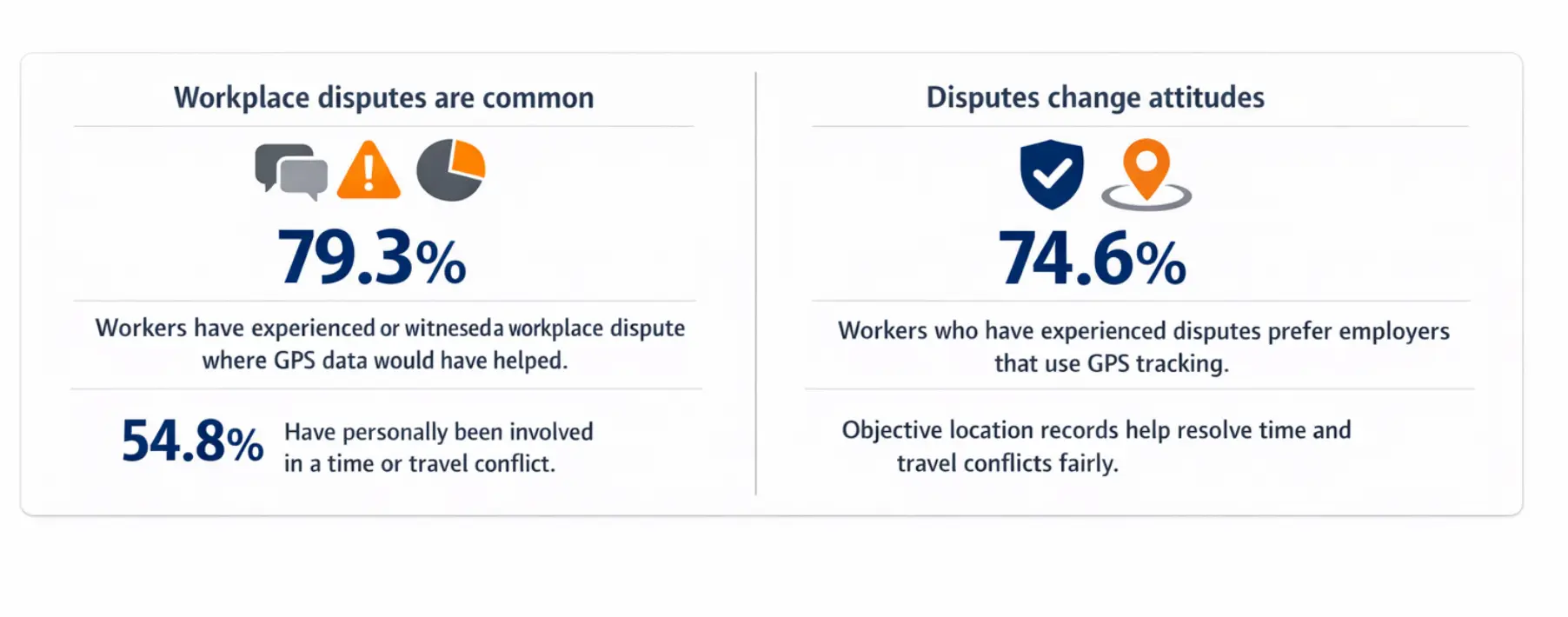
Of the 1,000 workers we surveyed, 79.3% have direct or indirect experience with a conflict where GPS data would have mattered. Over half (54.8%) have been personally involved in one of these situations. For anyone who's been there, it's not something you forget.
Disputes change how employees see GPS tracking
Once employees go through a workplace dispute, their perspective shifts. Workers who have dealt with multiple disputes were asked which type of employer they prefer:
74.6% said they prefer employers that use GPS tracking
Only a small portion said they would rather work somewhere without it
However, the reason employees prefer GPS-enabled employers isn’t because they enjoy being tracked. Rather, employees prefer working for companies that use GPS systems because the technology captures details that manual records can’t.
When experienced field workers learn that a company uses GPS tracking, many interpret it as a sign that the company:
Keeps accurate records
Runs organized operations
Resolves disputes using data instead of guesswork
Protects employees when questions about hours or mileage come up
For someone who’s already been through a payroll or job-site dispute, having an employer that uses GPS tracking matters a lot. This tells them they won’t be left trying to prove their side of the story without any documentation.
How Timeero builds privacy boundaries into GPS tracking
The GPS tracking system you choose to use plays a large part in the level of privacy and transparency you provide to your teams.
Timeero is built around the idea that GPS tracking should be structured with clear limits that employees can see and understand.
✅ Tracking only runs during work hours
One of the biggest concerns employees have with GPS tracking is after-hours tracking.
With Timeero, employees’ time and mileage are only tracked while workers are on the clock.
Here’s what that looks like during a typical workday:
At clock in: GPS tracking activates when the employee starts their shift
During the day: Routes, job visits, and travel are recorded for work purposes
At clock out: Tracking stops immediately when the shift ends
For employees, knowing when tracking stops and starts removes the fear of being monitored off the clock.
✅ Employees can see the same records that managers see
Transparency is another major factor that affects how comfortable employees feel with GPS tracking.
With Timeero, employees don’t have to wonder what data is being recorded. They can view their own records directly in the app, including:
Work hours and clock-in times
Routes taken during the workday
Mileage driven between job sites
This visibility helps in everyday situations. Instead of asking a supervisor for records, employees can verify the information themselves.
✅ Managers control who can access location data
Another important privacy safeguard is controlled access. Not everyone in the company needs to see employee location data.
With Timeero, managers can set permissions so that only the right roles have access.
For example:
Supervisors may see job progress and arrival times
Payroll teams may review timesheets and mileage reports
Operations managers may access reports for dispute resolution
This prevents location data from being widely visible across the company. Access is limited to those who actually need it.
✅ Geofencing adds an extra layer of protection
Timeero’s geofencing capabilities allow companies to create location-based boundaries around job sites.
This helps reinforce the limits of GPS tracking by:
👉 Confirming when employees arrive at a work location
👉 Automatically recording job-site visits
👉 Preventing confusion about whether someone was on-site
Geofencing also supports the broader goal of keeping tracking tied to work activity, not personal time.
✅ Trust makes adoption easier
At the end of the day, GPS tracking works best when employees understand how it works and what the limits are.
When workers know exactly what data is being tracked and when tracking stops and starts, the system feels less like monitoring and more like a shared record of the workday.
Instead of pushing against the technology, most teams simply see it for what it is: a clearer way to track work and protect everyone involved.
Build a clear GPS policy before you roll it out
If you’ve been delaying GPS tracking because you’re afraid employees will reject it, the data says you're worried about the wrong thing. Your employees aren't opposed to GPS tracking. They're opposed to vague rollouts and unclear GPS policies.
When you remove uncertainty by building clear boundaries, sharing access, and communicating openly, acceptance follows.
Ready to build a GPS policy your team can actually get behind? Use our GPS Tracking Policy Builder to set clear and fair guidelines before you roll the technology out.
FAQs
Do privacy concerns stop GPS adoption?
No. Our survey of 1,000 field workers found that 88.4% of those extremely concerned about privacy are still comfortable with GPS tracking during work hours. The issue isn't privacy, it's the absence of clear boundaries. When employees know when tracking starts and stops, and can see their own data, comfort levels rise significantly.
Can employers legally track employees outside work hours?
In most U.S. states, tracking employees outside of scheduled work hours raises serious legal and ethical concerns. Best practice is limiting GPS tracking to active work hours only. This protects your business legally and builds trust with your team.
What percentage of workers are comfortable with GPS tracking?
75.5% of field workers surveyed said they are comfortable or very comfortable with GPS tracking during work hours. That number climbs to 84.9% among workers whose employers gave a thorough, transparent explanation of how GPS would be used in the workplace.
Does GPS tracking violate employee privacy?
When GPS tracking is limited to work hours, paired with a clear policy, and employees have access to their own records, most workers don't see it as invasive. The employees most likely to feel uncomfortable with the technology are those who don't know when tracking stops or whether they can see their own data.
How can companies protect employee privacy when using GPS?
Tie tracking to clock-in and clock-out times, give employees access to their own location and mileage records, communicate clearly about who can see GPS data and why, set a data retention policy and share it, and use geofencing to prevent off-hours tracking at the technology level.
Do privacy-conscious employees prefer GPS-enabled employers?
Yes. Even among workers who are extremely concerned about privacy, 70.6% say they prefer working for an employer that uses GPS tracking over one that doesn't. Employees who have been through workplace disputes see GPS as a form of protection, providing detailed records that resolve disputes fairly and quickly.
See how Timeero keeps tracking tied to work hours — and gives employees full visibility into their own data.
Judyann is a content specialist with nearly a decade of experience in digital marketing. When she's not building brands and strategies, you'll find her exploring new destinations, embarking on spontaneous adventures, hunting down the best local eats, and spoiling her two fur babies. She believes the best content, like the best trips, comes from curiosity, creativity, and never playing it safe.




%202.svg)


.png)
.png)



.png)


