Timeero vs Driversnote: Which Is Better for Field Teams?
Andjelka Prvulovic
Last update on:
June 6, 2026 1:39 AM
Published on:
TL;DR
Both apps, Timeero and Driversnote, automatically track mileage — no manual start required
Driversnote is built for individual drivers needing simple mileage logs
Timeero is built for field teams that need time tracking, payroll integration, and visibility
Driversnote requires manual review for commute mileage; Timeero handles it automatically
Verdict: Driversnote for solo use. Timeero for teams managing multiple jobs, employees, and payroll
If you're evaluating mileage tracking software for a field team, you've likely come across both Timeero and Driversnote. For field teams, Timeero is the stronger choice — but understanding why requires looking at how the two apps differ in scope, not just accuracy. Both apps auto-track mileage and generate IRS-compliant reports, but they're built for different jobs.
How we tested
This comparison is based on hands-on testing of both apps, including several weeks of running them simultaneously on the same iOS device. We also set up a Driversnote team account, added users, and ran the approval workflow to see how the admin side holds up. Here's what we found.
See exactly how Timeero tracks mileage — step by step
Explore how automatic mileage tracking, commute exclusion, and payroll-ready data work together in a real field workflow.
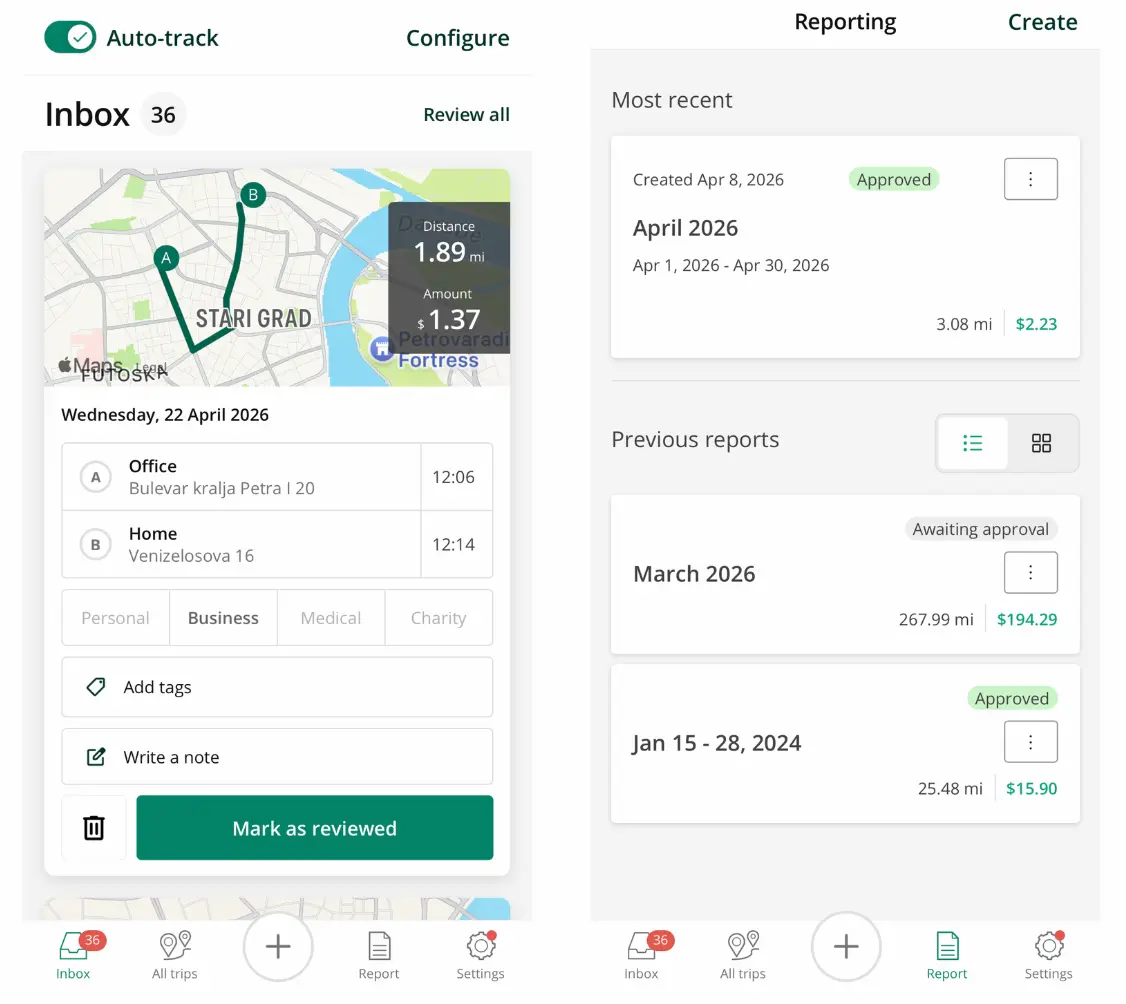
Driversnote is a mileage tracking app built primarily for self-employed drivers, freelancers, and small teams who need to track business trips for tax deductions or mileage reimbursement.
The app automatically records trips using your phone's GPS and accelerometer (motion-detection), generates reports compliant with IRS, CRA, HMRC, and ATO standards, and supports international tax rules across multiple countries.
Signature feature
Driversnote’s signature feature is iBeacon, a Bluetooth device placed in your vehicle that connects with your mobile device. iBeacon activates the app automatically when you enter the vehicle, and stops the app session upon exit.
Note: We didn't have access to iBeacon hardware for this review. The iBeacon section below is based on vendor documentation and user reviews, not direct testing.
Pricing
Plan
Price
Users
Trips tracked
Free
$0/month
1 user
15 trips/month
Pro
$11/month
1 user
Unlimited
Teams
$11/license/month
2–10 users
Unlimited
Teams +
Contact Driversnote
11+ users
Unlimited
iBeacon: $40 with a monthly plan, free with annual plan when purchased on the web
Integrations
Driversnote integrates with Xero, QuickBooks, Wave (Canada and US), and Dinero (Denmark). The app currently does not integrate with US payroll platforms, so ADP, Gusto, Paychex, Rippling, and Paylocity are not supported.
Export options
For teams, mileage data is exported from the app as a PDF or Excel report and reconciled with payroll manually. The report format itself is genuinely good — clean, well-structured, and accountant-ready.
Privacy
Drivers control which trips they submit, and only submitted trips are visible to administrators.
Timeero Overview
Timeero is a mileage tracking app built for field teams. It automatically logs every mile using a minimum speed threshold ( 4.47 mph), eliminating phantom rides and missed trips.
Timeero combines mileage tracking with time tracking, real-time location visibility, geofencing, break tracking, scheduling, and direct payroll integrations.
Signature features
Segmented Tracking
Gives managers a segmented view of where employees drove, how long they spent at each job site, and how many miles were driven between stops.
Commute mileage exclusion
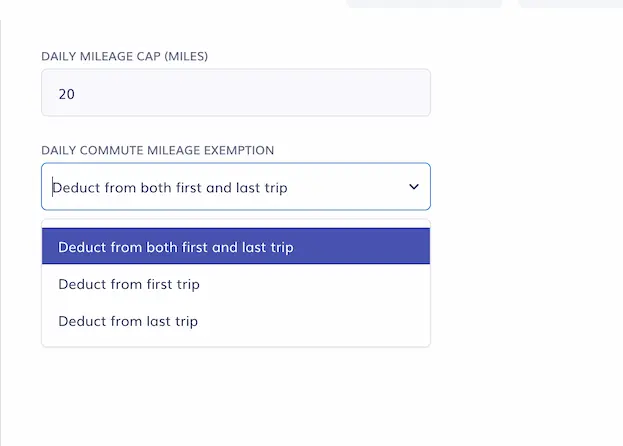
Companies can customize an employee’s commute mileage, which is auto-deducted from daily mileage totals for IRS compliance.
Minimum speed threshold
Unlike Driversnote, which uses GPS and accelerometer data to detect driving, Timeero waits until the vehicle reaches a defined speed (4.47 mph) before mileage tracking begins. This means Timeero's tracking is more predictable across a wider range of conditions — including slow traffic, stop-start urban driving, and low-connectivity environments.
Pricing
Plan
Price
Trips tracked
Basic
$6/user/month
Unlimited
Pro
$9/user/month
Unlimited
Premium
$12/user/month
Unlimited
Enterprise
Contact Timeero
Unlimited
Note: Segmented Tracking and Messaging are available as add-ons. Annual Discount (2 months free):<
Note: Segmented Tracking is available as an add-on
Integrations
Timeero integrates with payroll systems such as QuickBooks, ADP, Gusto, Paychex, Xero, Rippling, and Paylocity, so no manual reconciliation is required.
Privacy
Timeero only tracks mileage when an employee is clocked in. Tracking does not take place off the clock or during breaks.
Driversnote vs Timeero: pros and cons
Driversnote
Timeero
Pros
Accurate mileage tracking in 2026 testing
Simple setup for individuals and small teams
iBeacon option improves vehicle tracking
Clean, accountant-ready reports
Works well offline
Cons
No time tracking or workforce tools
Limited for field teams
No payroll integrations
No speed threshold detection
Manual commute mileage handling
Pros
Combines mileage, time tracking, and scheduling
Automatic commute mileage exclusion
Direct payroll integrations
Real-time team visibility and route replay
Segmented Tracking for multi-stop workdays
Cons
More features than solo users need
No iBeacon option
Mileage accuracy
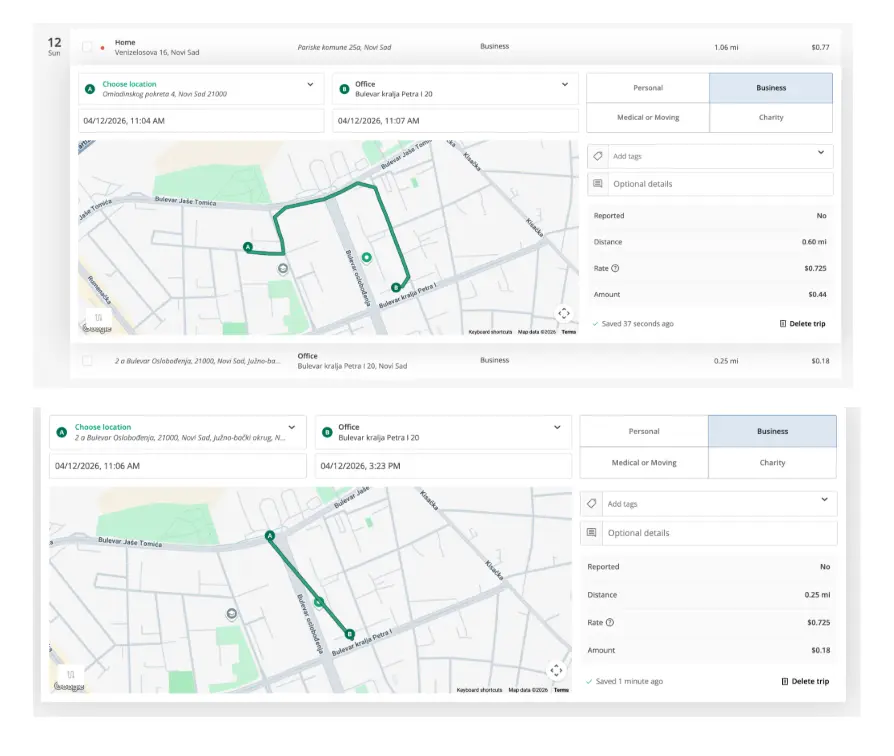
In our 2025 test, Driversnote failed to record 58.9 miles on a 208.3-mile trip and logged three phantom trips where no driving took place. The reason? Without a minimum speed threshold, Driversnote relies on both motion-detection and GPS accuracy to track mileage. If either an employee’s GPS or the vehicle’s accelerometer fail to activate, the app fails to track mileage and may recognize walking movements as driving.
In March 2026, we retested the mileage accuracy of Timeero and Driversnote, running both apps simultaneously on the same iOS device for several weeks.
Driversnote logged long trips accurately with no missed segments or phantom trips during the testing period, an increase in accuracy from our 2025 test.
Driversnote testing experiences
However, Driversnote still does not use a minimum speed threshold. Outside the formal test, in heavy stop-start traffic, Driversnote began capturing the route roughly 300 to 400 meters into the journey. The vehicles were barely moving, and the conditions needed to trigger tracking (GPS + Accelerometer) didn't align quickly enough. This single occurrence illustrates exactly why requiring GPS signal and motion-detection isn’t the best way to capture mileage.
During a separate test on the same day, Google Maps Timeline recorded a single 0.5-mile drive that Driversnote logged as two separate trips — one tracking the full route accurately, one showing a straight-line path that remained open for over four hours after the drive had ended. Both observations are detailed in our full Driversnote review.
One area where Driversnote performed well in both rounds of testing was offline mode. I put my device in airplane mode in an unfamiliar location during a return trip, and both Timeero and Driversnote continued logging mileage accurately. For drivers in low-coverage areas, that's a genuine strength.
Timeero
Timeero begins tracking an employee’s mileage as soon as the vehicle’s driving speed reaches 4.47 mph. This eliminates phantom drives and missed segments that Driversnote is prone to record.
For most solo drivers in normal conditions, Driversnote works reliably. For field teams where every mile affects payroll and reimbursement accuracy, the difference in predictability is worth weighing.
iBeacon: What it does and doesn't fix
Driversnote markets iBeacon as the solution to missed tracking — "no false starts, no missed drives."
But let’s take a look at what the device actually does.
iBeacon is a Bluetooth device placed in your vehicle that connects to your mobile device. When you enter the car, your phone detects the signal, and Driversnote begins tracking mileage without you needing to open the app. When you exit the vehicle, tracking stops.
Although we didn't have access to iBeacon hardware for testing, long-term iBeacon users in 2026 reported up to 99% accuracy. If the app reliably starts the moment you enter the vehicle, the late-start problem is largely resolved. However, we can't confirm this from our own testing.
What iBeacon fixes
The Bluetooth trigger on vehicle entry/exit prevents walking, cycling, and public transport (situations where motion-detection logs a trip as a drive) from being recorded as mileage.
Placing the device in a specific vehicle helps companies better allocate mileage to business-related travel and protects employee privacy.
What iBeacon does not fix
The iBeacon device does not determine how accurately GPS logs an employee’s driving route. The device is meant to automate when tracking begins and ends, but it does not play a part in the accuracy of mileage tracking.
iBeacon pricing
For teams considering using iBeacon, the device costs $40/vehicle with a paid monthly plan. Teams subscribing to an annual subscription can get an iBeacon for free when purchasing through the website.
Commute Mileage and IRS Compliance
The IRS does not allow deductions for commuting miles because the distance from an employee's home to their first job site is not a business expense. Reimbursing commute mileage as business mileage is a compliance risk.
Both Driversnote and Timeero generate IRS-compliant mileage reports, but the apps take different approaches to managing commute mileage.
Driversnote
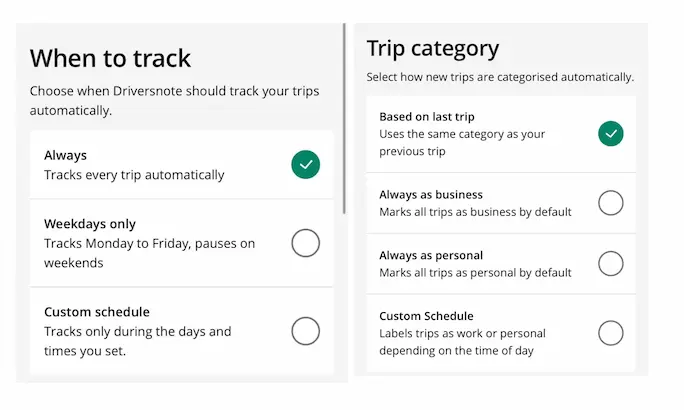
Driversnote gives drivers and admins several tools to manage commute mileage. Auto-tracking can be set to run on a custom schedule — weekdays only, or specific days and times — so the app doesn't record trips outside working hours.
Trip categorization is a separate setting. Drivers can choose to have trips labeled as business or personal based on time of day, the previous trip, or always as one or the other.
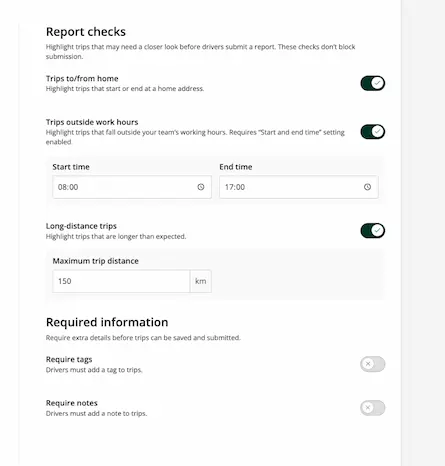
On the admin side, report checks flag trips that start or end at a home address before a driver submits their timesheet, giving managers a chance to review questionable entries before they're approved.
However, none of these steps happens automatically. The driver or admin still has to respond to flagged entries or configure mileage rules for commute trips to avoid including them on business mileage reports.
Timeero
Timeero handles commute mileage much differently than Driversnote. Managers customize commute mileage rules for individual employees, and the app automatically excludes non-deductible trips from business mileage reports without requiring any action from the driver.
GPS, location & visibility for field teams
This is where the difference in scope becomes most concrete for anyone managing a field team.
Driversnote
Driversnote shows a route map for every trip, which includes starting and ending points and the path driven. That's the right level of detail for a freelancer submitting mileage to an accountant. It's not enough for a manager who needs to know where five employees were at different points during the day.
Driversnote does not have the visibility features that field teams need. The app lacks breadcrumb timestamps, geofencing, and in-depth driving details or a current location map.
Timeero
Timeero's GPS time clock gives managers a real-time Who's Working map that shows the location of all active employees. The app’s Route Replay feature shows the exact path driven with clickable breadcrumbs that include timestamps and the employee’s driving speed at each point — useful for verifying routes, resolving disputes, and confirming adherence to driving policies.
Segmented Tracking breaks each employee's day into individual driving segrments. The Segmented Tracking timeline shows the address of each stop, the time spent at each location, as well as the drive time and mileage between stops.
For an HVAC company running three job sites in a day, the manager can see exactly when the technician arrived at the site, how much time they spent at the location, and how far they drove between stops. All job-related travel is tied directly to the employee’s timesheet – details a route map with starting and ending points alone can't provide.
Timeero also supports geofencing, allowing managers to set boundaries around job sites. When geofencing is enabled, employees can automatically clock in or out of jobs and receive system alerts when they try to clock in or out from an unauthorized location.
Driversnote is designed to be a capable mileage log. Timeero is built to show the full picture of the field day.
Integrations and reporting
For a solo driver or a small business, the differences in integrations are manageable. For a team running weekly payroll cycles, they aren't.
Driversnote connects with Xero and QuickBooks for accounting, plus Wave for users in Canada and the US, and Dinero for users in Denmark. There are no integrations with US payroll platforms. Mileage data leaves the app as a PDF or Excel file and is entered manually into ADP, Gusto, Paychex, or whatever payroll system the business uses every pay period.
I found that Driversnote’s PDF and Excel reports are clean, well-structured, and formatted in a way that accountants rarely push back on.
Timeero connects directly to QuickBooks, ADP, Gusto, Paychex, Xero,Rippling, Paycor and Paylocity. Mileage flows into payroll without any manual work on your part. For a team of ten that runs payroll biweekly, having integrations that automate mileage reconciliation increases productivity and overhead costs.
Pricing
Driversnote's paid individual plan runs at approximately $11 per month. Teams pay per driver, with admin licenses free. Small teams of 2 to 10 users are self-serve, with larger teams paying a custom price. Teams using iBeacon will pay $40 for each vehicle needing a device. If teams subscribe to an annual subscription online, iBeacon devices are free.
Timeero’s pricing starts at $6 per user per month (or $5 per user per month billed annually), with all plans including automatic mileage tracking and GPS. Higher tiers add scheduling, geofencing, and advanced compliance features. See Timeero’s pricing for current plan details.
The honest comparison for a 5-person field team isn't just the per-seat cost. A team on Driversnote at $55 per month also carries the time cost of manual payroll reconciliation each pay period — a real operational expense that doesn't appear in the subscription price. A team on Timeero at $30 to $60 per month, depending on plan, gets that reconciliation step removed entirely.
Driversnote vs Timeero: Which should you choose?
Choose Driversnote if you:
are a freelancer or solo driver
only need mileage tracking for tax reporting
don’t need time tracking or payroll integration
Choose Timeero if you:
manage a field team
need to track time, mileage, and job activity together
want to automate payroll and reduce manual work
need visibility into employee locations and job sites
Final verdict: Which is better for mobile and field teams?
Driversnote works well for individuals tracking mileage for tax purposes. It’s simple, reliable, and produces clean reports.
Timeero is designed for teams. It combines mileage, time tracking, payroll, and real-time visibility into a single system. For field operations with multiple employees and job sites, that difference is operational—not just technical.
For field teams, Timeero is the stronger choice because it removes manual work, improves accuracy, and gives managers a complete view of the workday.
If you're still comparing options, read the best mileage tracking apps for an overview of the top mileage tracking apps on the market.
If you've already decided Driversnote isn't the right fit for your business, we’ve researched and compared the Top 5 Driversnote alternatives to help you find the best solution for your company.
FAQs
Does Driversnote's iBeacon solve its mileage accuracy problem?
The iBeacon device ensures the app starts recording mileage the moment you enter the vehicle, rather than waiting for the employee’s GPS signal and vehicle accelerometer to activate. However, the iBeacon device does not ensure mileage accuracy while driving.
Is Driversnote free, and what do you get on the free plan?
Yes, Driversnote offers a free plan that covers 15 trips per month, with manual and automatic tracking included. iBeacon is not available on the free plan. For field employees who drive daily, 15 trips per month is typically not enough. Most users will need to upgrade to the paid plan.
Does Timeero track mileage automatically, or do employees start it manually?
Timeero starts tracking mileage automatically when the vehicle’s speed exceeds 4.47 mph. Employees don't need to open the app or tap any buttons to begin recording mileage.
Can Timeero exclude commute mileage from employee reports?
Yes. Managers can set per-employee commute mileage rules that automatically exclude non-deductible home-to-first-site trips from business mileage logs. This keeps reimbursement records IRS-compliant without requiring employees to manually classify their commute each day.
Which is better for a field service team with multiple job sites per day?
Timeero’s Segmented Tracking feature, commute mileage exclusions, and GPS-backed mileage records make it the best choice for field teams with multiple job sites per day.
Andjelka is a researcher and writer with 7+ years in digital marketing. Her background in social work and journalism has sharpened her skill in connecting with people from all walks of life. For the past 4 years, she’s specialized in time, location, and mileage tracking. Outside work, she enjoys yoga, swimming, and unwinding with her cats while listening to Leonard Cohen’s music.



.webp)
.webp)
.webp)
.webp)

%202.svg)


.png)
.png)



.png)


