Best Time Tracking Software That Integrates With QuickBooks
Emman Velos
Last update on:
June 6, 2026 1:37 AM
Published on:
TL;DR
Manual timesheet entry is one of the most common sources of payroll errors. The right integration eliminates it.
If you're using QuickBooks but still tracking time separately, you're probably doing more manual work than you should.
Most time tracking software that works with QuickBooks only syncs with QuickBooks Online, leaving QuickBooks Desktop users without a clean integration.
Timeero integrates with both QuickBooks Online and QuickBooks Desktop, and automatically tracks time, mileage, and job data in one place.
If you're using QuickBooks but still tracking time separately, you're probably doing more manual work than you should.
Here’s the thing, QuickBooks handles accounting well. Most businesses already know that. But real-time field tracking? Job-site visibility? Mileage reimbursement? That's where the gaps show up.
A lot of business owners end up searching for time tracking software that integrates with QuickBooks because they don’t want to work across multiple applications.
Using a GPS time tracking app like Timeero, eliminates manual data entry, payroll errors, and disconnected systems by syncing time, mileage, and job data directly into QuickBooks.
This article breaks down what field teams should look for in time tracking software, and why Timeero is the best choice for teams using QuickBooks.
Tired of chasing down timesheets, guessing mileage, and manually importing data?
Timeero automatically syncs GPS-verified hours and mileage directly to both QuickBooks Online and Desktop
Why QuickBooks users still struggle with time tracking
Most businesses running QuickBooks have the accounting side covered. The harder part is everything that happens before the numbers get there.
Hours are tracked in one place, mileage in another, and job details often live in texts, spreadsheets, or separate apps that don't fully connect with QuickBooks. By the end of the pay period, someone has to gather all of that information, double-check it, and make sure it lines up correctly before payroll can run.
When the process depends on multiple systems and a lot of manual follow-up, small issues start piling up. A missed timesheet here, an incorrect mileage total there, or hours attached to the wrong job can create payroll problems that take hours to sort through later.
QuickBooks isn’t built for real-time field tracking
QuickBooks is accounting software. It's built around financial records like invoices, expenses, payroll runs, and tax prep — and it keeps those records clean. What it can't do is tell you what's happening in the field while work is in progress.
It can't show where crews are working in real time, verify whether someone clocked in from the correct job site, or track how long employees actually spent at a location. That data simply doesn't exist inside QuickBooks, which means it has to come from somewhere else.
And getting it there accurately, every pay period? That’s where most field service businesses hit a wall.
Manual imports/exports create errors
When time tracking and accounting live in two separate systems, moving data between them requires someone to manually review, format, and transfer information on a regular basis. That process introduces a layer of oversight that becomes a liability over time.
Every import or export is an opportunity for something to land in the wrong place, and with payroll data, those errors have real consequences:
Mismatched employee records. When a name is spelled differently across two platforms or hours don’t map correctly, they all have to be reconciled manually before payroll can run.
Incorrect job or customer assignments. Hours from one job site get logged under the wrong customer, throwing off both payroll and job costing.
Skipped or duplicated rows. A single import error can result in an employee being underpaid or a job's labor costs being counted twice
Outdated data. When imports happen on a delay, payroll is built on information that's already a day or more behind what actually happened in the field.
QuickBooks Desktop adds another layer to this problem. Many businesses still rely on Desktop rather than the cloud version. A significant number of time tracking tools only sync with QuickBooks Online, which means Desktop users either pay for workarounds or keep doing manual imports indefinitely.
No built-in mileage tracking
Mileage tracking becomes difficult to manage when employees spend most of their day driving between locations.
A technician might move between multiple customer sites, stop to pick up materials, then head to another appointment across town. Those miles affect reimbursements and labor costs, but QuickBooks doesn't automatically track that movement while it's happening.
As a result, mileage usually gets handled through a separate process entirely. Employees estimate trips later, managers review submissions manually, and reimbursement data gets added during payroll processing.
The longer employees wait to report mileage, the less reliable the records tend to be.
Limited visibility into job sites
One of the biggest challenges with field-based time tracking is that hours alone don't provide much context. A timesheet might show when someone clocked in, but it won't explain where they were, whether they arrived on time, or how long a job actually took to complete.
Without visibility into active job sites, it becomes harder to answer customer questions, verify labor costs, or identify why certain jobs consistently run over schedule. When disputes come up, whether it's a billing issue, a payroll disagreement, or a customer claiming no one showed up, businesses may not have enough real-time data to clearly resolve the situation.
Why Timeero is the best time tracking software for QuickBooks
A lot of time tracking software that works with QuickBooks claims to handle field teams well. Fewer tools are actually designed around the way field service time tracking actually works day to day.
That difference becomes obvious once employees start driving between job sites, losing signal in rural areas, clocking in from customer locations, or tracking mileage across multiple stops. Many platforms handle office schedules well enough, but field work creates a completely different set of problems.
Timeero is built around those realities.
Instead of treating GPS tracking, mileage, scheduling, and payroll syncing as separate add-ons, the platform keeps everything connected inside one workflow. Time tracking feeds directly into QuickBooks, mileage gets logged automatically, and managers can see where work is happening while the day is still in progress.
Direct integration with QuickBooks
Timeero integrates with both QuickBooks Online and QuickBooks Desktop. A surprising number of time tracking apps only support QuickBooks Online, which leaves businesses using QuickBooks Desktop stuck exporting spreadsheets or manually importing payroll data every pay period.
For businesses specifically looking for time tracking software that integrates with QuickBooks Desktop, Timeero is one of the few options that handles it natively through the QuickBooks Web Connector rather than relying on CSV imports or manual workarounds.
Timeero keeps both versions connected, so payroll and job costing data move directly into QuickBooks without the extra cleanup work in between.
Sync employee hours to payroll. When employees clock in through the Timeero app, their hours sync directly into QuickBooks for payroll processing. There’s no need to export timesheets, clean up spreadsheets, or manually transfer records between systems at the end of the week.
Sync job and project data. Timeero syncs job and project information alongside employee hours, keeping labor costs attached to the right customers inside QuickBooks automatically.
Reduce manual entry and errors. Because Timeero syncs time and project data directly into QuickBooks, there's less manual handling involved. That reduces payroll corrections, cuts down on administrative cleanup, and makes payroll week considerably less chaotic.
Built for mobile and field teams
Field employees don't have a fixed office to clock into. Their workday starts in a driveway, runs through multiple job sites, and ends somewhere different every day. Timeero’s rich feature set is built with field teams in mind.
GPS tracking
Employees clock in through the mobile app from the job site, with GPS location captured at punch time. That gives managers more context behind each timesheet entry and helps verify where work started without relying on phone calls or handwritten updates later in the day.
Real-time visibility into work locations
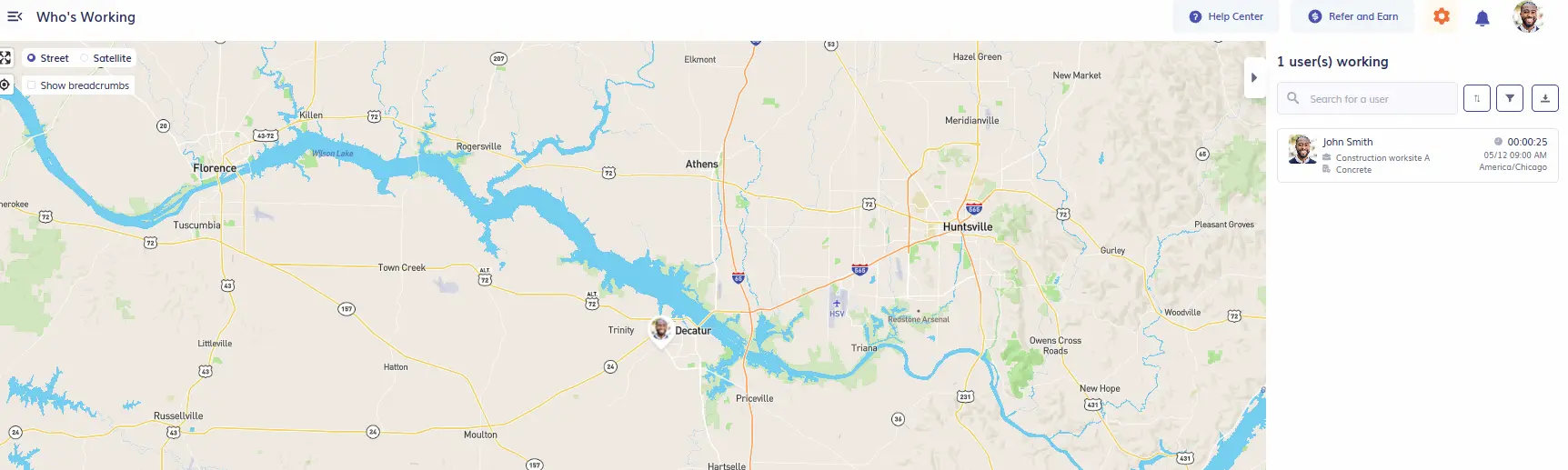
Timeero’s “Who’s Working” dashboard gives managers a live look at which employees are currently clocked in and where active work is happening.
View the location of employees that are on the clock
When crews are spread across multiple locations, that visibility becomes incredibly useful. Managers can check on the status of jobs, respond faster to customer questions, and make dispatch decisions without constantly calling employees for updates.
It also creates a clearer picture of how work is progressing throughout the day instead of waiting for timesheets to be submitted.
Reduced time theft
Time theft usually shows up through smaller habits that slowly inflate labor costs – buddy punching, extended breaks, or employees clocking in before they arrive on-site. Timeero prevents time theft in several ways:
Facial recognition helps prevent buddy punching by verifying that the employee clocking in is actually the person assigned to the shift.
GPS-verified clock-ins capture location data at punch time, making it easier to confirm employees are clocking in from the correct job site instead of somewhere nearby.
Geofencing creates approved clock-in zones around job locations, which helps prevent employees from clocking in before they arrive on-site.
Break tracking creates cleaner payroll records by logging paid and unpaid breaks directly inside the app, helping reduce issues with untracked or extended breaks.
Auto clock-in and clock-out
Timeero reduces missed punches through geofencing tied to specific job sites. When an employee arrives at a scheduled location, the app detects their presence and either prompts them to clock in or does it automatically, depending on how the account is configured.
As a result, managers spend less time fixing timesheet gaps. Meanwhile, employees are less likely to lose hours they actually worked because they forgot to punch in during a busy shift.
Automatic mileage tracking
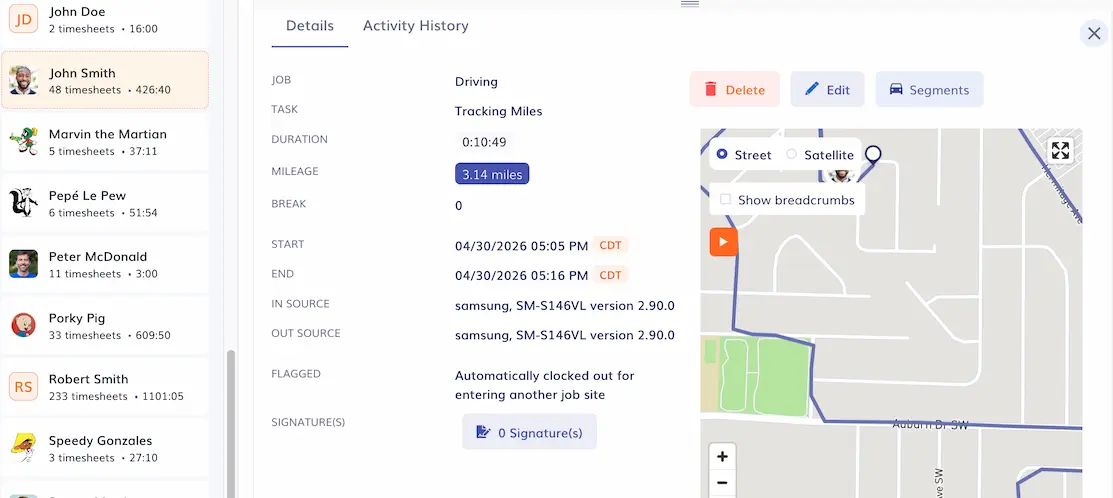
Manual mileage logging usually breaks down by midweek. Employees forget trips, estimate routes later, or wait until Friday to piece everything together from memory. Timeero removes that process entirely by tracking mileage automatically while employees drive, creating reimbursement-ready records without requiring drivers to stop and log every trip themselves.
All captured time and mileage data are automatically attached to the employee’s timesheet
When it's time to export, mileage data syncs into QuickBooks and appears under Expenses, separate from timesheet hours, which appear under Weekly Timesheets. That means mileage reimbursements and labor costs are both accounted for inside QuickBooks without any duplicate entry.
Mileage costs will be shown under Expenses in QuickBooks Online.
The last day before payroll closes tends to reveal every gap in the time tracking process from the previous two weeks. Hours that don't match, mileage that was never entered, job data that landed under the wrong customer — all of it surfaces at once and someone has to sort it out before anything can run.
Timeero captures GPS-verified clock-ins, mileage, breaks, and job assignments in a single system. When it's time to run payroll, managers generate a report in Timeero, select the pay period, and export directly into QuickBooks with one click.
Job scheduling
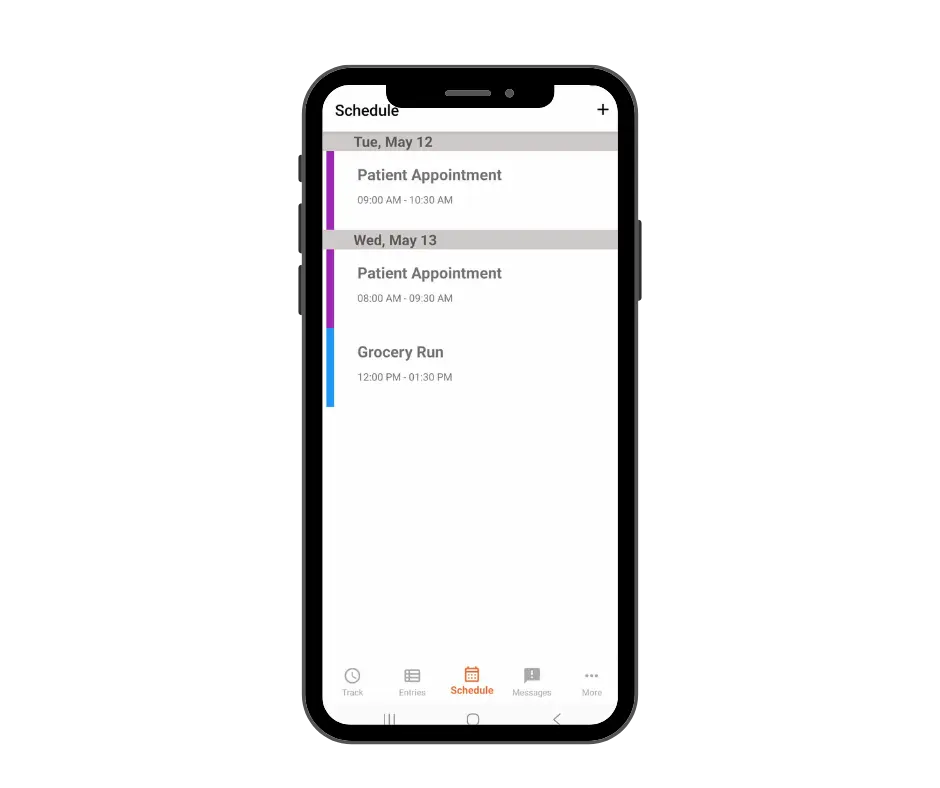
Employees can see their assigned jobs, locations, and shift times in the Timeero app. This eliminates the back-and-forth that tends to slow down field teams. No calls to confirm where to be, no texts asking what time the next job starts, and no confusion when the schedule changes mid-shift.
Employees can view their scheduled shifts in the app
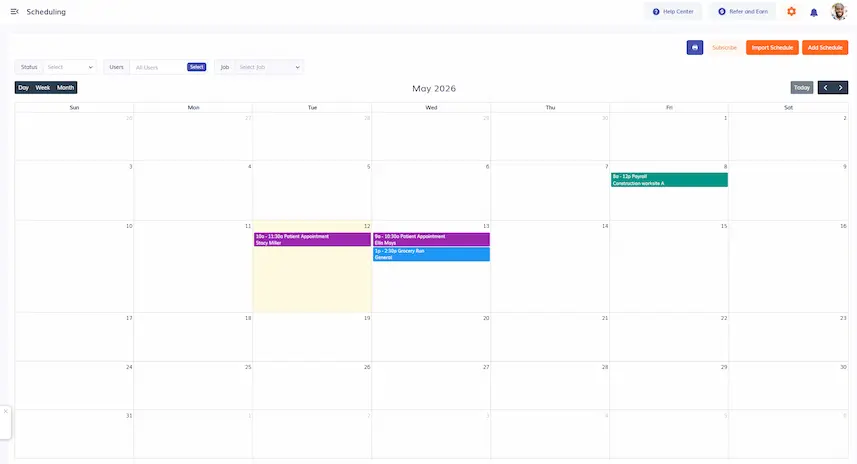
On the manager side, the scheduling tab on the left side of the web dashboard gives a full view of how the day, week, or month is laid out across the entire team. Clicking on any entry pulls up the details for that shift — who's assigned, where the job is, and when they're expected on-site.
View your team’s schedule at a glance
Offline mode
Cell service drops on construction sites, rural properties, underground projects, and plenty of other places where field work actually happens. Most time tracking apps require a stable internet connection to track time and mileage, but with Timeero, a loss of signal doesn’t mean a loss of data.
Timeero continues to record employee time, mileage and location data offline. All records are stored locally on the employee’s mobile device, and automatically synced with Timeero once connection is restored. With Timeero’s offline tracking, timesheets stay complete and compliant.
Break tracking
In states with strict meal and rest break requirements, the question during an audit or dispute isn't whether breaks happened, but whether there's documentation proving they did.
Timeero records employee breaks (paid and unpaid) on their timesheet, so every shift has a complete record from start to finish. When documentation is needed, it's already there, organized, timestamped, and tied directly to the timesheet it belongs to.
How Timeero Works With QuickBooks
Most QuickBooks users are used to payroll prep being a process: pulling data from one place, formatting it, importing it, and fixing what didn't transfer correctly. With Timeero connected, that process compresses into something much simpler.
Here's what a typical workday looks like once everything is set up:
Employees clock in from their phones. At the start of the shift, employees open the app and tap Start. Timeero records the time, GPS location, and assigned job information tied to that shift.
Time, mileage, and job activity are tracked automatically throughout the day. While employees work, Timeero records hours in the background. If they drive between job sites, mileage tracking runs automatically.
Employees clock out when the shift ends. Their final hours, mileage, breaks, and job activity are saved automatically as part of the completed timesheet.
The information syncs directly into QuickBooks. When payroll is ready to run, managers generate a report in Timeero, select the pay period, and click Export to QuickBooks. Hours appear in Weekly Timesheets and mileage costs appear under Expenses
Payroll and job costing are ready to review. Because records are already organized correctly inside QuickBooks, payroll is faster to approve and labor costs are tied to the right customers and projects without extra cleanup.
The QuickBooks integration your field team actually needs
Field service businesses don't need a tool that technically integrates with QuickBooks but still requires manual cleanup before payroll runs. With Timeero, time and mileage data exports to QuickBooks in one click, accurate, and payroll ready.
What time tracking software integrates with QuickBooks?
Several tools offer time tracking software that integrates with QuickBooks, including Timeero, QuickBooks Time, Harvest, ClockShark, and Hubstaff.
For field and mobile teams, Timeero is a top choice. Its automatic time and mileage tracking capabilities, offline tracking, real-time GPS visibility, and support for both QuickBooks Online and Desktop make it a stronger fit than most.
Does Timeero work with QuickBooks Desktop?
Yes. Timeero integrates with QuickBooks Desktop through the QuickBooks Web Connector. Note that the Desktop integration requires a Windows PC (Mac is not currently supported). Timeero also integrates with QuickBooks Online Essentials and above, though QuickBooks Advanced and Payroll Core are not supported.
Can I track mileage and sync it with QuickBooks?
Timeero tracks mileage automatically as employees drive and records that mileage on the timesheet. Upon export, mileage data from Timeero is synced directly into QuickBooks. Mileage costs appear under Expenses in QuickBooks Online, separate from timesheet hours, and are ready for reimbursement.
Is Timeero better than QuickBooks Time?
If your business relies on field service teams, Timeero is the better choice. Time's mileage tracking is only available on the Elite plan, which costs $40 per month plus $10 per user, on top of a QuickBooks Online subscription.
Timeero includes automatic mileage tracking in every plan starting at $4 per user, and adds features QuickBooks Time doesn't offer at any tier: Segmented Tracking, Suggested Routes, and Commute Exclusion, on top of support for QuickBooks Desktop.
How does Timeero improve payroll accuracy?
GPS-verified clock-ins confirm employees are on-site when they clock in. Automatic mileage tracking eliminates estimates. During payroll, managers export time and mileage data directly from Timeero into QuickBooks without any need to import files, reformat data, or make manual corrections.
The QuickBooks time tracker actually built for field teams.
Ditch the clunky workarounds and sync your field data directly to QuickBooks with a seamles Timeero ntegration.
Emman is a passionate writer with more than 6 years of digital marketing experience under his belt. As a licensed chemical engineer with a passion for writing, he marries the technical with the creative to create engaging copy that converts. He is also a certified #girldad who spends most of his day playing with his three girls when he's not busy writing.



.webp)

%202.svg)


.png)
.png)



.png)


