Field crews miss clock-outs because manual punching fights how field work actually ends, with no fixed stopping point to trigger the tap.
Every missed punch costs manager time to correct and creates legal exposure when a time card gets edited without a documented record of the change.
The fix is a four-layer system: prevent the miss, catch it live, resolve it automatically, and document every change.
Auto Clock-In/Out handles most missed clock-outs for you, and the documentation layer is what protects you when a dispute comes up.
Your field crew is done for the day. As they wrap up their final tasks, load the work truck, and pull away, they never think to clock out. When payroll runs three days later, you see a timesheet with missing starting and ending times, and a manager burning twenty minutes to reconstruct when the day ended.
For the majority of field teams, forgetting to clock in and out isn’t intentional. The end of the work day is filled with paperwork and project documentation, and clocking out ends up being the last thing on the list. One missed punch here and there may not have significant consequences. But multiply one missed punch across your whole crew for an entire month and you’re looking at recurring cleanup that comes with a cost.
Missed punches happen for a variety of reasons, but there are ways to fix them that don’t involve back and forth emails and phone calls. Timeero is a GPS time tracking and workforce management platform for field teams that automatically records when employees arrive at and leave job sites, replacing manual punch-ins with GPS-verified timesheets.
Tired of rebuilding timesheets by hand after every missed punch?
Timeero closes the punch automatically and logs every correction, so payroll runs on records instead of guesswork.
Field work in itself is much different than traditional office-based work where clocking in and out is built into daily routines. Field teams often work across multiple job sites in one day, switching between jobs, tasks, and vehicles throughout their shift. This increases the risks of missed punches, especially clock-outs as they are easily forgotten during the activities of the day.
Below are five of the most common reasons why field teams forget to clock out.
1. Driving off the moment the work is done
This is the most common reason field crews forget to clock out. Once the job is finished and the truck is loaded, getting home is what is on everyone’s mind, not a time tracking app.
2. No signal at the site
Without a reliable internet connection, crews working in basements, rural areas, or steel buildings that block reception will not be able to record their final time entry until internet connection is restored.
3.Multi-site days
Working across multiple job sites in one day increases the likelihood that missed punches occur, especially when crews need to clock in and out each time they begin working at a new site.
4.Cellular device unexpectedly closing the app
To conserve battery life, a phone's operating system can close a background app without notice. For an employee trying to clock out, this means the action is never completed and may be forgotten.
5. End-of-day fatigue
The work field teams do can be physically demanding. Pulling out a phone to clock out is the first thing crew members skip when they are physically and mentally tired.
What a missed punch actually costs you
One missed clock-out costs more than the few minutes it takes to correct the timesheet. Closing the gap a missed punch creates quickly turns into a small investigation: pull up the GPS data to see when the employee left the job site, call or text the employee to confirm the end time, and edit the timesheet to match before the payroll cutoff so their paycheck is correct.
Do this process once and it's an annoyance. Repeat it for three or four times a week across your whole crew and you're out of pocket more than you took in.
A more quiet way missed punches end up costing you involve the legal risks that you’re exposed to when a time card needs to be corrected. According to the Fair Labor Standards Act, when you edit an employee's time card the record must stay accurate and the employee must be paid for every hour actually worked (29 U.S.C. § 211(c); 29 C.F.R. Part 516).
Despite your honest efforts to quickly and accurately correct employees’ timecards, wage disputes can happen. Any time an edit is made to an employee’s timecard without the employee’s knowledge, or the edit is made without any documented reason or edit history on record, opens up the door to lengthy wage claims.
How to stop missed clock-outs with Timeero
Prevent the miss before it happens
Learn how Timeero’s Auto Clock-In/Out works by watching our interactive demo.
The most reliable way to prevent missed punches is to use a system that leans more on automation instead of memory. Timeero’s time tracking features make it easy for teams to prevent missed punches without micromanaging.
Clock-in/out reminders. When an employee approaches the end of their shift, Timeero automatically sends a push notification or email prompting them to clock out. With automatic reminders enabled, employees no longer need to remember to pull out their mobile device to start/stop their shifts. Our roundup of the best clock-in clock-out apps compares how reminders differ across platforms.
Late clock-in alerts. If an employee is at least ten minutes late to their scheduled shift, Timeero sends a late shift alert to managers and admins via email. This helps managers address the problem before time entries make it to payroll.
Auto Clock-In/Out. This is the geofencing time clock at the heart of Timeero. Set a geofence around the job site, and the geofence clock-in fires the moment an employee arrives, Auto Clock-In/Out clocks them in after a one-minute confirmation that they're on-site. When they leave, it waits one minute, then clocks them out, with no tap from the employee at either end. That removes the punch as a task the crew has to remember, which is why it anchors a missed-clock-out fix.
📌
Note: Auto Clock-In/Out will not work until you have configured your company’s Work Schedule. The Work Schedule does not restrict when employees are allowed to clock-out, but limits when employees can clock-in. Auto Clock-In/Out won't fire without a configured Work Schedule. If you’re concerned about employees clocking-in before their shift starts, see how Timeero helps prevent early clock-ins.
Catches missed punches in real time
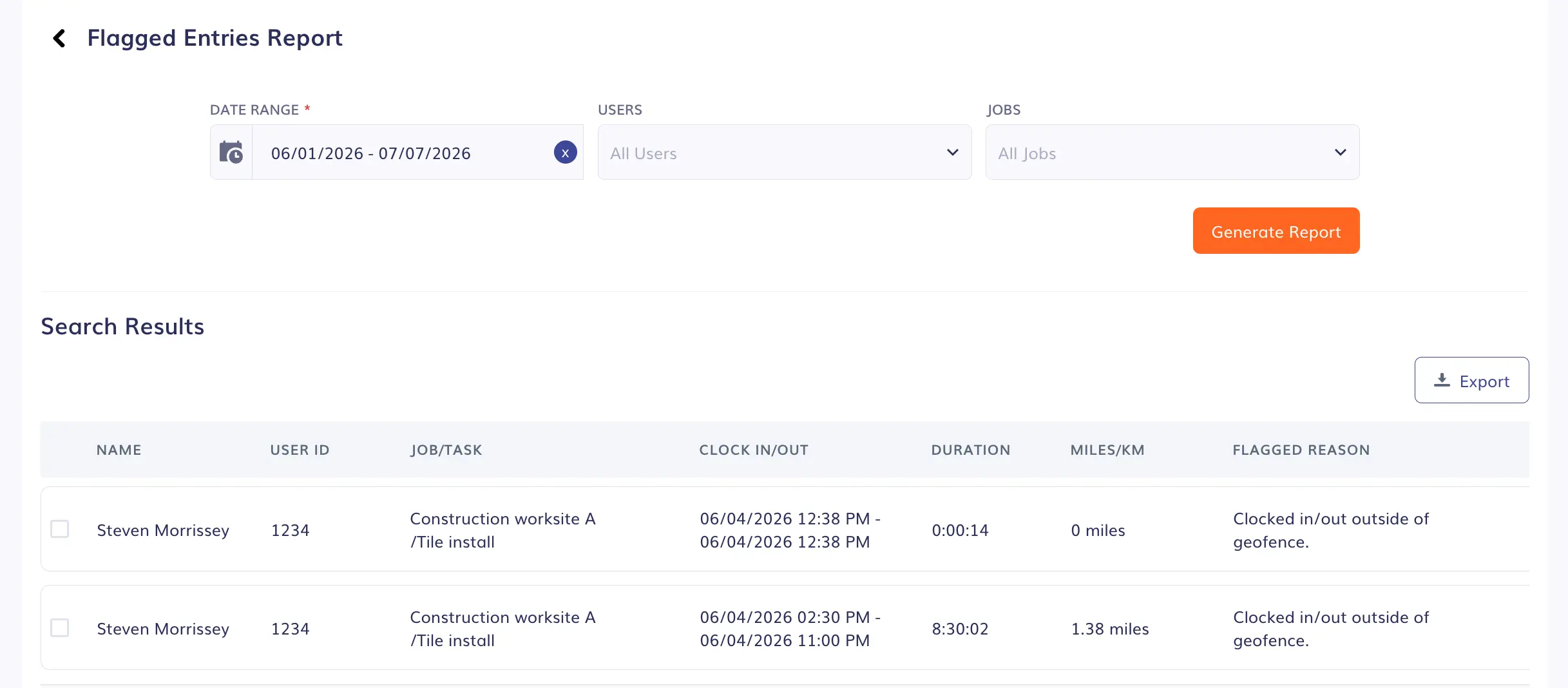
Timeero’s Flagged Entries Report allows managers to review all flagged entries by employee, date, and/or job
Timeero helps admins and managers identify missed punches as they happen, before they can ever make it to payroll.
“Who’s Working” dashboard. Admins and managers can see the current location of employees currently clocked in through Timeero’s “Who’s Working” dashboard. If someone is clocked in long after their job should have ended, their location will be visible on the map and prompt action can be taken to reduce the number of payroll corrections.
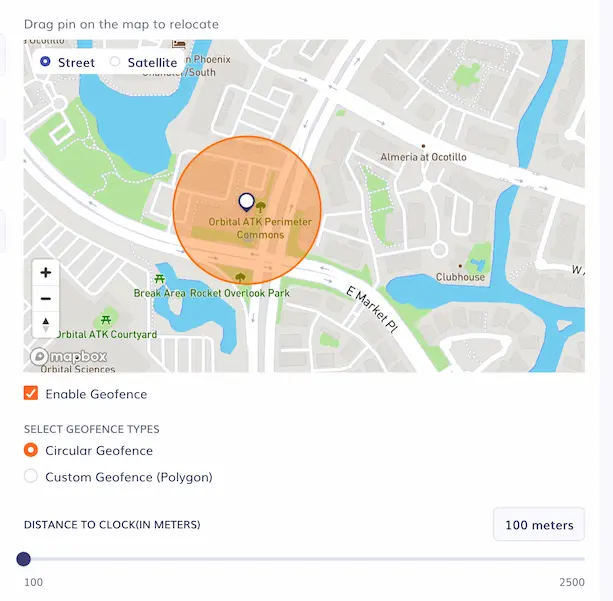
Out-of-bounds notifications. When workers clock-in/out outside of a geofenced area, Timeero displays a push notification to employees and sends a notification to company admins. Geofences help companies prevent early clock-ins and unauthorized punches from occurring.
The Flagged Entries Report. Automatic clock-outs and other anomalies show up as flagged rows on the Time & Mileage page and in Reports under Flagged Entries, with the name, job, times, miles, and flag reason. Generating a Flagged Entries Report makes it easy to review everything unusual across the crew without needing to open individual timesheets.
Automatically resolve missed punches
Timeero automatically clocks employees in/out when they arrive at or depart from a geofence.
When you manage a large crew, it’s not uncommon for missed punches to slip through the cracks. Timeero automatically resolves missed punches that would otherwise go unnoticed.
Geofence clock-out. With Auto Clock-In/Out active, employees are automatically clocked out when they leave the job site’s geofence. This feature resolves missed punches rather than just preventing them, as an actual time entry is made on the employee’s timesheet.
Clock out after a set number of hours. Managers can specify how many hours an employee can work before being automatically clocked out. If for some reason an employee forgets to clock out at the end of the day, this feature acts as a safeguard, reducing the amount of timesheet corrections that will need to be made.
Auto clock-out when the app is force-closed or GPS is turned off. If the phone shuts the app down or location access is switched off, Timeero can close the timesheet rather than leave it running indefinitely.
Documents time card corrections
Audit Logs record every timesheet edit so corrections stay defensible.
The quality of your documentation protects you if a missed punch turns into a dispute. Four Timeero features build that record.
Audit Logs record every timesheet edit with the editor's name, the change made, and the timestamp, so every manual correction is traceable and defensible.
Signatures.Employees can sign off on their own timesheets from the mobile app. When an employee signs their timesheet, they acknowledge that the hours recorded are true and accurate. Electronically signed timesheets can be used as evidence during a wage and hour dispute.
Route Replay map. To see exactly where employees have driven during their shift, managers and admins can review the Route Replay map. If a crew member says they left the work site at 4pm, managers can view the exact time their truck pulled off from the work zone. GPS breadcrumbs are dropped along the trail which show where an employee was at a specific point in time According to Timeero's 2026 GPS Survey, 39.1% of workers trust GPS data more than manager observations or customer reports, while only 14.0% trust human judgment more.
The Missed Punches Report. This reportshows which employees didn't clock in over a date range. It catches missing clock-ins, and can be used to spot a no-show pattern early, not to resolve a missed clock-out.
Reduce missed punches without micromanaging your crew
Most managers hesitate to turn on location-based time tracking because they believe their employees will feel like they are being watched.
But the data points in the opposite direction.
According to Timeero's 2026 GPS Tracking & Employee Trust Report, 84.9% of workers were comfortable with GPS tracking when their employer explained its purpose clearly at rollout. The comfort level decreased to 52.2% when employees found out GPS tracking was in use without their consent.
💡
Timeero's Auto Clock-In/Out removes a task the employee has to remember rather than adding a way to monitor them. The person who keeps forgetting to clock out gets held accountable by a system that closes the punch for them, not by a write-up. Field employee time tracking often fails because it asks a tired person to remember an administrative step at the most chaotic moment of the day.
Run payroll on records, not reconstruction
Recreating employee timesheets from memory exposes your company to wage and hour disputes and time consuming payroll edits. Digital time tracking solutions like Timeero automatically capture punches from the job site where work happens.
Preventing missed clock-outs in a field team requires a multi-step approach: reminders and alerts to prevent the missed punch, live visibility to catch them as they happen, geofence automation to resolve the missed punches, and auditing tools to document every time card change.
Reminders, live visibility, geofence automation, and audit trails — see how Timeero prevents missed clock-outs when you start your free 14-day trial today.
Frequently asked questions
Why do field employees keep forgetting to clock out?
Field employees work in an environment that isn’t tied to an office. When the work is done for the day, crews pack up and head home, often forgetting to clock out.
Do you have to pay an employee who forgot to clock out?
Yes. Under the Fair Labor Standards Act, employers must pay for all hours actually worked, regardless of a timesheet error. A missed punch doesn't change what's owed; it just means you reconstruct the real hours and pay them. This isn't legal advice, and for jurisdiction-specific questions it's worth consulting an employment attorney.
Is it legal for a manager to edit an employee's time card?
Yes, with conditions. A manager can correct a time record, but the edit has to reflect the hours actually worked. Having an accurate edit history of who changed what and when is what keeps the record defensible.
Can a time clock app automatically clock out field employees when they leave a job site?
Yes. Timeero's Auto Clock-In/Out uses GPS geofencing to clock an employee out automatically when they leave a job site's geofence, with no manual punch required. It also clocks them in the same way on arrival, after a one-minute confirmation that the employee is on-site.
What is a missed punches report and how does it help?
A missed punches report shows which employees didn't clock in during a date range. Timeero's Missed Punches Report lists those users for attendance tracking and compliance. Note the scope: it tracks missing clock-ins, not clock-outs, so it tells you who never started a shift, not who forgot to clock out. For the end-of-day miss, the geofence clock-out and Flagged Entries Report apply.
How do I stop my crew from missing punches without micromanaging them?
Using a timekeeping system that automates the clock-in and out process is the best way to stop your crew from missing punches. A GPS time tracking app like Timeero uses geofencing technology to automatically clock your employees in and out as they arrive at and depart from a job site. In-app features such as clock-in reminders can prevent missed punches from happening across your workforce.
Stop fixing missed punches by hand
Let Timeero close the punch at the job site and keep a clean record of every change.
Andjelka is a researcher and writer with 7+ years in digital marketing. Her background in social work and journalism has sharpened her skill in connecting with people from all walks of life. For the past 4 years, she’s specialized in time, location, and mileage tracking. Outside work, she enjoys yoga, swimming, and unwinding with her cats while listening to Leonard Cohen’s music.



.webp)

%202.svg)


.png)
.png)



.png)


