Timeero MCP: Ask AI About Time, Mileage, GPS, and Workforce Data
Jessica Packard
Last update on:
September 29, 2026 2:21 PM
Published on:
TL;DR
Timeero now has an MCP server that connects your workforce data to AI tools like ChatGPT and Claude.
Ask questions, analyze data, and find information in Timeero using natural-language prompts.
Use AI to find information, compare data, and ask follow-up questions without starting over.
With the right permissions, you can also ask AI to make certain changes in Timeero.
What if you could just ask Timeero for the information you need?
How many hours did my crew work last week?
Which timesheets still need approval?
How much did this group cost in labor?
With Timeero MCP, you can ask questions like these directly from ChatGPT, Claude, and other compatible AI tools.
Ask about your GPS time tracking, mileage tracking, timesheets, and other workforce data. And if you give AI the right permissions, it can also make changes in Timeero.
Your data stays in Timeero. MCP helps you see what’s happening with your workforce and get the information you need faster.
That includes information from GPS time tracking, mileage tracking, timesheets, and other workforce data in Timeero.
What if you could just ask?
Instead of building a report, type what you want to know. Connect Timeero to the AI tools you already use and get the answer in seconds.
The acronym MCP stands for Model Context Protocol, an open standard that allows AI assistants to connect to external tools and data.
Timeero MCP
With Timeero MCP, you can use ChatGPT or Claude to work with the data in your Timeero account. Ask about your team, look into report details, and make changes in Timeero when you give the AI tool permission.
For example, instead of opening a report and sorting through the results, you can just ask:
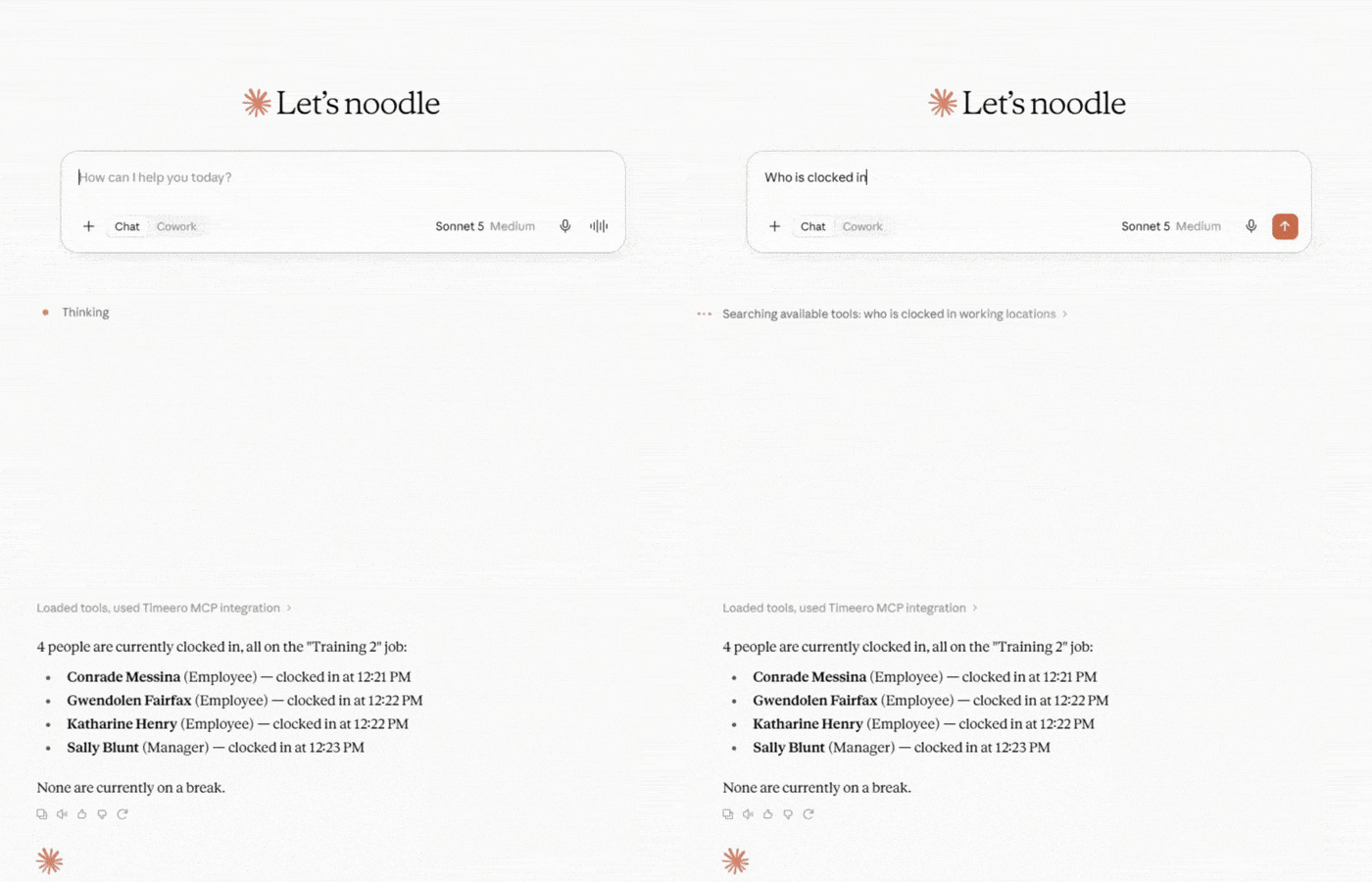
“Who’s clocked in right now?”
or
“How many miles did this group drive last week?”
The AI uses your Timeero connection to find the information you need and brings it into the conversation. From there, you can ask a follow-up question that builds off of the answers you have already been given.
Timeero MCP can work with data from GPS time tracking and mileage tracking, along with other parts of your Timeero account, including:
Users and groups
Jobs and tasks
Timesheets and time entries
Schedules and breaks
Custom fields
GPS locations
Time off
Mileage
What can you do with Timeero MCP?
Timeero MCP gives you a simple way to use AI with your workforce data. Here are a few things you can actually do with it.
Get quick answers
Need to know something about your team? Ask your AI tool and get the information from your Timeero account within seconds.
Timeero MCP - Ask your Ai assistant tool any questions about your workforce data inside Timeero.
For example:
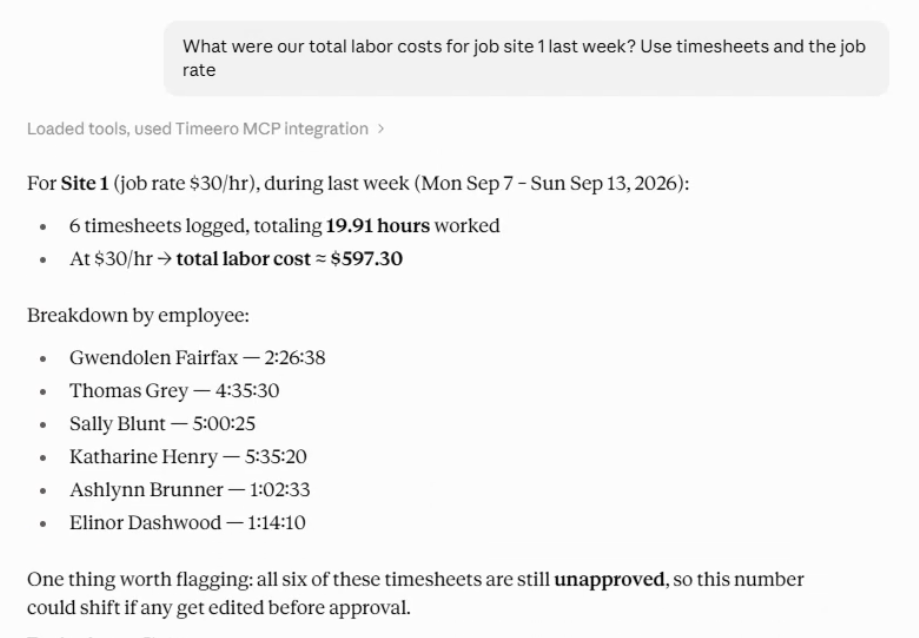
“How much did this group cost in labor last month?”
“How many hours did this crew work last week?”
“Who is scheduled to work today?”
“Where did this worker clock in yesterday?”
“How many miles did this group log last week?”
Instead of finding the right report first, you can start with the question.
Find what you need
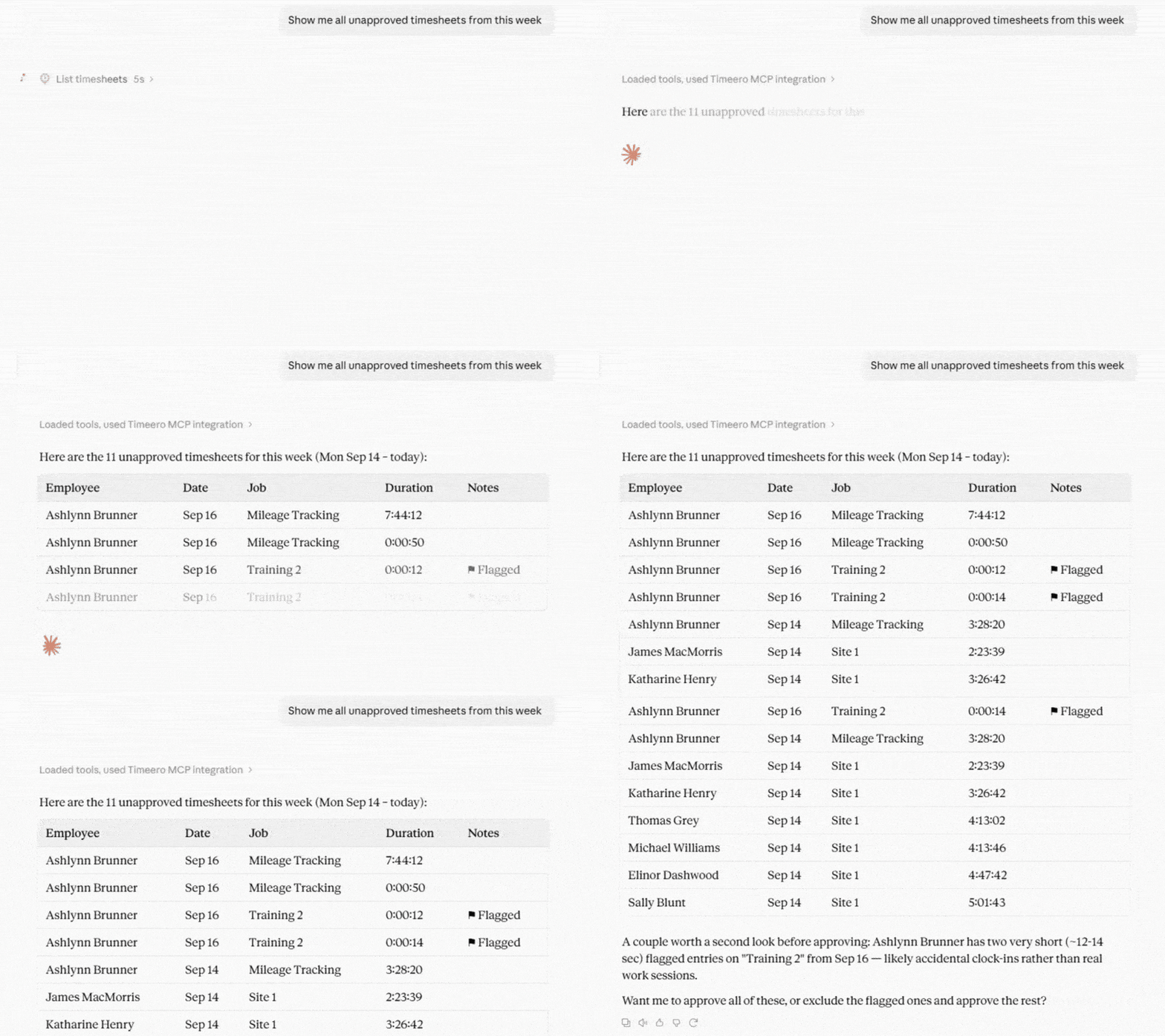
Need to find a specific timesheet, time entry, or set of hours? Ask the AI to find it in Timeero.
Timeero MCP - Easily get answers through your AI Assistant tool without sorting through reports.
For example:
“Show me the unapproved timesheets from Friday.”
“Find this worker’s time entries from last week.”
“Which timesheets still need approval?”
“Show me this group’s hours from Monday through Friday.”
“Find this worker’s mileage from last month.”
The AI can find what you’re looking for without making you dig through reports or apply filters yourself.
Dig deeper with follow-up questions
Finding the first answer is often just the beginning. You may want to compare it with another time period, look at another group, or understand why the numbers changed.
With MCP, you can keep the conversation going.
For example:
"How many hours did my team work last week?"
Then:
"How does that compare with the week before?"
Then:
"Which workers accounted for the biggest difference?"
Instead of running a new report for every question, you can build on the information you've already asked for.
Not sure what to ask first?
27 Timeero MCP prompts to try with ChatGPT and Claude
Ready-to-use questions about hours, mileage, jobs, schedules, breaks, and GPS data, with tips for the follow-up questions that dig deeper.
Timeero MCP can do more than answer questions. With the right permissions, you can also ask the AI to make changes in your Timeero account.
Take actions insight your Timeero MCP
For example, after finding unapproved timesheets, you could ask:
“Approve these timesheets.”
You can go from finding an answer to getting the work done, all through the same conversation.
Read access is on by default. Write and Delete access are optional, so you decide whether the AI can make changes to your Timeero data.
Use Timeero with ChatGPT, Claude, and other AI tools
One of the benefits of MCP is that you're not locked into a separate Timeero AI assistant. You can connect Timeero to the AI tools you already use.
Timeero + ChatGPT
Timeero and ChatGPT integration
The Timeero and ChatGPT integration brings your Timeero data into ChatGPT. Use it to look up workforce information, compare data, and dig deeper with follow-up questions. With the right permissions, ChatGPT can also make supported changes in your Timeero account.
The Timeero Claude integration lets you work with your Timeero data inside Claude. You can explore workforce information, ask follow-up questions, and use the same conversation to work through a task. With the right permissions, Claude can also make supported changes in Timeero.
Timeero MCP also works with Cursor and other AI tools that support remote HTTP MCP connections. This gives developers a way to work with Timeero data while building and testing software.
If you're building your own application or integration, the Timeero Public API is still the better option. MCP is designed for working with Timeero through compatible AI tools.
Connecting Timeero to an AI assistant doesn't mean handing over full access to your account.
You control what the AI can do through your MCP permissions.
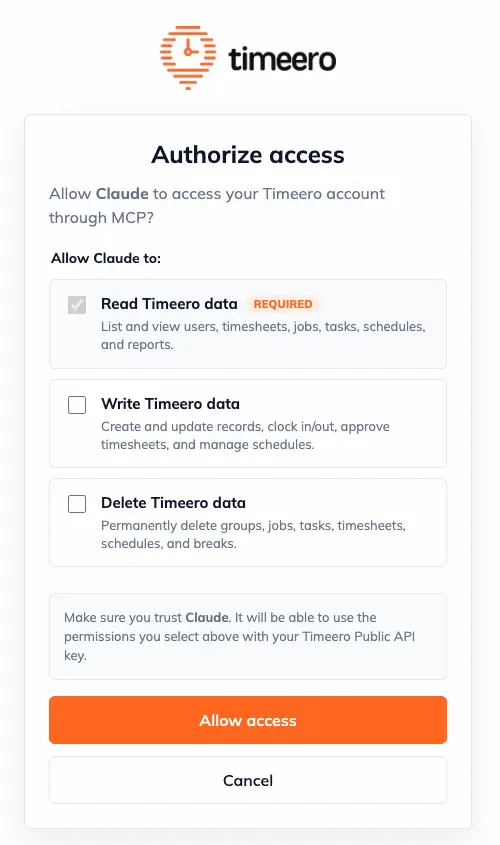
Timeero’s MCP access authorization
Read access is available by default. This allows the AI to find and work with information in your Timeero account.
Write and Delete access are optional. If you enable them, the AI can make supported changes to your Timeero data.
You can change these permissions anytime to control what the AI can access and do.
Timeero MCP vs. Timeero Public API
MCP and the Public API both connect other tools to Timeero, but they're meant for different jobs.
The Timeero Public API is for developers who want to connect Timeero with another application. It lets them retrieve Timeero data, send requests, and build custom integrations.
Timeero MCP lets you connect Timeero to AI tools like ChatGPT and Claude. Once connected, you can use plain English to work with your Timeero data instead of building an integration yourself.
Timeero MCP
Timeero Public API
Built for AI assistants
Built for developers
Use natural-language prompts
Use API requests
Ask questions and give instructions
Build custom integrations
Works with AI tools that support MCP
Works with software that uses the Timeero API
Think of it this way: if you're a developer building a connection between Timeero and your own software, start with the Public API. If you want to work with your Timeero data through an AI assistant, MCP is the connection you need.
Put AI to work with your Timeero data
Timeero already has the workforce data you need. MCP gives you a new way to work with it through the AI tools you already use.
Connect Timeero to ChatGPT, Claude, or another compatible AI tool and start asking questions about your workforce data.
Once you have an answer, you can keep going. Ask another question, compare time periods, look at another team, or make a change in Timeero.
Ready to put AI to work with your Timeero data? Start your free trial with Timeero today.
FAQ about Timeero MCP server
What is a workforce management MCP server?
A workforce management MCP server connects workforce data to compatible AI tools. Timeero MCP lets you connect your Timeero account to tools like ChatGPT and Claude so you can ask questions, find information, and give instructions using natural-language prompts.
Can I use AI for my Timeero time tracking data?
Yes. Connect Timeero to ChatGPT or Claude and ask about your time tracking data. You can check hours, find timesheets, compare weeks, or ask a follow-up about something you want to understand better.
Does Timeero work with ChatGPT?
Yes. You can connect Timeero to ChatGPT and use it to ask questions about your Timeero data.
Does Timeero work with Claude?
Yes. You can connect Timeero to Claude and use it to ask questions and give instructions about your Timeero data.
What Timeero data can AI access through the MCP server?
Timeero MCP can work with data like users, groups, jobs, tasks, timesheets, time entries, schedules, breaks, custom fields, GPS locations, and time off.
Can AI change my Timeero data?
Yes, if you give it permission. Read access is on by default. You can choose whether to give the AI permission to make changes or delete data.
Is the Timeero MCP server the same as the Timeero Public API?
No. The Public API is for developers who want to build integrations with Timeero. MCP connects Timeero to AI assistants so you can ask questions, get information, and give instructions about your data.
Which Timeero plan do I need for MCP?
Timeero MCP is available on the Premium plan.
You already track the data. Now just ask for it.
Connect Timeero to ChatGPT or Claude and start a free trial today.
Jessica Packard is a B2B SaaS content strategist lead who helps companies turn SEO and content into real growth. With a mix of creativity and data-driven thinking, she builds strategies that drive traffic, generate leads, and make content a core part of the business.








%202.svg)


.png)
.png)


.png)


