Auto Clock-In/Out: Eliminate Missed Punches with Timeero
Jessica Helms
Last update on:
June 6, 2026 1:36 AM
Published on:
TL;DR
Employees forget to clock in and out of shifts, which means incomplete timesheets and more administrative work.
Timeero’s Auto Clock-In/Out eliminates missed punches by automatically clocking in employees as soon as they arrive at or leave the job site.
Companies can customize their Work Schedule settings within Timeero to prevent early clock-ins, unauthorized overtime, and costly instances of time theft.
Custom Geofences give administrators tighter control over Auto Clock-In/Out functionality.
Are you a payroll manager or business owner that’s frustrated by the number of times your team forgets to clock in or out?
No matter how many reminders you send and meetings you have to address this problem, your workers are still clocking in and out late, or not at all.
Most of the time it’s not intentional. Employees arrive at the job site, start going over the day’s agenda and get to work without ever thinking about clocking in.
But those missed punches end up in your lap when it’s time to run payroll. One missed shift entry per day, multiplied across your workforce equals hours of manual fixes on your end.
Your crew will never forget to clock in again.
Timeero detects when your team arrives at a job site and clocks them in automatically — no manual punches, no missed entries, no payroll headaches.
Timeero automatically clocks your crew in and out when they arrive at or leave the job site, with no buttons to push or apps to start. It helps you eliminate missed punches, payroll corrections, unauthorized overtime, and manual timesheet cleanup.
Your crew receives a notification as soon as they’re clocked in automatically, so they always know when their time starts.
Keep clock-ins within scheduled hours
Auto Clock-In/Out works automatically, but you’re still in control.
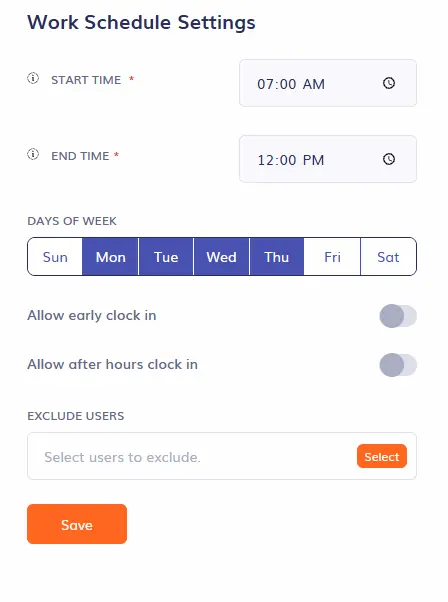
With Work Schedule settings, Timeero blocks employees from clocking in outside their scheduled hours, even if they’re already inside the geofence.
Customize your company’s work schedule
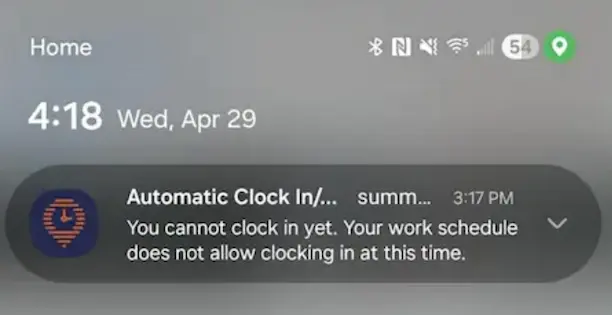
Any attempt an employee makes to clock-in before the scheduled start time is blocked, even when Auto Clock-In/Out is enabled.
This prevents costly instances of time theft, such as unauthorized overtime and buddy punching from occurring.
An auto clock-in attempt outside of the work schedule is blocked
More accurate tracking for complex job sites
Creating a geofence around a job site is the key to capturing accurate Auto Clock-In/Out times.
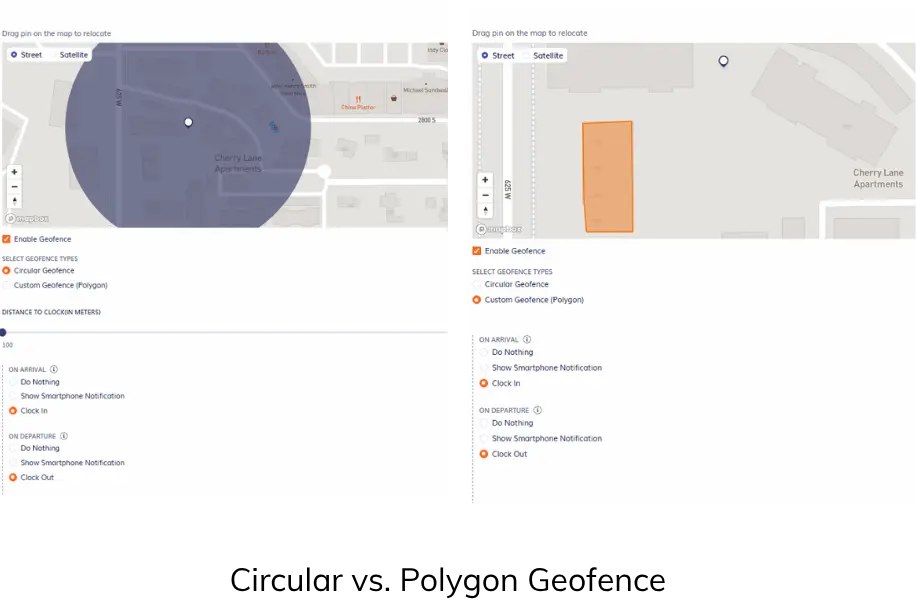
However, not every job site can fit neatly within a circular geofence, especially when the site has irregular borders or the work zone is particularly large.
Timeero gives you the ability to draw custom geofences around work zones by tracing the exact shape of a job site.
If an HVAC crew is assigned to work at an apartment complex with 24 buildings, you can draw a geofence around the exact building they will be working at. This means Auto Clock-In/Out will only trigger when they enter and exit the geofenced building, preventing clock-ins before work begins.
Stop chasing missed punches for good
With Timeero's Auto Clock-In/Out, you no longer have to deal with incomplete timesheets and missed punches. Employees are clocked in and out automatically the moment they arrive and leave the job site — no reminders, no manual fixes, and no chasing down your crew.
Simplify time tracking and payroll for your field team.
Auto Clock-In/Out is a feature that uses geofence technology to automatically clock employees in and out once they arrive at and leave a designated job site.
Do employees need to open the app to clock in?
No, employees do not need to open Timeero to clock in. The app recognizes when the employee enters a geofenced area and automatically clocks them in.
How does Timeero know they’re actually on site?
Timeero uses GPS technology as well as geofences to verify employee location prior to clocking them in or out. The app will wait for the user to be within the geofence for 2 minutes before clocking them in, but their clock in time will reflect the actual time they entered the geofence.
What if someone leaves briefly during a shift?
When an employee leaves a geofence, the app will wait approximately 1 minute before clocking them out. If they return within that window, they will remain clocked in.
Do I need to set up Auto Clock-In/Out on every employee’s phone?
No. You can enable Auto Clock-In and Out for your whole company in Company Settings > General Settings > Enable Auto Clock-In/Out. If you would like to exclude any employees from Auto Clock-In/Out, you can exclude them from the job’s geofence requirements.
Stop fixing timesheets. Start running payroll.
Timeero handles clock-ins and clock-outs the moment your team steps on site — so your timesheets are always complete, and your payroll runs clean.
Jessica is a skilled writer and proofreader with a unique flair for crafting engaging and impactful content. Her work reflects her ability to connect with clients on a personal level while successfully addressing their most pressing concerns. Jessica's professional background includes: teaching, social media marketing, and e-commerce. She resides in Alabama and loves the Golden Girls sitcom.




%202.svg)


.png)
.png)



.png)


