Workyard vs Timeero: Which Time Tracking App is Better for Field Teams?
Emman Velos
Last update on:
October 27, 2026 10:04 AM
Published on:
October 27, 2026
TL;DR
Field crews need a reliable app to track hours and locations, but choosing between Workyard and Timeero without a hands-on test is difficult.
Picking the wrong tool leads to missed punches, hard-to-reimburse mileage logs, and total monthly software costs that are much higher than they initially appear.
We tested both apps head-to-head. While Workyard is a strong choice for complex job costing, Timeero takes the lead in hands-off field automation, compliance reporting, and overall value.
Choose Timeero if your team needs automatic clock-ins and clock-outs, detailed mileage and break reports, and a significantly lower total monthly cost.
If you're comparing Timeero vs. Workyard to find the best construction time tracking app, you need to know how they perform in the field. Managing crews moving between sites creates a chaotic web of missed punches and hard-to-reimburse mileage.
This inaccuracy directly impacts your team. According to the 2026 GPS Tracking Survey Report, 54.8% of workers have personally experienced disputes over time, mileage, or location.
To see which app solves these headaches, we put both platforms through a head-to-head field test.
While Workyard excels at job costing, our tests prove Timeero eliminates tracking friction through hands-off automation and ironclad compliance.
Quick verdict
Workyard is a highly capable choice for construction teams that require job costing and specific cost codes tied directly to labor. Timeero is the best solution for businesses that want a truly hands-off experience featuring automatic clock-in and out, detailed mileage logs, strict break compliance, and a noticeably lower total monthly cost.
Want clock-ins that happen without opening the app?
Timeero clocks your crew in and out as they cross the job site geofence. You pay per user, with no monthly base fee on top.
Rather than simply summarizing online Workyard reviews, we conducted a true hands-on test. For this comparison, we configured accounts on both platforms and set up projects, workers, and cost codes.
Our team drove to physical locations to field-test polygon geofences, evaluate mileage tracking accuracy, and observe whether automatic clock-ins triggered prematurely when simply driving near a job site. We also analyzed the software from both perspectives, reviewing the manager's ability to track labor costs and checking whether field workers had full visibility of their total accumulated mileage after submitting a timesheet.
The results documented within this comparison reflect real product behavior and our genuine hands-on experience.
Workyard overview
What is Workyard?
Workyard is a construction time tracking app built to connect field hours directly to project budgets and cost codes.
Who is Workyard designed for?
Workyard is built specifically for contractors and sub-trades who need to track labor costs per job. By linking timecards to its live Project Hub, it shows managers exactly how much money each project is consuming in real time.
Key features
Project job costing and cost codes
GPS time tracking
Polygon geofencing
Automatic mileage tracking
Smart Forms and safety checklists
Crew scheduling
Facial detection clock-in
Typical industries that use Workyard
General Contracting
Construction
Specialty Trades
Timeero overview
What is Timeero?
Timeero is an automated time, GPS, and mileage tracking platform for mobile workforces.
Who is Timeero designed for?
Timeero is built for field service managers who want to stop chasing down paper timesheets, manual mileage logs, and missed break records. It runs in the background on employee phones, making timecards completely hands-off.
Key features
Auto Clock-In/Out (Geofence + Schedule triggered)
Segmented Tracking and Route Replay
Built-in California break compliance
Hands-off GPS mileage tracking with speed filtering
Continuous offline tracking
Facial recognition available through the Kiosk App
Drag-and-drop scheduling
Typical industries that use Timeero
Construction
Property Management
Cleaning
Landscaping
Agriculture
Sales
Feature-by-feature comparison
When evaluating top Workyard competitors, you'll find that although Workyard and Timeero offer users several of the same features, there are stark differences between the way these features are presented and utilized across both platforms.
We put the primary features of both apps to the test, highlighting ease of use, encountered difficulties, and the practical differences in how they operate in the field. The results below are from our actual interactions with both applications.
Auto clock-in/out
Workyard
When we first downloaded Workyard and tested its time clock, we found that the processes required more manual effort than expected. Workyard does not automatically clock employees out. When a shift ends, the employee has to manually open the app and punch out.
Employees have to manually clock in via the Workyard app.
To compensate for this, Workyard uses an "Auto Fill Clock Out Time" rule. If we forgot to clock out, the system would trim our finish time back to when we physically left the geofence, but only after we finally remembered to open the app and submit our time.
Relying on employees to remember to punch out is exactly where field crews tend to lose time on a timesheet.
Timeero
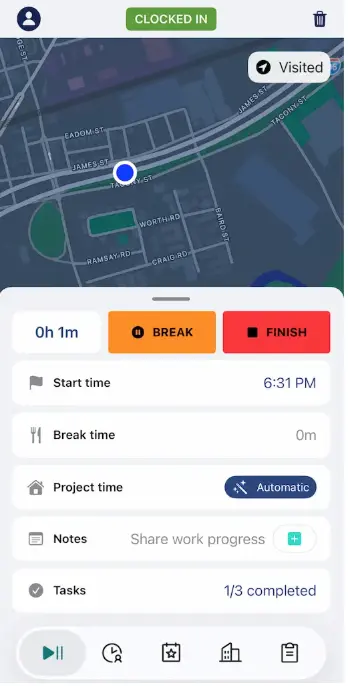
Timeero's Auto Clock-In/Out ran quietly in the background without requiring us to open the app. When we entered the job boundary during a shift, it clocked us in automatically, and clocked us out the moment we left.
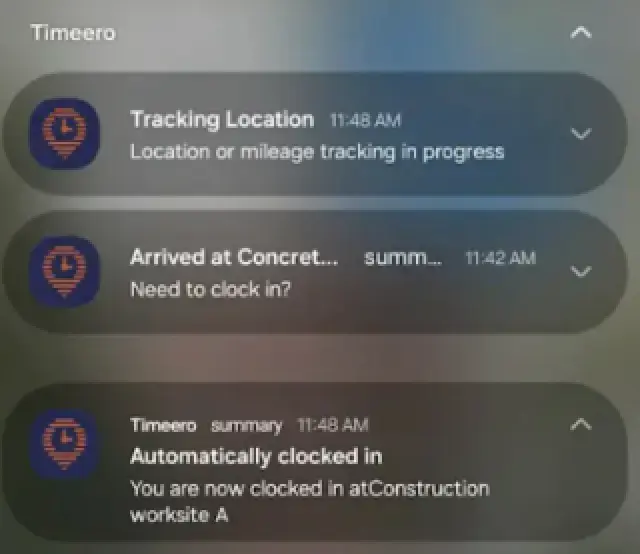
A push notification is sent when you enter a geofence to confirm your clock-in.
During setup, we did have to take the extra step of assigning a Work Schedule before the feature would activate. While that adds a minute to onboarding, it acts as a necessary filter so employees aren't accidentally clocked in if they pass by the site after hours.
Auto clock-in accuracy
Workyard
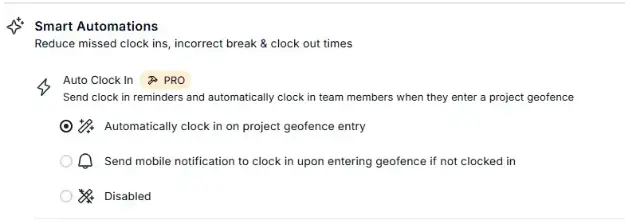
Activating Workyard’s auto clock-in took some digging, as the toggle is buried in the company automations menu under Company Settings rather than the main dashboard. Once enabled, it did successfully recognize our arrival and sent a push notification to confirm the punch.
Workyard’s Auto clock-in feature must be activated through the Company Settings.
However, we ran into two noticeable limitations during our field test:
The app clocked us in while we were simply driving near the geofenced area, even though we hadn't physically crossed the perimeter. If your crews drive past close-together sites, this creates artificial time entries that require manual cleanup.
The automation relies entirely on an active internet connection. If your team arrives at a remote job site with spotty cell service, the auto clock-in fails, forcing them to open the app and punch in manually.
Timeero
We didn't run into any false clock-in issues with Timeero. The app evaluates a worker’s actual physical presence before triggering a clock-in, making sure you are actually standing on the job site rather than driving past it at 45 mph.
If we stepped off the job site for a quick two-minute errand, Timeero didn't instantly clock us out. It waits briefly to verify the worker has actually left for the day, preventing short trips from interrupting a shift.
GPS tracking and live location map
Workyard
Workyard reliably captures GPS locations while employees are on the clock, but accessing that live data as a manager takes some navigation.
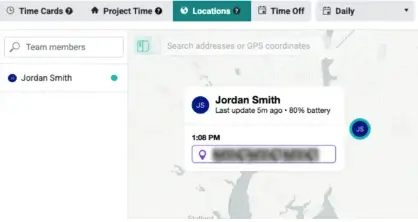
Workyard’s live map can be found under the Locations tab.
We couldn't just open a dedicated map to see our crew. Instead, we had to click into the Time Cards menu first and then navigate over to the Locations view at the top of the screen. From there, you can see your team's current location and review where they were throughout the day.
While the location history is accurate, burying the map inside a timecard sub-menu adds an unnecessary step when all you want to do is check where your crews are stationed right now.
Timeero
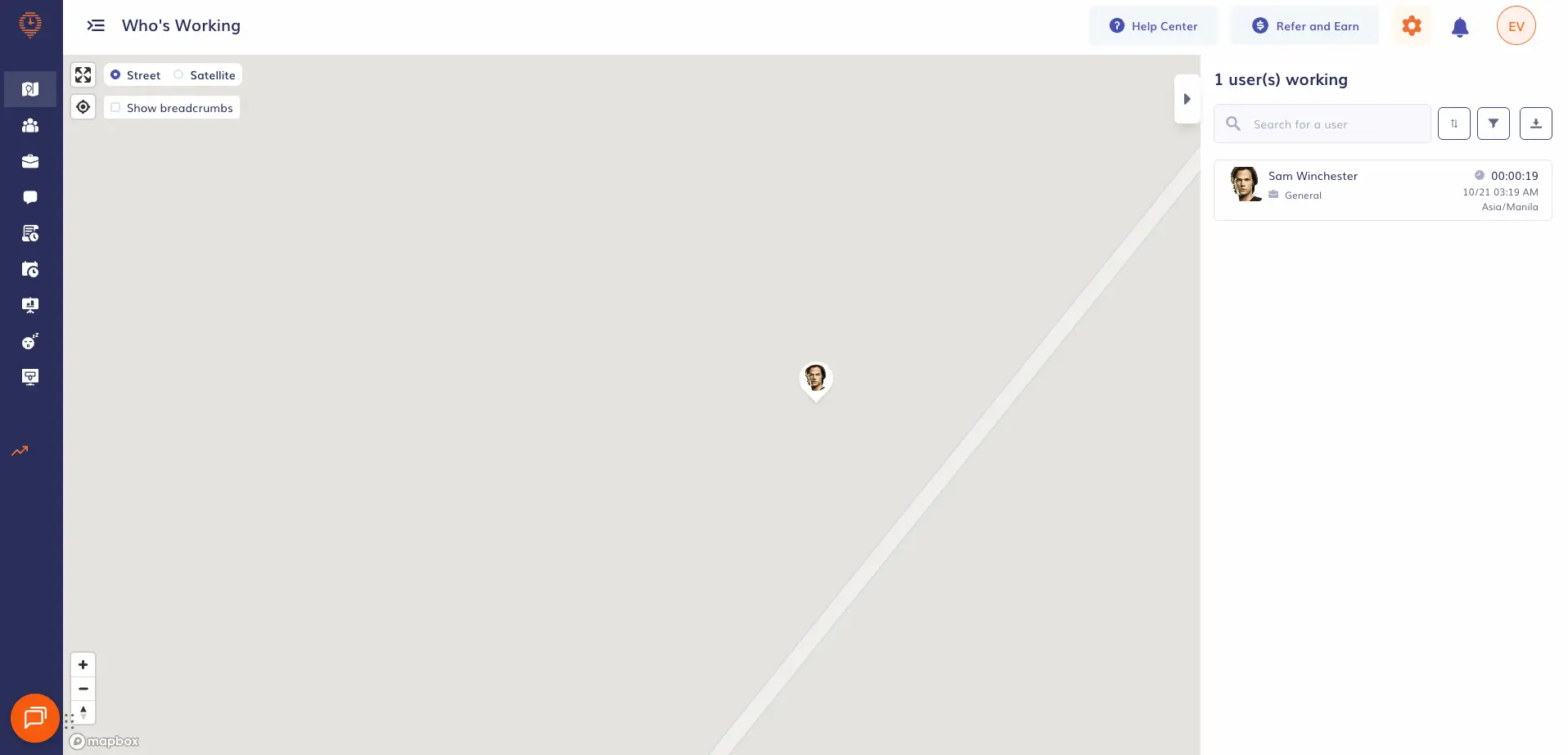
Rather than burying location data behind sub-menus, Timeero puts its live map front and center on the "Who's Working" dashboard. That single operational view allowed us to track our active test user in real time, confirm their exact coordinates, and see their assigned job at a glance.
Timeero’s Who’s Working dashboard is the first thing you see when you open the web portal.
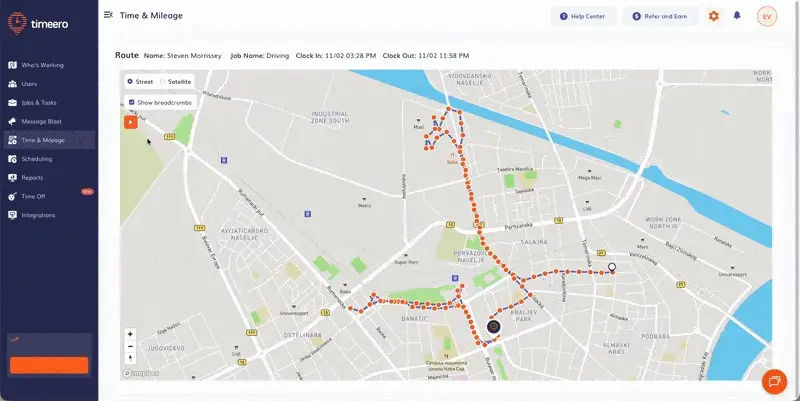
Testing Route Replay was just as seamless.
Selecting individual GPS breadcrumbs revealed exact arrival times, driving routes, and recorded speeds throughout our test run. This is helpful because it provides information teams would need to resolve customer questions and payroll disputes.
Keep track of the entire route taken from start to finish using Route Replay.
GPS geofencing
Workyard
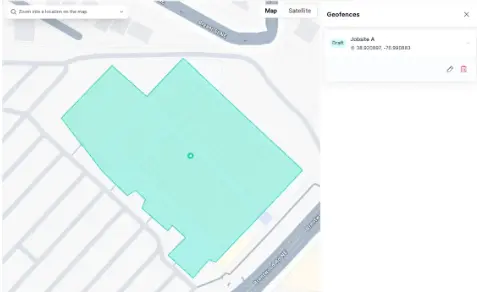
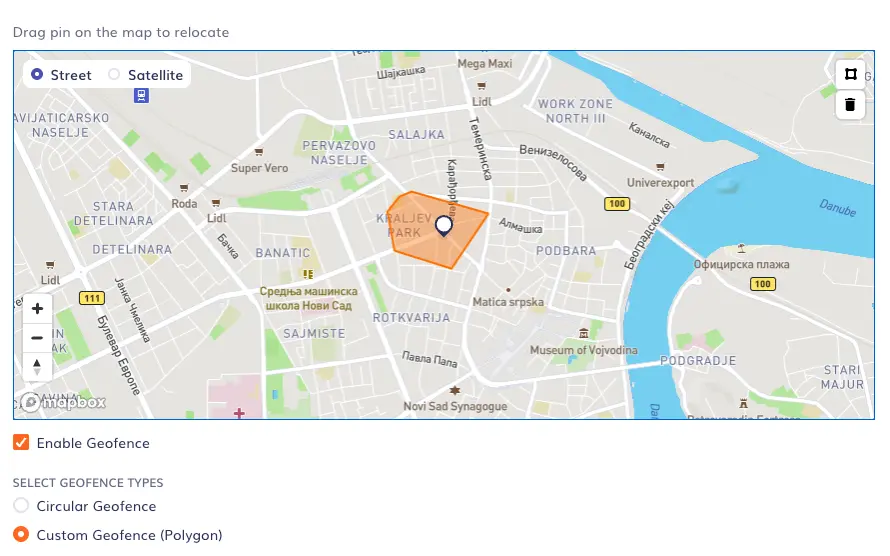
Setting up geofences is actually one of Workyard's genuine strengths. Instead of forcing us to draw a standard circle around an address, their polygon geofencing tool allowed us to trace the exact property lines of our test site on a satellite map.
Workyard’s polygon geofence setup lets you trace the exact boundaries of your site.
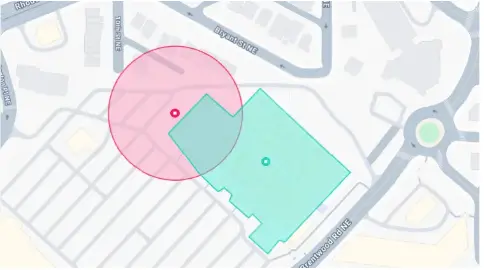
For irregularly shaped construction yards, this is a major advantage because it keeps the tracking boundary strictly inside the perimeter. Workyard also actively highlights overlapping geofences in red on the map.
This visual warning helps administrators spot boundary conflicts and fix them before crews accidentally clock into the wrong job site if you are managing multiple jobsites.
When you try to draw a geofence over an existing geofence, you get a clear visual warning.
Timeero
Timeero also allows you to set up circular boundaries or draw custom polygon geofences around job sites. What interested us most was how it enforced those boundaries.
You can draw a custom geofence around your site using Timeero’s polygon tool.
To test it, we tried to manually clock into a job located miles away from our desk. Timeero immediately blocked the punch and displayed an out-of-bounds error on the screen. As admins, we simultaneously received an instant alert. This means that Timeero actively stops bad data from entering the system rather than just flagging a timesheet for review later.
Mileage tracking
Workyard
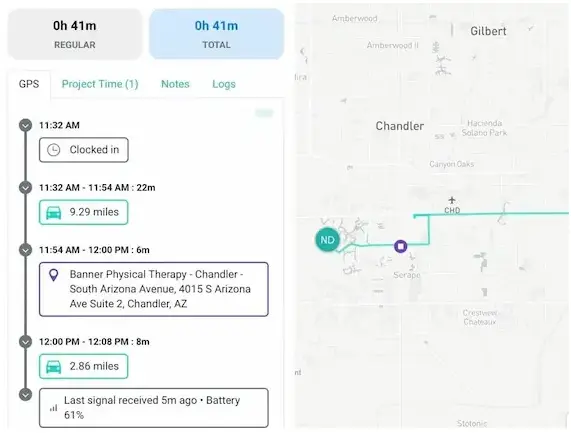
Workyard tracks mileage automatically in the background, logging travel time as workers move from one project to the next. What we appreciated most is that it doesn't just generate a single, lump-sum total for the day. Instead, it breaks the trip down into distinct segments, showing the exact miles driven and time spent traveling between individual locations. For teams that send workers to multiple job sites in a single shift, this context is excellent.
Workyard’s segmented mileage shows you a full view of an employee’s trip.
While the tracking itself was highly accurate, we found a major gap in visibility. After finishing our route and submitting our timesheet, we couldn't see our total accumulated mileage anywhere on our mobile app.
Mobile timesheets on Workyard do not contain a mileage breakdown.
As field workers, not being able to check our own mileage totals forces us to rely entirely on management to pull that data from the reporting dashboard. This makes it nearly impossible for workers to verify their own reimbursements before payday.
Timeero
Timeero tracks travel much the same way, automatically starting the GPS log once a vehicle hits about 4.7 mph. But the biggest difference we noticed was what happens at the end of the route.
When we finished our test loop and checked the app, our total mileage was right there on the timesheet. Unlike our experience with Workyard, field workers can actually see the exact miles they are submitting, which makes it easier for workers to confirm their numbers.
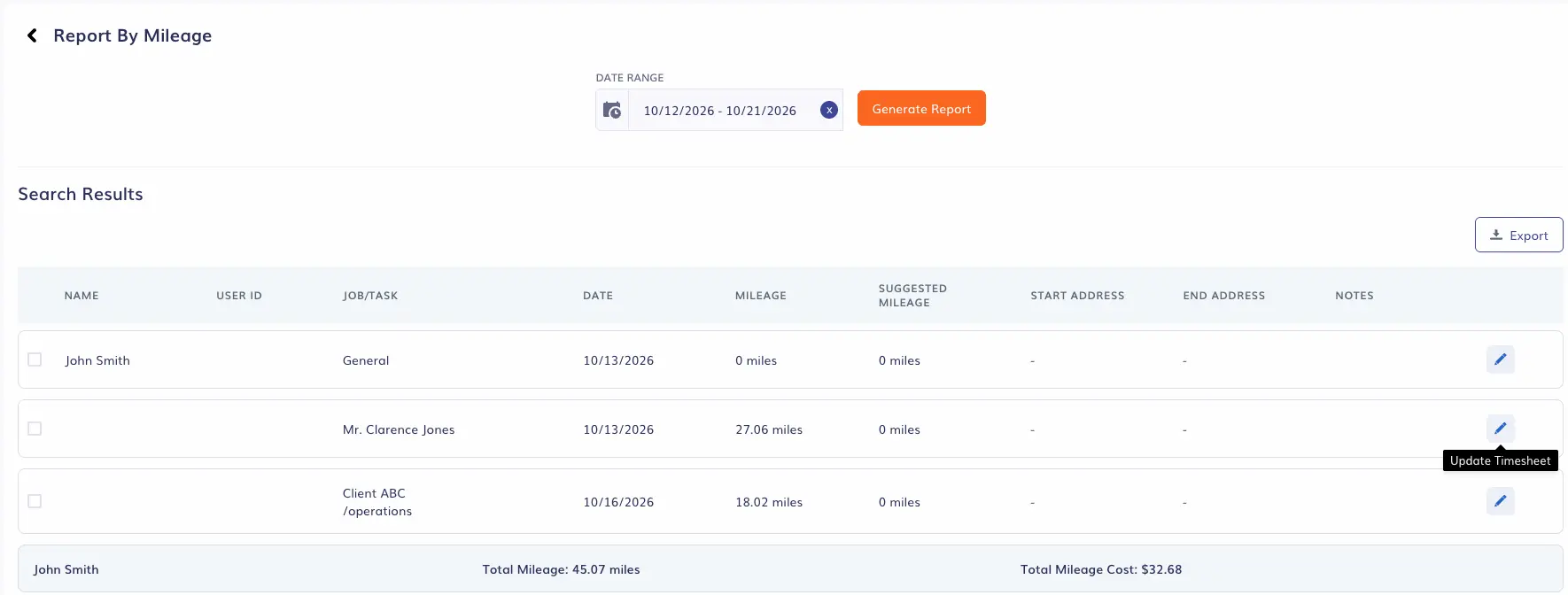
You can compare the total and estimated mileage when you create a Report by Mileage.
When we viewed the timesheet on the web portal, it showed us the exact route we took, but it also displayed a different path under the Suggested Mileage feature. This feature calculates the shortest route we could have taken, which was a great auditing tool when generating reports by mileage.
Break tracking and compliance
Workyard
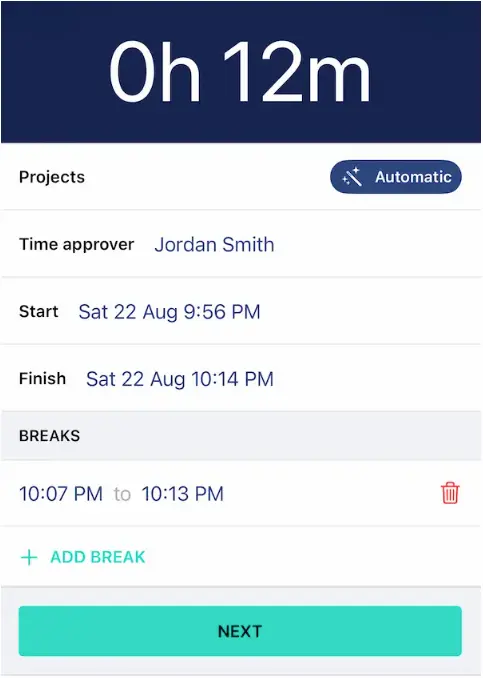
Workyard supports automated meal break rules and the time clock can be used to start and stop a break. However, reviewing those breaks on the admin side lacked granularity.
Workyard can automate taking breaks using the time clock after setting up meal break rules.
Workyard doesn't have a detailed break-level reporting interface. To verify if our test worker actually took their required 30-minute lunch on time, we had to open and review their individual timecard. While this may seem straightforward enough for a small team, doing that for a large crew would be incredibly tedious.
Timeero
Break compliance is one area where Timeero offers a clear advantage, particularly for businesses operating under strict labor regulations. Rather than treating meal and rest periods as passive timecard entries, the platform approaches them through compliance-driven tools like its California Breaks Tracker.
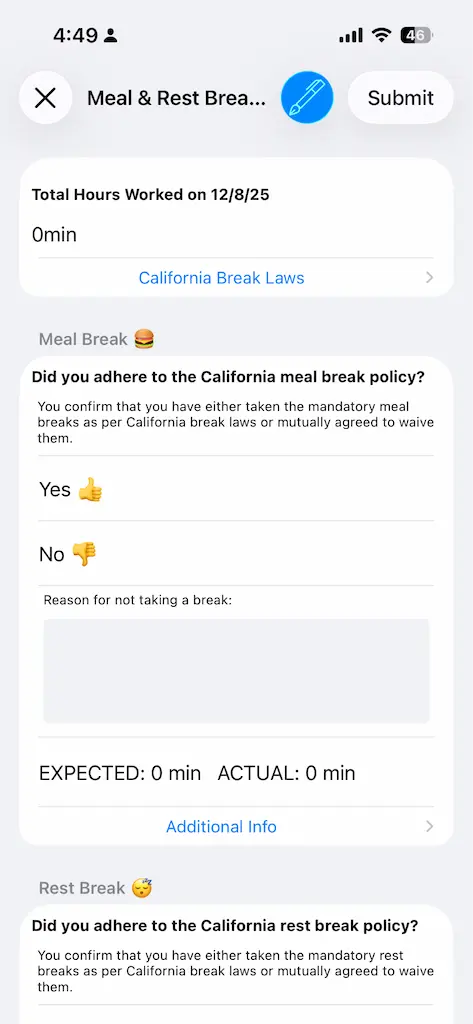
Employees are required to fill up break attestation forms after clock-out to ensure compliance.
Starting and stopping a break in the mobile app was simple, but the real difference surfaced at clock-out. Before closing the shift, our test employee was prompted with a Daily Sign-Off attestation form on their phone. We had to electronically sign the screen to confirm whether our required breaks were provided.
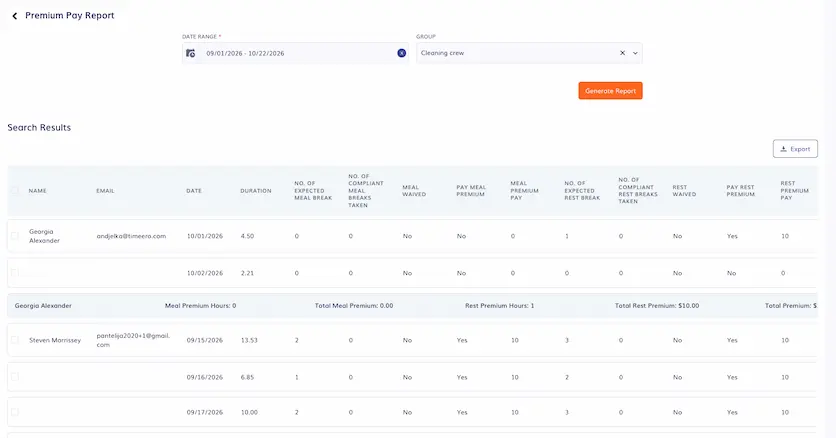
Timeero’s Premium Pay report summarizes an employee’s premiums and penalties for easier auditing.
To test how the system handles violations, we intentionally logged a shortened lunch break. On the admin dashboard, Timeero immediately flagged the discrepancy and routed it directly to a dedicated Premium Pay report, which automatically calculates and summarizes penalties into one audit view.
Reporting and job costing
Workyard
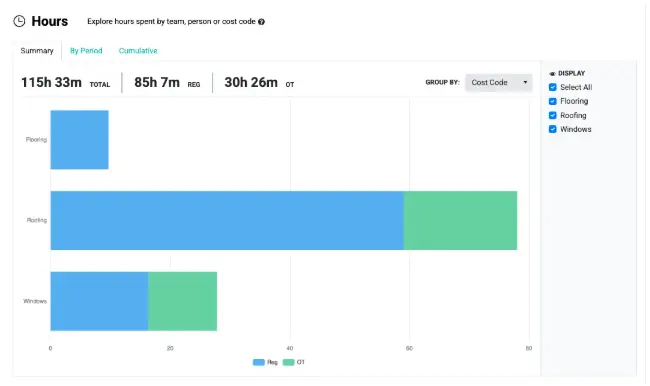
Job costing is undeniably Workyard’s strongest feature. During our tests, we loved how granular their project accounting features are, which make it an exceptional tool for tracking profitability. The platform cleanly broke down the exact hours billed to individual named cost codes and showed precisely which crew members contributed to each task inside a live Project Hub.
Workyard’s Project Hub shows the hours logged by project, worker, and cost code.
However, that heavy focus on project accounting comes with a frustrating operational tradeoff. When we tried to pull daily summaries for break compliance, the reporting tools were noticeably lean. Managers are forced to manually audit individual timecards just to verify if crews took their legally required meal and rest breaks.
Timeero
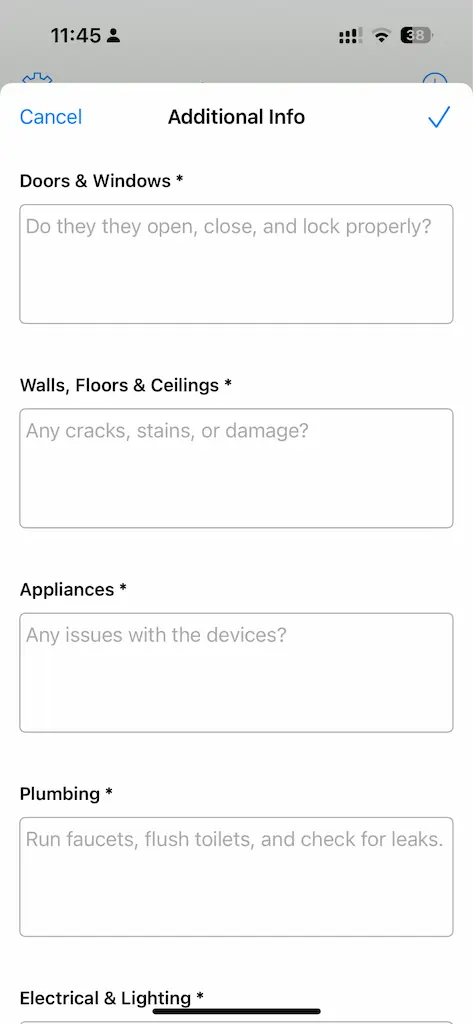
Rather than matching Workyard’s approach to project accounting, Timeero focuses on day-to-day field management. It covers the basics of job costing by allowing administrators to assign jobs, set per-job wage rates, and log labor and travel expenses. For field documentation, rather than using separate forms, Timeero uses Custom Fields to present task-completion checklists directly to workers when they clock in or out.
You can create custom forms for a job to collect additional information upon clock-in or clock-out.
Timeero lacks the nested cost codes and live project financial dashboards found in Workyard, focusing its reporting on daily field operations. Instead of treating timesheets strictly as project totals, the platform generates dedicated reports for travel mileage, break adherence, missed punches, and time off.
Timeero helps you keep track of your each project’s budget through the Scheduled vs Hours Worked report.
During our test run, we relied on the Schedule vs. Hours Worked report. It immediately flagged shift discrepancies and unapproved overtime, which gave us a clear view of attendance errors before any records were pushed to payroll.
Scheduling and integrations
Workyard
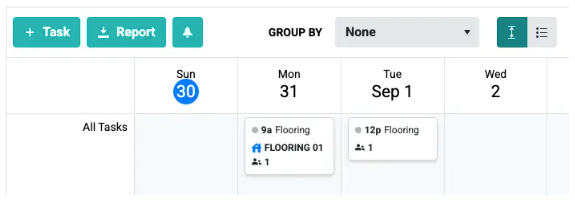
Workyard handles the basics of scheduling well enough, allowing managers to create shifts, assign workers, and link tasks to specific projects. However, we found the interface lacks the broader features that larger or fluctuating crews need. There was no drag-and-drop functionality nor any color-coding options on the calendar.
Workyard offers a straightforward scheduling feature using its Task & Schedule calendar.
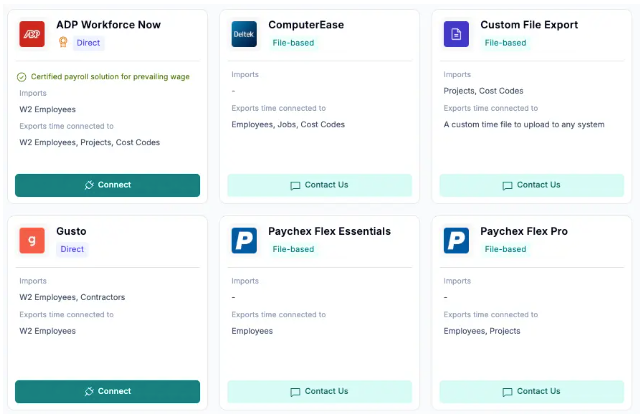
On the integrations side, Workyard connects with ADP, Gusto, Paylocity, and QuickBooks, highlighted by a reliable two-way QuickBooks sync. It also integrates with legacy construction accounting suites like Sage 50, 100 Contractor, and 300 CRE.
A look at the Workyard’s available integrations.
However, according to Workyard's pricing page, access to several construction-specific and project-management integrations requires stepping up to higher subscription tiers.
Timeero
Timeero’s scheduling is noticeably smoother. Building a shift takes seconds, workers get instant notifications to accept or decline, and the calendar provides straightforward filtering by job or user.
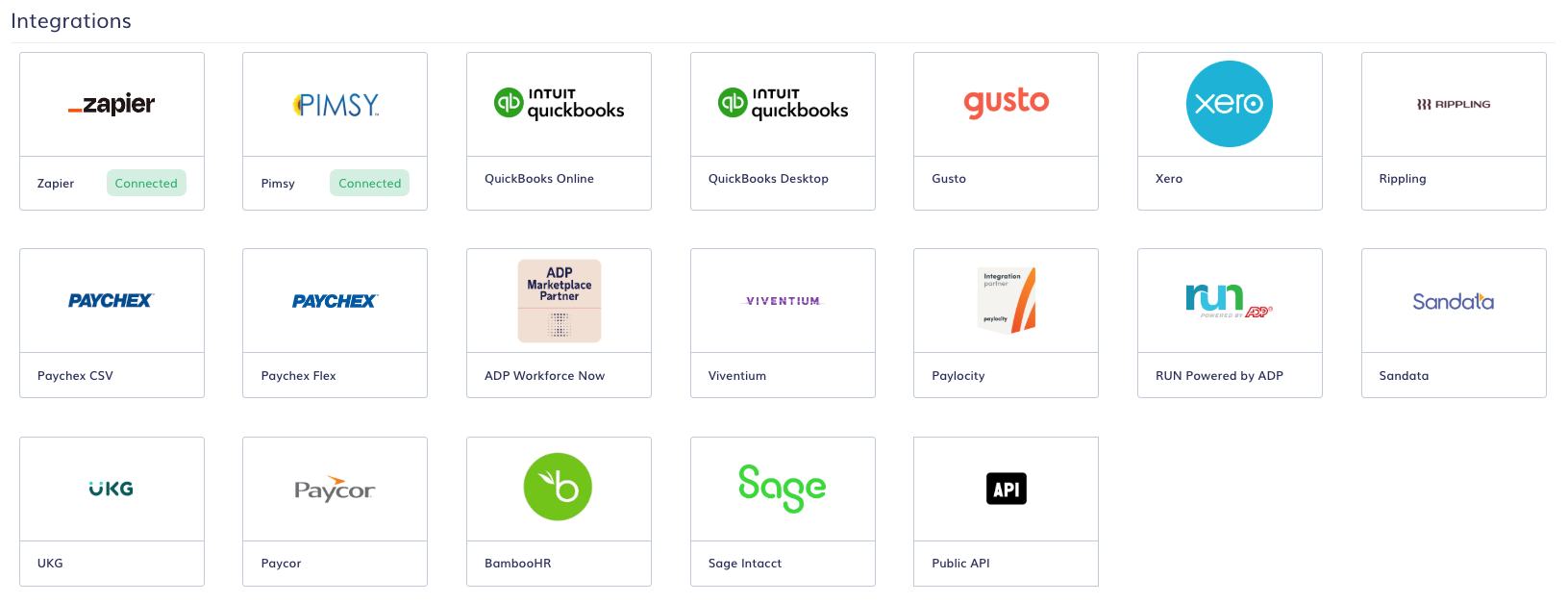
Timeero’s natively supported platforms.
For payroll and accounting, Timeero natively supports platforms like ADP, Gusto, Paylocity, Paycor, and Sage Intacct, alongside an open API for custom workflows. While it covers major cloud payroll systems well, it isn't built for heavy, legacy construction ERPs. So, teams relying on Foundation, ComputerEase, or NetSuite will find those connections missing here.
Identity verification
Workyard
Workyard lacks true identity verification. While the platform prompts workers to take a photo at clock-in to discourage buddy punching, it only uses basic face detection. The software simply confirms that a human face is present in the frame before accepting the punch and cannot identify who that person actually is.
Timeero
Timeero provides true identity verification through its Kiosk app with facial recognition. Deployed on a shared tablet on-site, the kiosk uses biometric facial recognition to match the person clocking in against an enrolled worker profile.
If an imposter attempts to punch in for a colleague, the system immediately flags the mismatch and sends an alert to management, actively blocking buddy punching at the point of entry rather than leaving it for supervisors to catch later.
Pricing and total cost
Workyard
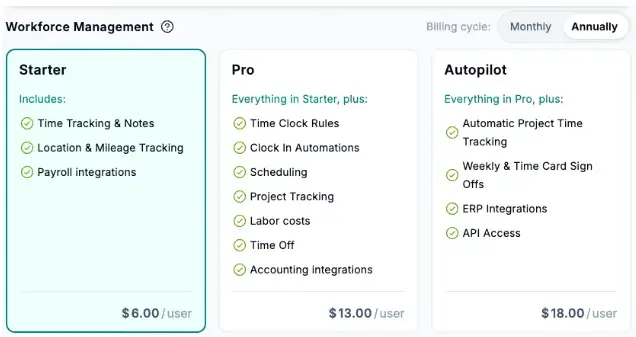
The Workyard pricing model combines a monthly per-user rate with a mandatory $50 monthly company base fee. This flat-fee structure can be a disadvantage, especially for small-to-midsize field teams, since businesses pay the same base fee regardless of whether they have 5 workers or 50.
Workyard’s pricing page.
Workyard offers two primary self-serve plans:
Starter: $6/user/month (billed annually) or $8/user/month (billed monthly) + $50/month base fee. This tier includes standard GPS time tracking, mileage logs, and basic timesheet reports.
Pro: $13/user/month (billed annually) or $16/user/month (billed monthly) + $50/month base fee. Gated behind this tier are key field features such as employee scheduling, automated meal break rules, customizable cost codes, and two-way QuickBooks integration.
Enterprise: Custom quote-based pricing for advanced construction ERP integrations (such as Foundation or ComputerEase) and open API access.
For a 10-person field team using Workyard Pro, the monthly cost breaks down to:
Annual billing: (10 users × $13) + $50 base fee = $180 per month
Monthly billing: (10 users × $16) + $50 base fee = $210 per month
Timeero
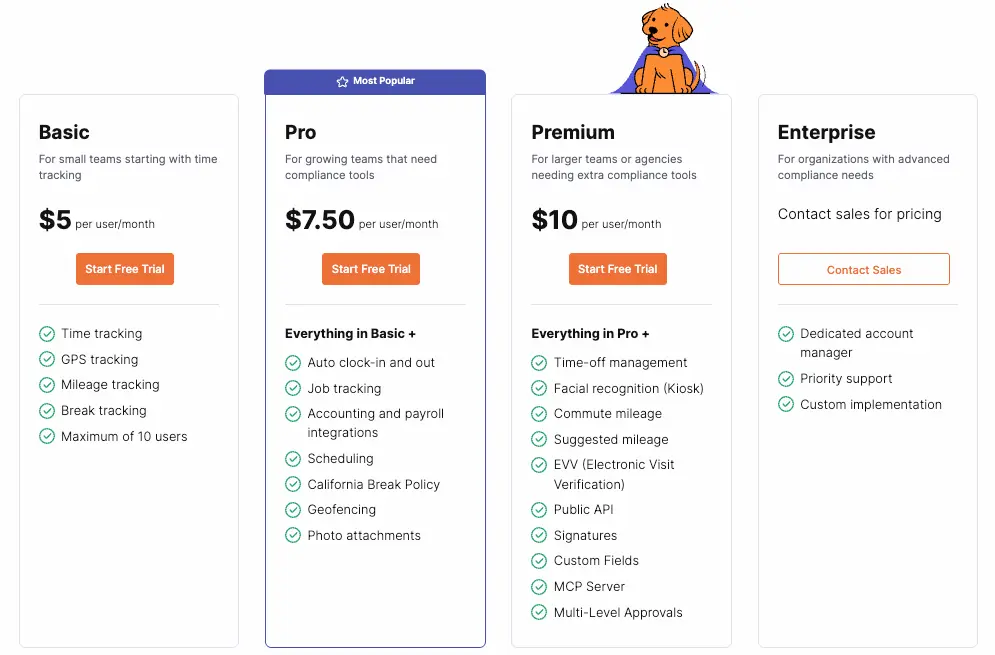
Timeero operates without any hidden base fees, delivering a significantly lower total monthly cost. Organizations only pay for active users on a per-seat basis:
Timeero’s pricing page.
Basic: $5/user/month (annual) or $6/user/month (monthly). Includes GPS location tracking, time clock, basic break tracking, and automatic mileage tracking.
Pro: $7.50/user/month (annual) or $9/user/month (monthly). Includes everything in Basic, plus Auto Clock-In/Out, employee scheduling, geofencing enforcement, California Breaks Tracker, and payroll integrations.
Premium: $10/user/month (annual) or $12/user/month (monthly). Includes everything in Pro, plus Kiosk facial recognition, commuter mileage deduction, digital signatures, EVV compliance, and open API access.
Enterprise: Custom pricing for organizations with over 250 users.
Timeero also offers optional add-ons, including Segmented Tracking ($5/user/month) and Messaging ($2/user/month) for Pro and Premium subscribers.
For a 10-person field team using Timeero Pro, the monthly cost breaks down to:
Annual billing: 10 users × $7.50 = $75 per month
Monthly billing: 10 users × $9.00 = $90 per month
Why teams pick Timeero
Testing both platforms side by side made it clear that software designed around spreadsheets doesn't always translate cleanly to the job site. While Workyard covers the accounting essentials, Timeero consistently eliminated the small points of daily friction that frustrate workers and dispatchers.
When evaluating how each tool handles everyday operations, four practical differences explain why teams switch from Workyard to Timeero:
Truly automated clock-in and clock-out: Instead of expecting workers to remember to open an app after a long shift, or relying on backfilled departure times, Timeero handles both arrival and departure in the background as crews cross the geofence.
Direct live map visibility: Managers get the "Who's Working" dashboard front and center from the main view, avoiding the need to click through nested timecard sub-menus just to confirm where crews are stationed.
Transparent mileage for workers: Field crews can review their accumulated trip mileage directly on their mobile timesheets, eliminating the friction and payout disputes that happen when mileage data is hidden on the employee app.
Built-in break compliance: For businesses navigating strict labor rules, particularly in states like California, Timeero automates the compliance record with timely break alerts, daily digital attestation forms, and automated premium pay tracking.
Eliminate timesheet friction with better field data
Accurate field data is the fastest way to eliminate timesheet disputes, payroll headaches, and manual cleanups. If your main objective is measuring labor against project budgets, Workyard’s deep cost coding makes it the right fit.
But if you want to stop chasing down missed punches and mileage logs, Timeero delivers the background automation your crew actually needs. That background tracking turns raw field movement into clean, verified records that cut the friction out of every payroll cycle.
What's the difference between Workyard and Timeero?
At their core, these two apps serve slightly different purposes. Workyard is heavily focused on project accounting, meaning it’s built to help you track labor costs against very specific job codes. Timeero, on the other hand, is a workforce visibility tool designed to automate the daily grind for your field crews.
While Workyard excels at backend project tracking, Timeero takes the hassle out of the actual workday with features like automatic clock-ins, continuous offline tracking, and built-in break compliance.
Does Workyard automatically clock workers out?
Not exactly. When a worker leaves a job site, Workyard doesn't instantly stop their clock. Employees still have to open the app and manually submit their timecard at the end of the shift. If they forget, the app does have a backup rule that adjusts their clock-out time based on when they crossed the geofence. But that correction only happens after the worker finally remembers to open the app and submit their hours.
Is Timeero cheaper than Workyard?
Yes, Timeero is significantly cheaper for teams of all sizes. The main reason is that Workyard charges a mandatory $50 monthly company base fee on top of its per-user costs. Timeero skips the base fees entirely, charging only for the users you actually have. So, if you're running a crew of 10, you can expect to pay around $180 to $210 a month for Workyard's Pro plan, compared to just $75 to $90 for Timeero.
Does Timeero track mileage automatically?
Yes, it does. Once an employee clocks in and their vehicle hits a set speed limit (usually around 4.7 mph), Timeero starts logging their route and mileage quietly in the background. Because it maps the actual drive using GPS, you don't have to worry about workers writing down odometer readings or guessing their trip totals at the end of the day. Plus, your team can check their daily mileage directly in their app, which goes a long way toward stopping payday disputes before they happen.
Which is better for construction teams, Workyard or Timeero?
It really depends on what your team struggles with the most. If you need to track profitability across complex project budgets and tie those hours directly into legacy accounting software like Sage 100 Contractor, Workyard is a fantastic fit.
But if you are tired of chasing down timesheets, losing money to payroll leaks, or stressing over strict labor compliance laws, Timeero is the better choice. It automates the entire tracking process, protecting your bottom line while giving your crews a completely hands-off experience in the field.
Does Workyard charge a monthly base fee?
Yes, it does. No matter how small your team is, Workyard requires a flat $50 base fee every single month just to use the platform. This is in addition to the standard per-user subscription rate you pay for each employee on the app.
Which one verifies who is clocking in?
If you need true identity verification, Timeero is the way to go. It features a Kiosk app with biometric facial recognition, meaning it actually matches the worker's face to an enrolled profile and alerts management if an imposter tries to clock in.
Workyard only offers basic face detection. That means the app simply checks to ensure a human face is in the photo, but it can't verify if it's actually the correct employee.
Is Timeero a good Workyard alternative?
Definitely. While Workyard is great for project job costing, Timeero is built to make the actual workday smoother for your field crews. It combines automatic geofenced time tracking, fully transparent mileage logs, and reliable offline syncing. You get exactly what you need to manage a mobile workforce, and you don't have to pay a steep monthly base fee to use it.
Ready to stop chasing missed punches?
Get automatic clock-outs, mileage your workers can check on their own timesheets, and break sign-offs at the end of every shift.
Emman is a passionate writer with more than 6 years of digital marketing experience under his belt. As a licensed chemical engineer with a passion for writing, he marries the technical with the creative to create engaging copy that converts. He is also a certified #girldad who spends most of his day playing with his three girls when he's not busy writing.



.webp)
.webp)

%202.svg)


.png)
.png)



.png)


