Timeero: The Best Time Tracking App for Cleaning Companies
Emman Velos
Last update on:
October 9, 2026 6:25 AM
Published on:
October 9, 2026
TL;DR
Cleaning crews are constantly on the move, making it difficult to accurately track how much time they spend driving versus actively cleaning at multiple client sites.
Relying on manual logs makes it impossible to confidently answer when your cleaning crew arrived or if they finished the job.
Standard punch apps don't offer the geofencing or route tracking needed for multi-stop cleaning shifts.
Timeero replaces text messages and scattered tools by combining shift scheduling, strict geofenced clock-ins, and continuous GPS location tracking into one easy-to-use mobile app.
Before ending a shift, crews can capture required before-and-after photos, digital checklists, and client signatures, giving you instant proof of work right on your live dashboard.
Managing cleaning crews across town is a daily challenge. On any given day, your cleaners move between multiple client sites, handle different tasks, and drive dozens of miles, which can make time and mileage tracking a scheduling and payroll nightmare.
When you rely on manual logs, text messages, or memory, basic questions become nearly impossible to answer with certainty.
Did your crew arrive at the Johnson commercial building on-time?
How long did they spend cleaning vs. driving?
Without clear facts and direct visibility into your operations, you’re leaving your business exposed to costly client and payroll disputes.
Modern cleaning companies need simple, specialized cleaning and janitorial time tracking tools built for moving workforces. As a dedicated time tracking app for cleaning companies, Timeero solves these daily headaches by connecting shift scheduling, real-time location monitoring, mileage logging, and proof of work into one easy-to-use system.
Stop guessing where your crews are.
Timeero turns every shift into GPS-verified hours, automatic mileage, and on-site proof of work.
Why do cleaning businesses need more than a basic time clock app?
A basic time clock app might work perfectly for employees who stay in a single building all day. But when your team is constantly on the move, using standard punch apps or paper timesheets actually creates more problems than it solves.
Using outdated or basic tracking methods leaves your business exposed to these major problems:
Forgotten clock-ins and manual edits: Field workers often forget to clock in when rushing into a busy client site. This means you spend hours every week chasing down your staff just to fix missing timesheet punches manually.
Unverified travel between jobs: By federal law, travel time between job sites during the workday must be paid. Without an automatic way to track business mileage, you end up guessing, which means you are likely overpaying for mileage reimbursements, and potentially personal mileage.
Client disputes over hours: When a client questions whether your crew stayed on site for their whole shift, a piece of paper is not going to convince them. You need hard proof showing exactly when your team arrived and left the location.
Lack of proof of work: Knowing an employee clocked in does not mean that the building was actually cleaned to company standards. You need a way to connect job-site photos, checklists, and client signatures directly to their timecard.
Distorted job costs: Your business needs to know the costs of labor and travel time for each client location. Without these insights, it’s difficult to tell which cleaning contracts are actually making you money and which ones are draining your bank account.
Tracking your cleaning staff hours effectively means dropping outdated pen-and-paper methods. Using a dedicated cleaning business time clock app gives your management team full clarity across every shift.
How cleaning businesses use Timeero to manage their crews
Managing a cleaning crew gets chaotic when your schedule lives on a whiteboard, your timecards are on paper, and your proof of work is just a text message. Timeero replaces all those scattered tools by guiding your team through a simple, step-by-step daily routine right on their phones.
From the moment you assign a shift to the minute you run payroll, you get complete visibility into what is happening out in the field. Here is how the app helps you manage every part of the workday without the constant phone calls and paperwork.
1. Know when crews arrive, leave, and move between jobs
When your crews are driving all over town, you need a simple way to see exactly where they are without texting them. Timeero takes the guesswork out of daily travel by tracking locations, boundaries, and driving routes in real time.
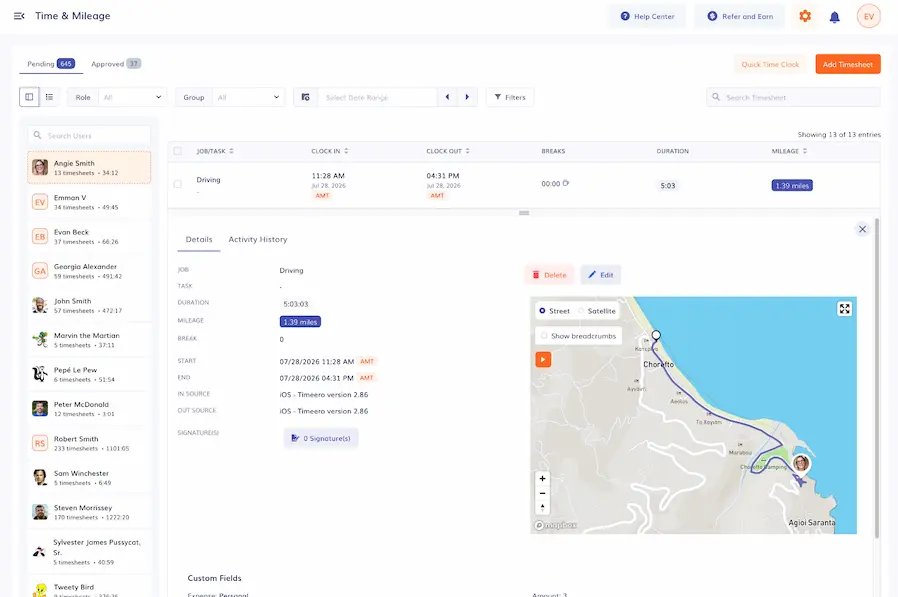
Timeero’s GPS-verified timesheets combine exact work hours and location coordinates in a single view.
Every time an employee clocks in, takes a break, or clocks out, Timeero tags that exact moment with their GPS location. But the visibility does not stop at the punch. Throughout the entire shift, the app continues to work quietly in the background, dropping a location breadcrumb every 150 feet whenever movement is detected.
Geofencing
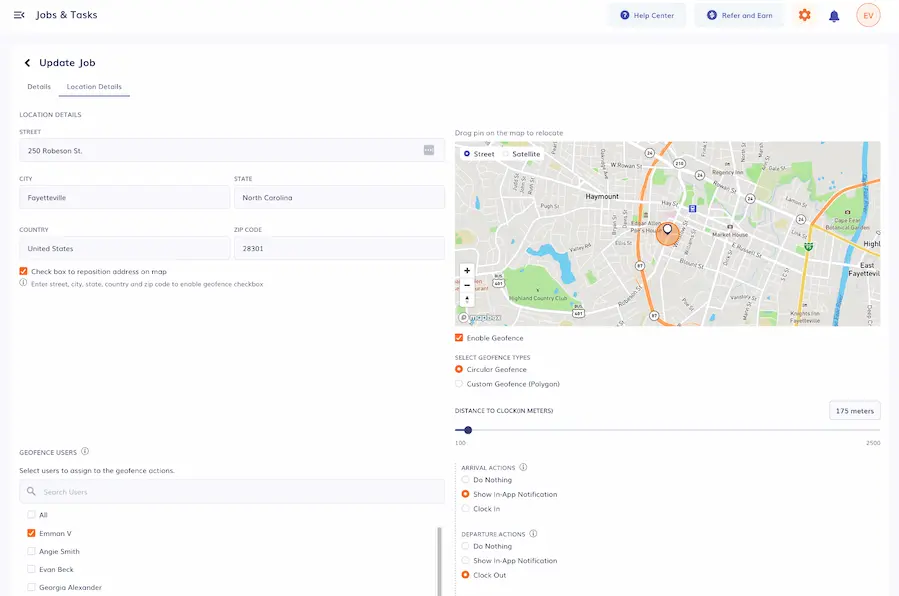
You can link specific physical addresses to every job and set custom geofenced boundaries around each work site.
Using Timeero’s geofencing tool, you can easily draw a virtual boundary around any client’s property on a map. When a cleaner tries to clock in, the app instantly checks their location. If they are not inside that boundary, the app simply blocks them from clocking in until they actually arrive on-site.
Clock-ins
To eliminate off-site punches, Timeero lets you link location verification directly to your team's clock-ins. If you turn on the strict geofence setting, the app checks a cleaner's GPS coordinates the moment they try to start a shift. If they are not physically inside the job site's boundary, the app simply blocks them from clocking in until they actually step onto the property.
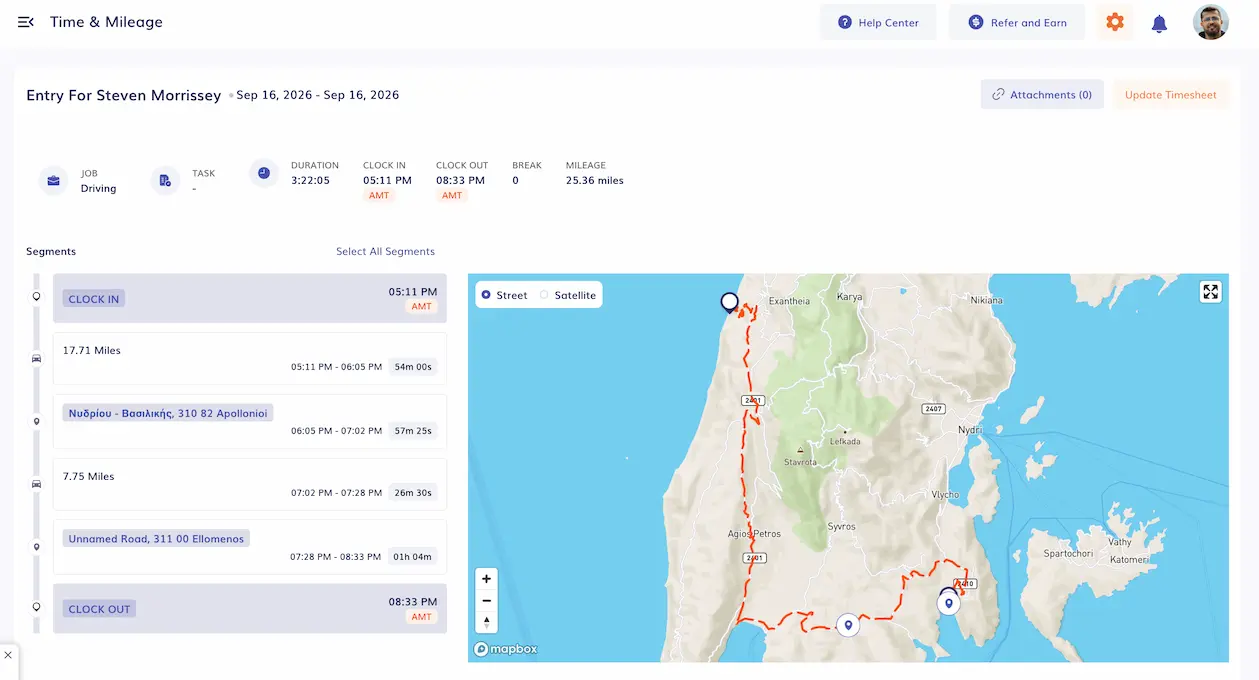
Segmented Tracking automatically splits the entire day into smaller segments to give you a clearer picture of an employee’s day.
If your team services multiple properties in a single shift, Segmented Tracking takes away the burden of clocking in and out at every stop. Workers clock in once at the start of their shift while Timeero works quietly in the background to automatically divide the workday into driving routes, idle breaks, and active cleaning time at each property.
Automatic mileage
You can also get rid of messy paper mileage books. Timeero features automatic mileage tracking for cleaning crews that records drive time and distances whenever a vehicle crosses a set speed limit. You get an accurate log for reimbursements and taxes, and you can use Route Replay to visually review exact travel paths, breadcrumbs, and driving speeds if a client ever questions an invoice.
PRO TIP: To keep your mileage numbers perfectly clean, set Timeero's driving speed filter to 5+ mph. This prevents on-site walking or slow movement around a large commercial building from accidentally adding extra driving miles to an employee's timecard.
2. Never lose another hour to a forgotten clock-in
Chasing down employees to fix missing timesheet punches is frustrating and slows down payday. Timeero prevents missed punches automating your company’s timekeeping system.
Auto Clock-In/Clock-Out
If you want a truly hands-off approach, Timeero's Auto Clock-In/Out feature does the heavy lifting for you. The app can automatically clock your cleaners in and out as they enter and leave a property's boundary.
To ensure total accuracy while entering a geofence, Timeero evaluates a worker's presence for about 1 to 2 minutes before automatically clocking them in. This prevents false triggers if an employee is simply driving past the site. Even with this brief delay, the recorded timesheet reflects the exact minute they originally crossed the boundary.
With Auto Clock-In/Out, your crews won’t have to remember to pull out their phones to clock in or out. You’ll have accurate timesheets down to the minute, all without the manual work.
Work Schedule
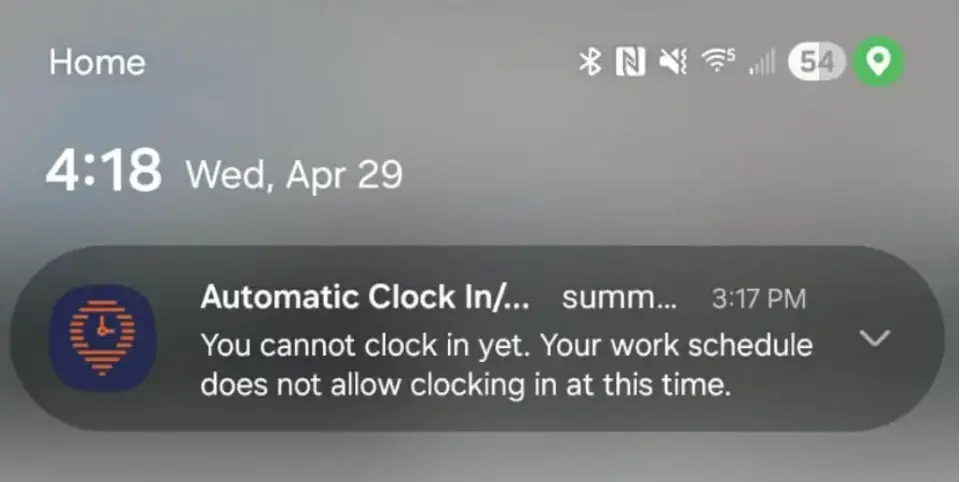
Timeero respects your company's Work Schedule Settings, which means it will never automatically clock someone in before their scheduled start window or after hours. This restriction, however, does not apply to clock-outs.
A notification will be sent to your phone when you attempt to clock-in while outside a geofence.
If a specific job requires your cleaners to fill out a digital form or safety checklist before starting, Timeero will send a push notification reminding the employee to open the app and complete the Custom Fields before Auto Clock-In is successful.
3. Keep every crew and client site on schedule
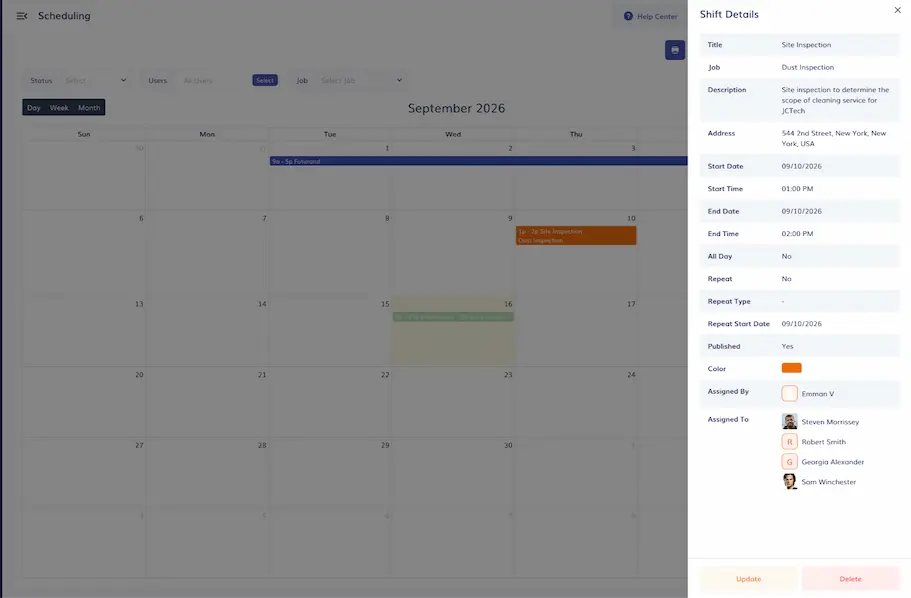
Use Timeero’s Scheduling feature to organize your crew so every team member knows exactly when and where they work.
Managing crew assignments is tough when you have properties spread across town. Timeero’s built-in scheduling tool takes the stress out of shift planning. You can easily create daily shifts, set up recurring weekly schedules, and assign specific jobs and tasks to a single cleaner or a whole crew.
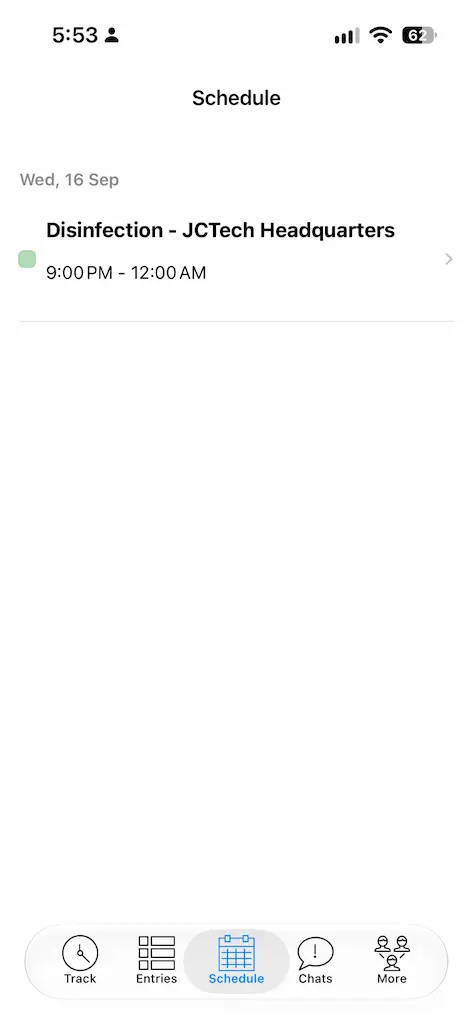
In the Timeero app, you can access your own schedule by tapping the Schedule tab at the bottom of the screen.
There is no need to send out mass text messages or hope everyone checks the whiteboard in the breakroom. Your cleaners get an instant alert on their phones via push notification or e-mail the second a schedule is posted or updated. This guarantees that every single minute of labor is tracked straight to the correct client account right from the start.
4. Know who’s working without calling or texting
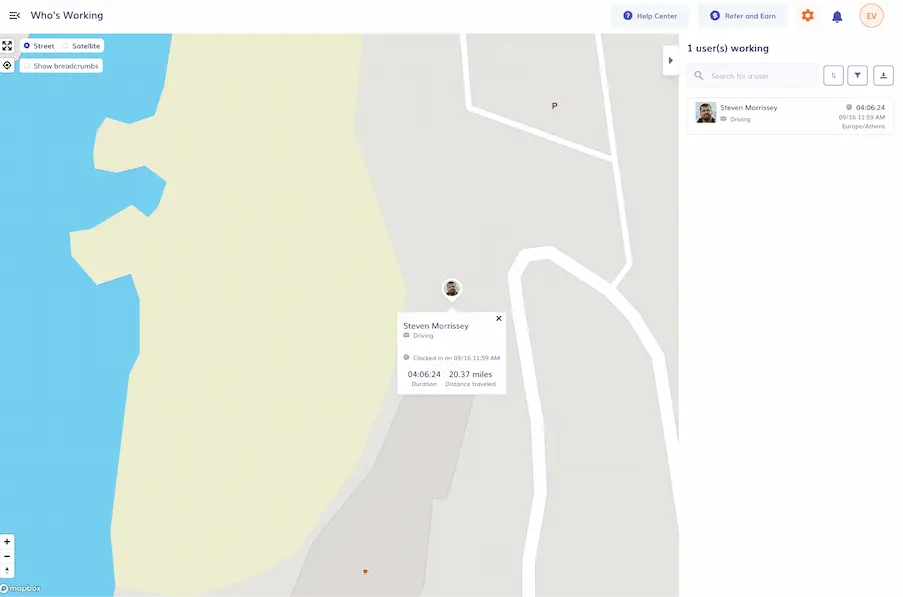
Calling and texting your crew all day just to see if they made it to the job site quickly eats up hours of your day. Timeero stops the endless game of phone tag by giving you instant answers right on your screen through the Who's Working dashboard.
While inside the “Who’s Working” dashboard, you can see the most recent location of clocked-in employees
From one simple map, you can instantly see exactly who is clocked in, where their live GPS location is, and what specific task they are tackling. If a client calls to ask when the cleaners will arrive, you can just check the live map and give them a precise update without interrupting your field staff while they are driving or working.
5. Prove the job was done, not just that someone was there
Disagreements with clients over missed tasks or cleaning quality can quickly damage your business relationships. Knowing your employee was physically at the property isn’t enough to defend your invoice. Timeero doubles as proof-of-service software for cleaners, capturing details of the actual work performed during every visit.
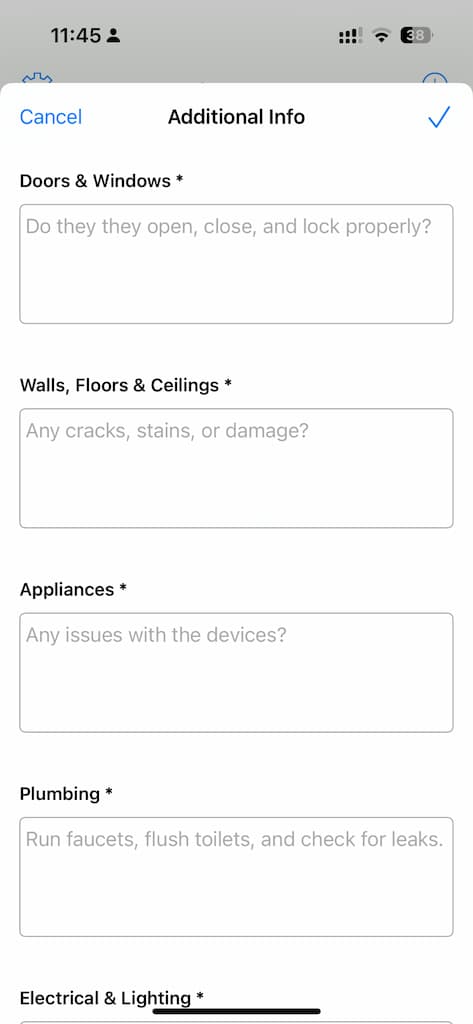
Require employees to complete a checklist before they clock out.
With Timeero’s Custom Fields, you can build questions and checklists right into your team’s mobile timesheets and make them required before employees clock out.
Require employees to complete a comprehensive checklist before they clock out.
Here are a few ways cleaning teams use Custom Fields and related features to capture the work:
Digital checklists: Have staff check off specific duties, like emptying the trash, sanitizing restrooms, and mopping floors, so you know every step was completed. Checklists also build accountability across your crew.
Supply logs: Track how much cleaning product and supplies remain after each client site to help manage your inventory.
Photo attachments: Let cleaners snap and attach before-and-after photos in the app, giving you visual proof of the property’s condition.
Customer signatures: Have the client sign on the cleaner’s phone to confirm the assigned work was done.
Get your team to sign off on the hours too.
Proof of service protects you with clients. Multi-Level Approvals protects you when an employee questions their pay. Employees review and sign their timesheets before submitting them, then a manager or admin signs to approve. You can also add approval questions, like “Any issues or incidents to report?”, so problems are on record before the timesheet is approved.
The approved timesheet keeps everything in one place: both signatures, any answers, and a time-stamped approval log.
Click through the interactive demo to see an employee sign their hours and a manager sign to approve them.
6. See which clients are profitable and which ones eat into your margins
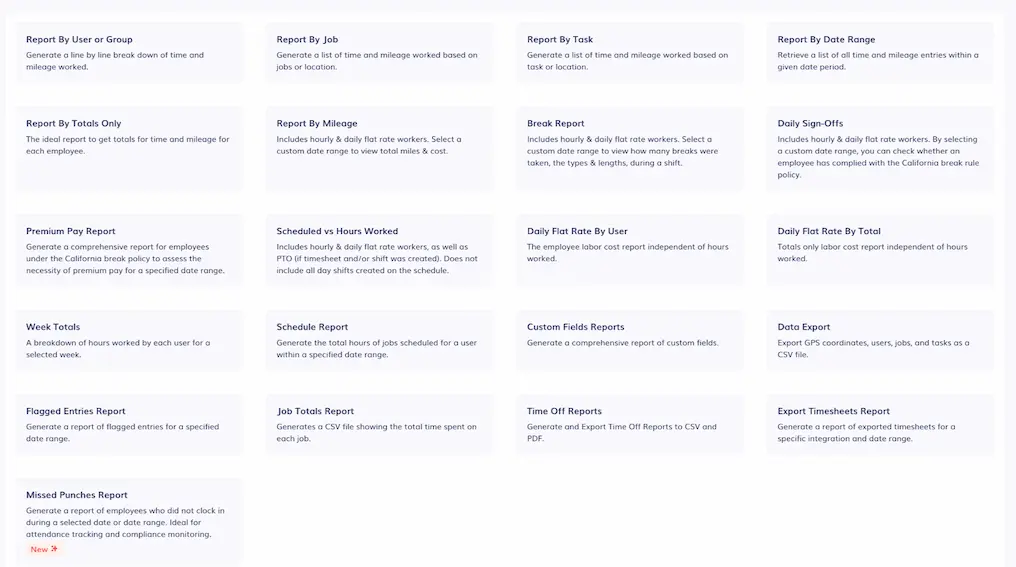
Knowing exactly how much a job costs you in labor and travel is the key to growing a profitable business. Timeero automatically turns your team's daily work data into clear, easy-to-read labor cost reports.
Timeero’s reporting tools deliver deep operational insights to help you make smarter, data-driven decisions.
If you pay your staff a different rate for specialized cleaning jobs or higher-tier client accounts, you can set custom hourly rates for those specific tasks. When it is time to check your numbers, Timeero automatically matches up the hours worked, the specific pay rates, and the driving costs for every single job profile.
With Timeero’s MCP server, you can ask the AI tools you are already using to pull the information you need from Timeero’s reports within seconds. This makes it incredibly easy to see which client accounts are bringing in solid money and which ones are secretly draining your profits through extra travel or unbilled time.
When it’s time to run payroll, export your timesheet data to popular payroll software providers like QuickBooks Online, Gusto, ADP, Paychex, and Xero through Timeero’s integrations.
Timeero vs. other cleaning time tracking apps
Choosing the right software means finding the features that actually fit how your cleaning team works. Here is a quick look at how Timeero stacks up against other popular workforce apps:
Feature
TimeeroOur pick
Connecteam
ClockShark
Workyard
Jibble
Swept
GPS tracking
✓
✓
✓
✓
✓
✓Clock-in verification only
Geofences
✓
✓
✓
✓
✓
✓
Automatic mileage
✓
✕
✕
✓
✕
✕
Automatic stop and drive tracking from one clock-in
✓Segmented Tracking
✕
✕
✓Autopilot plan
✕
✕
Auto Clock-In/Out
✓
✓Clock-out only
✕
✓Clock-in only
✓
✕
Scheduling
✓
✓
✓
✓
✓
✓
Proof of work
Photos, signatures, custom fields
Forms, photos, signatures
Photos, files, task checklists
Notes, receipts, photos, checklists
Facial recognition, selfies
Checklists, inspections, photos, notes
Job costing
✓
✓
✓
✓
✓
✓
Spanish-language app/UI
✓
✓
✓
✓
✓
✓
Offline time tracking
✓
✕
✓
✓
✓
✕
Entry price
$6/user/moBasic plan, up to 10 users
Free planUp to 10 users. Paid from $35/mo for 30 users, then $1/user
Free planPaid from $1.99/user/mo billed annually, $3.49 monthly (U.S.)
$30/moUp to 15 locations, billed monthly
✓Available✓Partial✕Not available
Tip: Feature availability depends on the plan, so the entry price doesn't include every feature shown. Pricing and features as of October 2026.
While apps like Connecteam are great for team chat, advanced GPS features like geofencing force you to upgrade to expensive higher-tier plans, and they completely lack automatic mileage tracking. Because of these hidden costs, exploring Connecteam alternatives that actually include full GPS tracking is usually a safer bet for mobile field crews.
Similarly, construction-focused apps like ClockShark offer solid job tracking, but they hit you with high monthly base fees before you even add a single user. They also lack speed filters, meaning an employee simply walking around a large commercial property might accidentally rack up paid driving miles. When comparing Timeero vs ClockShark, it becomes clear that paying for specialized construction software is not always the best fit for the daily workflow of a cleaning team.
Timeero provides the perfect balance for cleaning businesses. You get dedicated mileage tracking, flexible geofencing, route reconstruction, and affordable pricing without those heavy, hidden base fees holding you back.
Is Timeero the right choice for your cleaning business?
Every business has different operational needs. If you are a solo cleaner or independent freelancer who only needs a basic log of your personal drive time, simpler single-user mileage apps might be all you need. In the same way, companies with static office staff who never leave a central building will not need mobile GPS tools.
However, if you manage a team in the field and are tired of chasing down paper timesheets, guessing at travel miles, or losing money on client jobs, Timeero gives you complete clarity over your daily business. By turning daily crew activity into verified location data, clean mileage logs, and easy payroll reports, you protect your profit margins and build stronger trust with your clients.
Take the stress out of managing your mobile crews and run a faster, more accurate payroll today with the best app for cleaning staff clock in out. Start your free 14-day trial, no credit card required.
FAQs
What is the best time tracking app for cleaning companies?
Timeero is the best time tracking app for cleaning companies, as it brings every essential feature cleaning companies need together in one simple app. Instead of juggling multiple systems, cleaning business owners get everything they need in one place to stop payroll leaks, eliminate timesheet guesswork, and run a smooth, profitable team.
What should you look for in cleaning time tracking software?
When choosing software for a cleaning workforce, make sure it includes:
GPS & geofencing to confirm employee locations at clock-in and clock-out.
Automatic clock-in and clock-out reminders so workers never forget to track their time when arriving at or leaving a job.
Simple scheduling tools to assign crews to specific client sites so everyone knows where to go.
Automatic mileage tracking to accurately log drive time between client sites while ignoring foot travel.
The ability to upload proof of work through photos, task checklists, and client signatures on-site.
An offline functionality so crews can still track time and location while working in basements and other low-signal areas.
Real-time visibility through a live map to see who is working and where they are at any given moment.
Reporting tools that break down your labor costs by client, showing you exactly which jobs are making you money.
How do cleaning businesses track mileage between client sites?
Many cleaning businesses still track mileage manually, asking employees to write down their odometer readings in paper logs or spreadsheets. However, the most accurate way to track travel is by using a GPS time tracking app like Timeero that automatically tracks mileage using a speed filter. When an employee drives between cleaning stops, the app quietly records the exact distance, drive times, and visual travel routes without anyone needing to write a single thing down.
Can I prove my cleaning crew finished the job?
Yes. With Timeero, you can require your crews to complete digital checklists, take before-and-after photos, and get client signatures right on their phones before they finish their shift. All of this proof is saved directly to the timesheet, giving you a clear record that the work was done right.
Does Timeero track time per cleaning site or only daily totals?
Yes, Timeero tracks the exact time workers spent at each cleaning site, rather than just giving you a daily total. Your team can clock in and out of individual jobs or use Segmented Tracking to track how much time is spent at each client location.
How much does time tracking software for a cleaning business cost?
Many popular time tracking apps charge a steep monthly platform fee, often $30 to $50 a month, before you even pay for individual users. Timeero keeps things simple and budget-friendly for growing cleaning crews, starting at just $5 per user per month (paid annually) without those expensive base fees.
Can clients sign off on completed cleaning work?
Yes. Before an employee clocks out, they can pull up a signature screen from their mobile timecard. The client signs the screen using a finger or a stylus, and then types their name to confirm the work is done.
Does Timeero work for crews cleaning multiple sites in one shift?
Yes, Timeero is built specifically for the reality of multi-stop workdays. Once your employees clock in at the beginning of their shift, the app tracks their time, mileage, and location for the entire day.
Instead of asking your cleaners to manually clock in and out of every job, crews only need to clock in once at the start of their shift and Timeero’s Segmented Tracking automatically breaks up the whole day into clear segments, showing you exactly how much time was spent driving, taking breaks, and actively cleaning at each specific client site.
How does GPS time tracking stop buddy punching on a cleaning crew?
Timeero stops buddy punching by requiring a worker to actually be on the client's property before they can clock in. Managers can draw geofences around client locations which prevent employees from clocking in unless they are physically present at the job site.
If your team does not use personal phones and instead clocks in together from a single shared tablet, you can still curb on-site buddy punching through the Timeero Kiosk App, which uses facial recognition to scan the employee's face as they punch in. The system sends an instant alert to management if the photo does not match their profile, which stops buddy punching on the spot.
Know which cleaning jobs actually pay
Get verified hours, clean mileage, and labor costs by client — free for 14 days, no card required.
Emman is a passionate writer with more than 6 years of digital marketing experience under his belt. As a licensed chemical engineer with a passion for writing, he marries the technical with the creative to create engaging copy that converts. He is also a certified #girldad who spends most of his day playing with his three girls when he's not busy writing.




%202.svg)


.png)
.png)

.png)


