Why Field Crews Need Team Messaging With GPS Tracking
Emman Velos
Last update on:
September 7, 2026 4:31 AM
Published on:
TL;DR
Most field crews track GPS in one tool and chat in another. That separation leaves managers texting in the dark, with zero connection between who is messaging you and whether they're actually clocked in or on-site.
This software gap means critical updates go unverified, managers lose vital situational context, and healthcare or home care teams are left without a secure, HIPAA-compliant messaging app.
Timeero builds secure communication features directly into your daily tracking platform, ensuring your crew's live timesheets and location dashboards are always just a few tabs away when an update rolls in.
Having a chat tool that shares operational context with your time and GPS data eliminates the back-and-forth guessing game and changes how you respond to your team.
It’s a Friday afternoon and your phone buzzes with a text from your HVAC crew lead saying “30 minutes out.”
It sounds like a standard update, but you’re not sure what it means. Is he still clocked in at the previous job? Is he heading to your current location? Or does he mean he’s off the clock?
To get a straight answer, you close your messaging app, open your GPS tracking platform, and dig through active timesheets to find his location.
This constant back and forth is what we call the “two-app problem.” When your team’s communication lives in one place and GPS time tracking data lives in another, every conversation becomes a constant loop of toggling screens just to add context.
Closing that operational gap is critical for growing field service companies. That’s why so many teams are trading their disconnected systems for Timeero, a workforce visibility platform that brings GPS tracking and team messaging into one workspace.
Let’s take a look at the quiet operational risks of personal texting and how a unified platform like Timeero changes your day-to-day.
See how Timeero's messaging works inside your GPS tracking platform.
Why personal messaging apps don't work for field teams
Most field teams do not think about using business communication software like Slack. Instead, they choose more popular apps like WhatsApp, iMessage, or standard SMS text messages to communicate with each other.
While these personal apps are convenient for casual chats, they present serious risks when used for business operations:
1. Complete loss of data ownership. The moment a project update, client address, or site photo is sent via standard SMS, that data lives on the employee's personal device. If that employee leaves your company, your proprietary business records walk right out the door with them.
2. They have no reliable audit trail. When a customer disputes a billable hour or claims a task was done incorrectly, you need proof. Digging through a cluttered, unmanaged text thread on a supervisor's personal phone to find an old message is nearly impossible, leaving you completely unprotected.
3. Accidental labor compliance risks. In states with strict labor regulations, texting an employee while they are on a mandated rest break or off the clock can trigger wage-and-hour disputes. Because personal texts offer zero visibility into real-time clock-in status, managers are forced to text completely in the dark.
4. Employee boundary burnout. Forcing crews to use personal numbers for work means job alerts constantly mix with texts from family. Without a clear line between the two, field employees are left with no way to mentally log off at the end of a shift.
What field managers actually need from a communication tool
To run a secure and productive mobile workforce, you need a field service communication app that is built specifically for the realities of field service:
A channel you control, not the employee's personal phone
Work-hours awareness to let you know whether the person you're messaging is on the clock before you send anything
Role-based permissions, because not every employee should be able to start a group chat or message anyone in the company
Read receipts on announcements and other chats that matter
Photo and file sharing for job site documentation
An audit trail tied to the platform, not a personal device
HIPAA compliance for businesses in home health or any EVV-regulated work
How integrated team messaging with GPS tracking works
Calling a combined system an "all-in-one app" makes it sound convenient. But true integration is much more practical. Instead of running a separate chat program, the communication tool is built directly inside your GPS time tracking app.
This can impact your day-to-day operations in two powerful ways:
1. If a crew member responds to your message, you immediately know they’re on the clock. Because your chat tool is embedded inside your time tracking software, you can verify if that worker has an active timesheet running before sending high-priority work details.
2. Since the field service communication app sits right inside your GPS tracking app, you can easily see what is happening on a job site. The system uses geofencing to show you exactly who is actively clocked in and physically on-site.
Inside Timeero’s in-app messaging feature
When your crews rely on personal texting apps for company business, your operations are left wide open to data and compliance risks. Scattered text threads mean you lose administrative control, lack a reliable paper trail, and can't easily protect proprietary project details when an employee leaves.
Fixing this requires moving your team's communication onto the same system where you manage their shifts. That's why we built secure communication features into our workspace.
Timeero is a GPS time tracking and workforce management platform for field teams. Our secure, two-way messaging is built directly into the app your mobile crew uses every day, protecting your records without complicating your daily workflow. You can easily access this communication feature as an add-on for Pro and Premium plans at just $2/user/month.
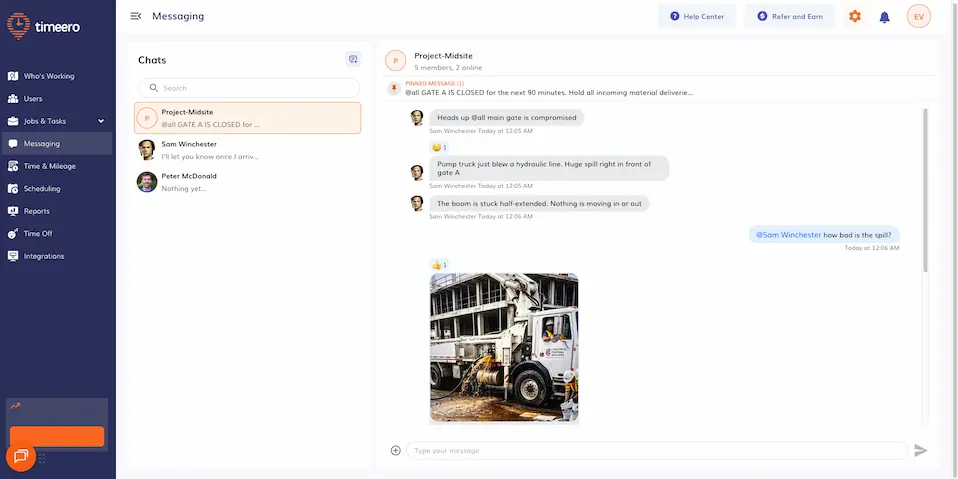
Direct messages and group chats
With Timeero’s in-app chat feature, you can message your mobile workers one-on-one or set up collaborative group chats:
On the web portal, just head to the Messaging tab and click the Chat + icon.
On the mobile app, tap Messages at the bottom and select the pencil icon. From there, you can name your group and select multiple team members to instantly build a channel for a specific job site.
Select your group from the left sidebar and type your message in the chat box to involve your entire field crew.
To keep communications focused, account access is managed by teams in real time. Crew members and managers can only chat with coworkers who share their assigned groups.
Role-based permissions
Administrators hold complete control over the platform's security preferences. Once you activate the feature in your Company Settings, you can customize your permissions within the Messaging Settings dashboard.
Use the Messaging Settings menu to easily toggle chat and group management permissions by user role.
You define exactly which roles can access active threads or start direct messages. You can also control who is allowed to build new group channels.
Rich media, photo, and file sharing
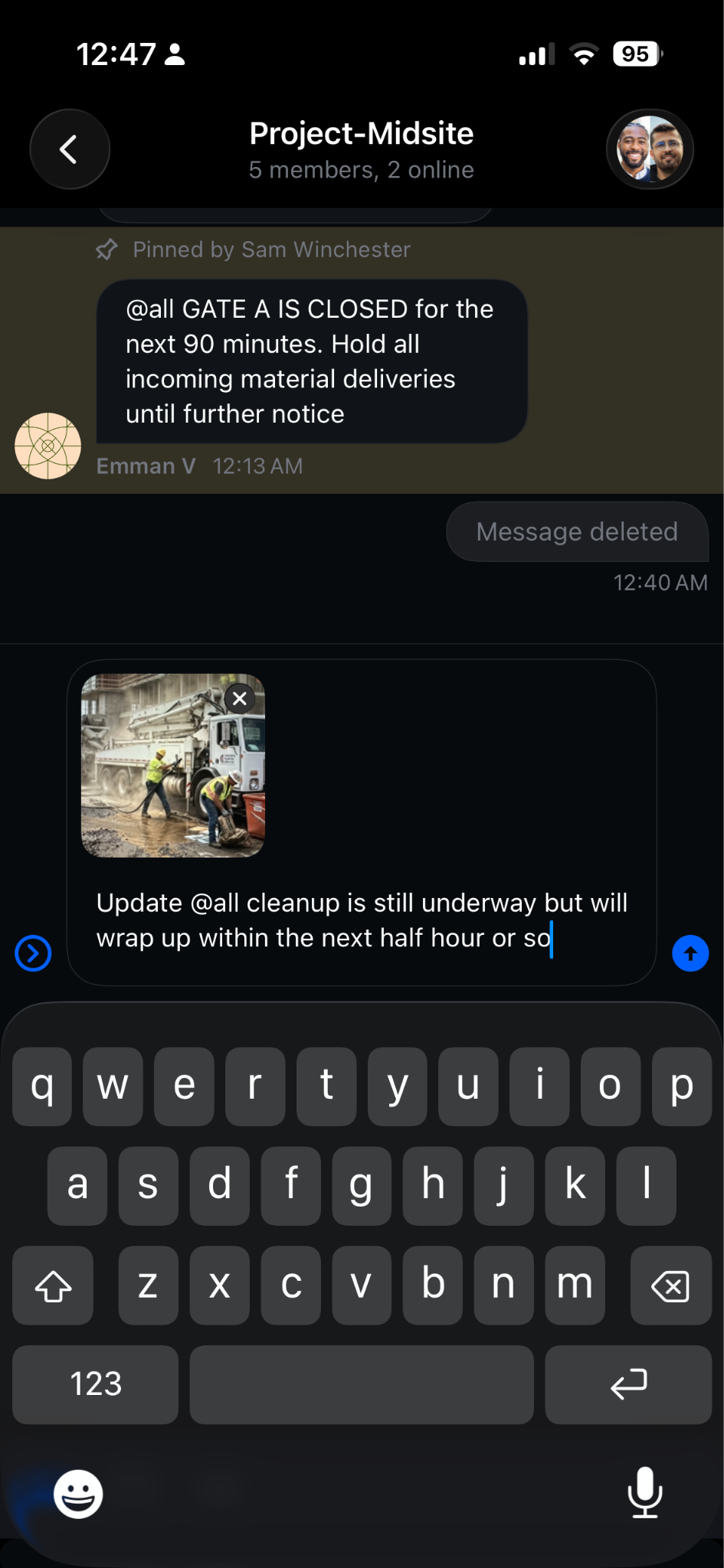
Field proof shouldn't clog personal phone galleries or get lost in messy texting logs. Your crews can attach job photos and videos right inside their Timeero mobile app. They can also upload documents through a desktop browser. There is no cap on file sizes or the number of media attachments you can share in a thread.
Send instant visual proof from the field by tapping the paperclip icon and choosing the camera icon to take a live photo.
Retrieving these documents later for job verification is incredibly simple for your office staff. Anyone in the thread can tap the name of the conversation at the top of the screen to open the chat details and view all photos, videos, and files shared within that conversation.
Modern communication tools
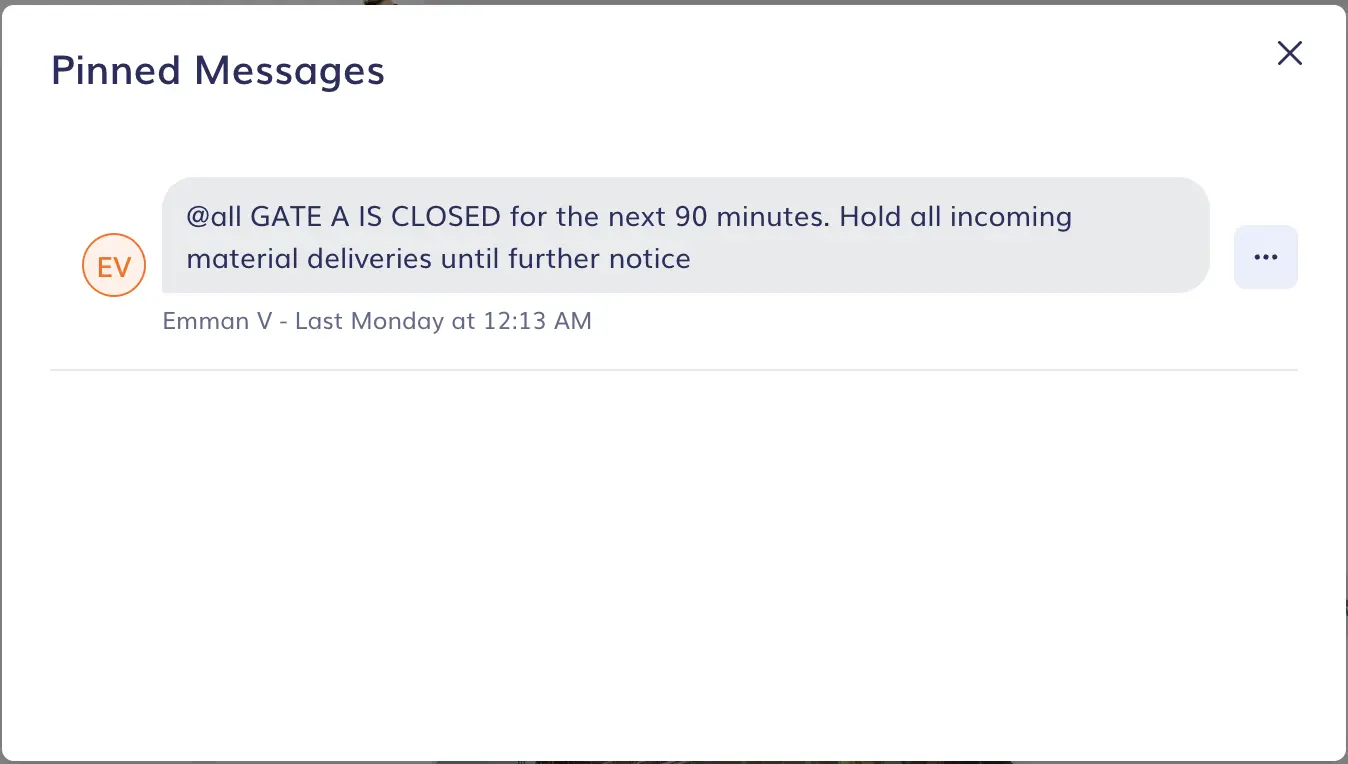
Tap the group icon in the top-right corner of your chat and select Pinned Messages to instantly reveal all saved team updates.
Work-focused chat doesn't have to feel rigid to remain secure. Timeero includes interactive threads and rapid emoji reactions to keep your team's conversations moving quickly. If an admin wants to pin a scheduling update to a channel, they can hover over the text in the web portal, select the three dots, and click Pin.
Your mobile team can also use built-in search commands to keep updates lightweight. Typing /giphy followed by a phrase generates instant visual context for daily milestones. If the first image isn't perfect, just click the shuffle button to browse alternative options before hitting send.
Message editing and deletion
Typing mistakes happen frequently on active sites. Users can delete single messages, or select Edit Message within group channels to fix spelling errors on the fly.
Full group deletion rights are limited to users with group management permissions, while direct messages cannot be edited after they're sent to preserve a secure historical record.
Notification muting with cross-device sync
Employees can mute specific chat threads to prevent work updates from bleeding into nights, weekends, or scheduled rest breaks. Silencing a thread only pauses active mobile push notifications. Workers can still view and reply to the text history whenever they manually open the app.
Work-hours awareness
The workspace provides immediate visibility into your crew's app activity. Every chat window features a live indicator dot that highlights whether a team member is currently logged into the mobile app.
A green dot above the user’s photo indicates that they are logged in.
Because Timeero’s communication app is built right into your tracking software, you can easily cross-reference this login dot with your active timesheets to avoid messaging off-duty staff.
Audit trail and secure offboarding
Timeero logs all chats within secure company profiles instead of private phone hardware. Office staff can pull secure historical reports at any time to verify instructions or resolve invoice disputes. If an employee leaves the company, deactivating them instantly revokes their access to all past conversation histories, project notes, and client documents.
HIPAA compliance
Standard text messaging introduces severe privacy risks for medical teams and home care providers. Timeero eliminates this exposure by providing full HIPAA compliance on our high-tier plans. The platform encrypts protected health information right inside our HIPAA-compliant messaging app, allowing field nurses to coordinate patient care updates safely.
Keep team communication logs entirely in your control with Timeero's in-app messaging.
How does Timeero compare with Slack and other messaging apps?
Choosing the right communication tool for your team requires looking at the apps your crew uses every day. Most field service businesses either default to casual personal texting or try to force office-first software onto mobile workers. Neither option fits the practical realities of working on a busy job site.
Why personal apps fail mobile teams
When you evaluate casual texting apps from a business management perspective, the core issue is control. If you do not own the channel your crew uses to talk, you do not own your company's operational data.
Personal apps fail mobile teams because they are fundamentally built for private consumption, not corporate oversight. They lack administrative control panels, offer no way to archive records for company files, and cannot integrate with live shift data. This leaves office administrators completely isolated from what is happening on the ground.
How Timeero compares to Slack
Slack, a popular communication app, is a great option for desk and office teams. It handles asynchronous collaboration, channel organization, and large-scale software integrations beautifully. For teams working behind a screen all day, it gets the job done.
But field crews operate under completely different conditions. Office-first tools fall short because they don't provide clock-in details or GPS tracking context. They don't link to active timesheets or job assignments, lack admin controls, and aren't built to be HIPAA-compliant by default.
If you are weighing your options against general desk applications or searching for a Connecteam alternative with messaging, the choice ultimately comes down to how seamlessly your communication ties into your live field operations.
Timeero handles things differently by embedding your communication loops directly inside your tracking platform. When a message comes in, the worker's active clock-in status, specific job assignment, and live GPS data are always just a single tab away.
This gives your office coordinators complete operational context before they ever type a response, keeping your whole business perfectly in sync.
Team chat comparison: Personal apps vs. Slack vs. Timeero
Here's a direct look at how these three setups compare when it comes to protecting your company records and managing your crews on the move:
Feature
Personal apps
Slack
Timeero messaging
Admin control and offboarding
NoneAdmins can't manage chats or archive records. Histories stay on private phones after offboarding.
HighExtensive control over company files and workspace provisioning when workers leave.
CompleteChats live on employer-owned profiles. Admins control group deletion, and one-on-one threads can't be deleted.
GPS and work status context
NoneText threads sit apart from your daily coordinates and project tasks.
NoneOffice-first software has no native GPS tracking, map routes, or timesheet data.
FullMessaging sits alongside live GPS breadcrumbs, mileage records, and geofenced job sites.
HIPAA compliance
NoSending client medical notes over consumer messaging puts you outside federal privacy standards.
ConditionalNeeds enterprise-level configuration and a separate agreement before you can handle protected data.
YesTimeero's messaging is HIPAA compliant, so home care crews coordinate inside the app they clock into.
Role-based field controls
NoneAny employee can start unmonitored chats or contact any number with no oversight.
LimitedChannels segment office topics but lack field constraints, so crews can message anyone in the directory.
RobustAdmins set who can access messaging, start direct messages, create groups, and manage membership.
Work-hours awareness
NoneManagers text in the dark with no access to work schedules.
LimitedNo sync with timesheets, so it relies on workers changing their status manually.
DirectSee who's on the clock through active timesheet data and the Who's Working tab.
Getting Timeero’s messaging up and running takes just a couple of minutes and three quick steps:
Purchase the messaging add-on: Head over to your Account & Billingpage in the web portal. Scroll down to the Add-Ons section and click Purchase to add the messaging tool to your current plan.
Enable messaging in settings: Go to your Company Settings and find the General Settings tab. Toggle the Enable Messaging switch to active, then hit Save at the bottom of the page to turn the feature on across your workspace.
Set up role-based permissions: Click Messaging Settings on your left sidebar menu. This is where you customize your role permissions and decide exactly who can jump into active chats or build new group channels. Save your changes, and your crew is ready to connect.
If you want a closer look at the exact dashboard layout, you can review the full Configuring Messaging Settings article in our Help Center.
Connect your field team without the back-and-forth
Think back to that text from your field lead saying they’re “30 minutes out.” Normally, a quick update like that kicks off an immediate guessing game.
But with TImeero, you already have the full story before you start typing a response. The incoming text only confirms what the platform already shows — precise GPS data tied directly to their timesheet, without you ever having to switch between separate apps.
Does Timeero's messaging work without an internet connection?
No, it doesn't. While Timeero will continuously track and record time and mileage offline, sending and receiving chat messages requires an active internet connection. If your crew is in an area without cell coverage, they won't see new updates or be able to send replies.
However, this doesn't mean your message is lost. They're stored securely on our cloud servers and will be sent automatically once a connection is restored and the device syncs.
Can employees message managers outside of work hours?
Yes, employees can technically send messages as long as they are logged into the app. However, Timeero is designed to help teams protect personal time and maintain healthy boundaries.
Features like notification muting and our live shift-status indicator encourage managers and crews to keep conversations strictly within active work hours. We recommend setting clear company expectations so your team knows when it's time to log off and silence work notifications.
Is Timeero's messaging HIPAA compliant for home health agencies?
Yes, absolutely. Timeero provides robust security safeguards to ensure your team's conversations meet federal compliance standards.
All protected health information (PHI) shared through the app is fully encrypted and stored safely in our system. Additionally, admins have precise access controls to dictate who can participate in chats, and you can instantly revoke access to all past histories the moment an employee is deactivated from your account.
What's the difference between Message Blast and two-way messaging in Timeero?
Message Blast and two-way messaging are independent features designed for entirely different communication workflows. Two-way messaging allows your crew to have interactive, back-and-forth conversations with colleagues and managers.
If you turn off two-way messaging for a specific user role, the Message Blast tool takes its place on the left menu sidebar. This allows admins and managers to broadcast read-only announcements, safety alerts, or schedule updates to their group without cluttering the mobile layout with distracting replies.
Can I restrict which employees can start group chats in Timeero?
Yes, you have full control over your chat environment. Through your Messaging Settings dashboard, admins can configure role-based permissions to determine exactly who can send direct messages or build new group channels. This ensures your mobile crews stay focused on their specific projects without creating unmonitored noise across different departments.
Does Timeero messaging show a user's GPS location inside the conversation?
No, the chat window doesn't display GPS coordinates or map tracking points directly inside your conversation threads. However, that context is always just a couple of taps away. You don't have to switch apps to find it. Simply tap over to the Timesheets or Who's Working dashboard to instantly view your crew's live location and shift status.
Which Timeero plans include in-app messaging?
In-app messaging is available as a paid add-on for both our Pro and Premium plans. It costs just $2 per user per month, allowing you to easily scale your communications budget up or down as your field team grows.
Stop switching between apps to find context your team chat should already have.
Emman is a passionate writer with more than 6 years of digital marketing experience under his belt. As a licensed chemical engineer with a passion for writing, he marries the technical with the creative to create engaging copy that converts. He is also a certified #girldad who spends most of his day playing with his three girls when he's not busy writing.



.webp)
.webp)

%202.svg)


.png)
.png)

.png)


