MileIQ vs. Timeero: Which Is Better for Field Teams?
Jessica Helms
Last update on:
June 2, 2026 7:41 AM
Published on:
TL;DR
MileIQ is best for solo drivers and freelancers, it was not built for field teams needing scheduling, time tracking, multi-stop tracking, or real-time GPS visibility.
MileIQ raised its team plan prices in 2026 with no new team-facing features added — Teams Lite now starts at $8/user/month, up from $5.99.
During testing, MileIQ failed to log any miles when started offline, while Timeero tracked the full trip from start to finish.
Field teams that need more than mileage tracking — including GPS time tracking, breadcrumb trails, and offline reliability — will find Timeero is the more complete solution.
Timeero Callout Box
MileIQ and Timeero both track business mileage automatically, but they are built for very different users. MileIQ works well for freelancers and solo drivers who need simple mileage logs for tax purposes. Field teams that need time tracking, real-time GPS visibility, and reliable offline functionality will find Timeero is the stronger choice.
What Is MileIQ?
MileIQ is a mileage tracking app that automatically tracks your drives using GPS technology. The app is available on both Android and iOS devices.
MileIQ is best for freelancers or teams that only want to track mileage for tax deductions and reimbursements.
Key features include: automatic mileage tracking, mileage classification via swipe or work schedule, IRS-compliant reports, frequent trips, reimbursement calculations, integrations, name locations, route map, automated reminders
Industries that frequently use MileIQ: real estate agents, rideshare drivers, delivery drivers, self-employed professionals
What is Timeero?
Timeero is a field workforce visibility app that helps teams track time and mileage using GPS technology. The app is available on both Android and iOS devices.
Timeero is best for teams that want to increase visibility and compliance in the field.
Key features include: automatic time and mileage tracking, real-time GPS visibility, route replay with breadcrumbs, geofencing, auto clock-in and out, Segmented Tracking, scheduling, in-app messaging, commute mileage, integrations, IRS-compliant reports
Industries that frequently use Timeero: property management, construction, home health, sales reps, agriculture and farming, general contractors
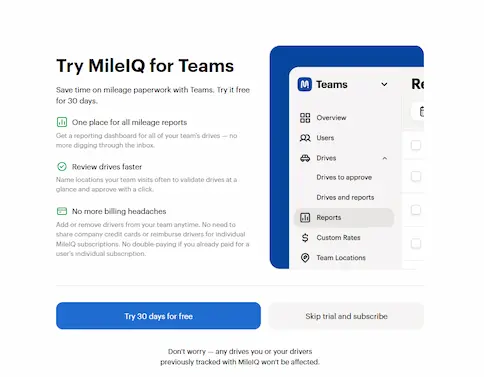
For this head-to-head comparison, I signed up for MileIQ’s free 30-day Teams Pro trial. I utilized both the app’s desktop site and mobile app (Android) during test drives.
I used MileIQ and Timeero simultaneously to test the accuracy of mileage tracking during trips, and when documenting how the apps behave offline, I put my phone in airplane mode while driving.
Signup experience
MileIQ
Signing up for MileIQ was simple. I was asked to create a user account and was then directed to the dashboard where I started my free trial.
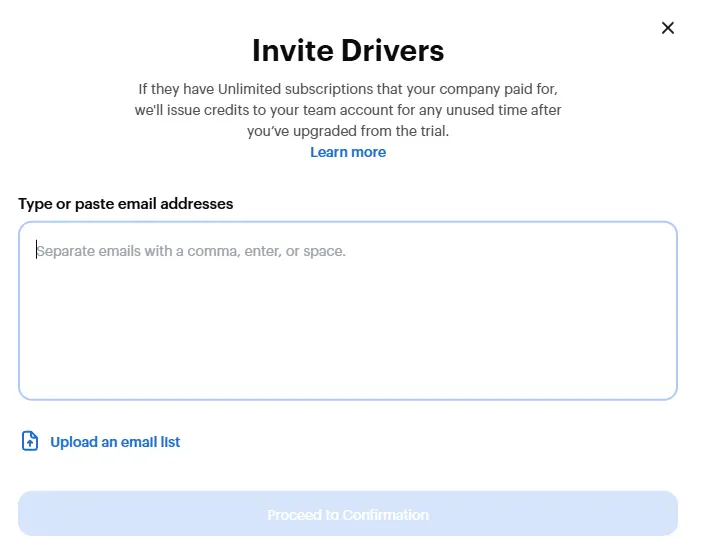
Once I started my 30-day trial, I was asked to invite drivers to my team.
Adding the first driver took less than 30 seconds
I recommend using the desktop version of MileIQ during sign up for an easier user experience.
Timeero
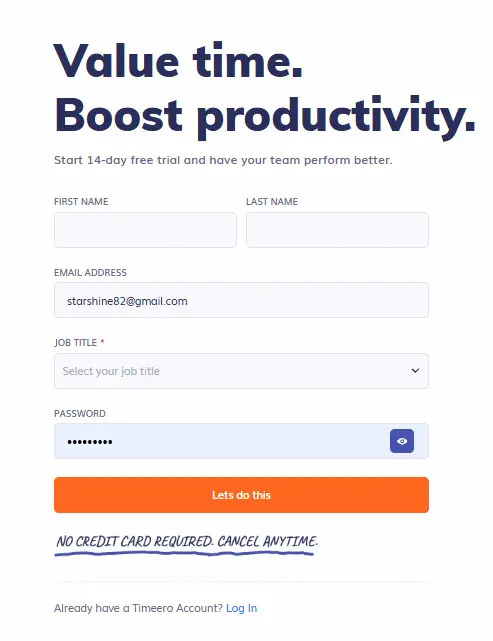
Timeero’s sign up process is similar to MileIQs. You are first asked to create a user account to start your free trial.
I was then shown a brief video and directed to the admin dashboard to set up my team account.
Finding out how to add users to my team in the dashboard wasn’t as intuitive as my experience with MileIQ. I did click on the “Account Setup Guide” that was shown on screen to help me navigate through the set up process.
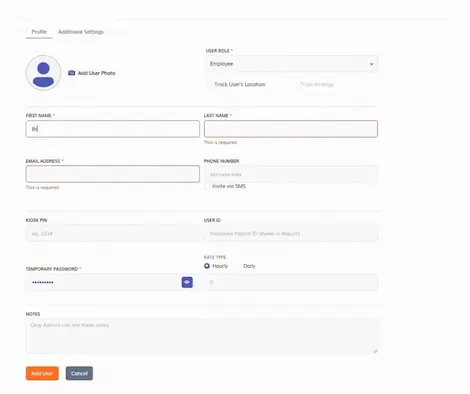
Once I figured out how to add a user, the process was simple. It took roughly 45 seconds to input the employee information and have them join my team.
One thing to add, Timeero does require you to select “Track User’s Location” and “Track Mileage” during the set up process. This is a step you don’t want to miss.
Adding a user to my team was simple.
Offline tracking
MileIQ
To test MileIQ’s offline tracking, I switched my phone into airplane mode. I took a round-trip drive to and from Construction Site A.
MileIQ did not log any part of my trip while my device was offline. This is a major drawback for field teams that work in areas with unreliable internet connection.
Timeero
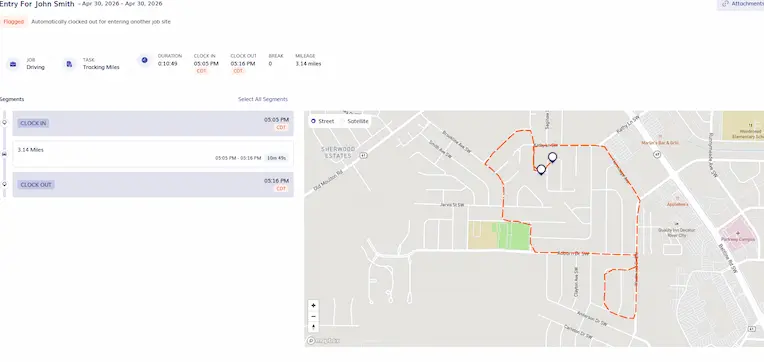
During the same trip, I tested the reliability of Timeero’s offline mode under the same conditions. I was surprised to find out that the app logged my whole trip from start to finish.
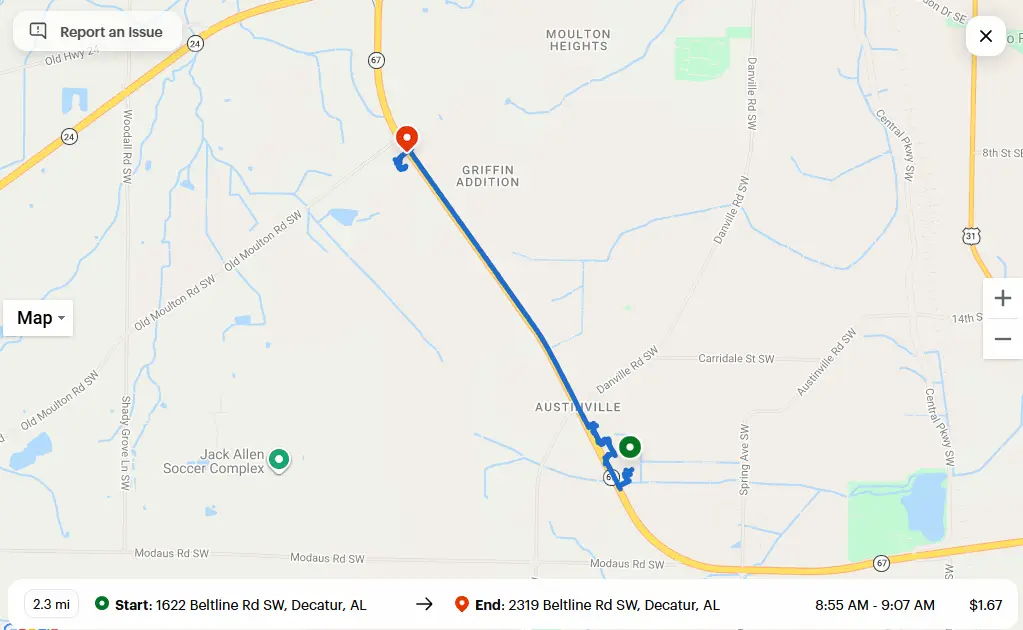
Timeero accurately tracked my 3.14 mile trip while offline.
For field teams traveling in remote areas, Timeero does a great job of tracking time and mileage without an active internet connection. The app’s offline mileage tracking alone makes it stand out against MileIQ and other popular mileage tracking apps on the market.
Mileage accuracy (Real-world results)
MileIQ
To evaluate MileIQ’s tracking performance, we tested its automatic mileage tracking capabilities during short trips (<5 miles and <.5 miles) and long trips (>5 miles).
Test 1: Short trip (3.8 miles)
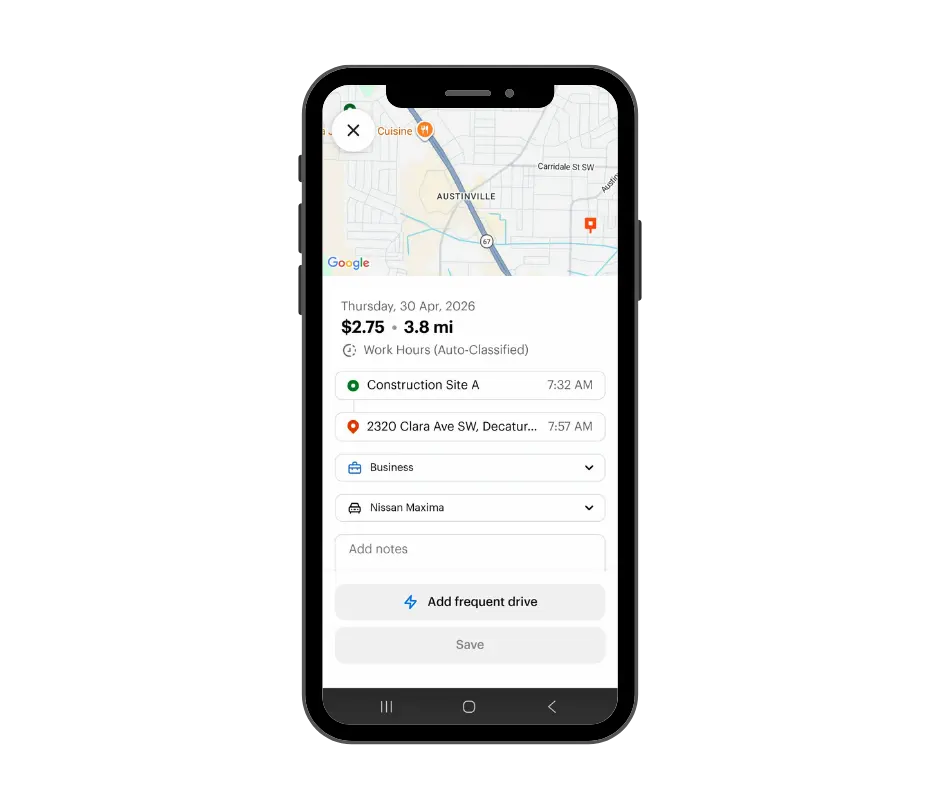
For the first test, we drove from the named location “Construction Site A” to our first stop (2320 Clara Ave. SW).
MileIQ accurately logged the mileage for my 3.8 mile trip
What happened?
MileIQ correctly labeled our starting location as the location name (Construction Site A) we defined in the settings.
Drive times were recorded accurately, along with starting and ending addresses.
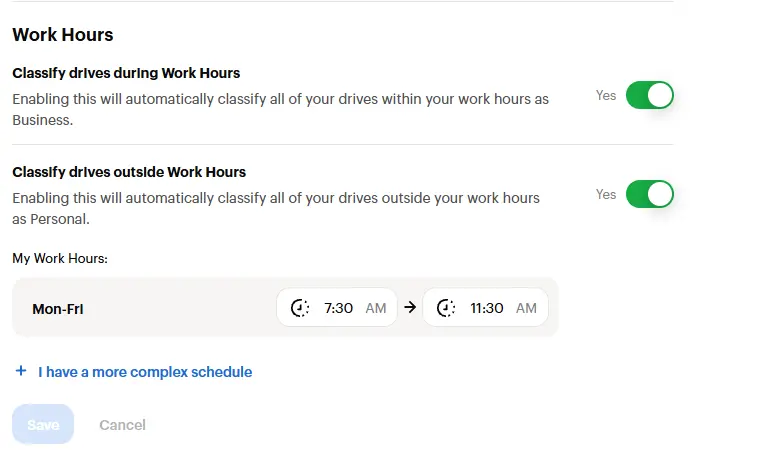
The trip was auto-classified as business due to our Work Hours settings.
Mileage reimbursement was calculated correctly at the Standard IRS-rate of 72.5 cents per mile.
Test 2: Long trip (6.3 miles)
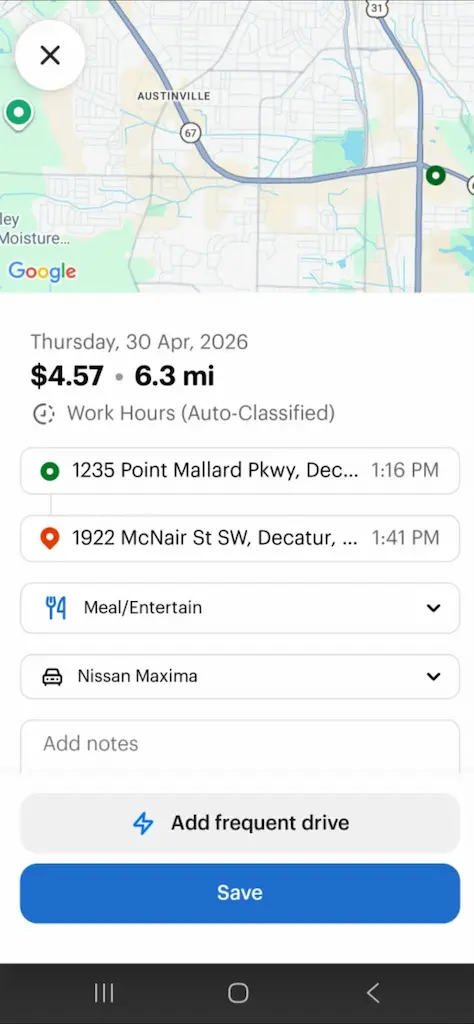
During this test, we drove from our second location (1235 Point Mallard Pkwy) to 1922 McNair St.
This trip was also auto-classified as business because it took place during the company’s specified Work Hours.
What happened?
MileIQ accurately tracked our mileage from point A to point B.
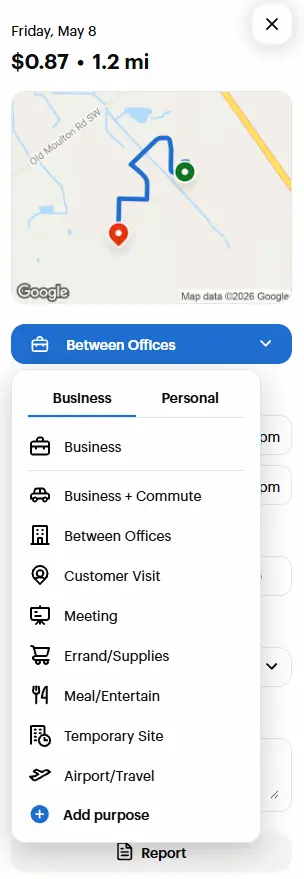
The trip was correctly classified as business related, which we later categorized as Meal/Entertainment since we stopped for lunch during this drive.
MileIQ recorded this trip as 6.3 miles, which is an overestimate according to Google Maps, which puts this trip at 5.1 miles.
Test 3: Trip <.5 miles
During my testing, I can confirm that MileIQ fails to log trips that are shorter than .5 miles.When I drove down to the end of my street, which is less than .5 miles, MileIQ did not log any movement, nor did it create a trip.
MileIQ results
With a stable internet connection, MileIQ correctly tracked my mileage during my 3.8 mile trip.
For trips less than .5 miles, MileIQ did not log my trip. Omitting short drives can impact the accuracy of mileage logs for tax deduction purposes and reimbursement.
The app did overestimate my mileage by one mile during my second test, which could create a potential problem with the accuracy of reimbursement during longer trips.
MileIQ fails to track mileage offline, which could be a dealbreaker for field teams.
Drive classification & Commute mileage
MileIQ
MileIQ offers several ways for employees to classify their drives as business or personal.
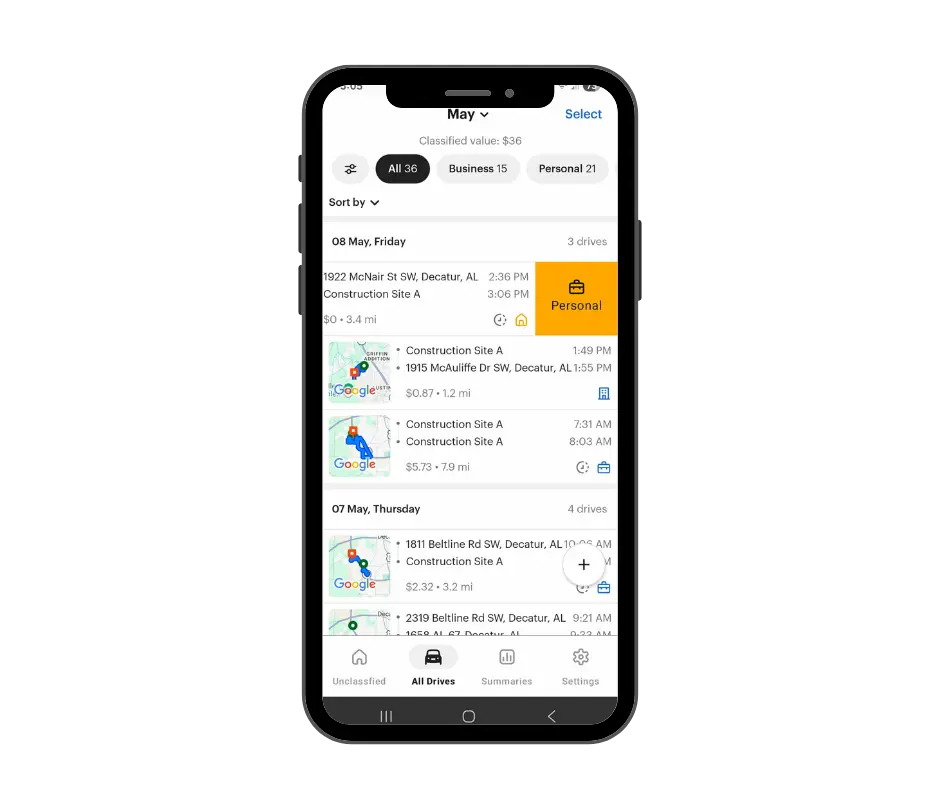
Swipe classification- on the mobile app, swipe left to classify the drive as personal, and right to classify as business. This is one of the most unique features MileIQ offers.
Swipe left or right to classify trips on the MileIQ app
Define work hours- set personal work hours to automatically define trips as business or personal.
Manual classification- when reviewing trips, you can manually select the trip type from a list of options under each category.
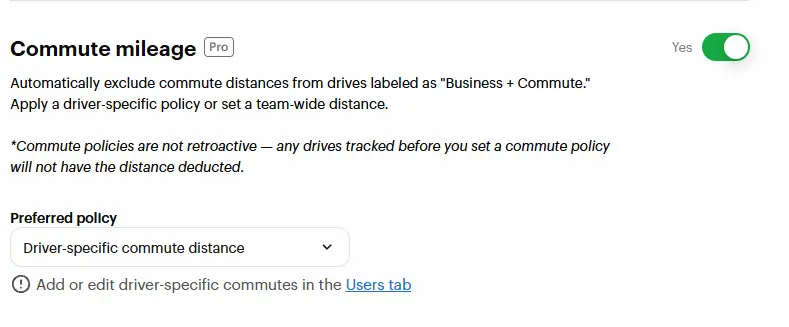
Additionally, managers can customize company commute mileage settings, auto-deducting business+commute mileage or commute mileage from driving totals.
Customize your company’s commute mileage features
Timeero
Timeero automatically classifies all trips on the clock as business mileage, no off-the-clock or personal mileage is tracked. The app also offers a commute deduction feature which automatically removes commute mileage from an employee’s daily mileage totals.
Time tracking
MileIQ
MileIQ does not offer its users time tracking tools. The closest thing to time tracking that MileIQ provides is the starting and ending time of drives.
However, for teams that want to track how long their crews have been on site, relying on the start and stop time of drives will not provide admins with accurate time records.
Timeero
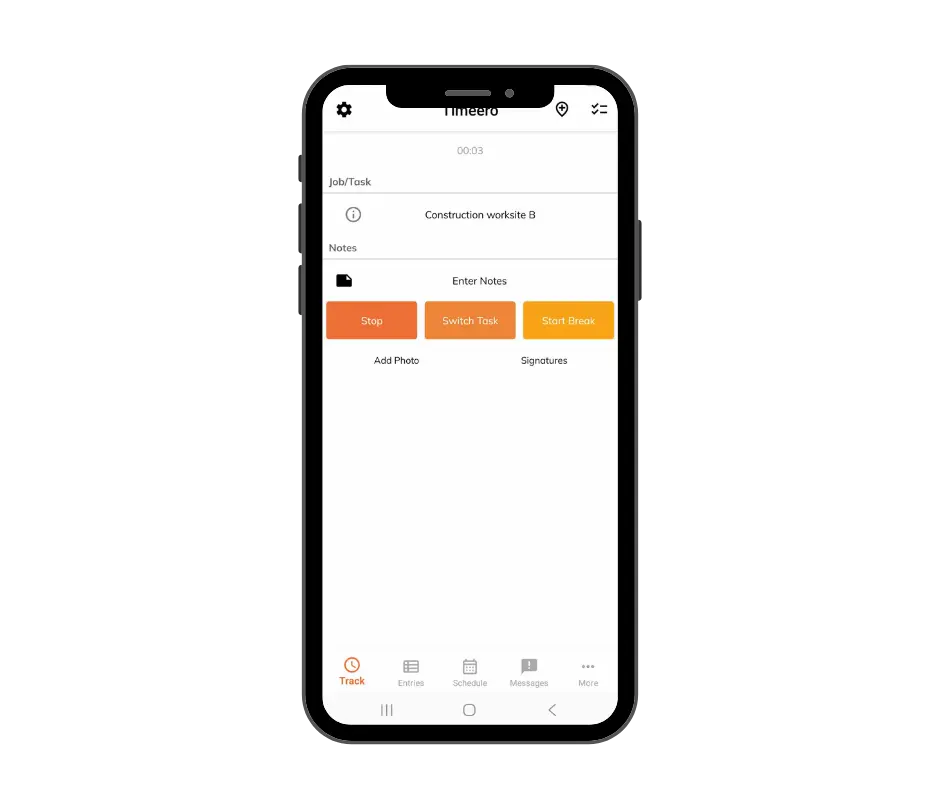
One of Timeero’s strongest features is time tracking. As soon as an employee hits “start” the app begins tracking their time and ties logged hours to specific jobs/tasks for accurate job costing.
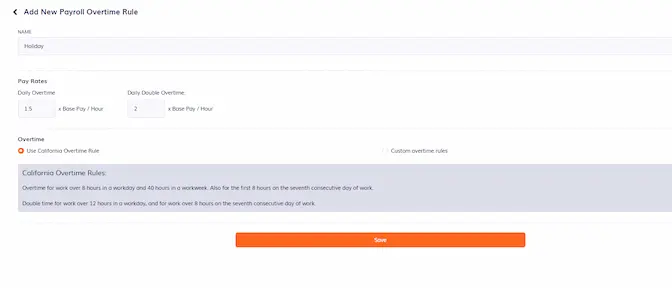
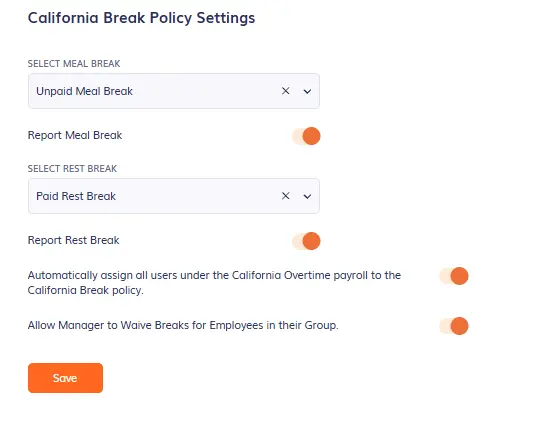
Admins can also customize the company’s overtime and break rules, simplifying compliance for businesses in states like California with strict labor laws.
Customize your company’s overtime rules
Real-time GPS visibility and breadcrumbs
MileIQ
MileIQ does not show the real-time location of drivers. The route map displays starting and ending points once the employee is no longer driving.
Additionally, the app does not utilize breadcrumb technology for detailed GPS tracking.
Timeero
Timeero uses GPS technology to provide the location and movements of workers in real time.
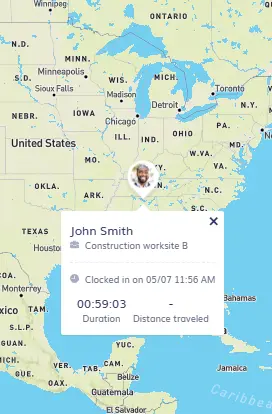
The app’s “Who’s Working” dashboard shows the current location of employees that are on the clock, along with the job they are currently working on, as well as their time on the clock.
The “Who’s Working” dashboard shows employee location in real time
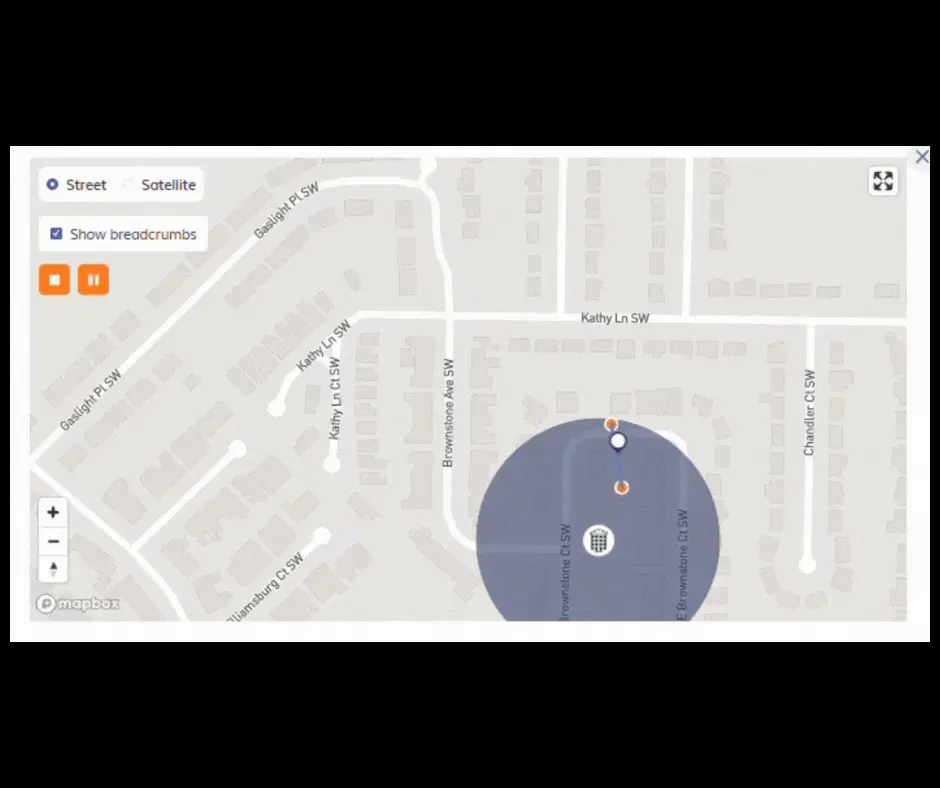
During drives, Timeero drops breadcrumbs every 150 ft., which allows admins to view employees’ whereabouts while actively driving.
Breadcrumbs increase the accuracy of GPS tracking
Geofencing
MileIQ
MileIQ does not use geofences in the way that field teams need. The app does not allow you to draw geofences around work zones. Rather, the app creates a personal geofence around your current location and activates mileage tracking when you leave that geofence.
Timeero
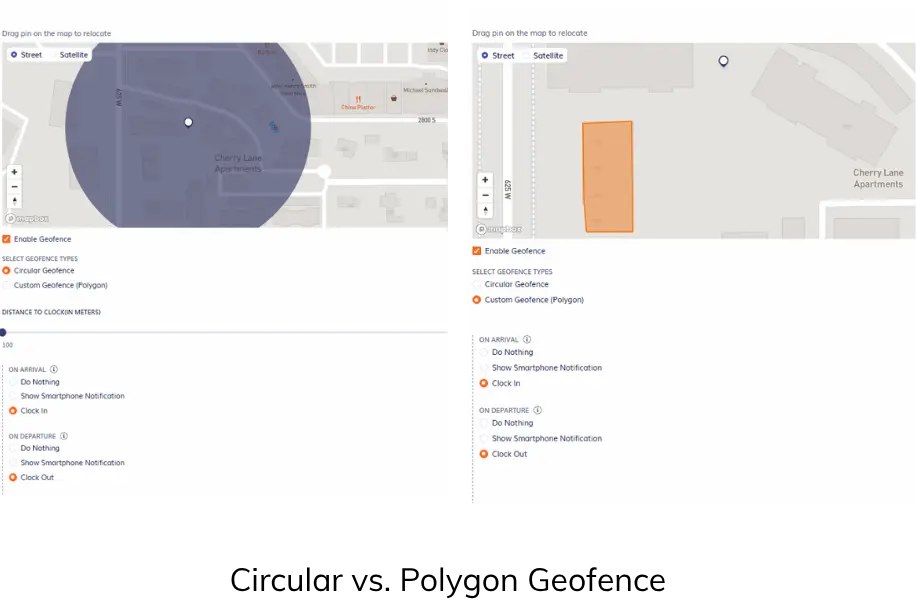
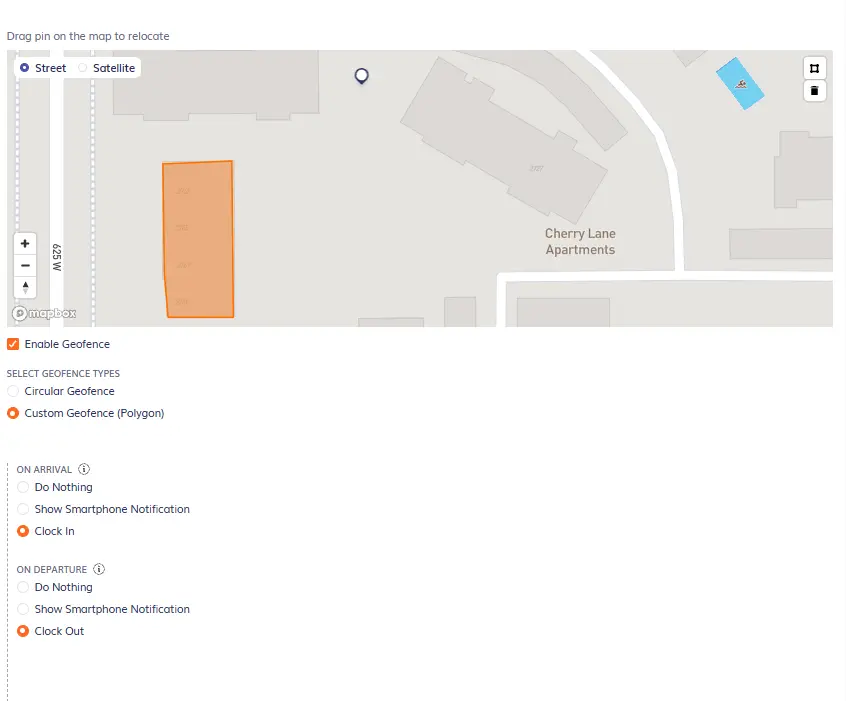
Timeero allows users to create both circular and polygon (custom geofences).
Timeero allows users to create circular and polygon (custom) geofences
With geofences, admins and managers can restrict employees from clocking in outside of a specific work zone. This prevents buddy punching, early clock-ins, and other instances of time theft.
Additionally, Timeero’s Auto Clock-in and Out feature uses geofence technology to automatically clock employees in when they arrive at their job site and out when they leave.
Enable Auto Clock-In and Out when you set up geofences
Scheduling
MileIQ
MileIQ does not offer any scheduling features.
Timeero
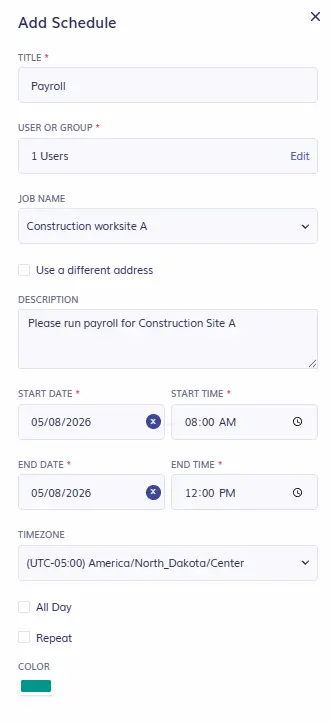
Admins and managers can quickly create and assign shifts to employees using Timeero’s scheduling feature.
Create schedules for individual employees or multiple users
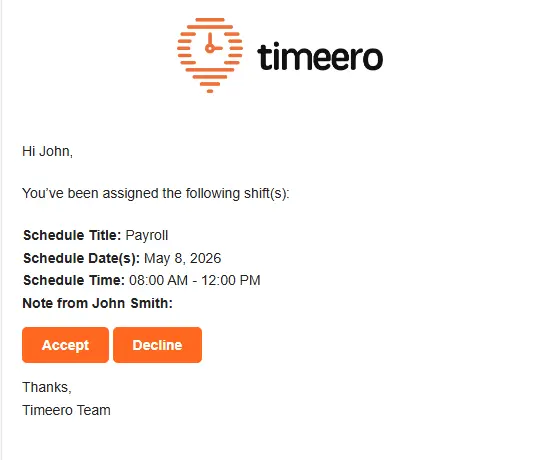
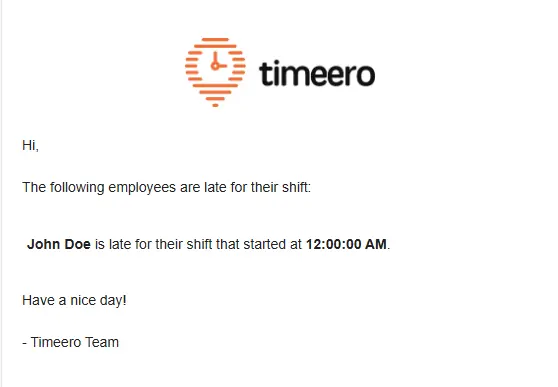
As soon as an employee is scheduled to work a shift, they are notified via email.
Employees are notified by email when they have been assigned to a shift
Additionally, managers are notified by email when an employee does not show up to their scheduled shift on time.
Timeero’s scheduling feature is easy to navigate and simplifies time tracking for field teams.
Pricing (2026)
MileIQ
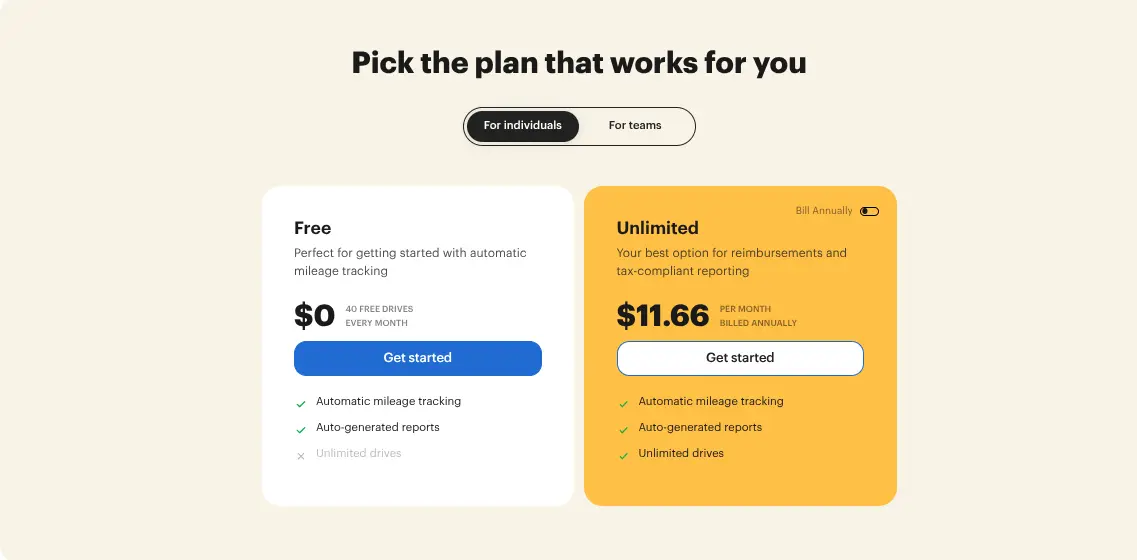
MileIQ offers both Individual and Team plans.
MileIQ Pricing
For individuals
For teams
Free plan — $0/month
Automatic mileage tracking
Track up to 40 drives per month
Teams Lite — $8/user/month or $80/user/year
Automatic mileage tracking
Add/remove drivers
Streamlined billing
Unlimited — $13.99/month or $140/year
Automatic mileage tracking
Track unlimited drives each month
Includes auto-generated reports
Teams — $9/user/month or $90/user/year
Automatic mileage tracking
Add/remove drivers
Streamlined billing
Reporting dashboard
30-day free trial availableTeams Pro — $10/user/month or $100/user/year
All features in Teams Lite and Teams, plus:
Approve/reject drives
Exclude commute mileage
Team locations
Report reminders & automatic reporting
Multiple admins
Custom rates
Individual plans
MileIQ Individual plans (annual billing shown)
For an individual driver wanting to track their mileage for tax purposes, the free plan is recommended if less than 40 trips are made a month.
Users on the free plan can also turn off or pause MileIQs drive detection to prevent the app from tracking non-business related trips.
Team plans
MileIQ Team plans (monthly prices shown)
MileIQ offers three pricing plans for teams. Each plan is charged per user, and there is no base fee. For teams wanting better control over mileage tracking, the Teams Pro plan is recommended.
Timeero
Timeero does not offer pricing plans for individuals. However, solo drivers or small businesses with 1-3 employees do sign up for the Basic plan.
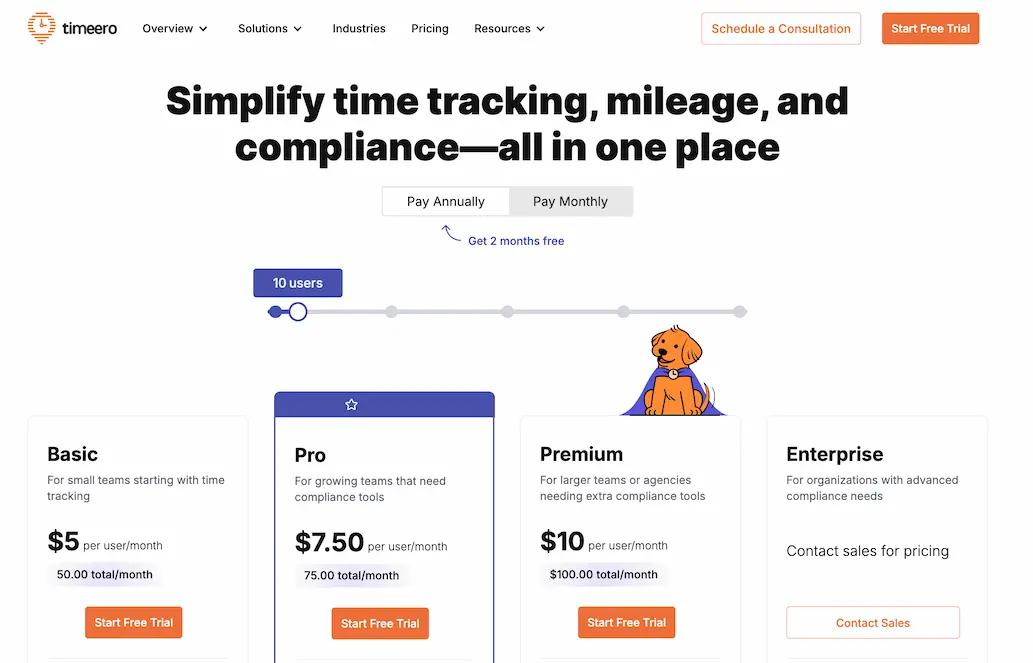
Timeero offers four business plans: Basic, Pro, Premium and Enterprise. There are no base fees, and users can be billed monthly or annually.
Timeero Pricing
Plan
Price Per User
User Limit
Features
Basic Plan
$6/user/mo.$5/user/mo. annually
Up to 10 users
GPS tracking
Mileage tracking
Time tracking
Break tracking
Pro Plan
$9/user/mo.$7.50/user/mo. annually
No limit
Basic plan features, plus:
Auto clock-in and out
Job tracking
Accounting and payroll integrations
Scheduling
California Break Policy
Geofencing
Photo attachments
Premium Plan
$12/user/mo.$10/user/mo. annually
No limit
All Basic & Pro features, plus:
Time-off management
Facial recognition (kiosk)
Commute mileage
Suggested mileage
EVV
Public API
Signatures
Custom fields
Enterprise Plan
Contact Timeero Support for pricing
No limit
All features, plus:
Dedicated account manager
Priority support
Single Sign On (SSO)
Custom implementation
Note: Segmented Tracking, In-App Messaging, and Expert Onboarding are offered as paid add-ons. Teams subscribing to a plan with annual billing receive 2 months free.
Timeero’s pricing plans (annual costs shown)
Segmented Tracking
MileIQ
When I reviewed my daily trips, I noticed that MileIQ does not include each stop I made during a single drive. For example, if I left Construction Site A to travel to Construction Site B, MileIQ does not include the stop I made at the gas station. Instead, a new trip would be created from the gas station to Construction Site B.
MileIQ does not have a way to track multi-stop routes without creating a new record, which isn’t the best solution for teams wanting to increase visibility in the field.
Timeero
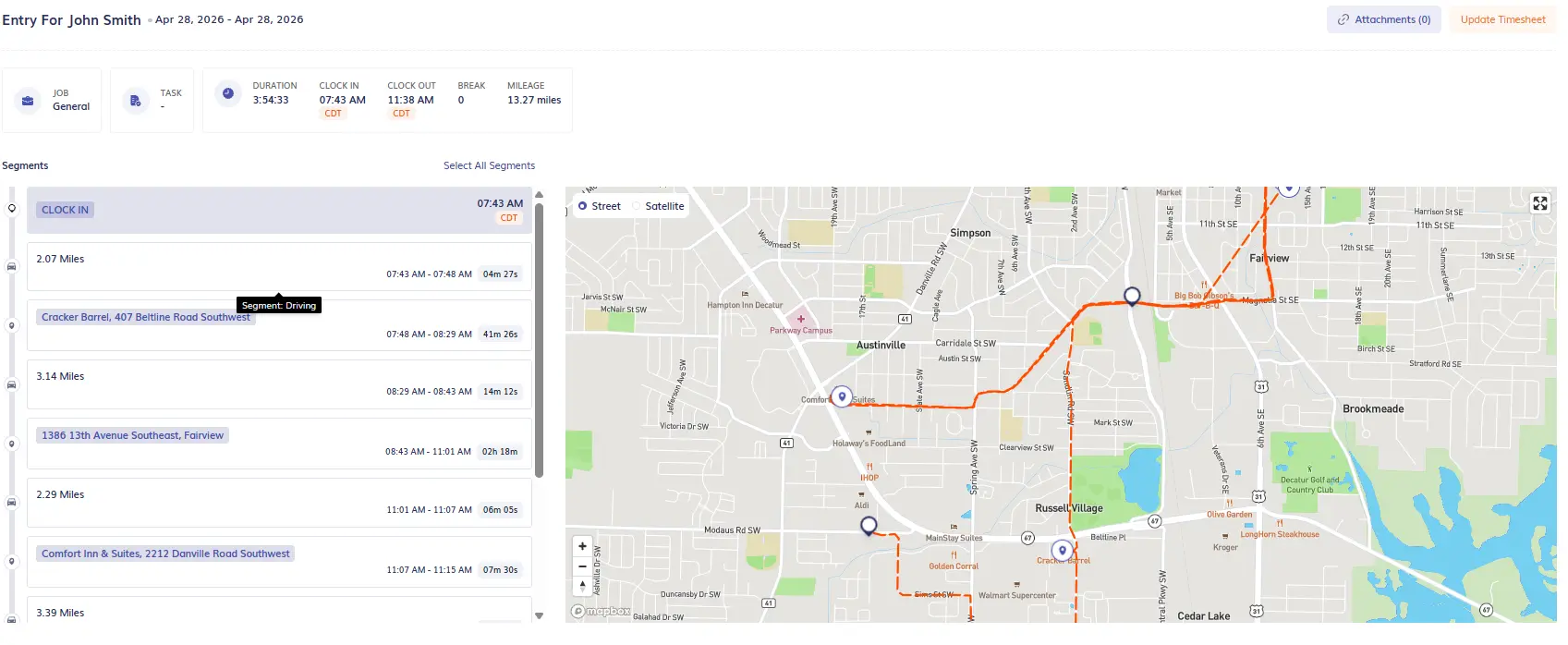
With Timeero’s Segmented Tracking, employees only need to clock in once at the start of their shift and Timeero automatically divides their trip into segments based on stops made.
The Segmented Tracking timeline shows the address of every stop along with how long the employee spent at the location and miles traveled between sites.
View every stop made during an employee’s day with Segmented Tracking
Segmented Tracking is a valuable tool for field teams that want to monitor driving habits, spot inefficient travel patterns, and verify the time employees spend at client locations.
Break tracking
MileIQ
Since MileIQ does not offer time tracking, it does not include break tracking. The app only operates when you are driving.
Timeero
For teams that track employee hours, Timeero includes break tracking.
Managers can customize company break rules, specifying the length of breaks and whether it is paid or unpaid.
Customize your company’s break rules
For teams in California, Timeero offers California Breaks Tracking – a feature that helps California businesses stay compliant with the state’s strict meal and rest break laws.
Timeero simplifies break tracking for California businesses
Off-Hours tracking
MileIQ
Tracking location off the clock is a major concern for employees. By default, MileIQ continues tracking mileage even when the employee is off the clock. The only way to turn off automatic mileage tracking is to pause automatic drive detection in the app or disable location access on your mobile device.
Timeero
Timeero only tracks mileage when employees are on the clock. When workers go on breaks, or clock out for the day, the app no longer tracks their time, mileage, or GPS location.
Integrations
MileIQ
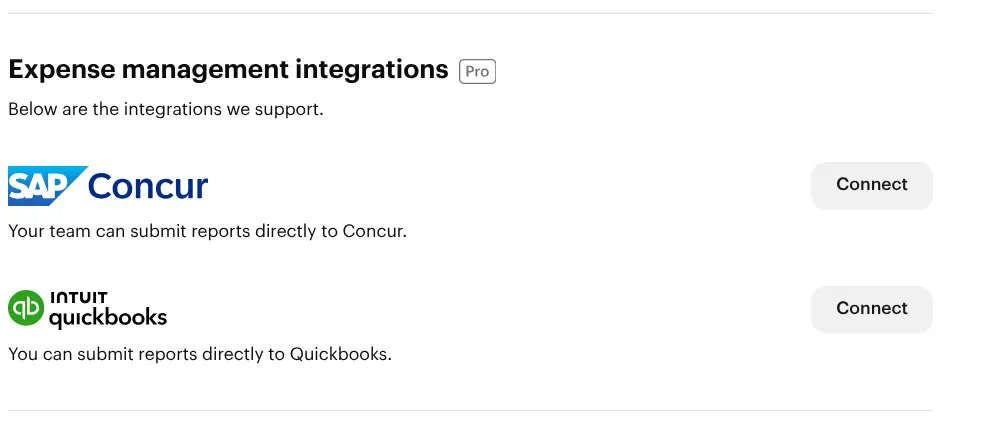
MileIQ’s payroll and accounting integrations are limited. When researching the integration options, I found that MileIQ connects with Concur and QuickBooks. If there are other integration options (Xero is often cited), they are not directly promoted.
Advertised MileIQ integration options
Timeero
Timeero provides users with many payroll integrations. To view the full list, visit Timeero’s integrations page.
Who should choose Timeero over MileIQ?
Mobile field teams looking for a better way to track time, mileage, and job costs, while managing day-to-day operations should choose Timeero over MileIQ.
Timeero uses GPS technology to verify the accuracy of recorded time and mileage records, making the app a great choice for teams wanting to reduce costly disputes and avoid lawsuits.
Is MileIQ Worth It for Field Teams?
MileIQ is a great mileage tracking app for freelancers and solo drivers, but it was not built for field teams — and the gaps in time tracking, offline reliability, and real-time visibility make that clear.
If your business depends on accurate records, GPS accountability, and tools that work offline, MileIQ may not be your best option.
Field teams that need more than mileage tracking will find that Timeero covers the full picture.
Your field team deserves accurate time and mileage tracking.Try Timeero free — no credit card required.
FAQs
Is MileIQ worth it for businesses with mobile and field employees?
No, MileIQ is built for individual drivers or teams that need mileage tracking tools only. The app does not include time tracking or real-time GPS visibility that field teams need.
Does MileIQ work offline?
During testing, MileIQ did not work offline. The app completely skipped my 3.14 mile drive.
What is the best MileIQ alternative for field service teams?
The best MileIQ alternative for field service teams is Timeero. The app uses GPS technology to verify the accuracy of time and mileage records. Timeero also includes compliance and workforce management features such as: break tracking, scheduling, in-app messaging, auto clock-in and out, Segmented Tracking, and multiple payroll integrations.
Jessica is a skilled writer and proofreader with a unique flair for crafting engaging and impactful content. Her work reflects her ability to connect with clients on a personal level while successfully addressing their most pressing concerns. Jessica's professional background includes: teaching, social media marketing, and e-commerce. She resides in Alabama and loves the Golden Girls sitcom.




.webp)
.webp)

%202.svg)


.png)
.png)



.png)


