Timeero vs. TripLog: Which Mileage & GPS Tracking App Is Right for Your Field Team?
Jessica Helms
Last update on:
June 22, 2026 3:33 AM
Published on:
TL;DR
Timeero vs. TripLog: Timeero is the stronger choice for field teams needing an all-in-one GPS time, mileage, and compliance platform, while TripLog excels as a standalone mileage tracker best suited for solo drivers and gig workers.
Pricing advantage: For a team of 10, Timeero's Basic plan costs $50/month compared to TripLog's $140/month for equivalent time and mileage tracking — and Timeero requires no additional hardware for offline tracking.
Key feature gaps in TripLog: TripLog lacks auto clock-in/out, built-in break tracking, segmented multi-stop tracking, and offline time tracking without a $79.99 hardware purchase — features Timeero includes across all plans.
Best use case breakdown: Choose Timeero for real-time GPS workforce visibility, California break compliance, and automatic mileage tracking for mobile teams; choose TripLog if mileage logging and driving expense management for individual drivers is your primary need.
Field teams looking for a GPS time and mileage tracking app may begin by using TripLog. While the app is known for its free mileage tracking, it does not offer the extensive GPS time and visibility features field teams need. For example, TripLog’s free mileage tracking is limited to individuals and solo drivers only, mileage tracking for teams comes at an additional cost.
Timeero, a field workforce visibility app delivers the essential features mobile teams need without expensive add-ons and package upgrades. Although TripLog succeeds as a mileage tracking tool, it lacks real-time GPS visibility, automatic time and mileage tracking, and the compliance features mobile teams are looking for.
Spotty cell service? No problem.
Track field mileage and hours seamlessly, online or off.
For this head-to-head comparison, we retested TripLog in May 2026, running Timeero & TripLog simultaneously through several scenarios. We compared the functionality and accuracy of each app’s GPS tracking, time and mileage tracking, scheduling, multi-stop tracking, break tracking, and compliance features. For this article, we signed up for a free trial of TripLog and tested the app using an Android device. The results documented in this article reflect real product behavior.
TripLog overview
TripLog is an automatic mileage tracking app that is best suited for solo gig drivers. Although TripLog does offer time and expense tracking, the features are offered in separate packages that require an additional subscription.
For advanced mileage tracking capabilities, including enhanced security and offline tracking, TripLog requires users to purchase either the TripLog Beacon device ($19.99) or TripLog Drive for ($79.99).
TripLog does offer users unique features that provide greater insights into employee activity such as driving safety monitoring and heat maps. Businesses that use TripLog for expense tracking will find the app’s OCR receipt scanning simplifies recordkeeping by removing manual data entry.
Timeero overview
Timeero is a GPS time and mileage tracking app built for field teams that need real-time visibility into workforce operations.
Timeero’s stand-out features include:
Segmented Tracking for teams with multi-stop routes
Offline tracking with auto-sync for teams that work in remote locations
Auto Clock-In/Out for teams needing a way to eliminate missed punches
Built-in break tracking, including break compliance features for teams operating in California
Automatic mileage tracking using drive detection technology (offered in all plans)
Real-time “Who’s Working” dashboard with Route Replay and GPS breadcrumbs for accountability
Unlike TripLog that requires teams to subscribe to three separate plans or pick and choose features to create their own Flex Plan, Timeero offers time, mileage, and scheduling in one plan - no additional hardware or costs required.
Feature comparison
Feature
TripLog
Timeero
GPS & Location Tracking
Segmented Tracking
✕
✓
Geofencing
TripLog: adjustable size to trigger mileage only Timeero: circular and custom polygon geofences
✓
✓
Automatic Mileage Tracking
TripLog: separate subscription; Team & Enterprise plans only Timeero: included in every plan
✓
✓
Offline Mode
TripLog: TripLog Drive device only Timeero: continuous tracking, auto-syncs on reconnect
✓
✓
Time & Attendance
Auto Clock-In/Out
✕
✓
Break Tracking
✕
✓
California Break Compliance
Timeero: break reminders, overtime alerts, daily sign-off forms
✕
✓
Workforce Management
Scheduling
Timeero: drag-and-drop
✓
✓
Expense Management
TripLog: separate subscription; receipt scanning, bank connections Timeero: receipt capture, mileage reimbursement calculations
✓
✓
Payroll Integrations
✓
✓
In-depth feature comparison
Mileage tracking
TripLog
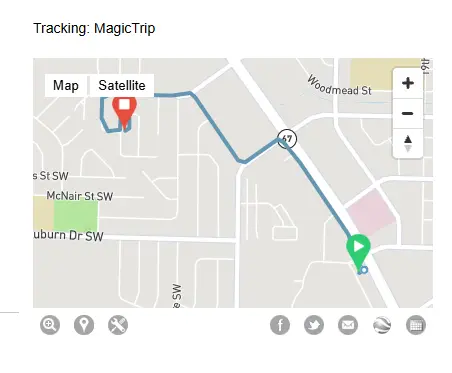
TripLog is a strong mileage tracking solution. It accurately tracks employees’ driving routes throughout the work day, capturing starting and ending GPS locations.
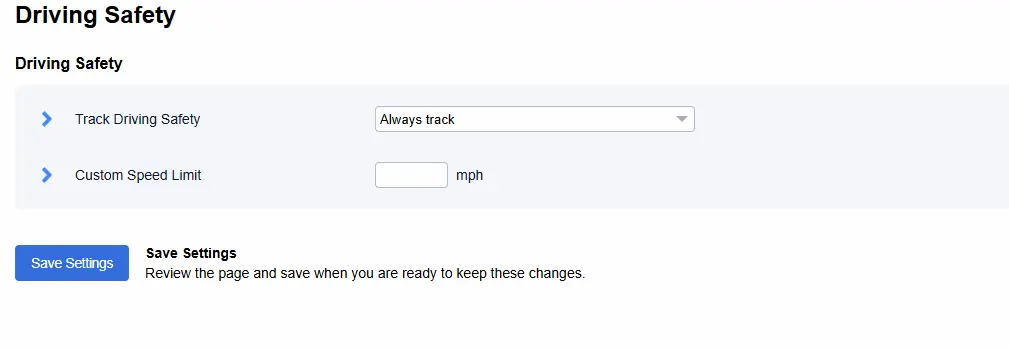
With the app’s Driving Safety feature enabled, TripLog displays questionable driving behavior such as hard accelerations, and phone calls made/taken while driving.
Enable Driving Safety from the Settings menu
The app does not offer multi-stop location tracking. Instead it shows the beginning and ending trip points.
Image of logged driving route
One feature I did like was the “Heat Map” which shows the frequently traveled driving routes and stops a driver makes. I can see this feature being used by management when it’s suspected an employee is making an unauthorized stop every day.
TripLog’s “Heat Map” shows frequently driven routes and stops made
TripLog offers users multiple ways to track mileage:
MagicTrip- automatically captures starting and ending points using your phone’s GPS and motion detection technology. Users can classify trips as personal or business by swiping left or right on their mobile device, or can classify locations as business or personal from the desktop site.
Car Bluetooth- TripLog connects to your car’s bluetooth system and begins tracking mileage as soon as you drive over 5mph. Mileage is tracked as long as there is a stable bluetooth connection.
Plug-N-Go- Mileage tracking starts when you plug your phone into your car charger and go over 5mph. Unplug your phone to stop tracking.
Gig Apps- When a gig app is open and you start driving, the app will automatically start tracking. After you are idle for more than 5 minutes, the trip will be stopped.
Manual Mileage Tracking- Manually enter your odometer readings, or pin locations directly within the app. Swipe left and right to classify trips as business or personal.
TripLog’s mileage tracking options
Timeero
To begin tracking mileage with Timeero, employees only need to start the time clock and begin driving. Once the vehicle reaches a predetermined speed threshold, Timeero automatically begins tracking mileage.
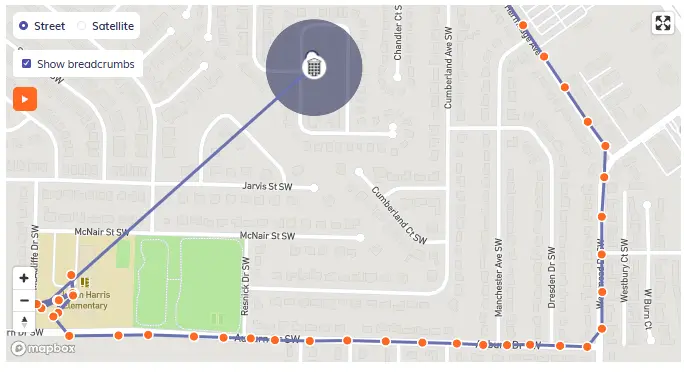
For accurate mileage tracking, Timeero drops virtual GPS breadcrumbs periodically along the driving route. When you open up Route Replay from the Time and Mileage menu to review an employee’s driving route, breadcrumbs display the driving speed, as well as a location timestamp.
Segmented Tracking
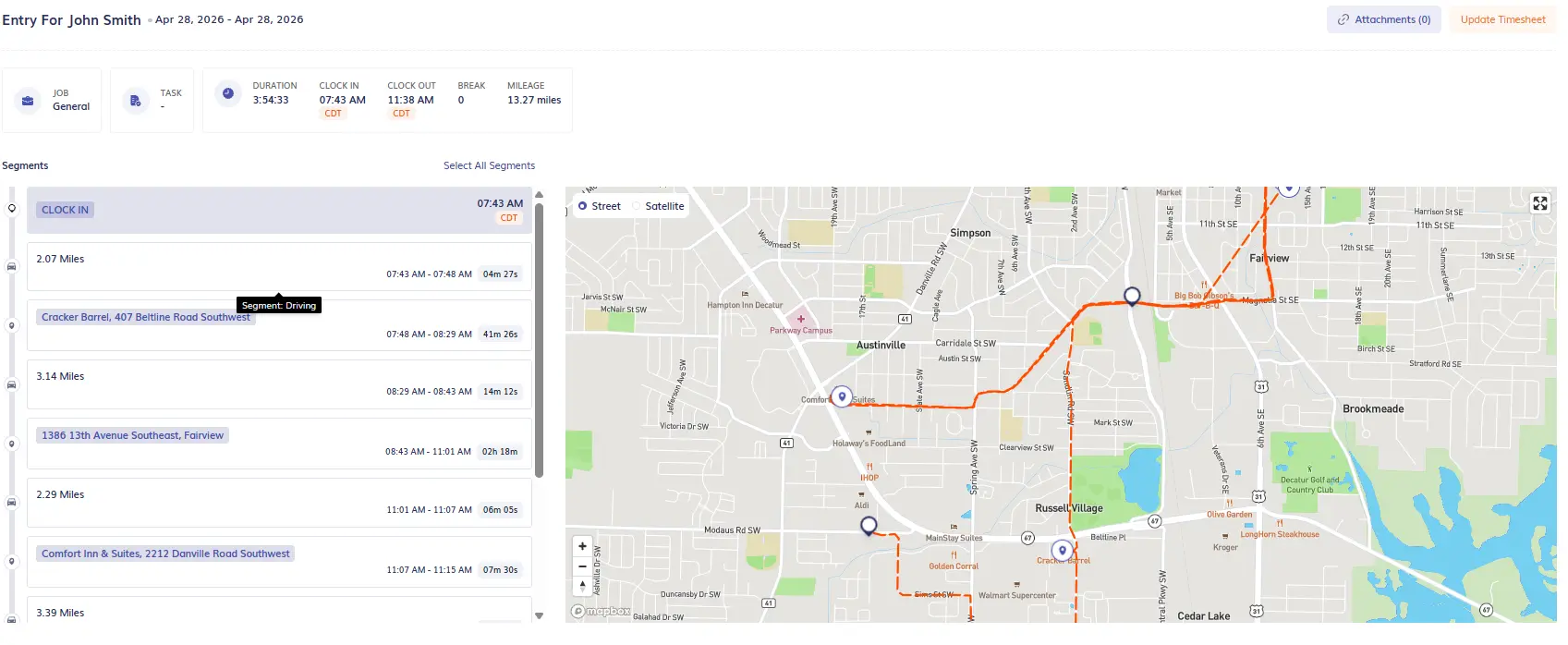
For teams that make multiple stops throughout the day, Timeero’s Segmented Tracking continuously tracks mileage without employees needing to start/stop the time clock at each location.
Timeero recognizes when a driver has made a stop and records the location on the Segmented Tracking timeline. When they begin driving again, mileage tracking resumes as normal – no gaps in records or stalls in the route map.
Segmented Tracking allows managers to see each stop that a driver makes, when they arrive at/departed the location, the mileage driven between stops, as well as how long they spent at each location. This feature is great for fleets, sales reps, and any industry that wants to better track drive time to maximize cost savings.
Segmented Tracking shows each stop a driver made during their work day.
GPS & location tracking
TripLog
TripLog offers basic GPS tracking that captures starting and ending trip points throughout the workday. While the app records driving routes, location tracking is primarily tied to mileage tracking rather than workforce visibility — meaning managers have limited insight into where employees are in real time.
TripLog does not offer a real-time dashboard for monitoring employee locations, and there is no route replay feature available from the mobile app or desktop site. Managers looking for live workforce visibility will find TripLog falls short.
Timeero
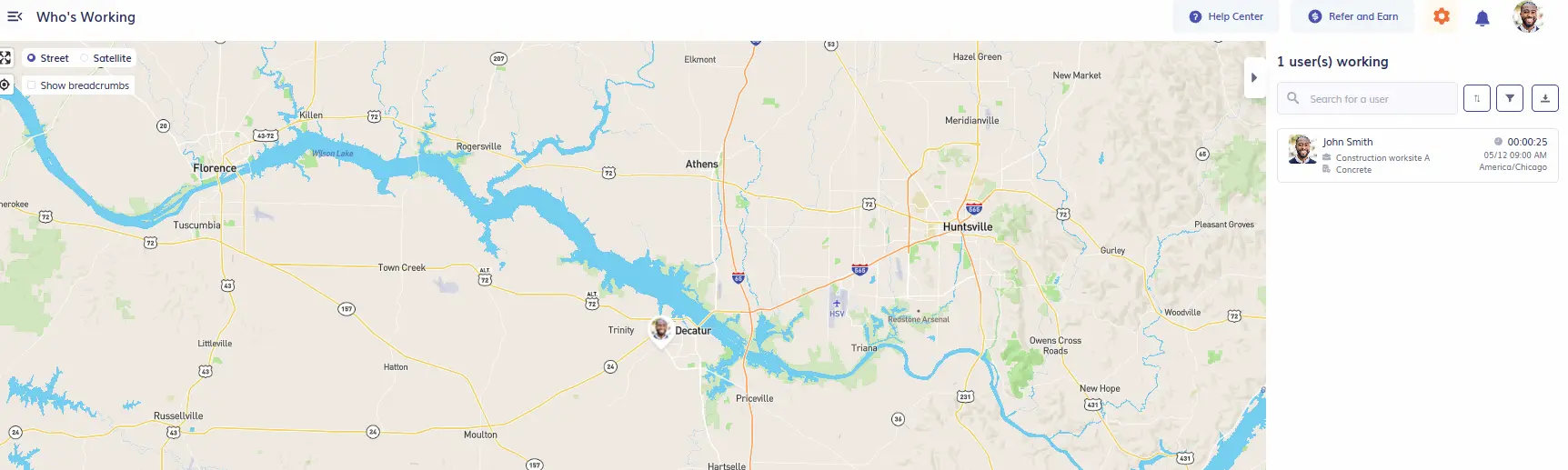
Timeero is built around real-time GPS visibility, giving managers a live view of their entire field workforce from a single dashboard. From the "Who's Working" screen, managers can see every active employee's current location, clock-in time, and assigned job — all updated in real time.
Timeero’s “Who’s Working” dashboard
Timeero drops virtual GPS breadcrumbs along an employee's driving route throughout the workday. Managers can open Route Replay from the Time and Mileage menu to review a worker's exact path, including driving speed and location timestamps at each breadcrumb point.
View GPS breadcrumbs through Route Replay
This level of detail makes it easy to resolve client disputes, verify job site visits, and ensure accountability across the team.
Auto Clock-In/Out & Time tracking
TripLog
I expected TripLog’s time tracking system to function like other mobile time clock apps I’ve tested, allowing me to clock-in to jobs/tasks and take breaks from a designated clock-in screen.
Instead, when you use TripLog’s mobile app to track work hours, you click a small button at the bottom of the screen to start and stop the time clock.
TripLog’s time tracking feels more like an afterthought, and isn’t the app’s strongest product offering.
Auto Clock-In/Out
TripLog does not offer auto clock-in/out which is a feature most field teams request to eliminate missed punches.
Timeero
Timeero is built to function as a GPS time and mileage tracking app. The first screen shown on the mobile app is the time clock where employees can clock-in and out, take breaks, and attach photos and notes to timecards.
When employees clock-in to a job or task, a timesheet is automatically created and all time is allocated to the selected project for accurate job costing. Workers can switch between jobs/tasks without needing to clock-in or out, a function that TripLog lacks.
Auto Clock-In/Out
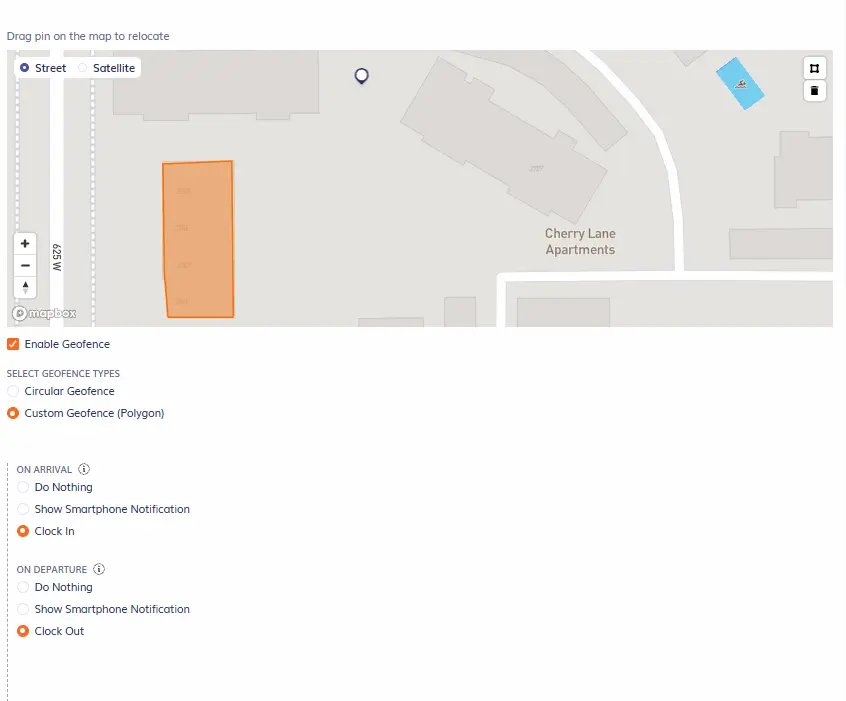
Field teams that struggle with timesheet errors and missed punches can use Timeero’s auto clock-in/out feature to automatically track employee time when they arrive at and depart a geofenced job site.
Enable Auto Clock-In/Out by selecting the action at arrival/departure of a geofence
Break tracking
TripLog
TripLog does not offer users break tracking, which is a major limitation for field teams. While employees can log their hours worked, they can not input breaks. The only option is for workers to clock out every time they take a break and clock back in when they return to work, which opens up the door to break violations and compliance violations.
Timeero
Timeero has a rich break tracking system that is perfect for field teams working in states like California with strict labor laws.
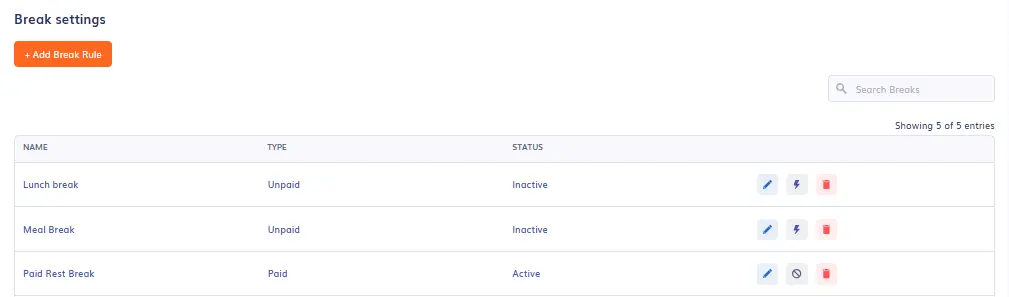
Managers first configure their company’s break settings, customizing break rules.
Companies can create custom breaks for teams
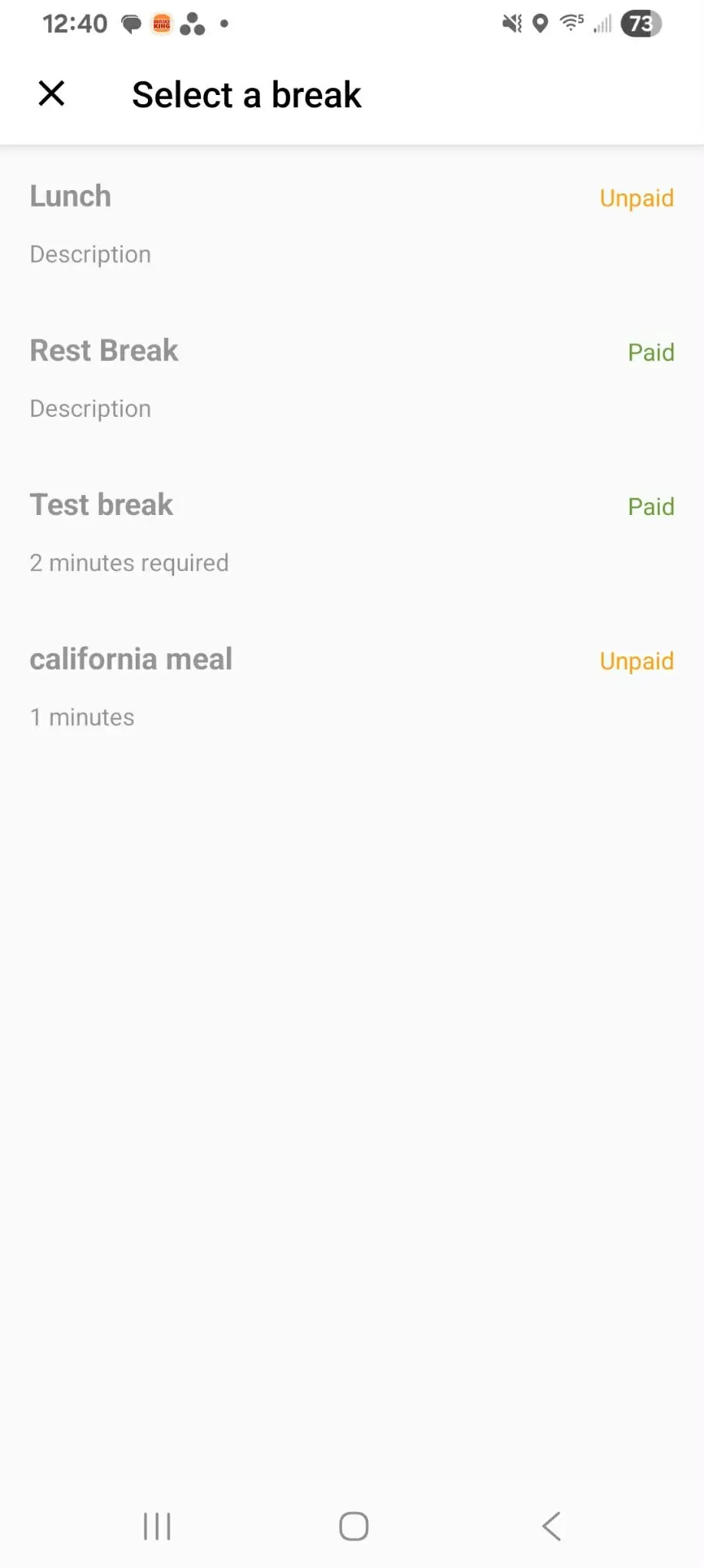
Employees open the Timeero mobile app and select “Start break” and then choose the type of break they want to take. All break time is recorded automatically on an employee’s timesheet, no need to manually enter in break details unless an employee forgot to log their break.
To help employees take their breaks on time and prevent break violations, managers can define the break duration and restrict employees from being able to end their break early, as well as remind them when it is time to return to work.
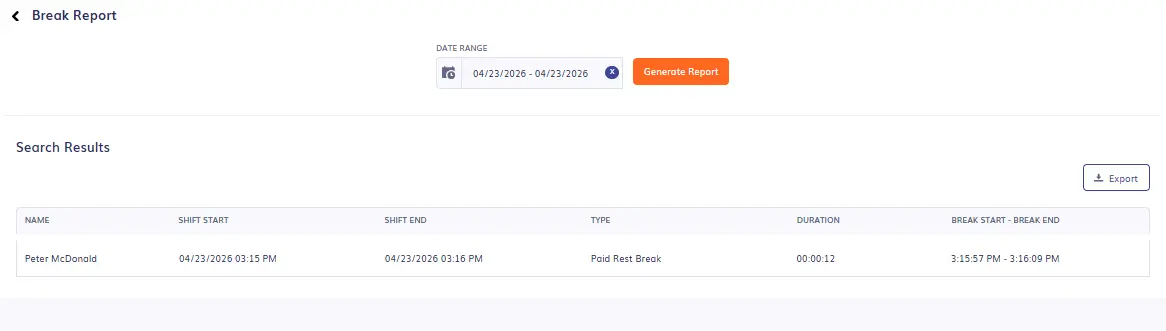
Managers can generate break reports for specific dates to see who has or has not taken their daily breaks.
Generate a break report to view employees’ break details.
For California employees, managers will enable California Break Tracking through Company Settings. Employees must be assigned to California Breaks in order for break reminders and daily sign-off forms to trigger.
Timeero’s break tracking system is built for busy field teams that want to maximize break compliance. The app’s break reminders and custom break rules make it a natural fit for teams operating in strict states like California, Washington, and Oregon.
Offline mode
Note: To test each app’s offline tracking capabilities, the mobile device is put into airplane mode.
TripLog
Before putting the mobile device in airplane mode, I did a bit of research on TripLog’s offline tracking capabilities. I found that the software does not include offline tracking unless you purchase the TripLog Drive device ($79.99 hardware purchase).
For field teams that work in remote locations, having the ability to track time and mileage while offline is a must-have. The additional cost of hardware is a drawback for many companies with large teams, as one device must be purchased for each vehicle. Additionally, the TripLog Drive device does not track employee time, only mileage.
With my device placed in airplane mode, I was still able to clock-in and out, as well as take breaks. When I switched out of airplane mode and reconnected to Wi-Fi, my time and mileage was automatically synced with my Timeero account.
Field teams often work in conditions with spotty internet service. Having the ability to accurately track time, mileage, and location history while offline is a huge plus for field teams that want to reduce the amount of timesheet errors and payroll fixes.
Scheduling
TripLog
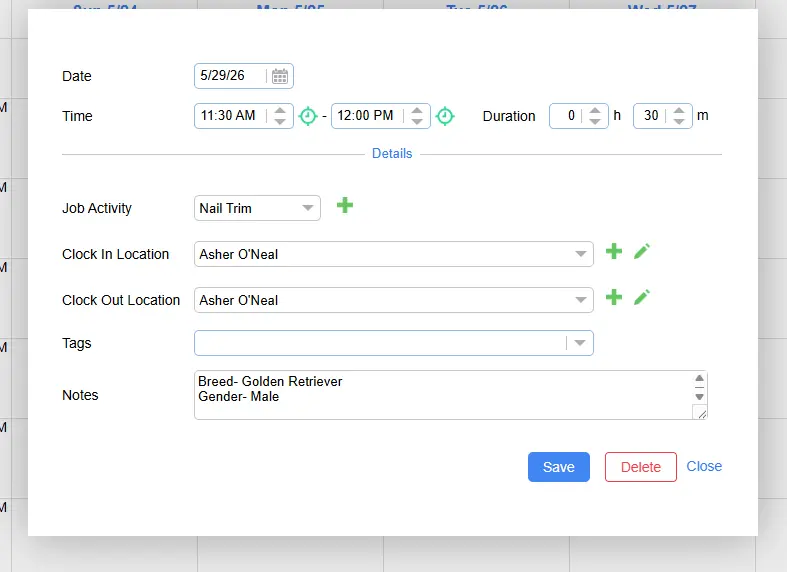
TripLog’s scheduling feature gets the job done. Once you navigate to the scheduling page, click on “+Add” to create an employee shift.
Managers will input basic shift information, including job activity, clock-in and out locations, and shift notes.
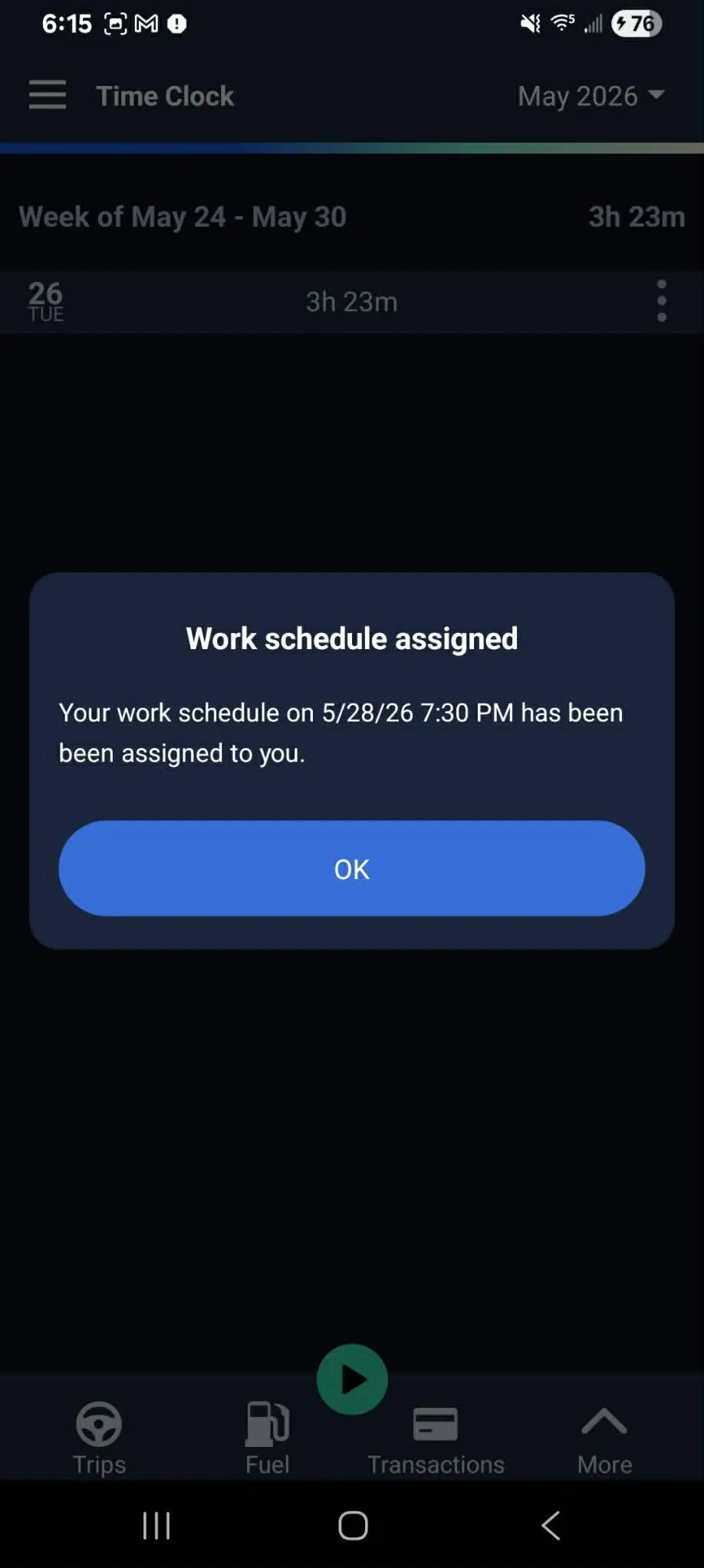
Once a shift is assigned to an employee, they receive a notification in-app.
In-app schedule notification
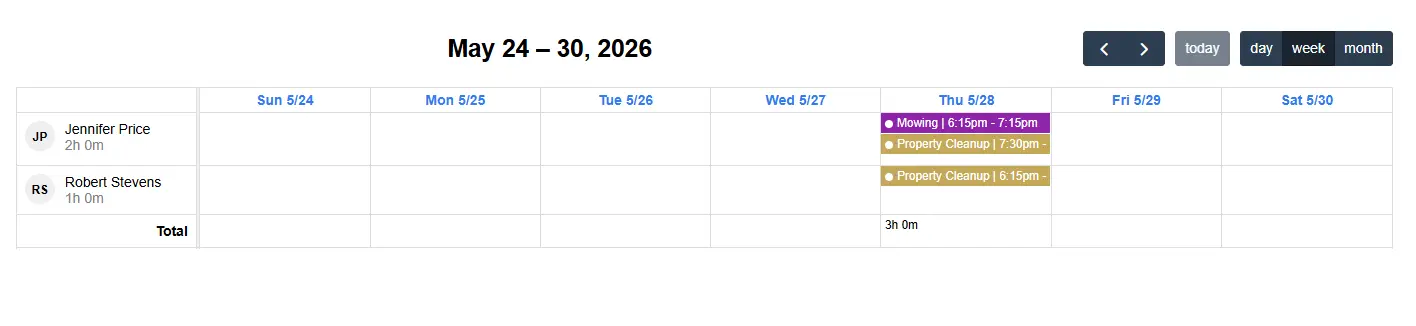
The work schedule can be viewed from the desktop site, as well as the employee’s mobile device.
Weekly schedule (desktop view)
Timeero
Timeero’s scheduling feature operates in a similar fashion as TripLog, but the workflow is much smoother.
Managers and/or supervisors navigate to the “Scheduling” menu and click “Add Schedule”. When the job assignment is selected, the address is prepopulated. Once the shift time and employee have been added to the schedule, it is now ready to be published.
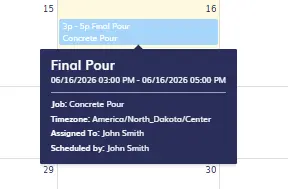
Hovering over the shift displays the schedule information.
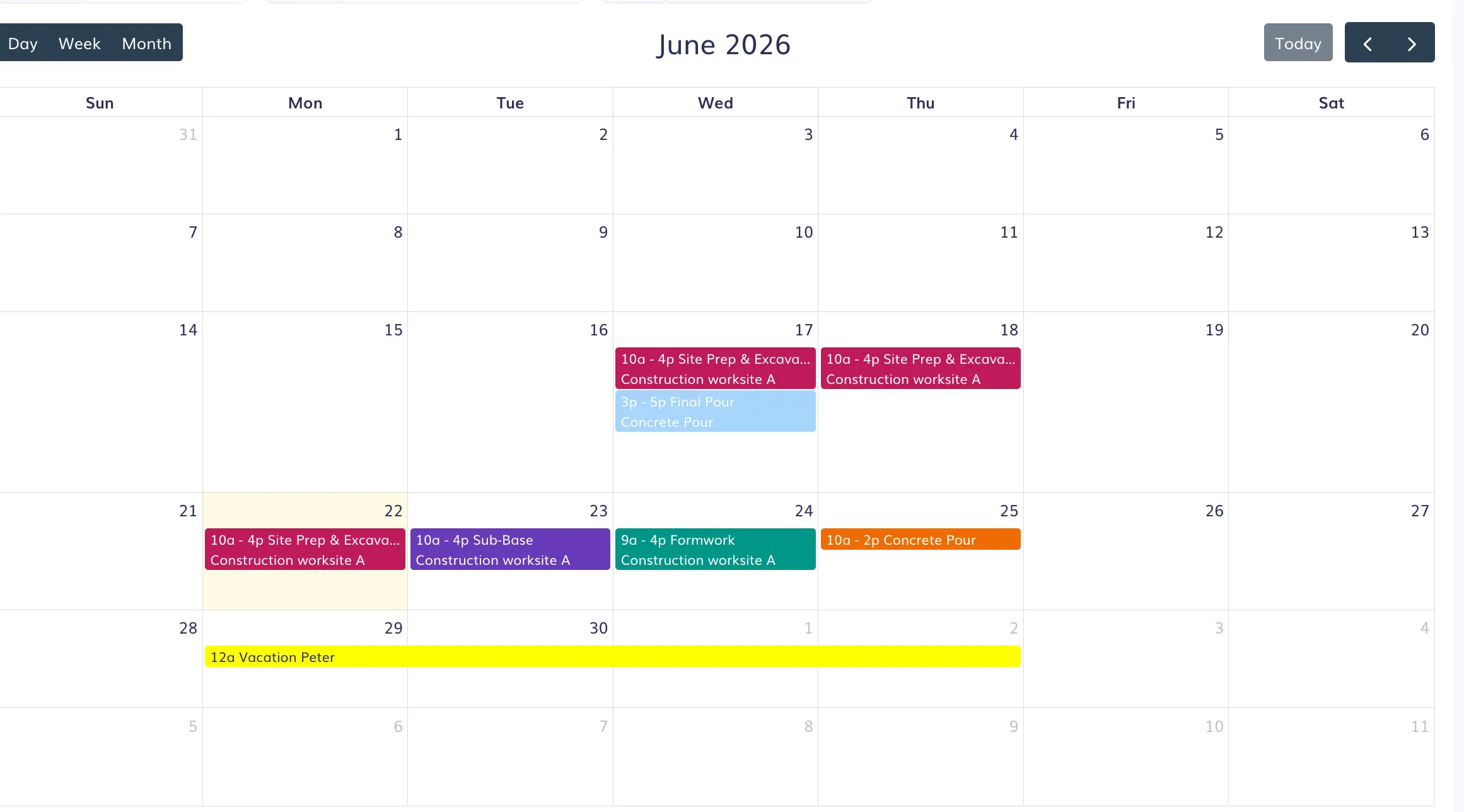
Company schedules can be viewed in daily, weekly, or monthly format. If a shift needs to be changed to a different date, managers can easily drag-and-drop the shift to another day or week.
Easily drag-and-drop scheduled shifts from the desktop site.
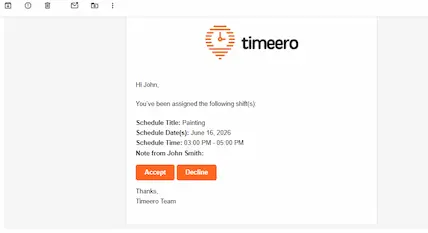
Employees are sent emails each time a shift is assigned to them or their schedule has been changed.
Email notification of shift assignment
Pricing Comparison
TripLog
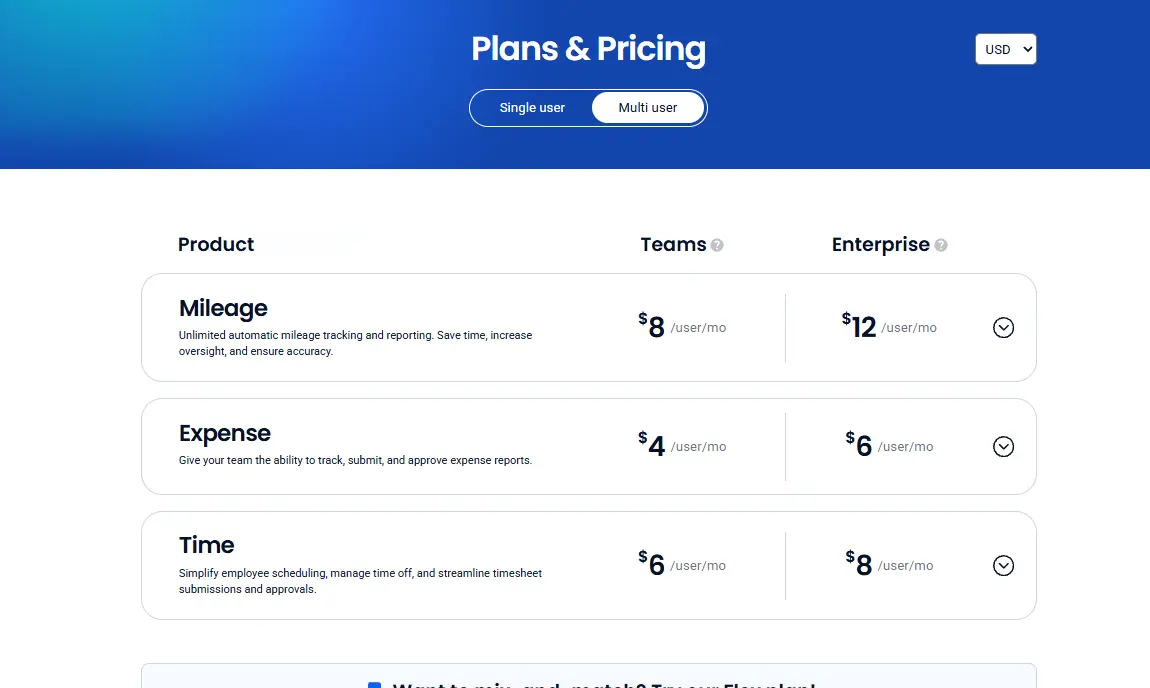
TripLog offers mileage, time, and expense tracking in three separate packages. If you are a field team or small business that needs time and mileage tracking, you will be paying for Teams plans for each product.
For a team of 10 users this looks like:
Mileage tracking at $8/user/month + Time tracking at $6/user/month
$8 x 10 users + $6 x 10 users = $140 per month
Furthermore, TripLog requires separate hardware: the TripLog Drive ($79.99) and Beacon ($19.99).
Timeero
Timeero helps field teams save on administrative costs by combining the features field teams need into one product package, regardless of the plan chosen.
Plan
Features
Basic$6/user/mo $5/user/mo (annual)Up to 10 users
GPS tracking, time tracking, mileage tracking, break tracking
Pro$9/user/mo $7.50/user/mo (annual)
Everything in Basic, plus:
Auto Clock-In/Out, job tracking, payroll integrations, scheduling, California Break Policy, geofencing, photo attachments
Premium$12/user/mo $10/user/mo (annual)
Everything in Pro, plus:
Time-off management, facial recognition (Kiosk), commute mileage, suggested mileage, EVV, public API, signatures, custom fields
See a complete, transparent breakdown on our pricing page.
For example, a team of 10 needing basic GPS, time, mileage, and break tracking can subscribe to the Basic plan for $50.00/month. That is a total cost savings of $90.00 compared to TripLog.
Timeero does not require additional hardware purchases for offline tracking like TripLog does.
However, optional add-ons are available:
Segmented Tracking - $5/user/month for Pro/Premium plan users
Messaging - $2/user/month for Pro/Premium plan users
Expert Guided Onboarding
Timeero vs. TripLog - Our verdict
Choosing the best GPS time and mileage tracking app for your field team can be a tough choice.
Here’s what we suggest:
Choose TripLog if you are looking primarily for a mileage tracking app with expense management features. TripLog specializes in mileage tracking, offering multiple ways for drivers to track their daily trips. The app’s receipt scanning feature and the ability to connect bank/credit accounts make it a great choice for teams wanting to track mileage and driving-related expenses throughout the year.
Choose Timeero if you are looking for a GPS time and mileage tracking app with advanced compliance features and real-time visibility for field teams. Timeero’s Auto Clock-In/Out and automatic mileage tracking make it a great fit for busy teams that work across multiple locations. The app’s California Break Tracker is a stand out feature for teams that want to avoid premium pay penalties and fines in the state of California. Timeero simplifies payroll, job costing, and workforce management for field teams of all sizes.
If you’re a solo driver or field team that is only looking for a mileage tracking platform, MileIQ or Everlance may be better solutions for your business.
How automated mileage tracking and GPS visibility help employers stay compliant
When businesses employ hundreds of field workers across multiple locations, accurately tracking time and mileage can be a challenge. Workers either forget to start the time clock or find themselves in locations without a stable internet connection which makes mileage tracking impossible.
Timeero automates mileage tracking for field teams, capturing GPS-backed records in real time and attaching them to an employee’s timecard. With real-time GPS visibility, managers are able to resolve employee/client work hour disputes quickly and avoid costly PAGA claims.
Which GPS tracking app is right for your field team?
After our hands-on testing, it’s obvious that Timeero is the best GPS tracking app for field teams. The app offers real-time GPS time and mileage tracking as well as break tracking in one package starting at $50/month for a team of 10 users.
For businesses managing mobile teams across multiple locations, Timeero delivers more features at a lower total cost with no additional hardware required.
Does TripLog track mileage automatically for teams — or only for individual users?
TripLog offers users multiple ways to track mileage automatically, at the individual and team level. For example, TripLog’s MagicTrip automatically detects when a user is in motion and begins recording mileage. However, MagicTrip has made mistakes distinguishing between walking movements and driving.
Can TripLog work offline without additional hardware?
Not at this time. TripLog requires users to use the TripLog Drive device for offline tracking.
Does TripLog have geofencing or auto clock-in/out?
No, TripLog does not have geofencing or auto clock-in/out. Although the app does have geofencing capabilities, it is only to set the perimeter around an area to begin mileage tracking, it is not for time tracking.
What is Segmented Tracking and how is it different from a standard breadcrumb trail?
Segmented Tracking is used when a field employee makes multiple stops during the day and doesn’t want to clock-in/out to start and stop mileage tracking. Timeero uses Segmented Tracking to continuously track mileage, regardless of the number of stops made. A breadcrumb trail consists of virtual GPS breadcrumbs that are dropped along a driving route to increase the accuracy of mileage tracking. Breadcrumbs are timestamped and help recreate an employee’s driving route.
Which is better for a field service team: Timeero or TripLog?
Field service teams needing real-time GPS visibility, time and mileage tracking, as well as compliance features should choose Timeero. TripLog succeeds as a mileage tracking app with expense management features, but its time tracking system is not built for field teams working across multiple locations with break compliance needs.
Don’t pay extra just to make your tracking software work.
Jessica is a skilled writer and proofreader with a unique flair for crafting engaging and impactful content. Her work reflects her ability to connect with clients on a personal level while successfully addressing their most pressing concerns. Jessica's professional background includes: teaching, social media marketing, and e-commerce. She resides in Alabama and loves the Golden Girls sitcom.



.webp)
%20(1).webp)

%202.svg)


.png)
.png)



.png)


