Supercrew vs Timeero (2027): Which Is Better for GPS & Mileage Tracking?
Jessica Helms
Last update on:
November 19, 2026 9:20 AM
Published on:
November 19, 2026
TL;DR
Thinking about switching from Supercrew to another time tracking app? Or comparing Supercrew and Timeero to decide which one is right for your team?
Maybe your team is forgetting to clock in and out and mileage reimbursement costs are through the roof, or you need better visibility into where your field team spends its time.
Formerly known as ConstructionClock, Supercrew rebranded in September 2026 with a new name but no changes to the app’s tracking capabilities. So, if you're exploring your options, is Timeero a good alternative?
I tested both apps side by side during November 2026 to compare their time tracking, GPS capabilities, mileage tracking, break compliance, and pricing. Here's what I found.
TL;DR
Use Supercrew if your field team needs basic time tracking, location visibility and job costing.
Use Timeero if your field team needs mileage tracking, break tracking, and California compliance features.
Timeero is the more affordable mid-tier option: a 10-person crew pays $90/month on Timeero Pro versus $120/month on Supercrew Team.
Supercrew handles forgotten clock-outs better, with privacy zones that stop tracking when workers arrive home, while Timeero tracks until a manual clock-out or a max shift length.
Looking for a Supercrew or ConstructionClock alternative?
I tested both Supercrew and Timeero using my iPhone 17e. I ran both apps simultaneously during drives, and created fictitious jobs and locations to test how well both apps handle time, mileage, and GPS tracking. I put my device in airplane mode to test how well the apps handle tracking time and mileage offline.
I tested features and workflows on the mobile and desktop site of Supercrew and Timeero for two weeks. This article reflects actual hands-on testing including screenshots from both platforms.
Supercrew vs Timeero at a glance
Supercrew
Timeero
Best for
Construction teams that need job-specific time tracking and basic location visibility
Distributed field teams that need time, mileage, and GPS tracking and/or compliance features
No base fee; Team plan starts at $12/user/month (monthly)
No base fee; Pro starts at $9/user/month (monthly)
Supercrew vs. Timeero: key differences and similarities
Basic time tracking is the same for both apps, but the differences show in GPS, mileage, and compliance.
What’s the same
Mobile time tracking: Both mobile apps have easy to navigate timeclocks, teams can clock-in to jobs and track time with one tap.
Auto Clock-In/Out: Supercrew and Timeero use geofences to trigger Auto Clock-In/Out.
Live location tracking: Both apps show workers’ current GPS location on location maps
Offline tracking: In airplane mode and with WiFi disabled, both apps continued to track my time, allowed me to clock-in/out and tracked my route.
What’s different
Mileage tracking: Timeero calculates mileage totals from GPS data, teams using Supercrew will need to manually enter mileage totals into timesheet notes.
Geofences: Supercrew only offers circular geofences and requires them for every job. Geofences are optional for jobs in Timeero, but circular and polygon geofences are offered.
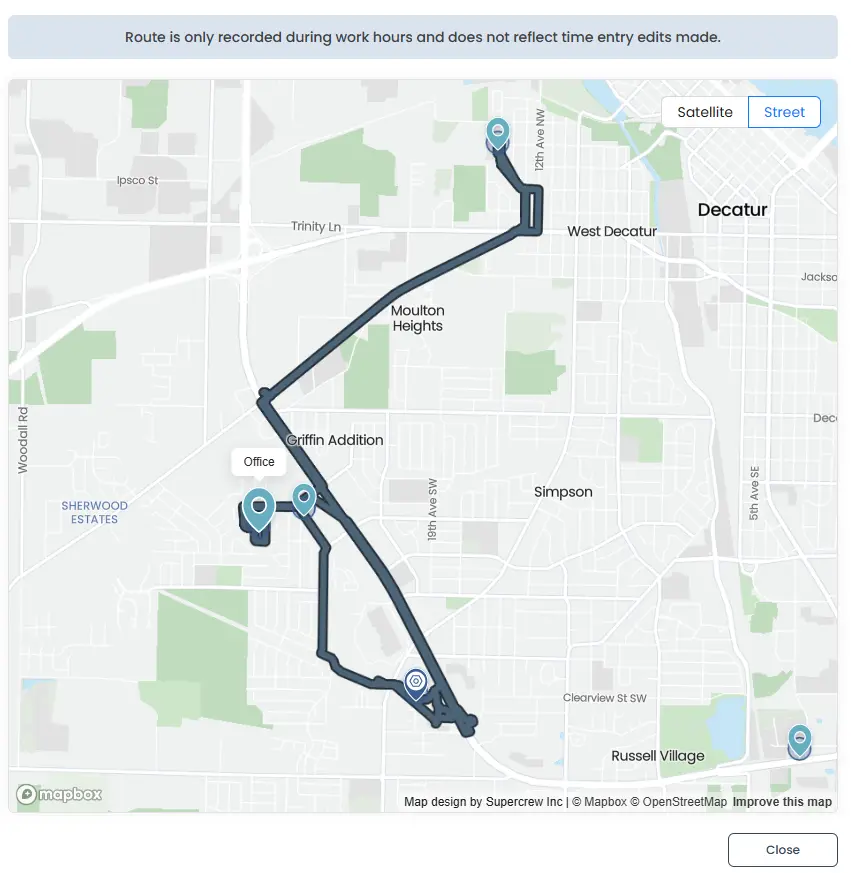
Multi-stop Tracking: Timeero’s Segmented Tracking shows every stop made along a driving route as well as total time and mileage for each stop. Supercrew only tags job locations and lacks detailed insights on the route map.
Break tracking: There is no “break” button for employees to start or stop their breaks. Workers will need to either clock in or out to take a break or the company will need to enable autodeduction for unpaid breaks. Timeero has a “break” button on the mobile app and allows employees to choose their break type.
Supercrew vs. Timeero: feature-by-feature comparison
Timeero can block off-site clock-ins, but Supercrew allows manual ones in automatic mode
The whole point of creating geofences around a job site is to increase the accuracy of timesheets by eliminating the ability employees have to clock in from outside of a work zone. While testing Supercrew, I attempted to manually clock in to a job with its geofence in a different state. I was surprised when I was allowed to clock in, but I was clocked out by the system within seconds.
Supercrew allowed my manual offsite punch but immediately clocked me out
I tried to clock in to a different job, “Maintenance” with a geofence in Utah. The timesheet shows that I clocked in offsite, but I was automatically clocked out at 3:50, which means 10 minutes made it to my timesheet if the payroll team doesn’t review flagged entries.
My offsite punch was allowed, but I was automatically clocked out without an offsite flag
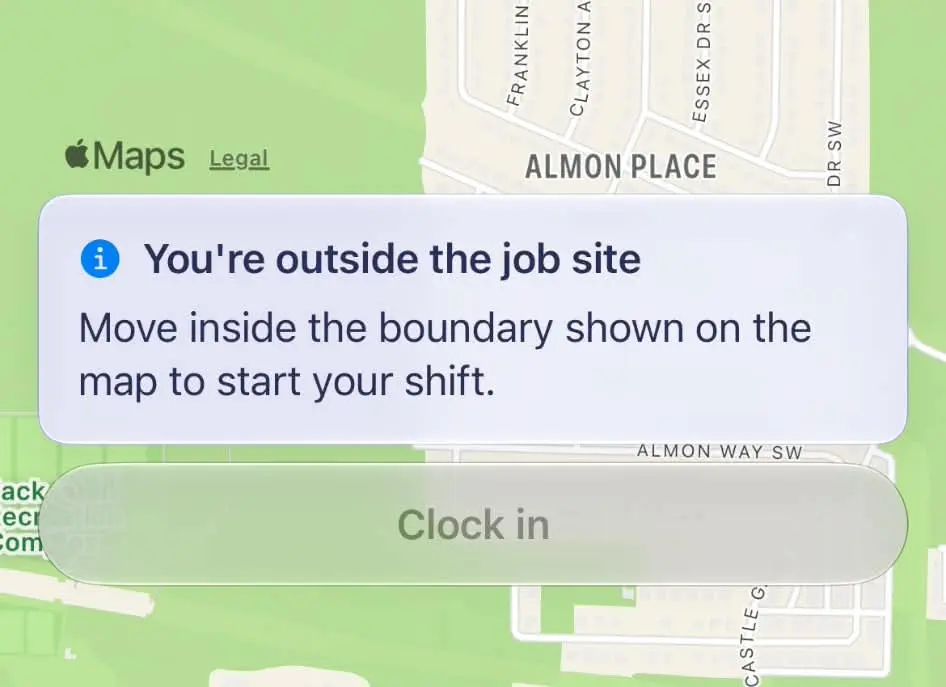
Geofences that block offsite clock-ins are an important part of time tracking for distributed teams. Timeero blocked my attempted clock in, not even adding it as a time entry on my timesheet.
Timeero successfully blocked my attempt to clock in offsite.
Both apps track your route, but only Timeero turns it into mileage
Supercrew tracks workers’ driving routes, but does not calculate mileage during the drive. Instead, crews will need to add mileage manually in the note section on the mobile time clock.
Workers manually add mileage totals to timesheet notes
This means that mileage reimbursement will only be as accurate as a worker’s mileage log. Without automatic mileage tracking, your team will need to keep a separate mileage record through either another app, a paper log, or spreadsheet. All of these methods increase the risk of mileage disputes or reimbursement over/under-payments, something that could easily be avoided.
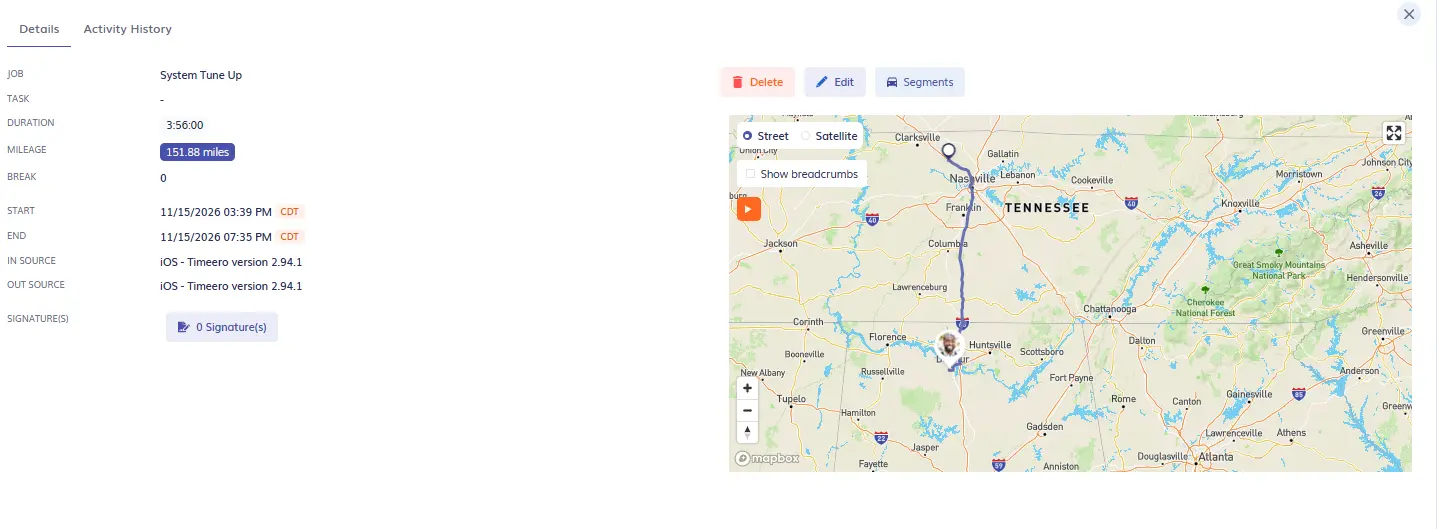
Timeero not only tracks your teams’ driving routes, but also calculates mileage totals and reimbursement amounts from GPS data.
Timeero calculates mileage from the GPS route
Payroll runs a lot smoother when mileage is tracked and calculated automatically based on actual driving instead of from handwritten notes and estimates.
Timeero can split a drive into stops, while Supercrew shows only total travel time
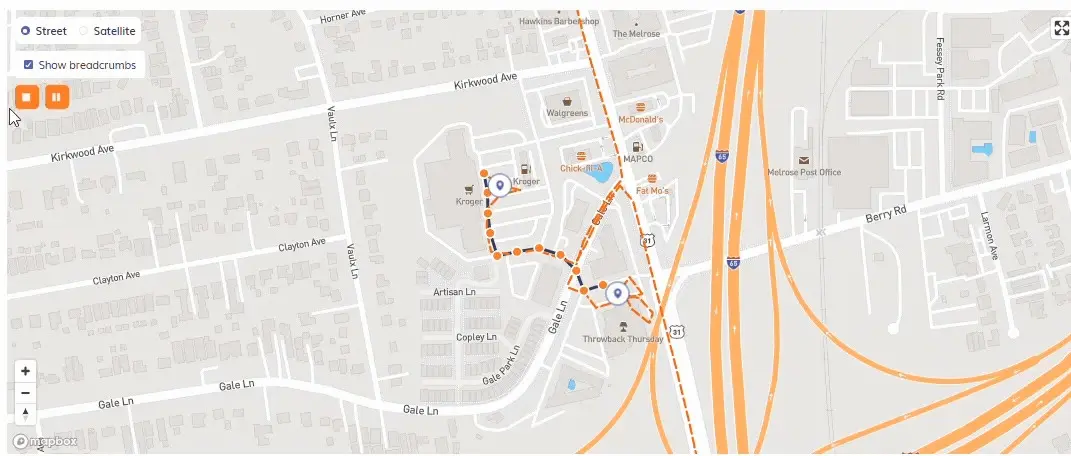
One of the most significant differences I noticed between both apps was how each handles multi-stop tracking. Timeero’s Segmented Tracking shows each stop a driver makes during their workday. This is helpful for sales teams, property managers, or maintenance technicians that travel to multiple sites during their shift.
Segmented Tracking provides insights into how much time and mileage were accrued between stops, how long a team spent at a work location, as well as which jobs were visited.
Investigate the details of driving stops, including routes
Managers can click on individual segments to zoom in on location details, review GPS breadcrumbs, and watch an interactive route replay.
Supercrew only shows travel as a block of time; it does not show individual stops made along the driving route, only job locations.
Supercrew pins job locations on the route map, but not the stops made
This is not very beneficial for distributed field teams that need visibility into time and location tracking.
Timeero tracks break compliance, while Supercrew only auto-deducts breaks or relies on manual punches
Field teams that need compliance features will find Timeero is built for teams with strict break requirements. For example, California employers must offer their employees meal and rest breaks every day or they are required to pay the affected workers premium pay.
Employers can assign employees to Timeero’s California break rules, which tracks whether the workers took their required meal and rest breaks, capturing their personal break attestation at the end of their shift.
California employees fill out a digital attestation form at the end of their shift
Supercrew tracks breaks in two ways:
Employees clock out then back in to start/stop breaks
Autodeduct an unpaid break from employees
Both of the options Supercrew offers are not recommended for companies that want to track break compliance. The first option does not leave any break documentation on the employee’s timesheet unless they entered break times in the timesheet notes. The second option deducts break time, but there is no proof that the worker actually went on a break.
Timeero doesn’t require a geofence for each job, while Supercrew does and clocked me in on a drive-by
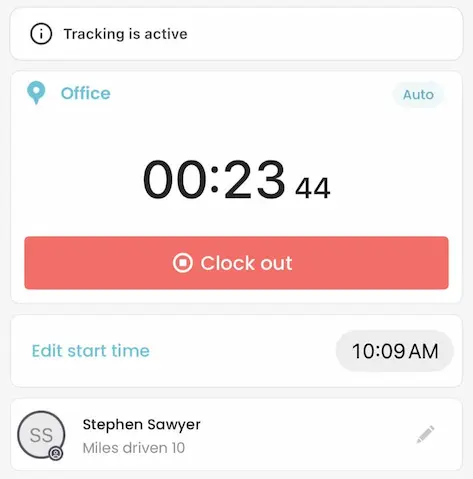
Timeero does not require a geofence be drawn for every job, adding that control is optional. I enjoy that flexibility, because when I traveled to a different job site during my test shift, I didn’t have to worry about making sure Auto Clock-Out was disabled. I could drive to my next destination and keep my time worked on the same timesheet.
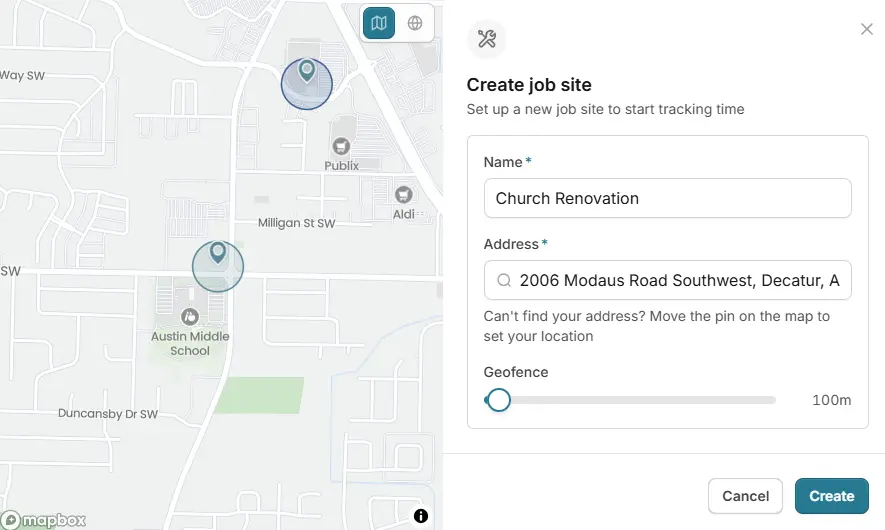
Each time I wanted to create a new job through Supercrew’s mobile app, a location was required to create a geofence around the work site.
Supercrew creates a geofence for every job site
While this does restrict clock-ins to jobs only, it poses a problem for job sites that are close together, let’s say an apartment complex for example.
During my testing, I drove by a job site and was automatically clocked in for 10 seconds, even though I wasn’t working at that location. Even though automatic time tracking can be disabled, Supercrew has a lot of checks that you will need to conduct if you want to prevent accidental clock-ins/outs which is a lot for a busy field team to handle.
Supercrew’s privacy zones prevent tracking when a forgotten punch happens, while Timeero tracks until the max shift length
Both Timeero and Supercrew only track time and location while an employee is on the clock. By default, Supercrew stops all tracking outside of a worker’s defined schedule, while Timeero requires a clock-out action to stop tracking.
According to Timeero’s 2026 GPS Tracking and Employee Trust Report, 22.8% of workers surveyed worry about being tracked outside of work hours. I included this observation in my comparison because your employees care about how your company handles location tracking outside work hours – including when they forget to clock out. This could shape your final decision.
Timeero tracks time, location, and mileage as long as an employee is on the clock, so your company will need to create a geofence around a job and enable Auto Clock-In/Out to make sure tracking stops once the worker has left the job site.
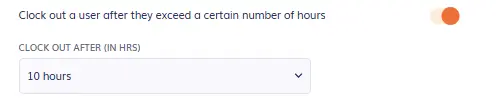
The only other work around Timeero currently has to make sure location tracking is turned off when there is a forgotten punch is to force clock out workers once they reach a max number of hours worked per day.
Timeero will force clock out an employee after they exceed a max number of hours
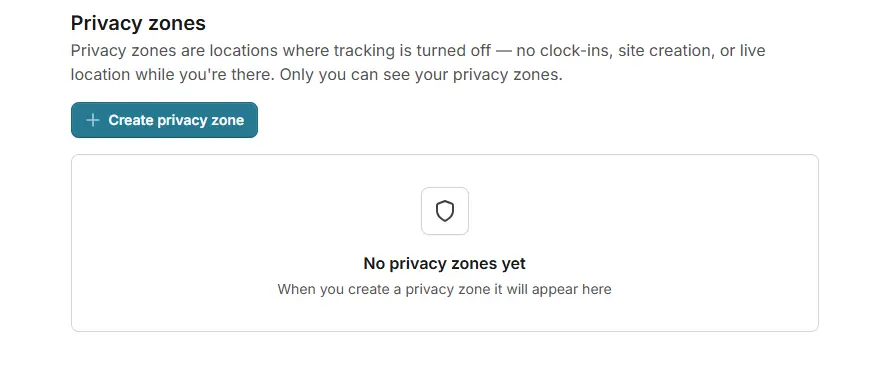
Supercrew allows workers to set up “privacy zones” around locations such as a doctor’s office, home, or school that they don’t want tracked. If a worker left the job site early and forgot to clock out and then drove home, Supercrew recognizes their house as a privacy zone and automatically stops all time and location tracking.
Create a privacy zone in Supercrew to prevent unauthorized location tracking
I feel like Supercrew has the advantage in what happens when a crew member forgets to clock out.
For 10 users, Timeero Pro saves $360 a year over Supercrew Team
Supercrew Team
Timeero Pro
Price per user (monthly billing)
$12/month
$9/month
10-person crew (monthly)
$120/month
$90/month
Time tracking (manual clock-in/out)
✓
✓
Auto Clock-In/Out
✓
✓
Geofencing
✓
✓
Live GPS tracking
✓
✓
Mileage tracking
✕
✓
Break tracking
✕
✓
California break policy
✕
✓
Photo attachments
✓
✓
Segmented Tracking
✕
✓
Scheduling
✕
✓
Messaging
✕
✓
Offline tracking
✓
✓
Integrations
✓
✓
Supercrew offers a 7-day free trial, while Timeero offers a 14-day free trial
Supercrew vs. Timeero: Which app is right for your team?
Choose Supercrew if:
Your construction crew mainly needs straightforward, job-specific time tracking with labor hours and costs tracked against project budgets.
You work at fixed, well-spaced job sites where requiring a geofence for every job won’t cause accidental clock-ins from nearby locations.
You rely on tools like CompanyCam or Sage100 Contractor and want time data to flow into them.
Your workers are concerned about off-hours tracking, since privacy zones automatically stop time and location tracking when someone forgets to clock out and heads home.
Choose Timeero if:
Your team drives between multiple sites and needs mileage and reimbursement calculated automatically from GPS data, with Segmented Tracking showing every stop along the route.
You need to document break compliance, especially California meal and rest breaks, with a dedicated break button and end-of-shift attestations.
You want stricter timesheet accuracy, with geofences that block offsite clock-ins entirely and optional circular or polygon shapes for job sites that sit close together.
You want scheduling, multi-level timesheet approvals, in-app messaging, and a wider range of payroll integrations, all at a lower starting price of $9 per user per month.
FAQs
Is Supercrew the same as ConstructionClock?
Yes. ConstructionClock rebranded to the name Supercrew in September 2026.
Is Timeero a good alternative to Supercrew for construction companies?
Yes, Timeero is a good alternative to Supercrew for construction companies, with strong GPS, mileage, and compliance features. Timeero offers real-time GPS tracking with automatic mileage calculations based on driving routes and GPS data.
Can Timeero and Supercrew automatically clock workers in and out when they arrive at a job site?
Yes, both apps offer Auto Clock-In/Out. When this feature is enabled, geofences trigger the clock-in/out action.
Does Supercrew or Timeero track mileage and calculate mileage reimbursement?
Of the two apps, Timeero tracks mileage and calculates reimbursement totals. Supercrew tracks driving routes, but only logs “travel time”.
Does Supercrew or Timeero offer employee scheduling, timesheet approvals, and team communication?
Supercrew does not offer employee scheduling, timesheet approvals or team communication. Timeero offers scheduling with drag-and-drop capabilities, multi-level timesheet approvals, and in-app Messaging.
Switching from Supercrew (ConstructionClock)?
Timeero calculates mileage from the same GPS data it uses for hours, so your crews don’t log miles by hand.
Jessica is a skilled writer and proofreader with a unique flair for crafting engaging and impactful content. Her work reflects her ability to connect with clients on a personal level while successfully addressing their most pressing concerns. Jessica's professional background includes: teaching, social media marketing, and e-commerce. She resides in Alabama and loves the Golden Girls sitcom.