Connecteam is a strong scheduling and communication platform. But, its features weren’t necessarily built for field teams. Its GPS tracking is not detailed enough, mileage reimbursement is manual, and it lacks the location-tracking needed to prove compliance.
Unreliable location and reimbursement data and undocumented break violations can leave your business exposed to IRS scrutiny and legal risk, especially in California.
What field teams need is an alternative built around the realities of field work, offering GPS field tracking, automatic mileage reimbursement, verifiable compliance documentation.
Timeero is the strongest Connecteam alternative that is purpose-built as a field workforce visibility platform for companies who constantly operate outside the office.
Connecteam has built a genuinely strong reputation among businesses that need to keep deskless teams organized. It brings scheduling, communication, onboarding, and HR workflows into a single mobile-friendly platform, and does so in a way that is accessible enough for business without a dedicated IT team to set up and run.
For a lot of companies, Connecteam delivers exactly what it promises. But the reality of field operations can also reveal its limitations.
A dispatcher trying to route a technician to an urgent job needs to know where that technician is right now, not just where they clocked in two hours ago. That single gap has a way of creating downstream problems that show up in payroll, reimbursement disputes, and, eventually, compliance conversations nobody wants to have.
If your operation is running into those same walls, you may be taking a look at different alternatives. We did the research and narrowed down our list to seven of the top Connecteam alternatives for field teams.
Here’s a preview of the apps that made our list:
Timeero
Workyard
ClockShark
Homebase
Deputy
Buddy Punch
When I Work
Still comparing tools?
Timeero gives field teams GPS tracking, mileage, and scheduling — without per-user pricing surprises.
Teams start looking for a Connecteam alternative because they need a better way to track what happens in the field. Although Connecteam is great for communicating and scheduling, field teams need increased visibility into day-to-day operations that Connecteam simply can’t provide.
Here’s a few reasons why field teams start looking for Connecteam alternatives.
1. GPS tracking reliability
When operations leads ask, "can Connecteam track your location?" or "does Connecteam track your location continuously on the road?" they find that the answer comes with limitations.
Connecteam tracks location at the point of clock-in and out, but fails to capture everything in between, including driving routes, stops made, and the time employees spend on-site.
Without real-time GPS tracking, there’s no way to prove what employees actually did while on the clock, which means increased disputes and gaps in time and mileage records.
2. No automatic mileage reimbursement
Connecteam doesn’t automatically calculate mileage. Employees must manually log their trips, which introduces inconsistencies and inaccuracies in mileage records.
A system that depends on employee memory at the end of the day can leave you exposed to IRS fines and audits.
3. Break compliance cannot be documented at the GPS level
California employers carry the highest risk here because the state’s break laws require strict rest and meal period timing.
The penalties for non-compliance under the Private Attorneys General Act (PAGA) are significant. This means that if you cannot prove compliance, your business remains exposed to costly lawsuits and fines.
4. Pricing at scale
Connecteam’s pricing model tiers advanced compliance and integration features into higher-cost add-ons. For smaller field teams, the cost-to-value ratio can shift quickly once you need the features that actually protect the business.
The 7 best Connecteam alternatives for mobile teams
We have ranked seven of the best alternatives to Connecteam based on their ability to solve the core challenges of mobile teams, prioritizing GPS accuracy and field visibility over scheduling and communication.
Below, we break down the strengths and use cases of each app to help you find the best fit for your crew.
1. Timeero — Best overall for field workforce visibility
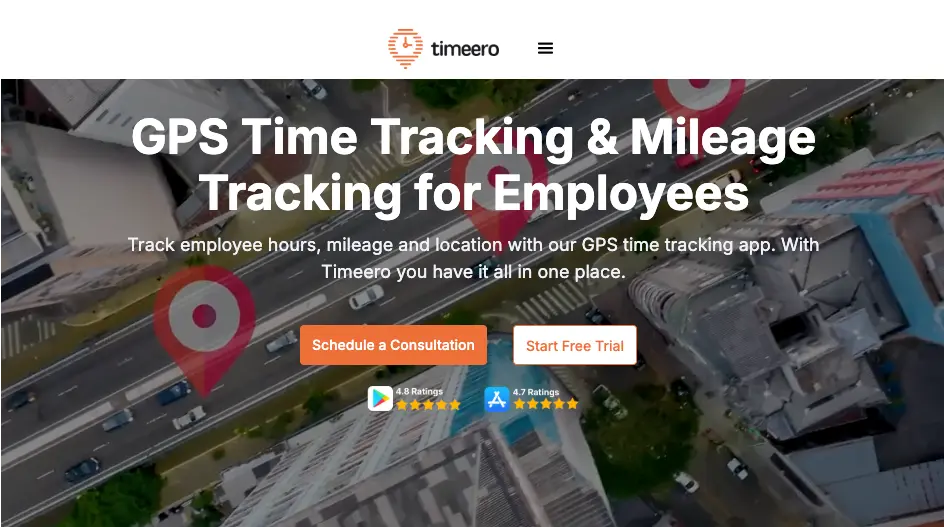
Timeero is a field workforce visibility platform providing users with GPS tracking, automatic mileage reimbursement, and California break compliance.
Best for
Mobile teams who need to track employee location, automate mileage reimbursement, and document break compliance.
Key features
Segmented Tracking
Segmented Tracking splits the workday into individual stops and durations, giving managers a clear, easy-to-review timeline of field activities.
With Segmented Tracking, your mobile employees only punch in once at the start of their day. Timeero automatically tracks the continuous multi-stop route, breaking the day into clean, structured segments based on the stops they make to give you a clear, objective breakdown of driving time versus actual time spent on-site.
GPS breadcrumbs
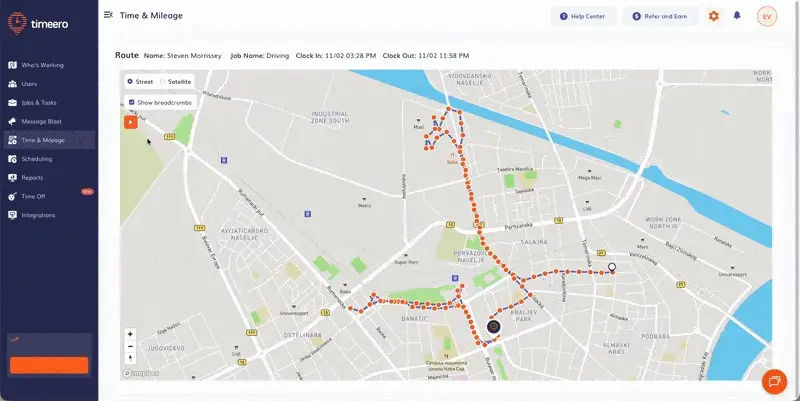
Use Route Replay to reconstruct an employee’s exact path throughout the day.
Timeero uses breadcrumb technology to accurately capture an employee’s driving route throughout the day. Breadcrumbs are dropped every 150 ft. during travel, and include location timestamps as well driving speeds. With Route Replay, you can use breadcrumbs to completely reconstruct a driver's path throughout the workday.
Automatic mileage reimbursement
Timeero automatically tracks mileage as soon as a clocked-in employee begins driving. Once an employee clocks out, Timeero automatically calculates mileage reimbursement for the total miles driven using the IRS standard mileage rate or your company’s custom rate.
California Break Tracker
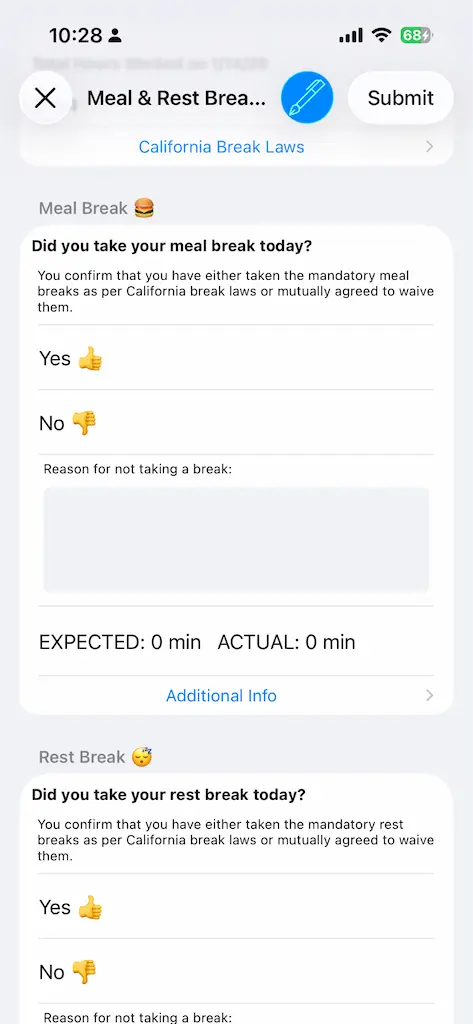
To proactively protect your business, Timeero’s California Breaks Tracker actively enforces mandatory meal and rest period timing with automated alerts once activated.
The daily sign-off form creates an audit-ready paper trail by requiring employees to attest to their daily breaks before logging out
Employees are also required to complete and electronically sign a mandatory daily attestation form before clocking out, verifying they took their required breaks or providing a valid reason if they did not.
“Who's Working?” Dashboard
This dashboard shows you the real-time location of every active employee. With this level of visibility, you can make rapid operational decisions, quickly dispatch the closest team member to an emergency, and manage your workforce based on current conditions.
Geofencing
You can draw custom polygon geofences around your work area to outline irregular work areas and prevent off-site punching.
By setting up geofencing, you can create virtual boundaries around specific job sites to restrict workers from being able to clock-in prematurely or from an unauthorized location.
When enabled, Timeero prevents employees from clocking in when they are outside the geofenced site.
Timeero’s Auto Clock-In/Out uses geofencing technology to detect when an employee arrives at or departs a work site, automatically clocking them in at arrival, and out when they leave.
Offline functionality
Timeero continues to track time, location, and mileage while offline. All data is stored locally on an employee’s device, and then syncs automatically with Timeero once connection is restored. This GPS time tracking feature is critical for teams working in remote areas, basements, or rural job sites.
Payroll integrations
Timeero eliminates administrative burden through seamless payroll integrations. With direct connections to platforms like QuickBooks (Online and Desktop), Gusto, ADP (RUN and Workforce Now), Paychex, Xero, Rippling, Paylocity, and Viventium, your GPS-verified time and mileage data flows effortlessly from the field to your payroll system.
Pricing
Free 14-day trial, no credit card required
Basic Plan: $6 per user/month (up to 10 users)
Pro Plan: $9 per user/month
Premium Plan: $12 per user/month
Enterprise Plan: Custom pricing
Annual billing saves you two month's cost. No base fees. 14-day free trial — no credit card required.
Bottom line
If your primary goal is field workforce visibility, your team is better off choosing Timeero for its real-time GPS visibility, Segmented Tracking, breadcrumb tracking, and detailed Route Replay.
2. Workyard — Best for construction job costing
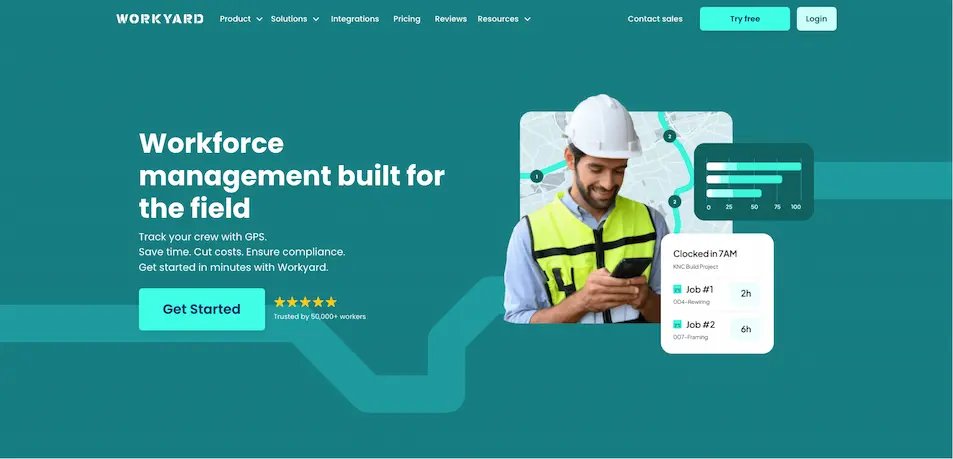
Workyard is a workforce management app for construction companies that offers crew tracking and project-level labor reporting.
Best for
Construction companies that need accurate job-site GPS, cost-code tracking, and project-level labor cost visibility, particularly those already using Procore or similar construction management platforms.
Key features
You can view real-time and past locations visited by your team for the day through the locations map (via Workyard)
GPS job-site clock-in
Employees clock in directly to a job and cost code, tying every hour worked to a specific project and task from the moment the day begins.
Real-time crew location
Superintendents can see which crew members are at each job site at any given moment, making it easier to manage multi-site operations and respond to scheduling gaps.
Geofencing
Virtual boundaries around job sites enforce location-based clock-in, preventing employees from logging hours before they arrive on site.
Project-level labor cost reporting
Workyard aggregates time entries by job and cost code. Project managers get a running view of labor spend against budget that can be exported directly to accounting and payroll platforms.
Procore, QuickBooks, and ADP integration
Time and labor data flows directly into the platforms construction companies already use, reducing duplicate data entry between field operations and back-office accounting.
Pricing
Starter Plan: $6 per user/month billed annually + $50/mo base fee per company
Pro Plan: $13 per user/month billed annually + $50/mo base fee per company
Custom pricing for Enterprise Plans, offering automated project time tracking and more
Free 14-day trial available on all plans
Bottom line
Workyard is best for construction companies whose primary pain point is job costing and project-level labor tracking. However, Workyard does not offer automatic mileage reimbursement, and its break compliance documentation is limited, which can still create legal exposure especially in California.
3. ClockShark — Best for field service teams that need scheduling and GPS together
ClockShark is a time-tracking tool that combines GPS-based clock-ins with strong scheduling capabilities in a single tool.
Best for
Construction and field service companies that need GPS clock-in and drag-and-drop scheduling in one platform.
Key features
When viewing timesheets, you can choose different timezones from a drop-down menu for easier tracking and fewer timekeeping errors (via ClockShark).
GPS and geofencing clock-in
Employees clock in from the field with GPS location recorded when they clock-in or out. Geofencing restricts clock-ins to designated job sites, reducing off-site punching without requiring manual oversight.
Job and task tracking
Time entries are tied to specific jobs and tasks, giving managers a breakdown of hours by project.
Multi-timezone timesheets
From a single dashboard, managers can view and edit timesheets using their team members’ local time, eliminating the need to calculate time differences manually.
QuickBooks and ADP integration
Approved time data exports directly to payroll, eliminating manual re-entry between the field and accounting.
Pricing
Standard plan: $40/month + $9/user/month
Pro plan: $60/month + $11/user/month
Bottom line
ClockShark solves the problem of scheduling complexities and location tracking for field and construction teams,but mileage tracking is manual and break documentation is limited.
4. Homebase — Best for hourly teams in fixed locations
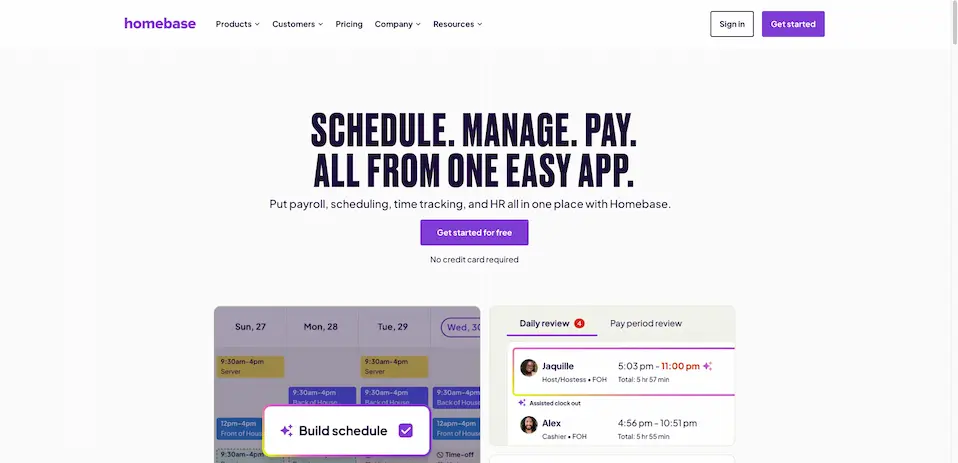
For teams that report to a fixed location every day, Homebase is a great all-in-one platform for basic workforce management.
Best for
Small businesses with hourly employees working from a fixed location who need scheduling, basic time tracking, and light HR features at an accessible price point.
Key features
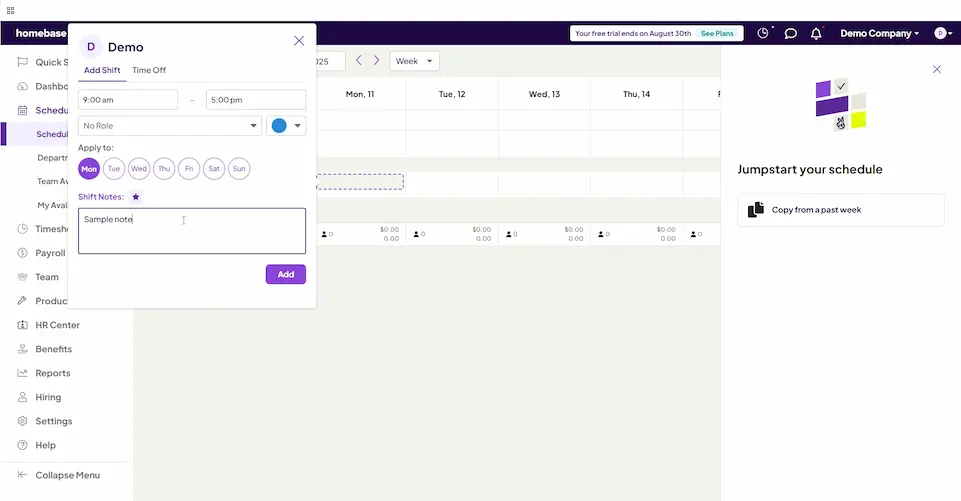
Build a schedule and easily add shifts straight from the Scheduling dashboard.
Shift scheduling and time-off management
Managers can build weekly schedules, handle time-off requests, and manage availability from a single dashboard while employees can see their schedules and request changes from the mobile app.
Basic GPS clock-in and photo verification
With the GPS-enabled mobile time clock, employees can punch in from almost any device using secure PINs, with photo capture to eliminate buddy punching.
Free plan for single-location businesses
Homebase offers a functional free tier for businesses operating out of one location.
Full-service payroll
Businesses can consolidate scheduling and payroll into a single dashboard, which automatically syncs tracking hours, tips, and overtime directly from the time clock.
Pricing
Plan
Pricing (annual)
Pricing (monthly)
Basic
$0/month1 location, up to 10 employees
$0/month1 location, up to 10 employees
Essentials
$24/location/monthUnlimited employees
$30/location/monthUnlimited employees
Plus
$56/location/monthUnlimited employees
$70/location/monthUnlimited employees
All-in-One
$96/location/monthUnlimited employees
$120/location/monthUnlimited employees
Add-Ons
Payroll: $39/month + $6/month per employee paid
Tip Manager: $25/month per location
Background Checks: $30 each
Bottom line
Homebase is strictly built for fixed-location hourly workforce management, not field workforce visibility. It is a reasonable and affordable choice for retail or restaurant businesses, but not the right fit for mobile field teams.
5. Deputy — Best for scheduling-heavy operations with multiple locations
Deputy is the premier solution for regulated businesses that prioritize rigorous scheduling compliance over remote GPS tracking.
Best for
Multi-location operations with complex shift patterns, high scheduling volume, or award interpretation requirements.
Key features
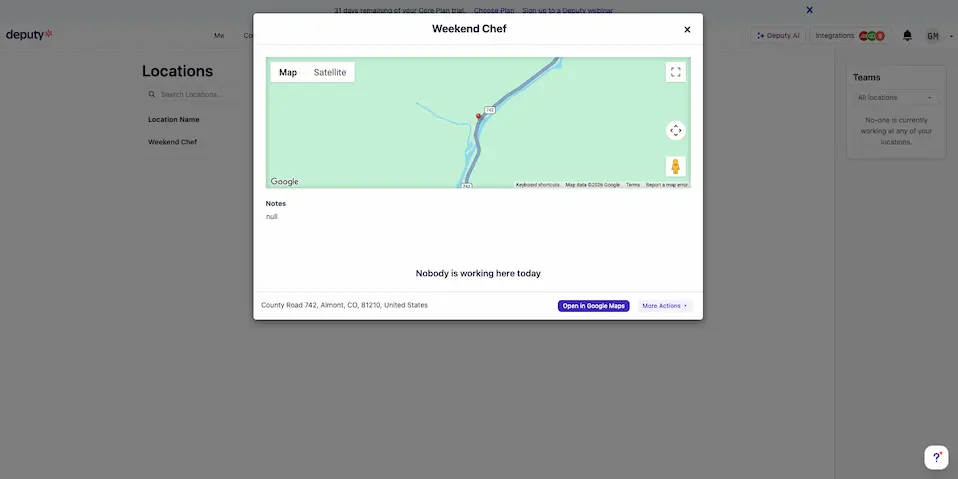
When you click on a location, you can instantly see who’s currently active on-site.
Demand-based and auto-scheduling
Deputy forecasts labor demand based on historical data and builds schedule suggestions automatically, reducing the time managers spend creating shifts manually.
Time and attendance with photo verification
Employees clock in through the app or a kiosk, with an optional photo capture at the moment of punch to confirm identity.
Basic GPS location at clock-in
Location is recorded at clock-in to confirm the employee is at the designated site.
Automated award interpretation
Deputy instantly calculates accurate pay rates across all shift types and employee classifications, ensuring total compliance for businesses navigating intricate industry awards.
Broad payroll integration
Deputy connects with most major payroll platforms, including ADP, Gusto, QuickBooks, Xero, and Paychex.
Pricing
30-day free trial of the Core plan available
Plan
Pricing (annual)
Pricing (monthly)
Lite
$5/user/month
$5.50/user/month
Core
$6.50/user/month
$7.25/user/month
Pro
$9/user/month
$10/user/month
Add-Ons
Deputy Payroll enabled by Paycor: $8/user/month (monthly) + $49 base fee
HR: $2/user/month (monthly)
Messaging+: $1.95/user/month (monthly)
Analytics+: $1.50/user/month (monthly)
Bottom line
Deputy is a good solution for businesses with complex scheduling and labor cost challenges across multiple locations. However, its GPS functionality only verifies clock-in locations rather than tracking continuous movement. If you need field workforce visibility, Deputy isn’t the best choice.
6. Buddy Punch — Best for small teams that need to eliminate time fraud
Buddy Punch is a time and attendance platform built to eliminate time fraud.
Best for
Small businesses that need a no-fuss, reliable way to verify that the right employee is clocking in from the right place without the overhead of a full workforce management platform.
Key features
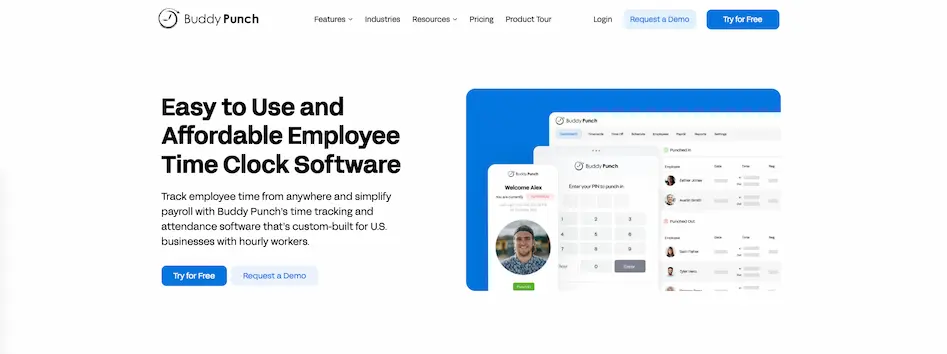
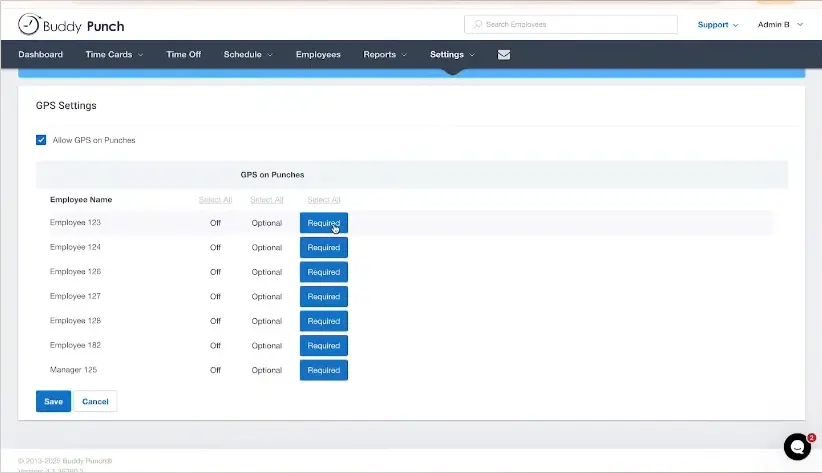
Buddy Punch gives managers the option of making GPS tracking optional for selected employees.
GPS and IP-based clock-in restrictions
Employees can only punch in from approved GPS locations or designated IP addresses, preventing off-site clock-ins without any manager intervention required.
Facial recognition at clock-in
The app captures a photo or uses facial recognition to confirm the employee clocking in is who they say they are, eliminating buddy punching at the point of entry.
Overtime alerts and PTO tracking
Managers receive alerts when employees approach overtime thresholds, and PTO balances are tracked automatically alongside regular hours.
QuickBooks, Paychex, and ADP integration
Approved time data exports to payroll platforms directly, reducing manual re-entry at the end of each pay period.
Pricing
Free 14-day trial, no credit card required
Plan
Pricing (annual)
Pricing (monthly)
Starter
$4.49/user/month + $19 base fee/month
$5.49/user/month + $19 base fee/month
Pro
$5.99/user/month + $19 base fee/month
$6.99/user/month + $19 base fee/month
Enterprise
$10.99/user/month + $19 base fee/month
$11.99/user/month + $19 base fee/month
Add-Ons
Payroll: $6/user/month + $39 monthly base fee
Scheduling: $1/user/month (Included in Pro & Enterprise Plans)
Real-Time GPS: $2/user/month (Included in Enterprise Plans)
Data Retention $2/user/month
Custom Reporting: $2/user/month
Bottom line
Buddy Punch is highly effective at verifying employee identity and location the exact moment they clock in. Its core strength is basic time and attendance tracking. It is a cost-effective, easy-to-implement solution for businesses focused primarily on eliminating time theft.
7. When I Work — Best for teams where scheduling is the core problem
When I Work is a scheduling and shift communication platform with time tracking built in as a supporting feature, giving workers a structured system that offers more visibility into their upcoming shifts from a mobile app.
Best for
Teams with moderate-to-complex scheduling needs where the primary challenge is coordinating shifts and communicating with employees.
Key features
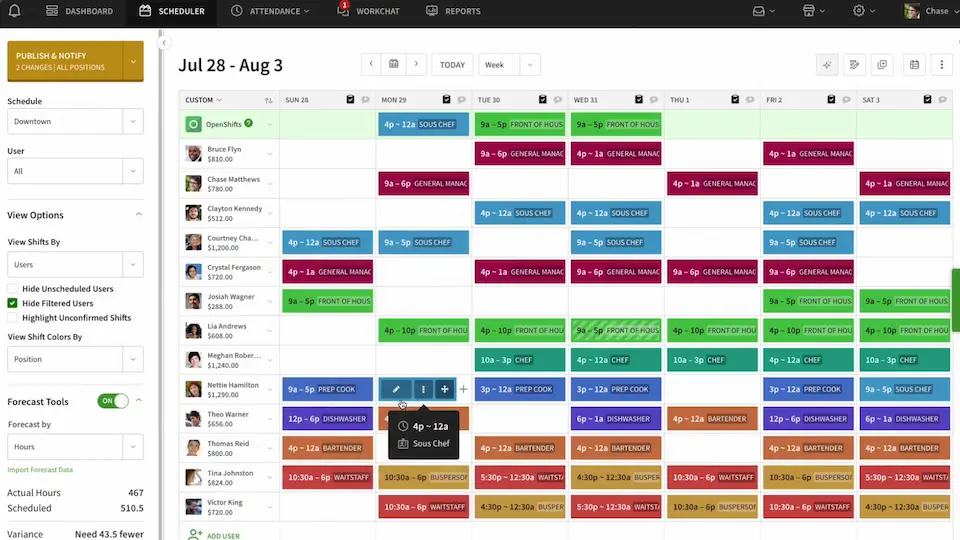
You can easily manage shifts right from the Scheduler using the app’s drag and drop feature.
Drag-and-drop scheduling with shift templates:
Managers can build and adjust schedules visually, copy recurring shift patterns, and publish updates to the team instantly through the mobile app.
Employee-facing shift management
Employees can view schedules, request shift swaps, pick up open shifts, and confirm availability, reducing the volume of scheduling-related messages managers handle manually.
Basic time clock with optional GPS clock-in
Employees clock in through the app, with an optional GPS location capture at punch. There is no continuous tracking, route history, or mileage reporting.
QuickBooks and ADP integration
Time data exports to payroll platforms at the end of the pay period, reducing manual re-entry.
Pricing
Free trial available
Single location or schedule: $2.50/user/month
Multiple locations or schedules: $5/user/month
Bottom line
When I Work sits closest to Connecteam's native category of scheduling and workforce communication, making it a natural landing spot for teams whose primary frustration is scheduling complexity. It is a focused, affordable option that brings structure to shift coordination and reduces the back-and-forth of schedule changes.
Which Connecteam alternative is right for you?
Not all Connecteam alternatives are built to handle the same operational problems. Knowing the issues each platform solves will help you choose the best solution for your field team.
Choose Timeero if you manage a field team where employees drive between multiple job sites, mileage reimbursement is a recurring payroll issue, or you need to document break compliance, especially in California. Timeero is best the choice when GPS accuracy, automatic mileage, and verifiable compliance are primary requirements, not nice-to-haves.
Choose Workyard if you run a construction company and your primary need is cost-code tracking and job-level labor reporting tied to GPS, with integration into Procore or similar project management platforms.
Choose ClockShark if you need both scheduling and GPS clock-in in a single tool and your workforce's compliance requirements are moderate, such as construction and field service companies without California break law exposure.
Choose Homebase if your team is hourly and reports to a fixed location like a retail store or restaurant, and scheduling and basic HR features are the priority over field GPS visibility.
Choose Deputy if your employees work complex shift patterns and multi-location management or structured roster compliance is the primary operational challenge.
Choose Buddy Punch if you run a small team and your primary need is confirming that the right employee is clocking in from the right place, without the overhead of a full workforce management platform.
Choose When I Work if the primary gap in your current setup is scheduling and shift communication.
How real-time GPS visibility, automated mileage reimbursement, and California break tracking help employers stay compliant
If you manage a mobile workforce with general scheduling tools, you are likely leaving your business exposed to compliance risks and inflated labor costs.
Switching to a dedicated field visibility platform replaces manual workarounds with exact, timestamped records. Instead of relying on memory-based estimates, you capture transparent, legally binding documentation straight from the field.
Get the operational proof your field business needs
Connecteam is a highly effective platform for team communication and shift scheduling. But when you manage a field crew, business needs extend beyond communication alone.
Timeero is built specifically for the realities of field work. It provides continuous GPS tracking, automated mileage reimbursement, and strict compliance documentation that mobile operations require.
What is the best Connecteam alternative for field teams?
While Connecteam excels at general scheduling and team communication, it isn’t the best option for mobile teams needing field visibility. Timeero is the best Connecteam alternative for field teams needing GPS visibility, automatic mileage reimbursement, and strict break compliance.
Does Connecteam track mileage automatically?
No, Connecteam does not automatically track or calculate mileage. Employees must manually log their trips, which leaves room for human error, padding, and disputes.
What is the best Connecteam alternative for GPS tracking?
While many apps offer a basic GPS clock-in, Timeero delivers continuous field visibility with features like GPS breadcrumbs, Route Replay, and Segmented Tracking, making it the most capable option for field operations.
What is the difference between Connecteam and Timeero?
The main difference comes down to category, not quality. Connecteam is an all-in-one workforce management platform designed for scheduling, HR, and team communication. Timeero is a dedicated field visibility platform built for field teams needing real-time GPS tracking, automated mileage reimbursement, and strict labor compliance.
Which Connecteam competitors offer automatic mileage tracking?
Among popular Connecteam competitors, Timeero is the only platform offering fully automatic, GPS-based mileage tracking as a core feature. Alternatives like Workyard, ClockShark, and Homebase either rely on manual entry or lack mileage tracking entirely. Timeero automatically calculates trip distances, deducts daily commutes, and generates IRS-compliant logs with zero manual input from your team.
Is Connecteam HIPAA compliant?
Yes, Connecteam is HIPAA compliant. Its security standards protect sensitive health data, making it a viable scheduling tool for home healthcare agencies. However, agencies that also need precise Electronic Visit Verification (EVV) for Medicaid compliance often switch to a platform like Timeero, which combines HIPAA compliance with robust GPS EVV tracking.
Does Connecteam do payroll?
Connecteam does not process payroll natively. Instead, it functions as a time-collection hub. Managers review and approve timesheets directly within Connecteam, then export that organized data to a dedicated, external payroll provider to cut checks and file taxes.
Does Connecteam integrate with QuickBooks?
Yes, Connecteam integrates with QuickBooks. It offers a direct, seamless data sync with QuickBooks Online, as well as formatted timesheet exports designed specifically for easy upload into QuickBooks Desktop.
Does Connecteam track your location off the clock?
When employees ask, "can Connecteam track your location when I am not working?", the answer is no. Connecteam only shares location data with administrators when a user is actively clocked into a shift. Once clocked out, location data remains stored locally on the employee's device for geofencing but is completely hidden from the employer.
The best Connecteam alternative is the one your crew will actually use.
See why field teams switch to Timeero for GPS tracking, mileage logs, and audit-ready reports.
Emman is a passionate writer with more than 6 years of digital marketing experience under his belt. As a licensed chemical engineer with a passion for writing, he marries the technical with the creative to create engaging copy that converts. He is also a certified #girldad who spends most of his day playing with his three girls when he's not busy writing.



.webp)
.webp)
.webp)
.webp)
.webp)
.webp)
.webp)

%202.svg)


.png)
.png)



.png)


