When crews coordinate over unmonitored personal texts, it leaves managers without a paper trail or delivery confirmation.
Disconnected communication causes missed schedule changes, disputed site visits, and creates after-hours work.
We tested 5 of the top workforce messaging apps on the market today, including Timeero, Connecteam, ClockShark, Beekeeper, and WhatsApp.
Timeero stands out as the top option for teams wanting chat tied directly to live timesheets and GPS pings.
The problem with most general chat apps is that they were built for people sitting at desks with reliable Wi-Fi, not crews operating out of a truck. Most desktop-first tools assume users have continuous internet access, static working hours, and time to monitor multiple channels, which just isn’t true for mobile field teams.
During disputes, operations managers end up spending stressful minutes cross-referencing timesheets and matching scattered location pings instead of resolving them in seconds. This frustrating disconnect between communication and field data is exactly what drives businesses to search for the best messaging app for field teams.
To help you decide which workforce management app meets all of your business needs (including messaging), we evaluated the top messaging platforms for field teams, testing their offline reliability, shift status visibility, data ownership, and job-site context. Below is our shortlist and side-by-side comparison.
Our testing process
We set up test accounts for a standard field team (1 administrator and 2 field employees) and tested each app’s features on a mobile device and the company’s web portal.
We tested each app, ranking them on their ability to complete these five key tasks:
Starting direct and group chats from mobile devices on job sites
Sending messages in low-signal and offline zones
Checking admin settings and security controls when someone leaves the team
Matching message logs with live timesheets and GPS location data
Sharing site photos and documents between crews and the office
App
Best for
Key features
Pricing
Timeero Our pick
Mobile teams wanting messaging tied to GPS time tracking
Two-way chat, work-hours status dot, role permissions, offline tracking
Add-on for $2 / user / month on Pro and Premium plans(starts at $9 / user / month)
Connecteam
Deskless teams needing HR tools and internal communications
Dedicated chat channels, updates feed, mobile forms, shift scheduling
Chat is accessible under the Communications hub($29 / month for first 30 users)
ClockShark
Construction crews focused on job costing and batch punches
CrewClock batch punches, job comment feeds, built-in quotes and invoices
$40 / month base fee + $9 / user / month
Beekeeper
Enterprise frontline teams needing multi-language translation
1. Timeero: Best for messaging tied to GPS time tracking
Timeero is a GPS time tracking and workforce management platform for field teams. Its built-in Messaging feature solves the “two-app problem” for field crews by bringing workforce management, GPS time tracking, and secure team messaging into a single platform.
Pros
Integrates chat with GPS and time tracking to provide clear location context.
Features a live login status indicator ( green dot) inside chat windows, letting managers avoid texting off-the-clock employees in states with strict wage-and-hour laws.
Keeps communication, job site photos, and client details on employer-owned company profiles.
A worker's access to chat histories is instantly revoked the moment they are offboarded.
Protects against customer billing disputes by keeping an official, secure paper trail of project conversations.
Offers HIPAA-compliant messaging on higher-tier plans, allowing home healthcare and medical field crews to safely coordinate patient care updates.
Cons
Sending and receiving chat messages requires an active cellular or Wi-Fi connection (messages queue and transmit once signal returns).
Messaging is available as a paid add-on ($2 per user per month) on Pro and Premium plans rather than a standalone free feature.
Key features
Direct and group messaging from job sites
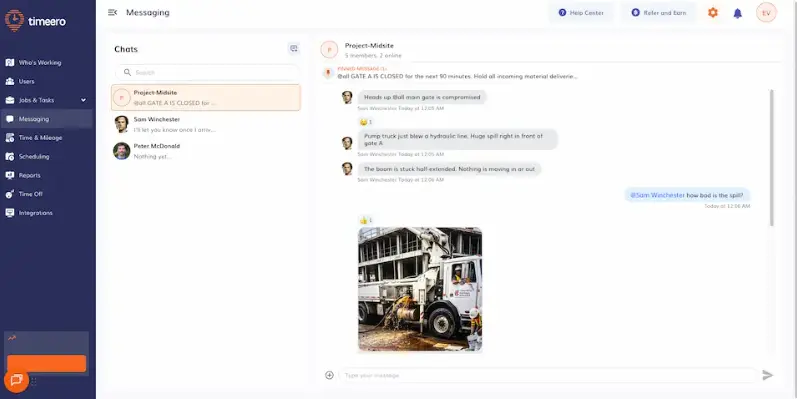
Timeero’s built-in messaging feature can be accessed through the web platform as well as the mobile app.
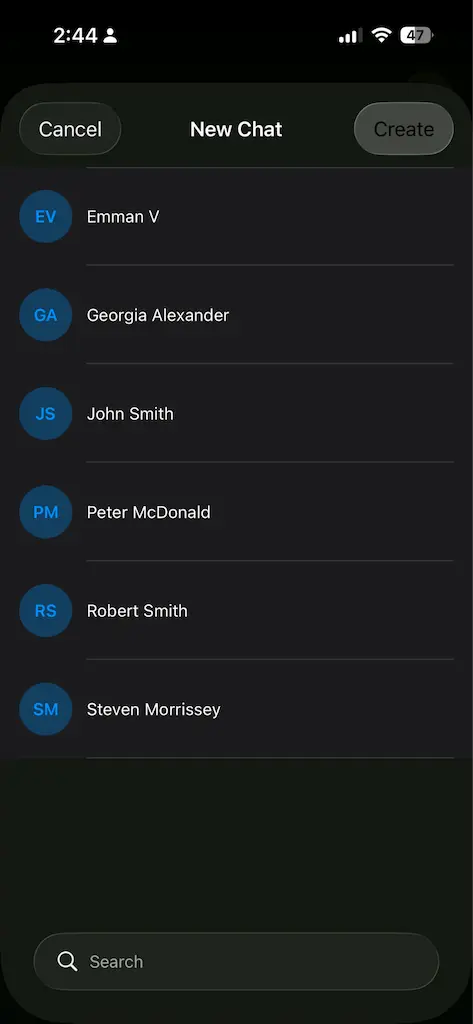
During our testing, we evaluated how easy it was to coordinate a small crew directly from the field. Setting up 1:1 direct and group messages for specific job sites was easy. To keep conversations focused and secure, Timeero automatically restricts who you can contact, allowing you to send messages to people who belong to the same group. This keeps communication focused and prevents the clutter that usually happens in unstructured text threads.
You can only send messages to users within your group to keep messages relevant.
Low-signal and offline messaging
Field work often means dropping in and out of cellular dead zones, so we tested Timeero’s offline capabilities by placing our devices in airplane mode. As expected, real-time chat transmission required an active cellular or Wi-Fi connection. But the moment our test device reconnected to the network, the queued messages transmitted automatically.
More importantly, while the chat was waiting for a signal, Timeero’s core GPS tracking, location pings, and mileage logs continued running uninterrupted in the background.
Admin settings and offboarding security controls
Timeero’s system is designed to immediately revoke an employee’s access to their company profile when they are offboarded. Because all chat data, site photos, and records live on employer-owned cloud servers rather than the local SMS database of the worker’s phone, deactivating the account cuts off their ability to log in or view past threads.
To prevent anyone from tampering with project records, the system does not allow direct messages to be edited after they are sent. But workers can still correct or delete their own posts within group channels.
Matching chat logs with live timesheets and GPS location data
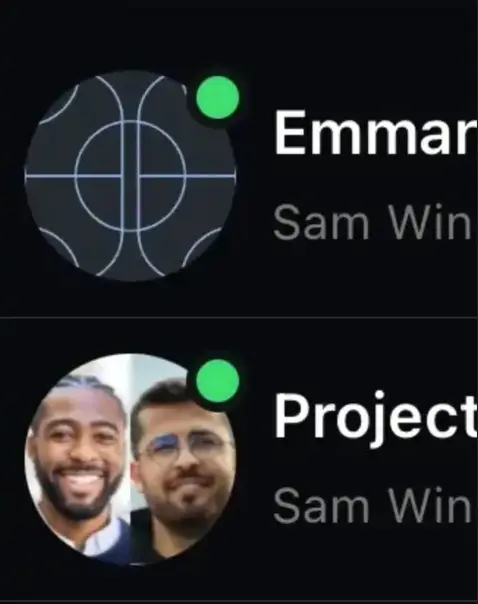
The live work-hours status indicator (a green dot) inside the chat window is the quickest way to check availability before sending an update, helping managers respect off-the-clock boundaries.
A green dot at the top-right corner of the image indicates that the user or group is online.
Because messaging sits inside the same system as GPS breadcrumbs, mileage logs, and geofenced job sites, cross-referencing a chat update against location data or timesheets is just a few taps away. You can see how Timeero messaging works in a short interactive walkthrough, no sign-in required.
Sharing site photos and documents
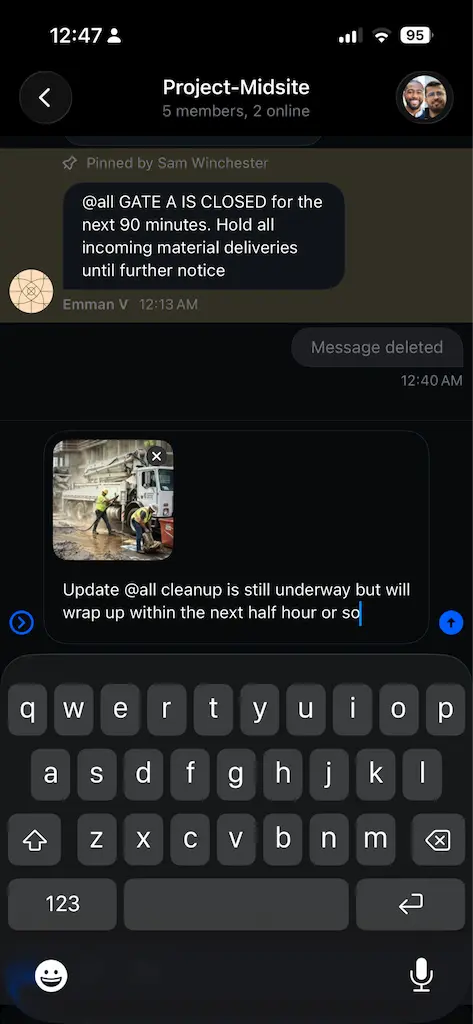
Field crews can take live photos or attach videos and project files directly inside chat threads with no cap on file size.
You can capture photos or attach images while sending a message
Higher-tier plans offer encrypted messaging, allowing home healthcare and medical field crews to share patient updates securely in compliance with HIPAA guidelines. Office staff can open the chat details at any time to view a centralized media gallery for audits or customer billing verification.
Integrations
Timeero integrates directly with:
QuickBooks Online
QuickBooks Desktop
Gusto, Xero, Rippling
Paychex (CSV and API)
ADP Workforce Now
RUN Powered by ADP
Paylocity
Viventium
Sandata
Pimsy
Zapier
A Public API is also available for custom internal software connections.
External ratings
Timeero holds an average rating between 4.4 and 4.8 out of 5 across Capterra and G2.
2. Connecteam: Best for deskless HR and workplace communication
Connecteam is an all-in-one workforce management application built for deskless teams. Its Communications hub gives businesses structured tools to broadcast updates and run employee surveys.
Pros
Provides a mobile chat interface with dedicated channels for teams, sites, and company announcements.
Features a custom forms builder with a live mobile preview for digital checklists and inspection forms.
Includes an updates feed that allows managers to share announcements with likes and comments.
Offers a free Small Business Plan for organizations with up to 10 users.
Cons
Requires purchasing subscriptions across two separate hubs (Operations and Communications) to access both time tracking and messaging.
Does not auto-queue messages when signal drops, requiring users to manually tap an icon to resend messages once back online.
Does not support automatic GPS mileage tracking and requires drivers to enter odometer readings manually.
A subscription to the Ops hub (starts at $29 / user / month) is needed to access live GPS tracking and route breadcrumbs.
Direct and group messaging from job sites
The chat feature is available under a separate tab on the Connecteam app.
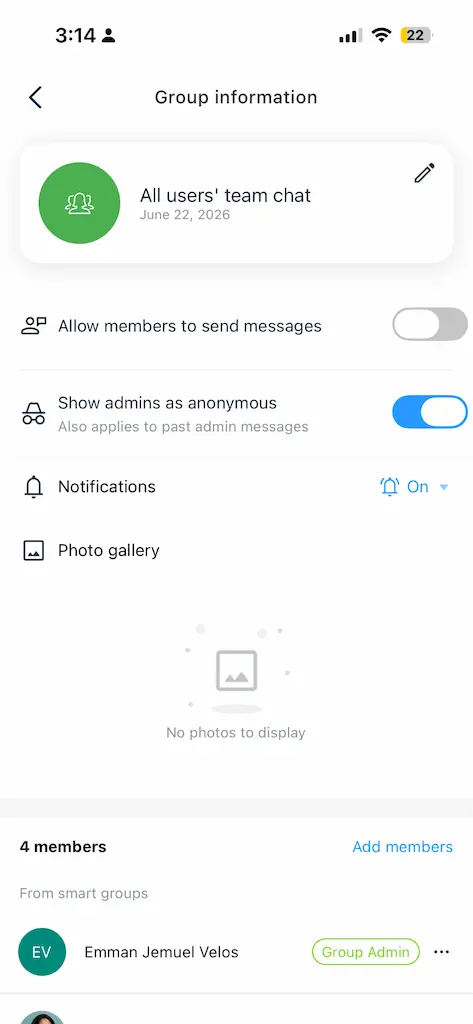
Connecteam supports standard 1:1 chats and group channels built for specific teams or job sites. Inside the group settings, you can toggle members' ability to send messages on or off. Turning it off converts the chat into a space for one-way announcements. This ensures that important shift updates and site instructions don't get buried under endless replies.
You can toggle admin anonymity inside one-way spaces for distraction-free company announcements.
Low-signal and offline messaging
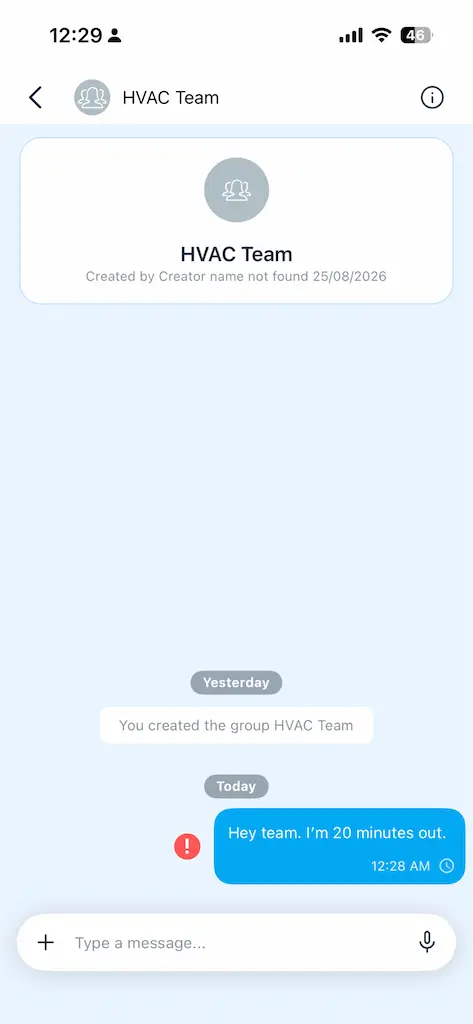
A notable limitation we found with Connecteam involves how it handles messaging when offline. Unlike tools that automatically queue and transmit data in the background, Connecteam displays a red exclamation point next to the failed message. The worker must then remember to open the app and manually tap the icon to resend the message once they are back in a service area, which is a downside for busy field teams.
When offline, your message stays undelivered. Tap the red exclamation point to manually resend your message.
Admin settings and offboarding security controls
Because Connecteam functions as a full deskless HR system, you get highly structured administrative controls. You maintain full control over workspace access, ensuring that former employees lose access to company data the moment you remove them from the system.
Additionally, you can export conversation histories directly into Excel spreadsheets. This makes it very easy to archive official team communications or attach chat logs to an employee’s permanent personnel file.
Matching chat logs with live timesheets and GPS location data
While Connecteam offers both time tracking and messaging, these features are separated into different software modules. To access live GPS route breadcrumbs and timesheets alongside team messaging, you need to subscribe to both the Operations hub and the Communications hub.
Sharing site photos and documents
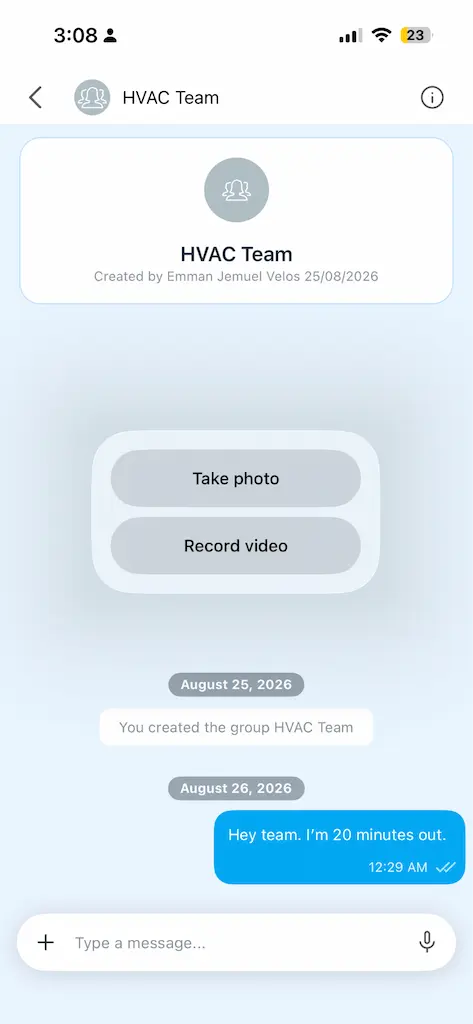
Connecteam’s chat interface easily handles rich media from the field. Your crew can upload job site photos and project documents, or record voice notes directly within a chat thread.
You have the option to take a photo, record a live video, or attach an image from your gallery.
The platform also features a custom form builder, allowing teams to submit detailed digital checklists and safety inspection forms straight from their mobile devices to streamline field-to-office documentation.
Integrations
Connecteam connects with:
QuickBooks Online
Gusto
Paychex Flex
Xero
MYOB
It supports CSV exports for ADP Run and QuickBooks Desktop, alongside Zapier automation.
External ratings
Connecteam maintains an average rating of 4.8 out of 5 on G2 and Capterra.
3. ClockShark: Best for construction job costing and crew punches
ClockShark is a GPS time-tracking and scheduling application built primarily for trade contractors, construction crews, and field service teams. Because it lacks native instant messaging, team communication occurs directly within individual job records. This enables field employees to attach notes, upload photos, and leave comments tied to specific customer jobs.
Pros
Includes CrewClock, allowing supervisors to clock entire work crews in or out simultaneously from a single device.
Stores text comments locally when offline, automatically sending updates once a reliable connection is restored.
Features built-in customer quoting and invoicing tools directly inside the mobile and web portal.
Allows managers to set up custom clock-out questions to collect shift feedback and task updates.
Provides drag-and-drop shift scheduling with automated shift reminders.
Cons
Lacks native instant messaging capabilities, which forces real-time communications into asynchronous job comment threads.
Restricts file and image uploads to online mode only, preventing photo attachments while working offline.
GPS pings occur roughly every 15 minutes, offering periodic location updates rather than continuous route tracking.
Does not log vehicle mileage or record driving routes for reimbursement.
Requires a monthly base administrative fee ($40 to $60 per month) in addition to per-user costs, increasing expenses for smaller teams.
Direct and group messaging from job sites
ClockShark does not feature a traditional 1:1 or group instant messaging tool. Instead, communication happens through job-based comment streams.
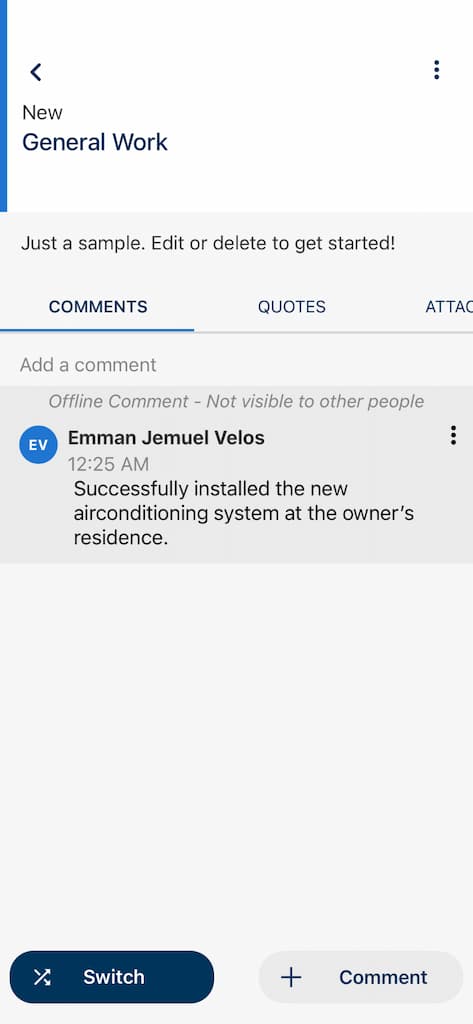
Instead of native in-app messaging, ClockShark allows team members to leave comments on specific Jobs.
Field workers search for a specific customer job on the mobile app and post notes or shift updates directly to that project's thread. While this keeps conversations organized by project, it functions asynchronously and cannot replace real-time chat for urgent crew updates.
Low-signal and offline messaging
ClockShark handles text-based job notes well in low-signal areas. If a field technician posts a job comment while offline, the app saves the text locally on the device and automatically uploads it once a reliable cellular or Wi-Fi connection returns.
Offline comments are locally stored until the connection is restored and automatically uploaded.
However, media attachments do not share this offline capability. Workers must be connected to a network to upload photos or project files.
Admin settings and offboarding security controls
Because all comments and project notes are tied directly to job files on the platform, company records remain secured on ClockShark’s cloud servers. Deactivating a former employee revokes their app access immediately, preventing them from viewing past project records or customer details.
For administrative management, ClockShark restricts accounts to one active third-party software integration at a time and does not offer an open API for custom connections.
Matching chat logs with live timesheets and GPS location data
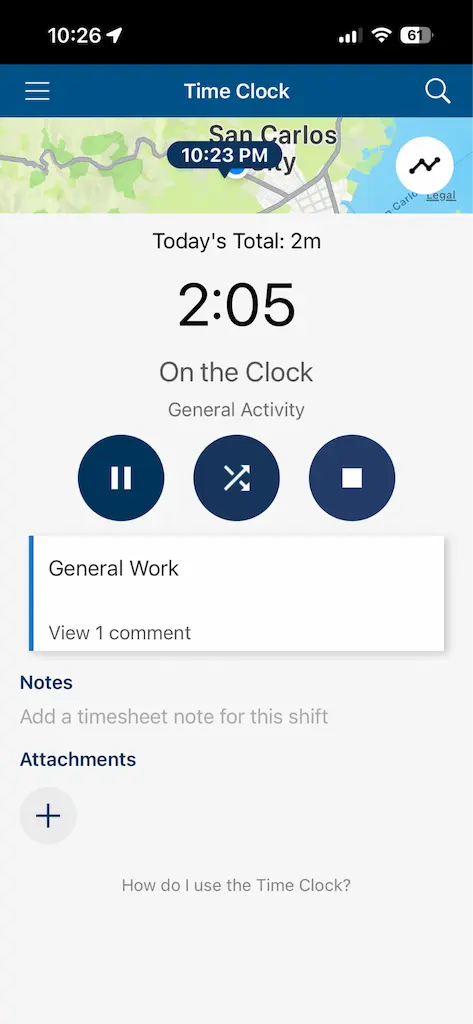
Connecting job notes to active shifts is automatic in ClockShark because all comments are posted directly onto specific job records and time cards. Managers can also configure custom clock-out questions to collect mandatory safety checks or shift summaries when workers clock out. However, location visibility is somewhat limited compared to continuous tracking tools, as ClockShark captures GPS location pings roughly every 15 minutes.
Sharing site photos and documents
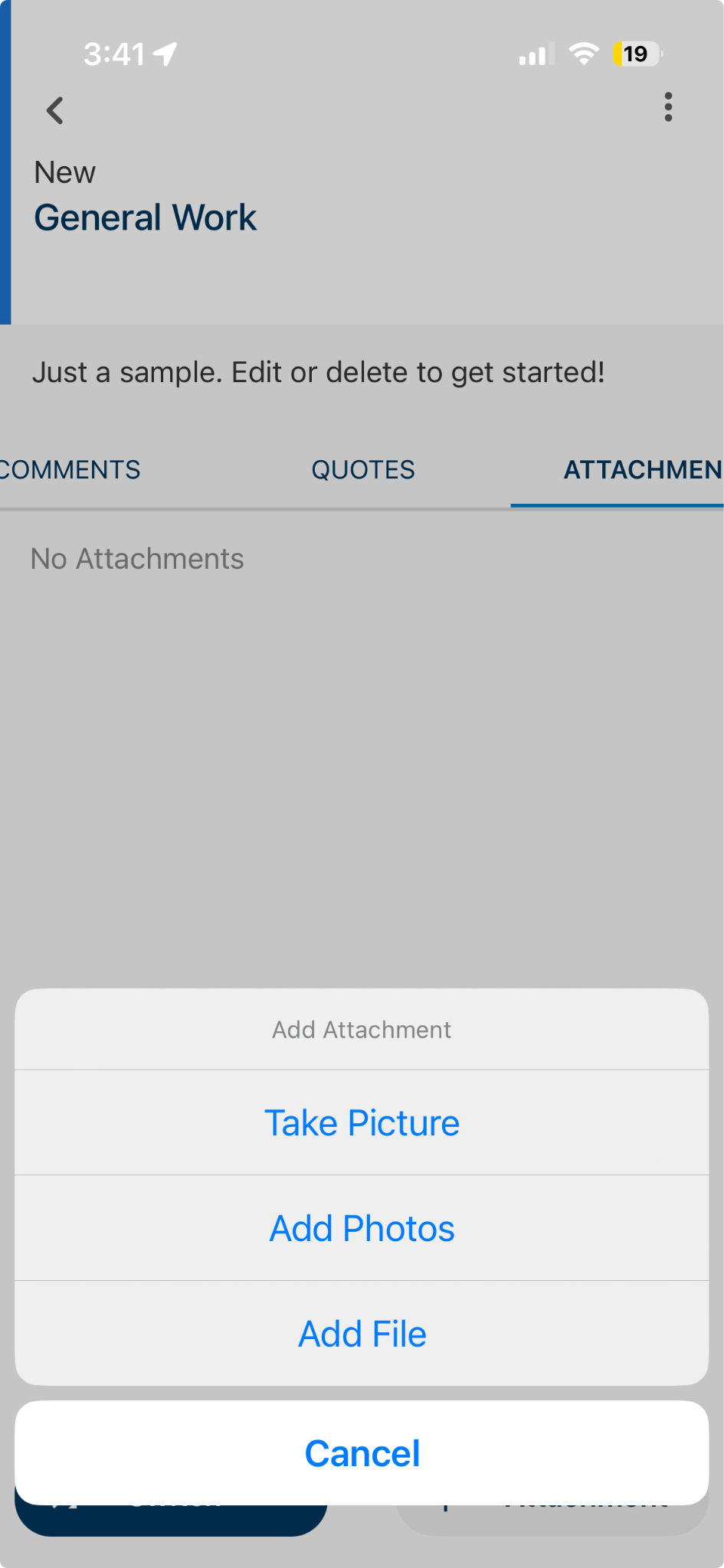
Add or view attachments in the “Attachments” tab when you open the task.
Field crews can upload photos and attach project files under a dedicated attachments tab within each job record. This gives back-office staff an organized view of progress photos alongside time entries and invoices. The primary constraint is network dependence: field workers must have an active internet connection to upload or view photos and document attachments.
Integrations
ClockShark integrates with:
QuickBooks Online
QuickBooks Desktop
ADP
Xero
Gusto
MYOB AccountRight
Paychex
Sage 100 Contractor
Simpro
Zapier
Only one third-party integration can be active at a time, and the platform does not offer an open API.
External ratings
ClockShark holds an average rating of 4.6 to 4.7 out of 5 across major software review portals.
4. Beekeeper: Best for enterprise multi-language frontline teams
Beekeeper is an enterprise mobile workplace platform designed to connect non-desk employees in hospitality, manufacturing, healthcare, and retail. It focuses heavily on internal communication, operational workflows, and frontline employee engagement.
Pros
Features automatic inline message translation supporting 27 languages to communicate between multi-language crews.
Provides operational communication streams, broadcast campaigns, and employee engagement surveys.
Offers administrative security controls and enterprise-grade data encryption.
Cons
High software pricing structure tailored for enterprise organizations rather than small to mid-sized businesses.
Does not include built-in GPS time tracking, geofencing, or automated mileage calculation tools.
Setting up communication streams and administrative permission structures requires onboarding time.
Users on large team accounts report occasional message sync delays during high-traffic periods.
Direct and group messaging from job sites
Beekeeper supports real-time direct chats and broad operational communication streams. The platform is built for large, diverse workforces, featuring automatic inline message translation that supports 27 languages. This allows frontline employees and managers to send group updates, read instructions, and reply to team chats in their native languages directly from the job site.
Low-signal and offline messaging
Because enterprise field teams often work in basements, hotel corridors, or manufacturing floors with poor reception, Beekeeper uses local inbox syncing. This means the app stores chat histories on the device so users can scroll through past messages and view recent project instructions while offline or in airplane mode.
Like most cloud-based tools, sending new messages still requires a restored network connection. However, some users on massive enterprise accounts report occasional message sync delays during high-traffic periods once reconnected.
Admin settings and offboarding security controls
Built primarily for enterprise organizations, Beekeeper provides strict administrative security controls and enterprise-grade data encryption. When an employee leaves the company, administrators can revoke access through the central system, instantly removing company data from the user's device. Because of its enterprise scale, setting up these communication streams and complex permission structures requires dedicated onboarding and IT configuration time.
Matching chat logs with live timesheets and GPS location data
Unlike dedicated field service tools, Beekeeper does not include built-in GPS time tracking, geofencing, or automated mileage calculation tools. Consequently, managers cannot natively check a live map to verify if a crew is on-site before messaging them.
Instead, the platform relies on deep integrations with enterprise HRIS platforms like Workday, ADP, Microsoft Azure, and SAP to bring shift schedules and pay slips into the employee's digital workplace. It also includes developer tools and an open API for custom software connections.
Integrations
Beekeeper connects with:
Workday
ADP
SAP
Microsoft Azure
Various enterprise HR platforms
It includes developer tools and an open API for custom software connections.
External ratings
Beekeeper holds a 4.8 out of 5 rating on the Apple App Store across more than 18,000 user reviews.
5. WhatsApp: Best for zero-cost informal crew communication
WhatsApp is a consumer messaging application that many small businesses default to for crew updates. While it offers immediate familiarity and zero software fees, it presents administrative and legal drawbacks for commercial operations.
Pro
Free to download and use on iOS, Android, and web browsers.
Requires minimal employee onboarding since many workers already use the app personally.
Supports photo, video, document, and voice note sharing alongside group calls.
Uses end-to-end encryption for message transmission.
Cons
Employers have no administrative control over data, conversation history, or group membership.
Work conversations stay on an employee's personal device after offboarding, creating data privacy risks.
Lacks integration with time cards, GPS tracking, job scheduling, or payroll systems.
Exposes companies to wage-and-hour compliance claims if employees receive work messages outside scheduled shift hours.
Requires saving teammates' personal phone numbers and manually entering contact information to start new chats.
Direct and group messaging from job sites
Zero cost and immediate familiar adoption allow micro-teams to start exchanging messages instantly without setting up administrative software. Field workers can set up group chats to quickly coordinate shifts and share client updates.
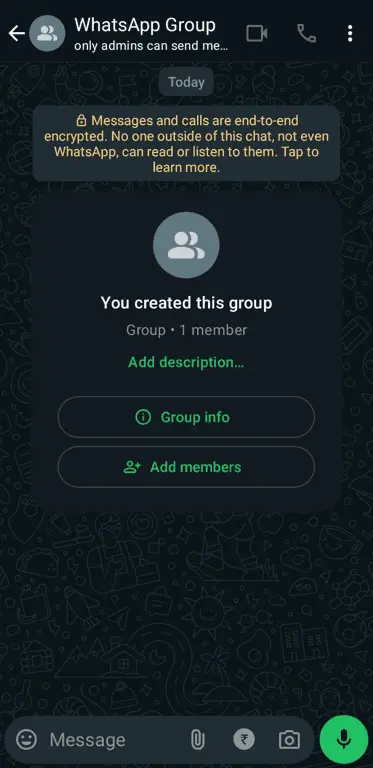
Create a WhatsApp group to quickly coordinate shifts and share client updates with your mobile team.
However, because it is a consumer tool, creating these channels requires saving teammates' personal phone numbers and manually adding contact information into personal devices, which blurs the line between work and private life.
Low-signal and offline messaging
Because it is built for everyday consumer use, WhatsApp handles spotty cellular coverage reliably. If a worker sends a message from a basement or rural dead zone, the app queues the text locally and automatically transmits it once a Wi-Fi or cellular connection is restored. All messages, voice notes, and media remain protected by end-to-end encryption during transit.
Admin settings and offboarding security controls
WhatsApp lacks the administrative control required to protect business operations. While group admins do have the ability to remove a former employee from a team chat, their security oversight stops there.
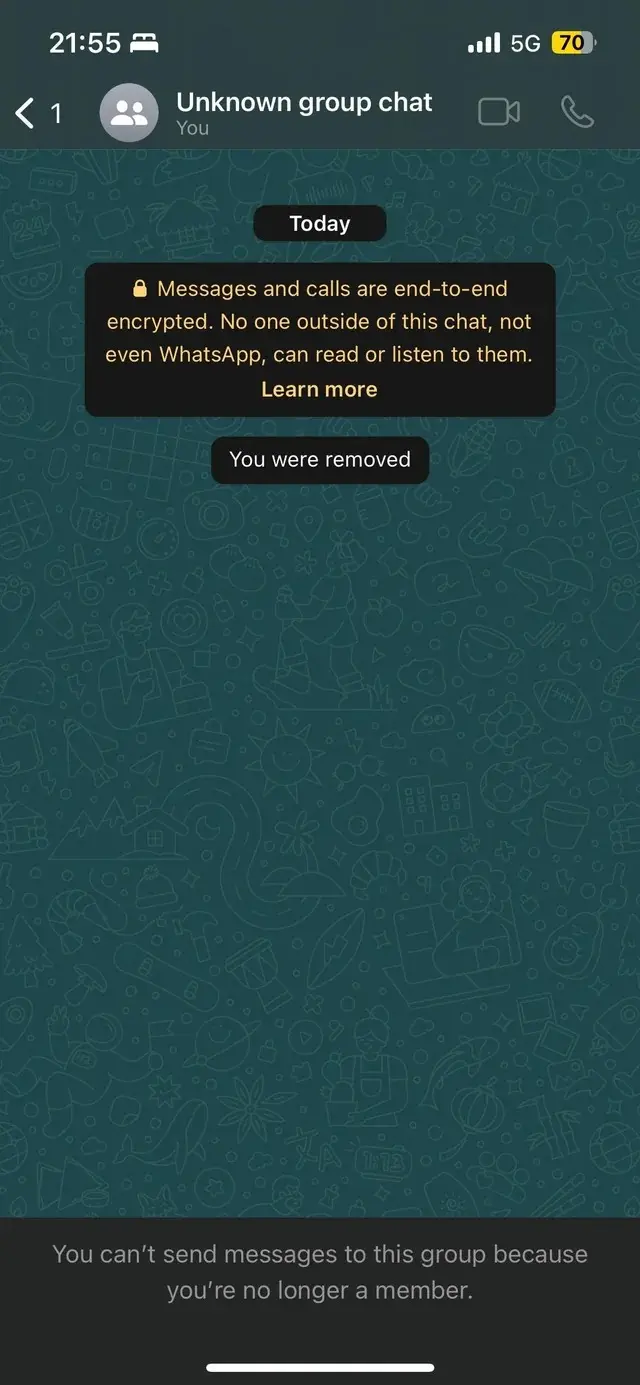
While you can still view the group chat, you can no longer interact with it when you’re removed from a Whatsapp group.
When an employee leaves the team, all their work conversations, client details, and job site photos remain stored permanently on their personal device. There is no central admin panel to instantly revoke access, wipe company records, or export chat logs for HR audits.
Matching chat logs with live timesheets and GPS location data
WhatsApp runs completely separate from your time tracking and payroll tools. It won't show you who is clocked in, where a crew member is located, or whether someone is on a required break.
Because there are no status indicators or live timesheet links, you have to manually check your time card app before sending a message. If you forget, you risk texting employees off the clock or during their time off, which can trigger wage-and-hour compliance issues for your business.
Sharing site photos and documents
Sending photos, videos, or voice notes from the field is simple on WhatsApp. The headache comes when you need to organize those files later.
Since everything gets dumped into a single chat thread, you or your office team have to manually scroll through days of text messages just to hunt down a job photo for client billing or project records.
Integrations
Standard WhatsApp does not integrate natively with business management or payroll software.
WhatsApp Business offers basic API connectors for customer service workflows, but lacks operational workforce integrations.
External ratings
WhatsApp maintains a 4.7 out of 5 rating across the Apple App Store and Google Play Store.
What to look for in a field team messaging app
Evaluating communication platforms for mobile crews requires focusing on operational realities rather than standard office chat features. Selecting a team communication app for field service involves reviewing four essential categories:
Offline reliability
Field teams frequently operate in areas where cellular signal drops, such as rural job sites, concrete basements, warehouses, or buildings made of thick materials. A messaging app that requires a continuous internet connection will freeze or fail to load when signal drops.
Look for applications that store operational tracking data locally and sync automatically when network connectivity returns. While real-time chat transmission depends on active signal, core tracking tools should run uninterrupted offline.
Group announcements with read receipts
Distributing schedule adjustments, safety warnings, or company policy updates requires confirmation that the message reached every crew member. Broadcast channels that include read receipts or delivery confirmation allow managers to verify who has viewed an announcement without generating endless reply threads. This ensures accountability across distributed job sites.
Messaging that connects to time and location
One of the main operational risks in managing field crews is contacting workers off the clock. Understanding how messaging works alongside GPS time tracking helps operations managers maintain labor law compliance.
When a chat tool displays an employee's active shift status and physical location, managers can verify that a worker is on the clock before sending job details. For teams reviewing broader operational software setups, exploring Connecteam alternatives or Workyard alternatives can help clarify how different systems integrate tracking data with communication tools.
Security and compliance for regulated work
Using consumer messaging apps for business operations exposes companies to data security risks. When an employee leaves a company, business communications stored on personal phones remain accessible to that former worker.
Purpose-built field communication platforms store chat logs on secure employer-owned servers. This allows administrators to revoke access instantly upon offboarding, maintain an auditable paper trail for billing disputes, and adhere to industry regulations such as HIPAA for healthcare field teams.
Stop running your business on personal apps
Relying on scattered personal text threads and disconnected chat applications leaves operations managers guessing. It creates wage-and-hour compliance risks, loses critical job-site context, and blurs the boundary between work and personal time.
A unified platform puts an end to this operational friction. Timeero keeps your field crew connected while tying every message directly to live timesheets, GPS location data, and exact job-site geofences.
FAQs
Do field team messaging apps work offline or in low-signal areas?
Field team messaging apps do work offline, but messages are not sent in real time. For most apps, messages sent while offline are stored locally on the employees device and are queued to send once internet connection is restored.
Can a time tracking app replace a separate team chat app?
Yes. Workforce management platforms that include built-in two-way messaging solve the “two-app problem.” Combining time tracking and team communication in a single app eliminates the need to pay for separate subscriptions while ensuring that conversations remain tied to live shifts.
Is it safe to use WhatsApp or personal texts to run a work crew?
No, it is not safe to use WhatsApp or personal texts to run your work crew. Using personal text messaging or consumer apps like WhatsApp introduces three main operational and legal risks:
Employers cannot manage or archive text threads stored on personal devices.
Access cannot be revoked when an employee leaves the company.
It’s difficult to prevent off-the-clock communications, which can increase the risk of wage disputes.
What’s the difference between a general team chat app and one built for field teams?
General team chat apps are built primarily for in-office communication. Platforms built for field teams are designed with the realities of mobile work in mind. They focus on mobile usability, work-hours status awareness, employer-controlled admin permissions, and integration with time cards and location.
Should crews use personal phones for work messaging, and what happens after hours?
No, crews should not use personal phones for work messaging. Relying on personal apps for work blurs the boundary between work responsibilities and personal life. Without shift visibility, managers and team members can message other employees without knowing their current work status, and there is nothing in place to prevent them from messaging during weekends or mandatory breaks.
Keep work chats off of personal devices and in-app where it belongs.
Emman is a passionate writer with more than 6 years of digital marketing experience under his belt. As a licensed chemical engineer with a passion for writing, he marries the technical with the creative to create engaging copy that converts. He is also a certified #girldad who spends most of his day playing with his three girls when he's not busy writing.



.webp)

%202.svg)


.png)
.png)

.png)


