Everlance vs. Timeero: Which Mileage Tracking App Is Better for Businesses?
Jessica Packard
Last update on:
November 25, 2026 10:29 AM
Published on:
TL;DR
Choosing the right mileage tracking and reimbursement app can make a big difference when you manage employees who drive for work. You need accurate mileage records, a simple way to handle reimbursements, and enough information to make sure employees are only reimbursed for business miles.
Everlance and Timeero both track mileage, but they serve different needs. Everlance focuses on individual mileage and expense tracking, while Timeero is built for businesses that manage employees in the field.
So, which one makes more sense for your business? I compared both apps to look at their features, ease of use, pricing, and what managers can actually do with them.
TL;DR
Choose Everlance if you're self-employed or a rideshare driver. It tracks miles automatically and includes expense and tax tools.
Choose Timeero if you manage a field team and need to track employee hours, work miles, job sites, and schedules in one app.
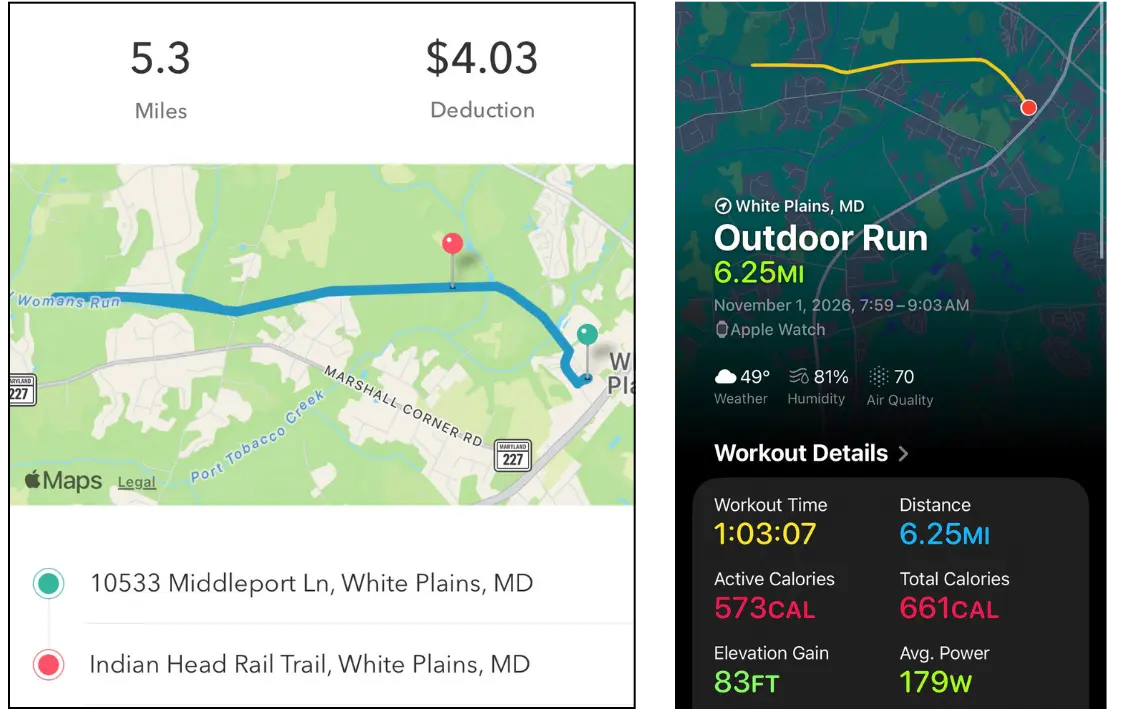
Everlance can record false trips. It recorded 5.3 miles of my 6.2-mile run as a drive, so I had to review my mileage logs.
Timeero offers more GPS details. It tracks mileage while employees are clocked in and uses GPS breadcrumbs and Segmented Tracking to show routes, stops, and breaks.
Managing a team that drives for work?
Track employee hours, mileage, and GPS routes in one place. See how Timeero can save your team time and make mileage tracking easier.
I tested both Everlance and Timeero to see how they handle mileage tracking in real-world situations. I tested automatic trip detection, GPS tracking, and how each app records and displays mileage.
I also explored their mobile apps and desktop dashboards, comparing key features, everyday workflows, and ease of use. Beyond testing, I reviewed current pricing plans and customer feedback to give a complete picture of what each app offers.
The comparison is based on hands-on testing, product research, and screenshots from both platforms.
Everlance vs Timeero at a glance
Timeero is better for businesses managing field teams; Everlance is better for self-employed drivers.
Everlance
Timeero
Overview
Best for
Self-employed drivers, gig workers, and small teams that need mileage and expense tracking
Field teams that need employee time, mileage, GPS, and compliance tracking
Strengths
Automatic trip detection, trip classification, expense and receipt tracking, tax tools, and a free plan
GPS time tracking, mileage tracking, geofencing, Auto Clock-In/Out, Segmented Tracking, scheduling, and payroll integrations
Ease of use (G2 score)
9.1/10
9.3/10
Mileage and GPS
How mileage tracking starts
Automatically detects drives in the background or lets users start trips manually
Tracks mileage while employees are clocked in
Non-driving movement
In my testing, the app recorded part of a run as a trip. Users also report walking and hiking being logged as drives
Only records mileage while employees are clocked in and moving above the admin-set speed threshold
GPS / live location
Shows trip start and end points on a map
Shows employee locations and GPS breadcrumbs about every 150 feet while clocked in
Trip segmentation / route breadcrumbs
No workday breakdown by drives, stops, and breaks
Segmented Tracking add-on shows drives, stops, and breaks throughout the workday
Time and attendance
Time tracking
✕No dedicated employee time clock
✓Yes, with a GPS time clock
Geofencing
✕No
✓Yes (Pro and Premium)
Scheduling
✕No
✓Yes (Pro and Premium)
Expenses and payroll
Expense tracking
Receipt capture; bank and card syncing and tax filing on Professional; team expense reports and approvals on Business
Photo attachments on Pro and Premium; Custom Fields for collecting expense details on Premium
Payroll integrations
ADP HRIS sync and API; CSV, Excel, and PDF exports. Businesses must export mileage reports and manually enter or import the data into payroll tools
Direct integrations with payroll and accounting platforms, including QuickBooks Online, Gusto, ADP, Paycor, Paylocity, and Paychex. Supported integrations can transfer employee hours and mileage
Everlance vs. Timeero: key differences and similarities
Everlance and Timeero both track mileage, but they offer different tools for businesses. Let's look at what sets them apart and where they overlap.
What are the biggest differences?
The biggest difference is what each app is built to do. Everlance focuses on mileage and expense tracking. It's a good choice if you mainly need to track your own business miles, save receipts, and prepare for taxes.Timeero does more than track mileage. It also tracks employee hours, locations, job sites, and schedules.
Here are the main differences:
Employee time tracking: Timeero has a time clock. Everlance doesn't track employee work hours.
Trip classification: Everlance asks employees to mark each trip as business or personal. Timeero tracks work mileage while employees are clocked in.
Expense tracking: Everlance has built-in expense tracking and receipt uploads. Timeero uses Custom Fields to collect expense information and run reports.
Payroll integrations: Everlance syncs employee profile updates from ADP but doesn't send mileage data to payroll. Businesses must export mileage reports and manually import or enter the data to their payroll software. Timeero connects directly with payroll and accounting platforms like QuickBooks Online, Gusto, ADP Workforce Now, RUN Powered by ADP, Paycor, Paylocity, and Paychex.
Where do Everlance and Timeero overlap?
Mobile mileage tracking: Both apps use your phone's GPS to record routes and calculate miles, and both work on iPhone and Android.
Mileage reimbursement: Both help businesses calculate employee mileage reimbursement.
GPS records: Both collect location data to support mileage records.
Everlance vs. Timeero: Feature-by-feature comparison
1. Everlance can record trips during physical activity like running, so you'll need to review your mileage logs
Everlance's automatic tracking is designed to make mileage logging easy. You don't have to start a trip or remember to turn tracking on. The app runs in the background and records your drives.
But during my testing, I noticed a problem: Everlance recorded 5.3 miles of a 6.2-mile run as a trip.
Everlance trip list showing the 5.3-mile trip recorded during a run.
I wanted to understand why this happened, so I checked Everlance's help center. The company says its app is designed to record extra trips rather than risk missing a real drive. It even calls these false trips "phantom trips."
In other words, Everlance would rather record a trip that you need to delete than miss one you might need for reimbursement or taxes.
Other users have reported similar issues in reviews:
May 2026, 2 stars: “This app tracks drives that don't exist. it will log walking as a drive, even walking in a building while I'm working or shopping. I use it on my farm as well, it logs driving a tractor or lawnmower off road as a drive. It is really annoying to have to delete all these.”
May 2026, 2 stars:“Inaccurate in auto detect mode. it detects driving while it sits on the counter. When I am done driving it just pops up again.”
For businesses, this can create problems with mileage reimbursement. If an app records walking, running, or other movement as driving, those miles can end up in employee mileage reports. Managers then have to review trips more closely, remove false records, and make sure the company isn't paying for miles employees never drove.
With larger teams, these extra checks can take time and make mileage reports harder to trust.
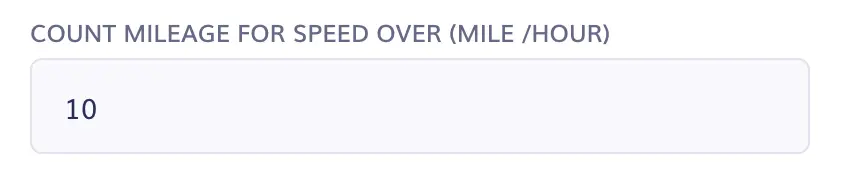
Timeero gives businesses more control over what counts as a trip. Companies can set their own speed threshold to filter out movement below a certain speed, such as walking or running. This prevents unwanted movement from being counted as work miles.
Timeero's mileage tracking settings showing the customizable speed threshold.
2. Everlance records trips automatically, but employees still need to classify each one
Everlance automatically detects and records drives in the background. Employees don't have to remember to start or stop a trip, which is convenient.
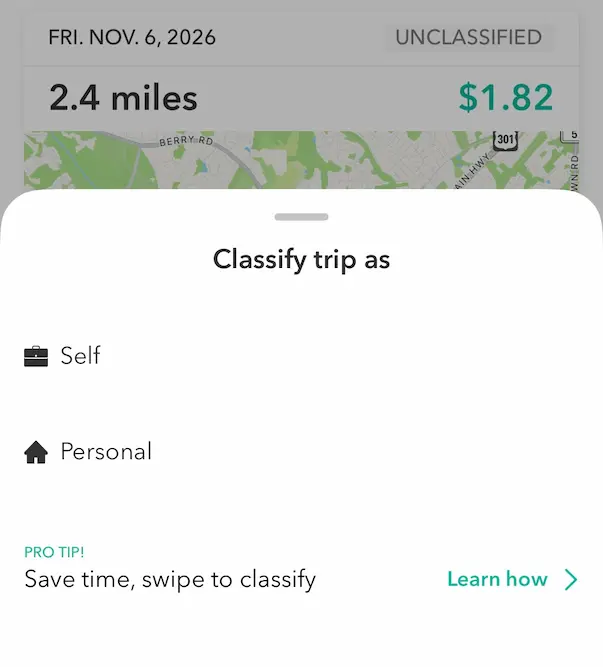
But during my testing, I noticed there's still a manual step. After each drive, employees need to review the trip and mark it as business or personal. They can do this right after the trip or come back to it later.
Everlance's classify-trip screen for an unclassified 2.4-mile trip, with Self and Personal options.
For businesses, this means employees need to keep up with their mileage logs and classify every drive. If they forget, admins may end up chasing them to complete missing entries.
With Timeero, employees don't have to sort through their trips after every drive. Mileage is tracked when they're clocked in, and commute miles are automatically removed. There's no need to label each trip as business or personal.
Admins don't have to keep chasing employees to finish their mileage logs or figure out which trips were for work.
3. Everlance only records a trip's start and end, while Timeero's Segmented Tracking maps the route in between
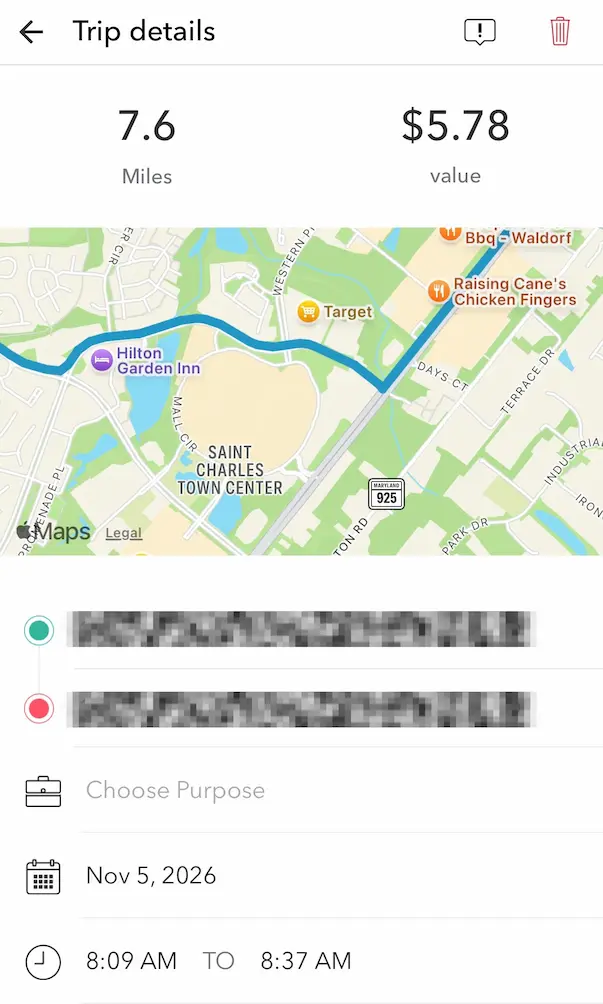
When reviewing Everlance's mileage logs, I noticed that it only showed the starting and ending points of each trip. There were no GPS breadcrumbs, so I couldn't see the actual route.
That's not ideal if your business reimburses employees for mileage. For example, an employee could make a few personal stops during a work trip, adding extra miles to the total. Without seeing the route, you have no easy way to tell if those miles were work-related or if your business is paying for extra driving.
Everlance trip details showing only start and end locations, not stops in-between.
I could see the full route in Timeero. The app records GPS breadcrumbs while employees are clocked in, capturing a location point about every 150 feet. So instead of just seeing the starting point, ending point, and total miles, admins can check the route the employee actually took.
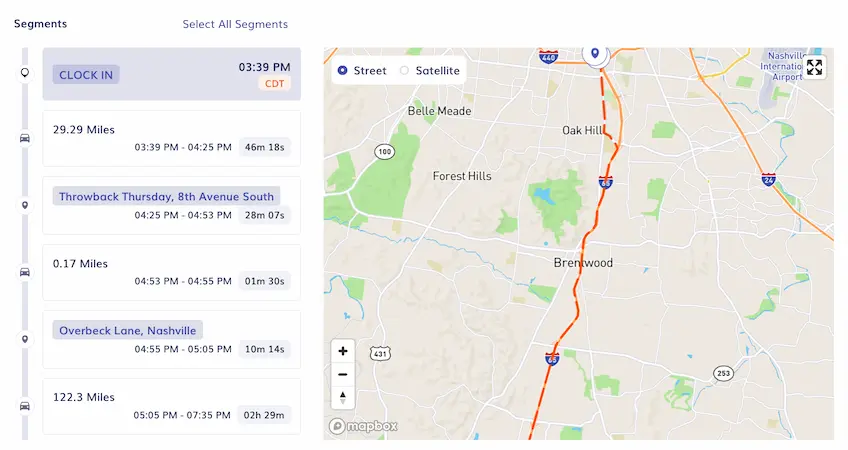
Timeero also offers Segmented Tracking, which gives admins a breakdown of an employee's entire workday while they're clocked in. You can see every drive, stop, and break, including how long the employee spent at each location. It even records stops that aren't saved as jobs.
Timeero's Segmented Tracking view showing a clock-in, drives, stops, and the route on a map.
Employees only need to clock in once at the start of the day and clock out when they're done. You can then see it on the map and replay the GPS trail. So if an employee makes several stops throughout the day, you can see where they went and how long they spent at each place.
4. Everlance has built-in expense tracking, while Timeero lets you customize it
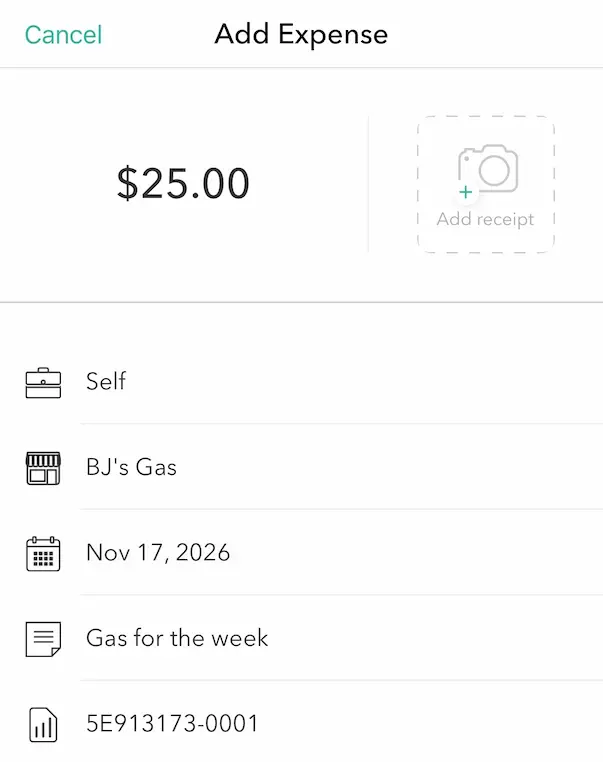
Everlance lets employees track work expenses in the app. They can add expenses, upload receipt photos, and keep track of costs like parking, meals, and other work purchases.
Everlance built-in expense tracker
Timeero handles this a little differently. Instead of a separate expense tracking feature, you can use Custom Fields to collect expense information from employees.
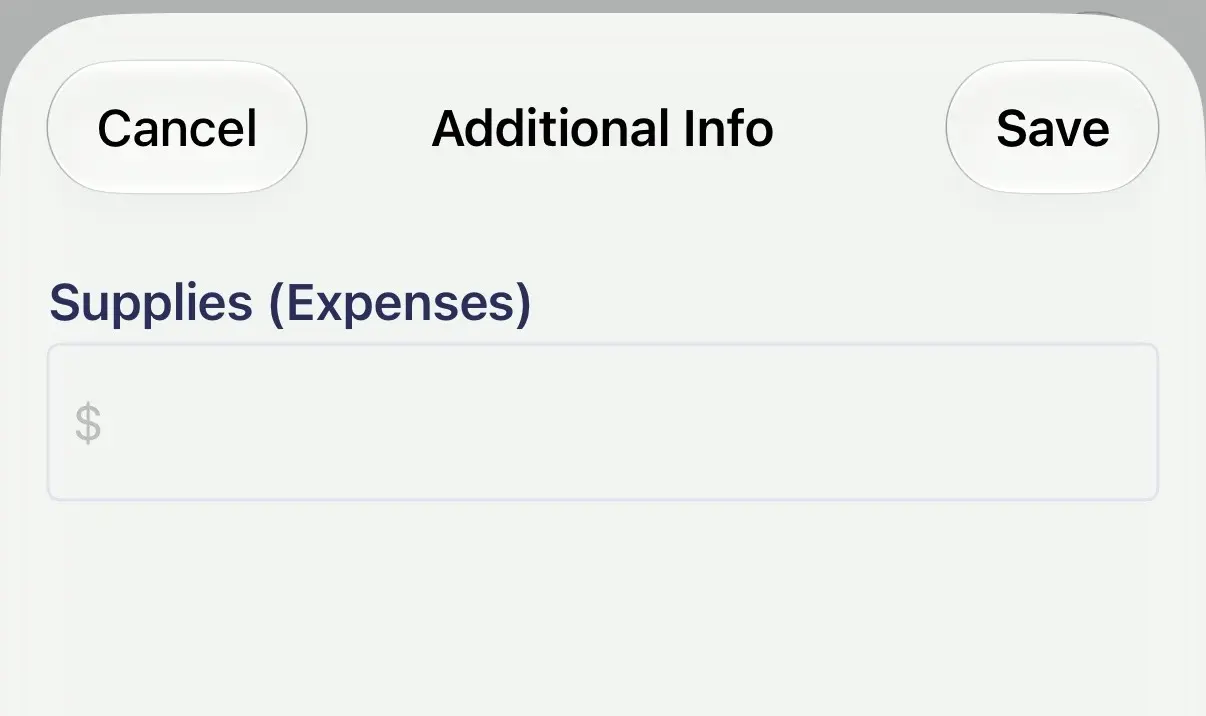
For example, you can create fields for parking fees, tolls, supplies, or other work expenses. You decide what information employees need to enter, so you can set it up around the way your business handles expenses.
Timeero’s Custom Field for expense tracking
You can also run reports on Custom Fields to see what employees have submitted and review expense details across your team.
This gives businesses more flexibility to track the information they need and pull reports without having to manage everything in separate spreadsheets.
5. Everlance has limited payroll integrations, while Timeero connects directly with popular payroll and accounting platforms
When comparing the integrations, I found a big difference between the two apps.
Everlance offers some HR integrations, but it doesn't have the same range of direct payroll and accounting integrations as Timeero. If you want to move mileage and expense data into your accounting system, you may need to export reports and handle some of that work manually.
For example, if you use QuickBooks Online, you can connect it to Timeero to sync employee information and transfer time and mileage data. This means you don't have to download a mileage report, look up employee hours, and enter everything into another system yourself.
If your business uses software that isn't on Timeero's integration list, you can also connect other apps through Zapier or use the public API to build a custom integration.
Everlance's plans are confusing for teams: free accounts that don't connect, or $24 per user/month
I found Everlance's team pricing a little confusing. Its main pricing page highlights Starter and Professional, but those plans are for individuals, not businesses. To find the business option, I had to look inside the app.
For businesses, I found two options:
Use free accounts. Each employee creates their own free Everlance account, but these accounts aren't connected to the company's dashboard. Employees have to download their mileage reports and send them to their manager for approval and reimbursement.
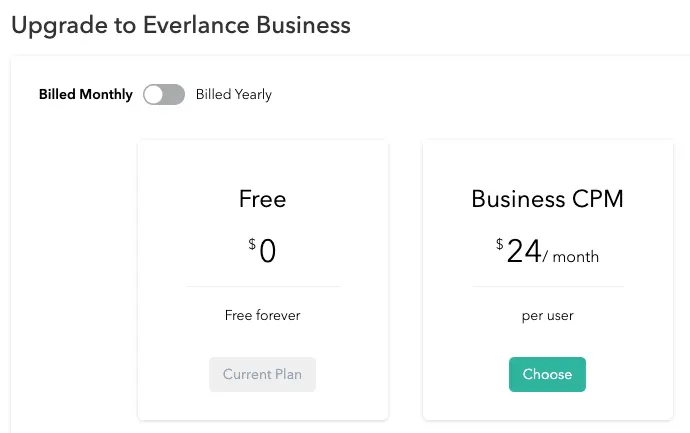
Pay for Everlance Business. In the app's "Upgrade to Everlance Business" screen, the Business CPM plan was listed at $24 per user/month with monthly billing in November 2026.
Upgrade to Everlance Business screen showing the Free plan at $0 and Business CPM at $24 per user/month.
For 10 users, Timeero Premium saves $1,480 a year over Everlance's Business CPM plan
For a 10-person team, Timeero Premium costs $120/month with monthly billing or $100/month with annual billing. Everlance Business CPM costs $240/month or $223.30/month with annual billing. That's a savings of $120 per month with monthly billing or $1,480 per year with annual billing.
Everlance Business CPM
Timeero Premium
Pricing
Price per user, monthly billing
$24/month
$12/month
10-person team (monthly billing)
$240/month
$120/month
10-person team (annual billing)
$2,680/year
$1,200/year
Features
Automatic mileage tracking
✓Yes, through background drive detection
✓Yes, while clocked in
Employee time tracking
✕No
✓Yes
Auto Clock-In/Out
✕No
✓Yes
Geofencing
✕No
✓Yes
GPS tracking
✓Start and end points only
✓Yes
Break tracking
✕No
✓Yes
California break tracking
✕No
✓Yes
Scheduling
✕No
✓Yes
Photo attachments or receipts
✓Yes
✓Yes
Trip segmentation
✕No
✓Yes (Segmented Tracking add-on)
Mileage reimbursement calculation
✓Yes
✓Yes
Bank and card syncing
✓Yes
✕No
Time-off management
✕No
✓Yes
Commute mileage
✓Yes
✓Yes
Suggested mileage
✓Suggested routes for manual trip entry only
✓Yes
MCP Server
✕No
✓Yes
Everlance offers a 7-day free trial on paid plans (Everlance Business CPM), but you'll need a credit card to start. Timeero offers a 14-day free trial without a credit card.
Everlance vs. Timeero: Which app should you choose?
The right choice depends on how you use mileage tracking. Both apps have useful features, but they're designed for different types of users.
Choose Everlance if:
You're self-employed, a rideshare driver, or a freelancer and want to track business miles without starting and stopping trips manually.
You want automatic mileage tracking that runs in the background and keeps a record of your work trips.
You need more than mileage tracking, including receipt uploads, expense tracking, bank and card syncing, and tax tools.
You want a free plan to get started, with unlimited manual trips and 30 automatically detected trips per month.
You run a small business and only need to track employee mileage, manage reimbursement reports, and review expenses, without time tracking or scheduling.
Choose Timeero if:
You need to track employee hours and work miles in one app.
Your employees travel between multiple job sites and you want to track mileage automatically using GPS. Segmented Tracking also shows each stop along the route, so you can see where employees went throughout the day.
You need to track employee breaks and follow California break rules. Timeero includes a dedicated break button and end-of-shift attestations to help document meal and rest breaks.
You want more control over employee clock-ins. Geofences can block employees from clocking in outside a job site, and you can use circular or polygon-shaped geofences for sites that are close together.
You need more tools to manage your team, including employee scheduling, multi-level timesheet approvals, and in-app messaging.
You want payroll integrations and mileage reports connected to employee work hours.
Managing a field team? Give Timeero a try
Everlance works well if you mainly need to track your own work miles and expenses. But when you manage a team, there's more to keep track of than mileage. You need to know when employees are working, where they're going, and how much time they spend at each job site.
Timeero makes it easier to manage it all in one place. You can track employee hours and miles without switching between different apps. Plus, you'll have the GPS data and reports you need to keep track of your team.
Want to see if Timeero is a good fit? Try it free for 14 days and test it with your team. No credit card required.
FAQs
Is Everlance free for businesses?
Not if you are a company and want to keep track of your team all from one dashboard. Employees can each use a free Everlance account, but those accounts aren't connected to the company's dashboard. They have to download their mileage reports and submit them for approval and reimbursement. To manage employee mileage in one place, you need a paid Everlance Business plan.
Which app is better for reimbursing employees who drive their own cars?
Timeero is a better fit for most businesses because it tracks work mileage and hours on the same timesheet and lets managers export that data to supported payroll systems. Everlance works for mileage reports, but managers may need to review inaccurate trips. In my testing, it recorded part of a run as a trip.
Does Everlance track employee hours?
No. Everlance doesn’t have a time tracking feature. If you need to track employee hours for payroll, Timeero tracks time and mileage together.
Does Timeero track mileage automatically?
Timeero tracks mileage using GPS while employees are clocked in. Admins can set a minimum speed for mileage tracking to filter out slow movement, such as walking or running.
Does Timeero track mileage when employees are off the clock?
No. Timeero records mileage only while employees are clocked in and moving above the company's speed threshold.
Can Everlance or Timeero deduct commute miles automatically?
Yes. Both apps can exclude regular commute miles from reimbursable mileage. Everlance Business offers Commute Disallowance, while Timeero's Commute Mileage feature, available on the Premium plan, automatically deducts a set daily commute amount from an employee's timesheet mileage.
Do Everlance and Timeero send mileage to payroll?
Timeero can export employee time and mileage data to supported payroll systems, including ADP, Gusto, and QuickBooks. Everlance's payroll integrations are different: it syncs employee profile updates from ADP to the Everlance dashboard, but it doesn't send mileage reimbursements to payroll. Businesses can pay reimbursements through Everlance direct deposit or enter them manually in payroll.
Can a team use Everlance and Timeero together?
Yes, but there's no documented integration between them. Most teams won't need both for mileage tracking since Timeero already tracks employee hours and work mileage.
Is Timeero a good alternative to Everlance?
Yes. Timeero is a good Everlance alternative if you manage employees who drive between job sites and need to track both work hours and mileage. It records mileage only while employees are clocked in and moving above your company's speed threshold, and gives managers one place to review employee hours, mileage, and GPS records.
Ready to make employee mileage tracking easier?
Try Timeero to track work miles, review employee routes, and manage your field team.
Jessica Packard is a B2B SaaS content strategist lead who helps companies turn SEO and content into real growth. With a mix of creativity and data-driven thinking, she builds strategies that drive traffic, generate leads, and make content a core part of the business.