Timeero’s In-App Messaging: Two-Way Messaging Built for Mobile and Field Teams
Jessica Helms
Last update on:
September 7, 2026 4:40 AM
Published on:
TL;DR
Timeero launches Messaging – two-way messaging built directly into the platform.
Every conversation between employees stays inside Timeero, with full admin control.
Maintain compliance by eliminating communication outside work hours.
Messaging is available as a paid add-on for Pro and Premium plan users at $2/user/month.
Mobile and field work by nature consists of crews working multiple jobs in different locations.
With that set up, it’s hard to keep everyone organized and on the same page. Unlike office work, where you can walk to your co-worker’s cubicle to ask for clarification, mobile and field work involves back- and-forth text messaging through group chats or texting apps like WhatsApp and GroupMe to get answers.
Even though traditional texting is fast and familiar, communicating with your team via personal apps is a privacy and compliance risk.
Keep team communication where it belongs
Messaging is available as a paid add-on for Pro and Premium plan users. Schedule a consultation to see if it's the right fit for your team.
Without clear audit trails and defined admin controls, it’s easy to lose message history and unknowingly allow previous employees continued access to active group chats.
Timeero’s Messaging eliminates these issues by providing users with a secure two-way messaging platform housed directly in the app. Experience it for yourself with our interactive tour or see the preview below:
Feature facts
Timeero’s Messaging launched March 2026
Messaging is available on iOS and Android devices, as well as Timeero’s desktop site
The feature is available as an add-on for Pro and Premium plan users at $2/user/month
How Timeero’s Messaging is built for mobile and field teams
You can see who’s clocked in before you send anything
In states like California and Washington that have strict labor and break laws, it’s important for managers to know when employees are clocked in.
If a manager sends a message to an employee who is clocked out on break, the break is considered interrupted and noncompliant.
To help avoid contacting employees during breaks or after their shift ends, Timeero’s Messaging allows managers and other employees to see the availability status of workers before a chat is opened.
Check the work status of employees before sending a message.
Every message stays inside Timeero
When personal messaging is used for team communication, there’s no reliable record of who said what and when.
With Timeero’s Messaging, all conversations are tied to individual accounts, not anyone’s personal device. This means no more deleted text messages and no more searching through months of threads to find project notes.
More importantly, when an employee leaves the company, you don’t have to wonder if they are still part of team chats. Messaging access is revoked instantly as soon as you remove the employee from your company account.
Group channels for job sites, teams, and announcements
When crews need to verify job details or relay urgent updates, Timeero's Messaging makes it easier to get the message to the right person.
Users can create group channels for specific job sites, departments or shifts, increasing the efficiency and speed of internal communication.
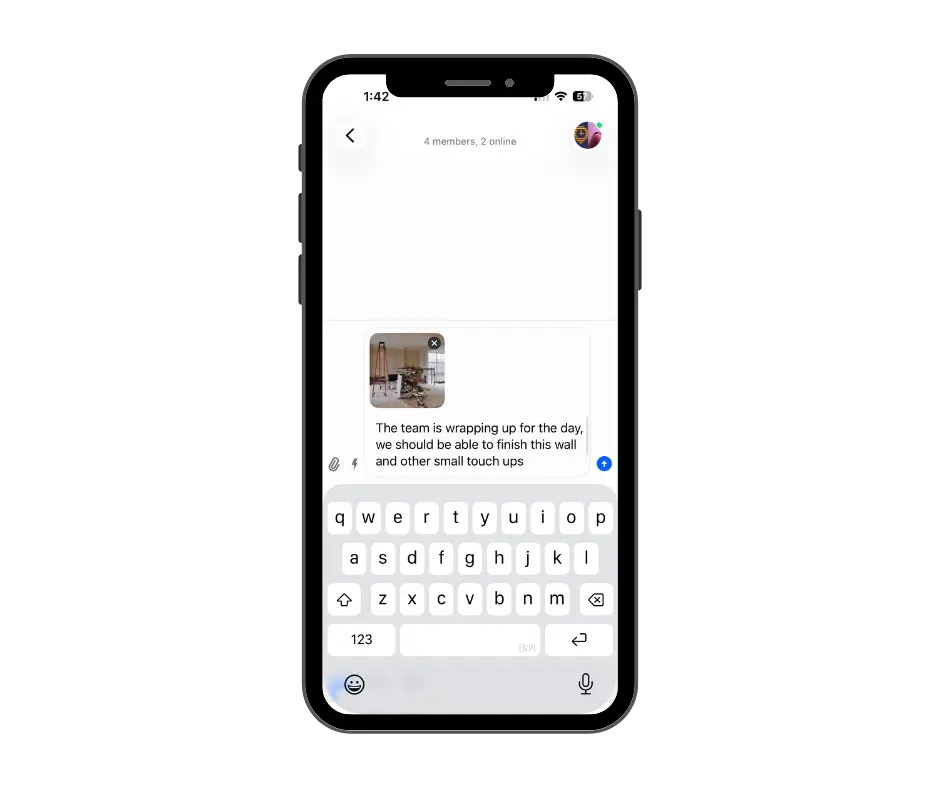
Messaging is not limited to text only. Workers can send files, photos, and work instructions without ever needing to leave the app.
Easily upload pictures and send files through Messaging
Admin control at every level
When employees use personal messaging apps to communicate with team members, there’s no way to keep track of how many groups have been created and which workers are in each group.
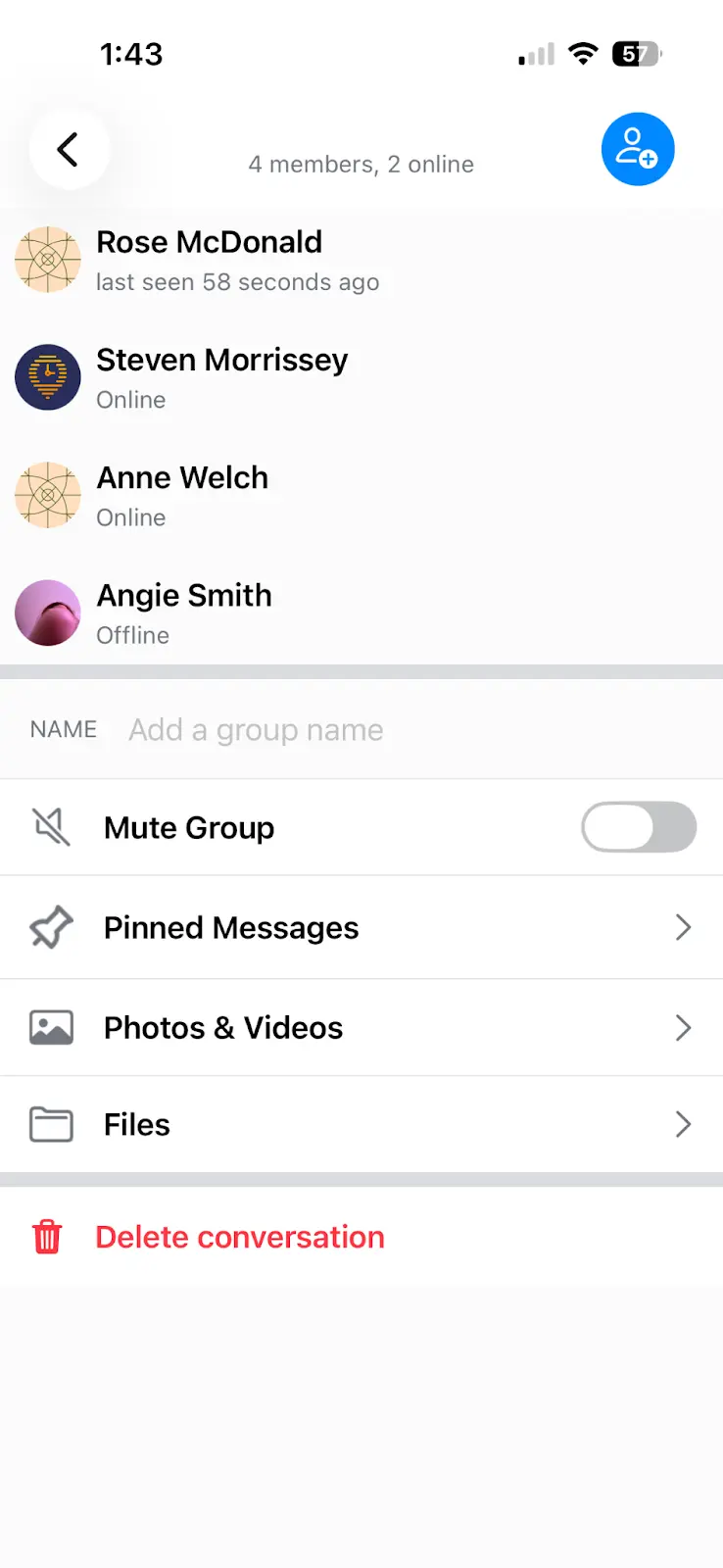
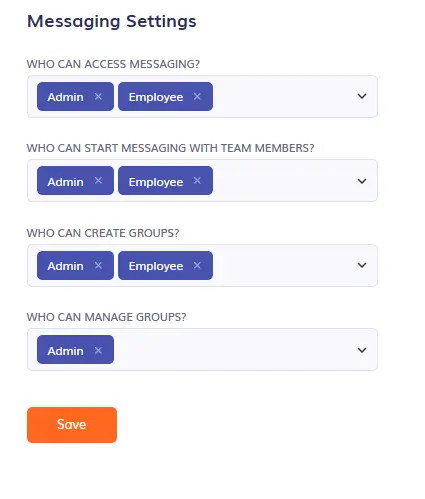
Timeero’s Messaging feature requires users to set up role-based permissions when Messaging is enabled. This determines who can view, start, and manage chats. When admins are given the permission to manage groups, they can archive past chats and invite or remove channel members.
Configure Messaging Settings and role-based permissions
When an team member leaves the company, Admins can instantly revoke their access to Messaging. This means they no longer have the ability to pull up past conversations or sensitive company information, protecting your business from data breaches and other legal risks.
Who is Messaging for?
Operations managers who want a better way to keep track of internal communication.
HR teams who are in need of audit-ready records for dispute resolution.
Employers in states like California and Washington with strict meal and rest break laws who need increased visibility into when and how team members are contacted.
Field teams that need a structured way to communicate with crews working at multiple job sites.
How Timeero’s In-App Messaging helps employers stay compliant
✅ Unmonitored messaging creates compliance risks
When team communication takes place through unmoderated apps like WhatsApp or mobile text messaging, the line between work and personal life is blurred. Employers open themselves up to liability issues and employees risk exposing private job-related information.
✅ A secure, centralized way to communicate
Timeero’s Messaging replaces traditional team communication methods with secure, in-app messaging. Every conversation is housed within the workforce platform, tied to employee jobs and hours, and is directly managed by administrators.
✅ Built-in records for audits and disputes
Messages can be easily recalled by admins during disputes or HR audits – no more hunting down text message threads on employee devices or trying to remember what was said in a text two months ago. Everything teams need to communicate is located conveniently within the app.
Ready to take control of team communication?
Workplace conversations shouldn’t take place in secret group chats or third-party apps. With Timeero’s Messaging, you can keep company conversations in the app where they belong.
Timeero’s In-App Messaging is a secure way for teams and employees to communicate with each other directly within the app. Users can send two-way messages, upload photos and files, create group channels, and announce company schedules and updates.
How is Timeero’s Messaging different from WhatsApp or iMessage?
Using personal texting applications to discuss work business creates privacy and security concerns. Timeero’s Messaging removes work conversations from personal apps and brings team communication inside the workforce platform where it belongs. Unlike WhatsApp and iMessage, Timeero’s Messaging can only be accessed by users with specific roles.
Can employees message each other, or only managers?
Employees can message each other in groups or individually. When the administrator customizes Message Settings, they choose which roles can start messages with team members.
What happens to chat history when an employee leaves?
When an employee resigns or is terminated, their access to Messaging and all conversation history is instantly revoked.
Which Timeero plans include In-App Messaging?
Messaging is offered as a paid add-on to users in the Pro and Premium plans.
Does In-App Messaging work on mobile devices?
Yes. Timeero’s Messaging works on iOS and Android mobile devices as well as the desktop site.
See Messaging in action
Messaging isn't included in the free trial. Book a quick call and we'll walk you through how it works for field and mobile teams.
Jessica is a skilled writer and proofreader with a unique flair for crafting engaging and impactful content. Her work reflects her ability to connect with clients on a personal level while successfully addressing their most pressing concerns. Jessica's professional background includes: teaching, social media marketing, and e-commerce. She resides in Alabama and loves the Golden Girls sitcom.




%202.svg)


.png)
.png)



.png)


